[fusion_builder_container hundred_percent=”yes” hundred_percent_height=”no” hundred_percent_height_scroll=”no” hundred_percent_height_center_content=”yes” equal_height_columns=”no” menu_anchor=”” hide_on_mobile=”small-visibility,medium-visibility,large-visibility” status=”published” publish_date=”” class=”” id=”” background_color=”” background_image=”https://www.globaltransmissionsupply.com/wp-content/uploads/gears-dark-overlay.jpg” background_position=”center center” background_repeat=”no-repeat” fade=”no” background_parallax=”none” enable_mobile=”no” parallax_speed=”0.3″ video_mp4=”” video_webm=”” video_ogv=”” video_url=”” video_aspect_ratio=”16:9″ video_loop=”yes” video_mute=”yes” video_preview_image=”” border_size=”” border_color=”” border_style=”solid” margin_top=”” margin_bottom=”” padding_top=”3%” padding_right=”” padding_bottom=”3%” padding_left=””][fusion_builder_row][fusion_builder_column type=”1_1″ layout=”1_1″ spacing=”” center_content=”no” link=”” target=”_self” min_height=”” hide_on_mobile=”small-visibility,medium-visibility,large-visibility” class=”” id=”” background_image_id=”” background_color=”rgba(0,0,0,0.4)” background_image=”” background_position=”left top” undefined=”” background_repeat=”no-repeat” hover_type=”none” border_size=”0″ border_color=”” border_style=”solid” border_position=”all” padding_top=”” padding_right=”” padding_bottom=”” padding_left=”” margin_top=”” margin_bottom=”” animation_type=”” animation_direction=”left” animation_speed=”0.3″ animation_offset=”” last=”no”][fusion_text columns=”” column_min_width=”” column_spacing=”” rule_style=”default” rule_size=”” rule_color=”” hide_on_mobile=”small-visibility,medium-visibility,large-visibility” class=”” id=””]
Kodeu Sesar Eaton Fuller Transmission
[/fusion_text][/fusion_builder_column][/fusion_builder_row][/fusion_builder_container][fusion_builder_container hundred_percent=”no” hundred_percent_height=”no” hundred_percent_height_scroll=”no” hundred_percent_height_center_content=”yes” equal_height_columns=”no” menu_anchor=”” hide_on_mobile=”small-visibility,medium-visibility,large-visibility” status=”published” publish_date=”” class=”” id=”” background_color=”” background_image=”” background_position=”center center” background_repeat=”no-repeat” fade=”no” background_parallax=”none” enable_mobile=”no” parallax_speed=”0.3″ video_mp4=”” video_webm=”” video_ogv=”” video_url=”” video_aspect_ratio=”16:9″ video_loop=”yes” video_mute=”yes” video_preview_image=”” border_size=”” border_color=”” border_style=”solid” margin_top=”25″ margin_bottom=”” padding_top=”” padding_right=”” padding_bottom=”” padding_left=””][fusion_builder_row][fusion_builder_column type=”1_1″ layout=”1_1″ spacing=”” center_content=”no” link=”” target=”_self” min_height=”” hide_on_mobile=”small-visibility,medium-visibility,large-visibility” class=”” id=”” background_color=”” background_image=”” background_image_id=”” background_position=”left top” background_repeat=”no-repeat” hover_type=”none” border_size=”0″ border_color=”” border_style=”solid” border_position=”all” padding_top=”” padding_right=”” padding_bottom=”” padding_left=”” margin_top=”” margin_bottom=”” animation_type=”” animation_direction=”left” animation_speed=”0.3″ animation_offset=”” last=”no”][fusion_text columns=”” column_min_width=”” column_spacing=”” rule_style=”default” rule_size=”” rule_color=”” hide_on_mobile=”small-visibility,medium-visibility,large-visibility” class=”” id=””]
Retrieving Eaton Fuller Transmission Sesar Kodeu manual
[/fusion_text][fusion_separator style_type=”default” hide_on_mobile=”small-visibility,medium-visibility,large-visibility” class=”” id=”” sep_color=”#0038a0″ top_margin=”” bottom_margin=”20″ border_size=”” icon=”” icon_circle=”” icon_circle_color=”” width=”20%” alignment=”left” /][fusion_text columns=”” column_min_width=”” column_spacing=”” rule_style=”default” rule_size=”” rule_color=”” hide_on_mobile=”small-visibility,medium-visibility,large-visibility” class=”” id=””]
Turutan parentah dina kaca ieu pikeun manggihan, nguji sarta diajar kumaha carana ngalereskeun kasalahan kode sesar pikeun Freightliner Anjeun, Mack, Peterbilt, Kenworth, Volvo na treuk Internasional. Meunangkeun Eaton Fuller Konci sesar transmisi sangkan mode timer diagnostik sistem urang. Sakali anjeun boga kode lepat anjeun, ngagulung ka tabél di handap pikeun neangan katerangan.
Catetan: Anjeun oge bisa make PC mangrupa- alat jasa dumasar, such as ServiceRanger to retrieve fault codes.
[/fusion_text][/fusion_builder_column][fusion_builder_column type=”1_2″ layout=”1_2″ spacing=”” center_content=”no” link=”” target=”_self” min_height=”” hide_on_mobile=”small-visibility,medium-visibility,large-visibility” class=”” id=”” background_color=”” background_image=”” background_image_id=”” background_position=”left top” background_repeat=”no-repeat” hover_type=”none” border_size=”0″ border_color=”” border_style=”solid” border_position=”all” padding_top=”” padding_right=”” padding_bottom=”” padding_left=”” margin_top=”” margin_bottom=”” animation_type=”” animation_direction=”left” animation_speed=”0.3″ animation_offset=”” last=”no”][fusion_text columns=”” column_min_width=”” column_spacing=”” rule_style=”default” rule_size=”” rule_color=”” hide_on_mobile=”small-visibility,medium-visibility,large-visibility” class=”” id=””]
-
- Tempat anu uas shift di nétral.
- Nyetél marake parkir.
- Hurungkeun konci on kalawan engine kaluar.
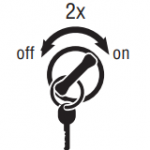
Catetan: Mun mesin anu geus ngajalankeun, you may still retrieve codes; kumaha oge, do not engage the starter if the engine stalls. - To Retrieve Active Codes: konci on. Hurungkeun konci dipareuman jeung dina 2 kali dina lima detik tungtung tombol on. saatos 5 detik, lampu Service dimimitian kedip-kedip Konci sesar dua-angka. Mun euweuh faults anu aktip, the service light will flash code 25 (euweuh Konci).
Catetan: An “88” may show up in the dash at key on which is a normal power-up test of the display
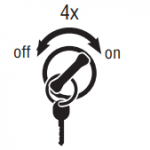
- Pikeun meunangkeun Kodeu teu aktif: Hurungkeun konci on. Turn the key off and on 4 kali dina lima detik tungtung tombol di on posisi. saatos 5 detik, lampu Service dimimitian kedip-kedip Konci sesar dua-angka. Mun euweuh faults anu aktip, the service light will flash code 25 (euweuh Konci).
- Two digit fault codes will be displayed in the gear display. Sababaraha kandaraan bisa jadi dilengkepan lampu jasa.
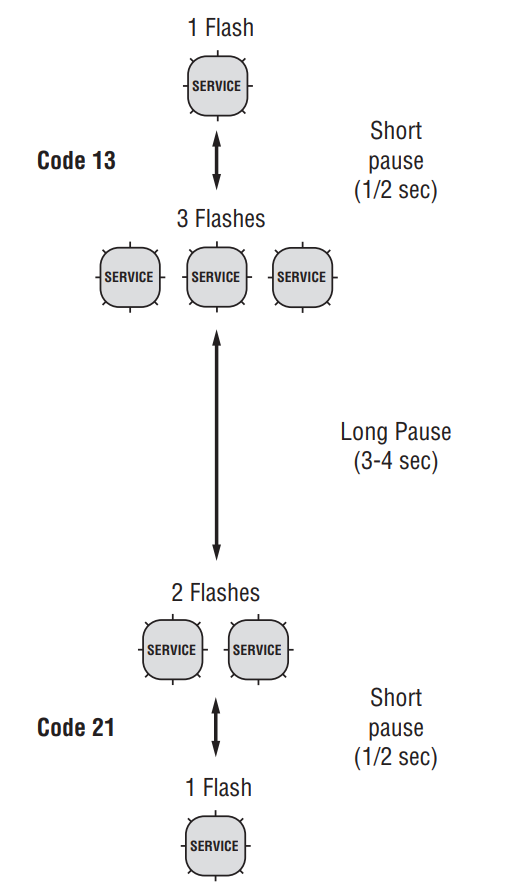
- Observe the sequence of flashes on the service light and record the codes. A 1- to 2-second pause separates each stored code, and the sequence automatically repeats after all codes have been flashed.
[/fusion_text][/fusion_builder_column][fusion_builder_column type=”1_2″ layout=”1_2″ spacing=”” center_content=”no” link=”” target=”_self” min_height=”” hide_on_mobile=”small-visibility,medium-visibility,large-visibility” class=”” id=”” background_color=”” background_image=”” background_image_id=”” background_position=”left top” background_repeat=”no-repeat” hover_type=”none” border_size=”0″ border_color=”” border_style=”solid” border_position=”all” padding_top=”” padding_right=”” padding_bottom=”” padding_left=”” margin_top=”” margin_bottom=”” animation_type=”” animation_direction=”left” animation_speed=”0.3″ animation_offset=”” last=”no”][fusion_imageframe image_id=”13871|full” max_width=”” style_type=”” blur=”” stylecolor=”” hover_type=”none” bordersize=”” bordercolor=”” borderradius=”” align=”none” lightbox=”no” gallery_id=”” lightbox_image=”” lightbox_image_id=”” alt=”Konci sesar transmisi Eaton Fuller- kumaha carana maca manual kode sesar runtuyan ” link=”” linktarget=”_self” hide_on_mobile=”small-visibility,medium-visibility,large-visibility” class=”” id=”” animation_type=”” animation_direction=”left” animation_speed=”0.3″ animation_offset=””]https://www.globaltransmissionsupply.com/wp-content/uploads/fault-code-sequence-flash-e1553099338337.png[/fusion_imageframe][/fusion_builder_column][fusion_builder_column type=”1_1″ layout=”1_1″ spacing=”” center_content=”no” link=”” target=”_self” min_height=”” hide_on_mobile=”small-visibility,medium-visibility,large-visibility” class=”” id=”” background_color=”” background_image=”” background_image_id=”” background_position=”left top” background_repeat=”no-repeat” hover_type=”none” border_size=”0″ border_color=”” border_style=”solid” border_position=”all” padding_top=”” padding_right=”” padding_bottom=”” padding_left=”” margin_top=”” margin_bottom=”” animation_type=”” animation_direction=”left” animation_speed=”0.3″ animation_offset=”” last=”no”][fusion_text columns=”” column_min_width=”” column_spacing=”” rule_style=”default” rule_size=”” rule_color=”” hide_on_mobile=”small-visibility,medium-visibility,large-visibility” class=”” id=””]
Clearing Kodeu Sesar manual
[/fusion_text][fusion_separator style_type=”default” hide_on_mobile=”small-visibility,medium-visibility,large-visibility” class=”” id=”” sep_color=”#0038a0″ top_margin=”” bottom_margin=”20″ border_size=”” icon=”” icon_circle=”” icon_circle_color=”” width=”20%” alignment=”left” /][fusion_text columns=”” column_min_width=”” column_spacing=”” rule_style=”default” rule_size=”” rule_color=”” hide_on_mobile=”small-visibility,medium-visibility,large-visibility” class=”” id=””]
The following procedure clears all Inactive fault codes from the TECU’s memory. Active fault codes are automatically cleared when the fault has been corrected.
Catetan: Anjeun bisa make alat jasa dumasar PC-, kayaning ServiceRanger, mupus Konci sesar.
1. Tempat shift uas di nétral.
2. Atur marake parkir.
3. Hurungkeun konci on kalawan engine kaluar.
4. Hurungkeun konci dipareuman jeung dina 6 kali dina 5 seconds ending with key on. Catetan: Lamun Konci geus hasil diberesihan, the Service light will come on and stay on for five seconds. Pintonan gear bakal némbongkeun 25 (euweuh Konci).
5. Hurungkeun konci nu kaluar sarta ngidinan sistem pikeun kakuatan
turun.
[/fusion_text][/fusion_builder_column][/fusion_builder_row][/fusion_builder_container][fusion_builder_container hundred_percent=”no” hundred_percent_height=”no” hundred_percent_height_scroll=”no” hundred_percent_height_center_content=”yes” equal_height_columns=”no” menu_anchor=”” hide_on_mobile=”small-visibility,medium-visibility,large-visibility” status=”published” publish_date=”” class=”” id=”” background_color=”” background_image=”” background_position=”center center” background_repeat=”no-repeat” fade=”no” background_parallax=”none” enable_mobile=”no” parallax_speed=”0.3″ video_mp4=”” video_webm=”” video_ogv=”” video_url=”” video_aspect_ratio=”16:9″ video_loop=”yes” video_mute=”yes” video_preview_image=”” border_size=”” border_color=”” border_style=”solid” margin_top=”” margin_bottom=”” padding_top=”” padding_right=”” padding_bottom=”” padding_left=””][fusion_builder_row][fusion_builder_column type=”1_1″ layout=”1_1″ spacing=”” center_content=”no” link=”” target=”_self” min_height=”” hide_on_mobile=”small-visibility,medium-visibility,large-visibility” class=”” id=”” background_color=”” background_image=”” background_image_id=”” background_position=”left top” background_repeat=”no-repeat” hover_type=”none” border_size=”0″ border_color=”” border_style=”solid” border_position=”all” padding_top=”” padding_right=”” padding_bottom=”” padding_left=”” margin_top=”” margin_bottom=”” animation_type=”” animation_direction=”left” animation_speed=”0.3″ animation_offset=”” last=”no”][fusion_text columns=”” column_min_width=”” column_spacing=”” rule_style=”default” rule_size=”” rule_color=”” hide_on_mobile=”small-visibility,medium-visibility,large-visibility” class=”” id=””]
Fault Code Retrieval and Clearing in ServiceRanger
[/fusion_text][fusion_separator style_type=”default” hide_on_mobile=”small-visibility,medium-visibility,large-visibility” class=”” id=”” sep_color=”#0038a0″ top_margin=”” bottom_margin=”20″ border_size=”” icon=”” icon_circle=”” icon_circle_color=”” width=”20%” alignment=”left” /][fusion_text columns=”” column_min_width=”” column_spacing=”” rule_style=”default” rule_size=”” rule_color=”” hide_on_mobile=”small-visibility,medium-visibility,large-visibility” class=”” id=””]
Pikeun nempo Konci lepat atanapi mupus aranjeunna, follow the procedures below.
[/fusion_text][/fusion_builder_column][fusion_builder_column type=”1_2″ layout=”1_2″ spacing=”” center_content=”no” link=”” target=”_self” min_height=”” hide_on_mobile=”small-visibility,medium-visibility,large-visibility” class=”” id=”” background_color=”” background_image=”” background_image_id=”” background_position=”left top” background_repeat=”no-repeat” hover_type=”none” border_size=”0″ border_color=”” border_style=”solid” border_position=”all” padding_top=”” padding_right=”” padding_bottom=”” padding_left=”” margin_top=”” margin_bottom=”” animation_type=”” animation_direction=”left” animation_speed=”0.3″ animation_offset=”” last=”no”][fusion_text columns=”” column_min_width=”” column_spacing=”” rule_style=”default” rule_size=”” rule_color=”” hide_on_mobile=”small-visibility,medium-visibility,large-visibility” class=”” id=””]
Nempo Faults Active na teu aktif
1. Sambungkeun ServiceRanger kana 9-Jalan diagnostik Panyambung.
2. Buka menu "Pakakas" tur pilih tab "Komunikasi".
3. Select the appropriate communication device for J1587 and J1939.
4. Pilih "Connect" dina kaca utama.
5. Pilih "Témbongkeun Sesar Kodeu" tab.
Catetan: pamakéan awal merlukeun sagala léngkah; however subsequent uses require only Step 4 jeung Lengkah 5.
[/fusion_text][/fusion_builder_column][fusion_builder_column type=”1_2″ layout=”1_2″ spacing=”” center_content=”no” link=”” target=”_self” min_height=”” hide_on_mobile=”small-visibility,medium-visibility,large-visibility” class=”” id=”” background_color=”” background_image=”” background_image_id=”” background_position=”left top” background_repeat=”no-repeat” hover_type=”none” border_size=”0″ border_color=”” border_style=”solid” border_position=”all” padding_top=”” padding_right=”” padding_bottom=”” padding_left=”” margin_top=”” margin_bottom=”” animation_type=”” animation_direction=”left” animation_speed=”0.3″ animation_offset=”” last=”no”][fusion_text columns=”” column_min_width=”” column_spacing=”” rule_style=”default” rule_size=”” rule_color=”” hide_on_mobile=”small-visibility,medium-visibility,large-visibility” class=”” id=””]
Faults aktif jelas
1. Sambungkeun ServiceRanger kana 9-Jalan diagnostik Panyambung.
2. Buka menu "Pakakas" tur pilih tab "Komunikasi".
3. Select the appropriate communication device for J1587 and J1939.
4. Pilih "Connect" dina kaca utama.
5. Pilih "Témbongkeun Sesar Kodeu" tab.
6. Pilih tombol "Hapus Faults".
Catetan: pamakéan awal merlukeun sagala léngkah, kumaha oge, kagunaan saterusna merlukeun ukur Lengkah 4 jeung Lengkah 5.
[/fusion_text][/fusion_builder_column][/fusion_builder_row][/fusion_builder_container][fusion_builder_container hundred_percent=”no” hundred_percent_height=”no” hundred_percent_height_scroll=”no” hundred_percent_height_center_content=”yes” equal_height_columns=”no” menu_anchor=”” hide_on_mobile=”small-visibility,medium-visibility,large-visibility” status=”published” publish_date=”” class=”” id=”” background_color=”” background_image=”” background_position=”center center” background_repeat=”no-repeat” fade=”no” background_parallax=”none” enable_mobile=”no” parallax_speed=”0.3″ video_mp4=”” video_webm=”” video_ogv=”” video_url=”” video_aspect_ratio=”16:9″ video_loop=”yes” video_mute=”yes” video_preview_image=”” border_size=”” border_color=”” border_style=”solid” margin_top=”” margin_bottom=”” padding_top=”” padding_right=”” padding_bottom=”” padding_left=””][fusion_builder_row][fusion_builder_column type=”1_1″ layout=”1_1″ spacing=”” center_content=”no” link=”” target=”_self” min_height=”” hide_on_mobile=”small-visibility,medium-visibility,large-visibility” class=”” id=”” background_color=”” background_image=”” background_image_id=”” background_position=”left top” background_repeat=”no-repeat” hover_type=”none” border_size=”0″ border_color=”” border_style=”solid” border_position=”all” padding_top=”” padding_right=”” padding_bottom=”” padding_left=”” margin_top=”” margin_bottom=”” animation_type=”” animation_direction=”left” animation_speed=”0.3″ animation_offset=”” last=”no”][fusion_text columns=”” column_min_width=”” column_spacing=”” rule_style=”default” rule_size=”” rule_color=”” hide_on_mobile=”small-visibility,medium-visibility,large-visibility” class=”” id=””]
Produk Mode diagnostik (PDM)
[/fusion_text][fusion_text columns=”” column_min_width=”” column_spacing=”” rule_style=”default” rule_size=”” rule_color=”” hide_on_mobile=”small-visibility,medium-visibility,large-visibility” class=”” id=””]
Produk Mode diagnostik (PDM)
Produk Mode diagnostik (PDM) ieu dipaké pikeun mantuan nangtukeun jenis panyakitna Konci aktif anu bisa geus diatur dina mangsa nyetir normal. modeu diagnostik Ieu ngaronjatkeun sensitipitas tina kamampuhan sesar sensing.
Prosedur ieu tés leupas, sambungan didegradasi na intermittent. Tempo "ault Code Isolasi Index Prosedur handap. Paké Dewan salaku pituduh ka wiring na panyambungna nu pakait jeung Konci lepat teu aktif. Flex abah wiring na panyambungna na nyobian deui sesar teh sanggeus ngaktipkeun PDM.
PDM ieu ukur keur dipaké ku teknisi jasa dilatih dina dealer otorisasi.
Pikeun nuliskeun modeu PDM:
Catetan: kendaraan moal ngamimitian di Produk Mode diagnostik.
(PDM). Hurungkeun konci wahana "OFF" sarta ngidinan sistem pikeun ngawasa ka handap ka LN PDM.
-
-
-
- Wahana kudu jadi cicing, engine kedah teu ngajalankeun, marake parkir kandaraan kudu diatur.
- Sambungkeun ServiceRanger kana 9-Jalan diagnostik Panyambung.
- Pilih "Témbongkeun Sesar Kodeu" layar.
- Nedunan dua clicks konci tina switch ignition dimimitian ku konci on, na tungtung tombol on.
Catetan: Hiji “88” bisa némbongkeun up dina dash di konci on, nu mangrupakeun uji kakuatan-up normal tina tampilan anu. - Pintonan gear bakal lampu kilat solid "PD" (Produk Mode diagnostik) jeung mode anu bakal diaktipkeun.
- Flex abah wiring na panyambungna na nyobian deui sesar teh. Mun lepat janten Active salila PDM, ServiceRanger bakal nembongkeun lepat sareng status Active.
- Mun lepat janten Active salila PDM, ServiceRanger bakal nembongkeun lepat sareng status Active.
- If a fault is detected, modeu PDM kaluar sarta ngalakukeun sesar saluyu prosedur kode ngungkulan. See Fault Code Isolation Procedure Index below.
Catetan: Konci aktif diatur dina mangsa mode PDM moal disimpen salaku aktif. - Ka LN mode PDM, ngawasa sistem handap kucara konci nu kaluar.
-
-
[/fusion_text][fusion_text columns=”” column_min_width=”” column_spacing=”” rule_style=”default” rule_size=”” rule_color=”” hide_on_mobile=”small-visibility,medium-visibility,large-visibility” class=”” id=””]
PDM ngan bakal bisa dipaké jeung Konci aktif di handap
9, 10, 14, 16, 17, 18, 19, 22, 24, 32, 33, 34, 35, 36, 38, 39, 40, 48, 49, 50, 51, 52, 56, 58, 59, 60, 61, 63, 76, 87, 88, 89, 95, 118
[/fusion_text][/fusion_builder_column][/fusion_builder_row][/fusion_builder_container][fusion_builder_container hundred_percent=”no” hundred_percent_height=”no” hundred_percent_height_scroll=”no” hundred_percent_height_center_content=”yes” equal_height_columns=”no” menu_anchor=”” hide_on_mobile=”small-visibility,medium-visibility,large-visibility” status=”published” publish_date=”” class=”” id=”” background_color=”” background_image=”” background_position=”center center” background_repeat=”no-repeat” fade=”no” background_parallax=”none” enable_mobile=”no” parallax_speed=”0.3″ video_mp4=”” video_webm=”” video_ogv=”” video_url=”” video_aspect_ratio=”16:9″ video_loop=”yes” video_mute=”yes” video_preview_image=”” border_size=”” border_color=”” border_style=”solid” margin_top=”” margin_bottom=”” padding_top=”” padding_right=”” padding_bottom=”” padding_left=””][fusion_builder_row][fusion_builder_column type=”1_1″ layout=”1_1″ spacing=”” center_content=”no” link=”” target=”_self” min_height=”” hide_on_mobile=”small-visibility,medium-visibility,large-visibility” class=”” id=”” background_color=”” background_image=”” background_image_id=”” background_position=”left top” background_repeat=”no-repeat” hover_type=”none” border_size=”0″ border_color=”” border_style=”solid” border_position=”all” padding_top=”” padding_right=”” padding_bottom=”” padding_left=”” margin_top=”” margin_bottom=”” animation_type=”” animation_direction=”left” animation_speed=”0.3″ animation_offset=”” last=”no”][fusion_text columns=”” column_min_width=”” column_spacing=”” rule_style=”default” rule_size=”” rule_color=”” hide_on_mobile=”small-visibility,medium-visibility,large-visibility” class=”” id=””]
The FMI (Gagalna Mode identifier)
[/fusion_text][fusion_text columns=”” column_min_width=”” column_spacing=”” rule_style=”default” rule_size=”” rule_color=”” hide_on_mobile=”small-visibility,medium-visibility,large-visibility” class=”” id=””]
The FMI (Gagalna Mode identifier) dipaké babarengan jeung SPN nyadiakeun informasi husus yén relates to kode gangguan diagnostik (DTC). The FMI bisa nunjukkeun yén masalah kalawan circuit éléktronik atawa hiji komponén éléktronik geus kauninga. The FMI ogé bisa nunjukkeun yén hiji kaayaan operasi abnormal geus kauninga.
[/fusion_text][fusion_text columns=”” column_min_width=”” column_spacing=”” rule_style=”default” rule_size=”” rule_color=”” hide_on_mobile=”small-visibility,medium-visibility,large-visibility” class=”” id=””]
IMF – gambaran
[/fusion_text][fusion_text columns=”2″ column_min_width=”” column_spacing=”” rule_style=”default” rule_size=”” rule_color=”” hide_on_mobile=”small-visibility,medium-visibility,large-visibility” class=”” id=””]
| 0 | Luhur - paling parah |
| 1 | Low - paling parah |
| 2 | Erratic, Intermittent, atawa salah |
| 3 | Tegangan luhur Normal |
| 4 | Tegangan handap Normal |
| 5 | Ayeuna handap Normal |
| 6 | Ayeuna luhur Normal |
| 7 | Henteu ngarespon Kuduna |
| 8 | Frékuénsi abnormal, pulsa Width, atanapi Periode |
| 9 | Laju Update abnormal |
| 10 | Laju abnormal of Robah |
| 11 | Séjén Mode paranti |
| 12 | kagagalan |
| 13 | Kaluar tina Calibration |
| 14 | Instruksi husus |
| 15 | Luhur - sahanteuna parna |
| 16 | Luhur - severity sedeng |
| 17 | Low - sahanteuna parna |
| 18 | Low - severity sedeng |
| 19 | data kasalahan |
| 20 | Data Drifted High |
| 21 | Data Drifted Low |
| 31 | - |
[/fusion_text][/fusion_builder_column][/fusion_builder_row][/fusion_builder_container][fusion_builder_container hundred_percent=”no” hundred_percent_height=”no” hundred_percent_height_scroll=”no” hundred_percent_height_center_content=”yes” equal_height_columns=”no” menu_anchor=”” hide_on_mobile=”small-visibility,medium-visibility,large-visibility” status=”published” publish_date=”” class=”” id=”” background_color=”” background_image=”” background_position=”center center” background_repeat=”no-repeat” fade=”no” background_parallax=”none” enable_mobile=”no” parallax_speed=”0.3″ video_mp4=”” video_webm=”” video_ogv=”” video_url=”” video_aspect_ratio=”16:9″ video_loop=”yes” video_mute=”yes” video_preview_image=”” border_size=”” border_color=”” border_style=”solid” margin_top=”” margin_bottom=”” padding_top=”” padding_right=”” padding_bottom=”” padding_left=””][fusion_builder_row][fusion_builder_column type=”1_1″ layout=”1_1″ spacing=”” center_content=”no” link=”” target=”_self” min_height=”” hide_on_mobile=”small-visibility,medium-visibility,large-visibility” class=”” id=”” background_color=”” background_image=”” background_image_id=”” background_position=”left top” background_repeat=”no-repeat” hover_type=”none” border_size=”0″ border_color=”” border_style=”solid” border_position=”all” border_radius=”” box_shadow=”no” dimension_box_shadow=”” box_shadow_blur=”0″ box_shadow_spread=”0″ box_shadow_color=”” box_shadow_style=”” padding_top=”” padding_right=”” padding_bottom=”” padding_left=”” margin_top=”” margin_bottom=”” animation_type=”” animation_direction=”left” animation_speed=”0.3″ animation_offset=”” last=”no”][fusion_text columns=”” column_min_width=”” column_spacing=”” rule_style=”default” rule_size=”” rule_color=”” hide_on_mobile=”small-visibility,medium-visibility,large-visibility” class=”” id=””]
View Eaton Fuller Transmission Fault Codes Isolation Procedure Index
[/fusion_text][/fusion_builder_column][fusion_builder_column type=”1_1″ layout=”1_1″ spacing=”” center_content=”no” link=”” target=”_self” min_height=”” hide_on_mobile=”small-visibility,medium-visibility,large-visibility” class=”” id=”” background_image_id=”” background_color=”” background_image=”” background_position=”left top” undefined=”” background_repeat=”no-repeat” hover_type=”none” border_size=”0″ border_color=”” border_style=”solid” border_position=”all” padding_top=”” padding_right=”” padding_bottom=”” padding_left=”” margin_top=”” margin_bottom=”” animation_type=”” animation_direction=”left” animation_speed=”0.3″ animation_offset=”” last=”no”][fusion_separator style_type=”none” hide_on_mobile=”small-visibility,medium-visibility,large-visibility” class=”” id=”” sep_color=”” top_margin=”20″ bottom_margin=”20″ border_size=”0″ icon=”” icon_circle=”” icon_circle_color=”” width=”” alignment=”center” /][fusion_text columns=”” column_min_width=”” column_spacing=”” rule_style=”default” rule_size=”” rule_color=”” class=”” id=””]
Pikeun manual tur lain daya bébas mangga buka kaca undeuran kami
[/fusion_text][fusion_button link=”https://globaltransmissionsupply.com/transmission-manuals” text_transform=”uppercase” title=”diagram, Manual tur PDFs Bagean” target=”_self” link_attributes=”diagram, Manual tur PDFs Bagean” alignment=”center” modal=”” hide_on_mobile=”small-visibility,medium-visibility,large-visibility” class=”” id=”” color=”custom” button_gradient_top_color=”#000000″ button_gradient_bottom_color=”#000000″ button_gradient_top_color_hover=”#f44336″ button_gradient_bottom_color_hover=”#f44336″ accent_color=”#ffffff” accent_hover_color=”#ffffff” type=”flat” bevel_color=”” border_width=”” size=”medium” stretch=”default” shape=”square” icon=”” icon_position=”left” icon_divider=”no” animation_type=”” animation_direction=”left” animation_speed=”0.3″ animation_offset=””]diagram, Manual tur PDFs Bagian >>>[/fusion_button][fusion_separator style_type=”none” hide_on_mobile=”small-visibility,medium-visibility,large-visibility” class=”” id=”” sep_color=”” top_margin=”20″ bottom_margin=”20″ border_size=”0″ icon=”” icon_circle=”” icon_circle_color=”” width=”” alignment=”center” /][/fusion_builder_column][/fusion_builder_row][/fusion_builder_container][fusion_global id=”13788″]