[fusion_builder_container hundred_percent=”no” hundred_percent_height=”no” hundred_percent_height_scroll=”no” hundred_percent_height_center_content=”yes” equal_height_columns=”no” menu_anchor=”” hide_on_mobile=”small-visibility,medium-visibility,large-visibility” status=”published” publish_date=”” class=”” id=”” background_color=”” background_image=”” background_position=”center center” background_repeat=”no-repeat” fade=”no” background_parallax=”none” enable_mobile=”no” parallax_speed=”0.3″ video_mp4=”” video_webm=”” video_ogv=”” video_url=”” video_aspect_ratio=”16:9″ video_loop=”yes” video_mute=”yes” video_preview_image=”” border_size=”” border_color=”” border_style=”solid” margin_top=”35″ margin_bottom=”” padding_top=”” padding_right=”” padding_bottom=”” padding_left=””][fusion_builder_row][fusion_builder_column type=”1_1″ layout=”1_1″ spacing=”” center_content=”no” link=”” target=”_self” min_height=”” hide_on_mobile=”small-visibility,medium-visibility,large-visibility” class=”” id=”” background_color=”” background_image=”” background_image_id=”” background_position=”left top” background_repeat=”no-repeat” hover_type=”none” border_size=”0″ border_color=”” border_style=”solid” border_position=”all” padding_top=”” padding_right=”” padding_bottom=”” padding_left=”” margin_top=”” margin_bottom=”” animation_type=”” animation_direction=”left” animation_speed=”0.3″ animation_offset=”” last=”no”][fusion_text columns=”” column_min_width=”” column_spacing=”” rule_style=”default” rule_size=”” rule_color=”” hide_on_mobile=”small-visibility,medium-visibility,large-visibility” class=”” id=””]
Eaton Fuller Hybrid Transmission Kodi Fault 84 – Shift Device kontrollit nuk konfiguruar
[/fusion_text][/fusion_builder_column][/fusion_builder_row][/fusion_builder_container][fusion_builder_container hundred_percent=”no” hundred_percent_height=”no” hundred_percent_height_scroll=”no” hundred_percent_height_center_content=”yes” equal_height_columns=”no” menu_anchor=”” hide_on_mobile=”small-visibility,medium-visibility,large-visibility” status=”published” publish_date=”” class=”” id=”” background_color=”” background_image=”” background_position=”center center” background_repeat=”no-repeat” fade=”no” background_parallax=”none” enable_mobile=”no” parallax_speed=”0.3″ video_mp4=”” video_webm=”” video_ogv=”” video_url=”” video_aspect_ratio=”16:9″ video_loop=”yes” video_mute=”yes” video_preview_image=”” border_size=”” border_color=”” border_style=”solid” margin_top=”” margin_bottom=”” padding_top=”” padding_right=”” padding_bottom=”” padding_left=””][fusion_builder_row][fusion_builder_column type=”1_1″ layout=”1_1″ spacing=”” center_content=”no” link=”” target=”_self” min_height=”” hide_on_mobile=”small-visibility,medium-visibility,large-visibility” class=”” id=”” background_color=”” background_image=”” background_image_id=”” background_position=”left top” background_repeat=”no-repeat” hover_type=”none” border_size=”0″ border_color=”” border_style=”solid” border_position=”all” padding_top=”” padding_right=”” padding_bottom=”” padding_left=”” margin_top=”” margin_bottom=”” animation_type=”” animation_direction=”left” animation_speed=”0.3″ animation_offset=”” last=”no”][fusion_text columns=”” column_min_width=”” column_spacing=”” rule_style=”default” rule_size=”” rule_color=”” hide_on_mobile=”small-visibility,medium-visibility,large-visibility” class=”” id=””]
Faji Kodi për Eaton Hybrid Sistemet Drive modele (MY08) EH-8E306A-U, EH-8E306A-UPG, EH-8E306A-UP, EH-8E306A-CD, EH-8E306A-T, EH-6E606B-CD, (MY09) EH-8E406A-U / P, EH-8E406A-UP, EH-8E406A-UPG, EH-8E406A-CD, EH-8E406A-CDG, EH-8E406A-CDR, EH-8E406A-T, EH-6E706B-CD, EH-6E706B-P dhe EH-6E706B-UPG. Lexoni më poshtë për të mësuar se si të provoni, të qartë dhe të rregulluar gabimet kodin faji për Freightliner tuaj, Mack, Peterbilt, Kenworth, Volvo, ndërkombëtar, dhe kamion të rëndë dhe pajisjet. Njësia e Kontrollit Elektronik Transmisionit (TECU) është e lidhur me pajisjen zhvendosje, e cila i dërgon të dhënat regjim shofer përzgjedhjes. vetëm Pajisja e pajtueshme ndryshim është Eaton® Push Button Shift Kontrollit (PBSC) dhe OEM furnizuar ndryshim levë (nëse pajisur me park). TECU kontrollon mjetin për llojin e pajisjes ndryshim gjatë të energjisë së parë deri.
faj Kodin 84 – Shift Kontrollit Device Not konfiguruar Zbulimi
Parakushtet e mëposhtme duhet të plotësohen para se sistemi zbulon defektin:
- TECU ndezjen tension është më i madh se 7 volt dhe më pak se 16 volt.
- TECU Sistemi Battery Low Voltage faji nuk është aktiv.
- TECU është duke mundësuar për herë të parë dhe nuk ka pajisje ndryshim është konfiguruar.
shënim: Kur troubleshooting një kod joaktive referohen të Produkt Diagnostic Mode (PDM)
Kushtet për Set Kodi Fault Active
- FMN 13 është vendosur kur fuqitë-up TECU herë të parë dhe nuk arrin të njohë çdo pajisje të vlefshme ndryshim lidhur me të automjetit brenda pesë sekonda.
Fallback Kur Code Fault 84 është vendosur ndodhin kushtet e mëposhtme:
- Red "Shërbimi" të lehta mund ose nuk mund të vijë në varësi të dështimit.
- Faji është i ruajtur në kujtesën TECU.
- TECU ndryshon në mënyrë "AutoShift fallback".
- Motori nuk fiksime.
[/fusion_text][fusion_text columns=”” column_min_width=”” column_spacing=”” rule_style=”default” rule_size=”” rule_color=”” hide_on_mobile=”small-visibility,medium-visibility,large-visibility” class=”” id=””]
Kushtet për Set Fault Code joaktiv
Vetëm gabime jo aktive mund të pastrohen nga Njësia e kontrollit elektronik të Transmisionit (TECU) ose historia HCM përdorur ServiceRanger. TECU automatikisht pastron gabimet nga historia pas 200 orë dhe HCM automatikisht pastron gabimet nga historia pas faj ka qenë inaktive për 200 orë.
Ky kod faji mund të shkaktohet nga ndonjë nga këto:
- FMN 13
- OEM Shaloni instalime elektrike midis TECU dhe pajisjes së kontrollit ndryshim është shkëputur
- PBSC
- FMN 14
- OEM Shaloni instalime elektrike midis TECU dhe pajisjes së kontrollit ndryshim është shkëputur
- Shift Llozi
[/fusion_text][/fusion_builder_column][/fusion_builder_row][/fusion_builder_container][fusion_builder_container hundred_percent=”no” hundred_percent_height=”no” hundred_percent_height_scroll=”no” hundred_percent_height_center_content=”yes” equal_height_columns=”no” menu_anchor=”” hide_on_mobile=”small-visibility,medium-visibility,large-visibility” status=”published” publish_date=”” class=”” id=”” background_color=”” background_image=”” background_position=”center center” background_repeat=”no-repeat” fade=”no” background_parallax=”none” enable_mobile=”no” parallax_speed=”0.3″ video_mp4=”” video_webm=”” video_ogv=”” video_url=”” video_aspect_ratio=”16:9″ video_loop=”yes” video_mute=”yes” video_preview_image=”” border_size=”” border_color=”” border_style=”solid” margin_top=”” margin_bottom=”” padding_top=”” padding_right=”” padding_bottom=”” padding_left=””][fusion_builder_row][fusion_builder_column type=”1_1″ layout=”1_1″ spacing=”” center_content=”no” link=”” target=”_self” min_height=”” hide_on_mobile=”small-visibility,medium-visibility,large-visibility” class=”” id=”” background_color=”” background_image=”” background_image_id=”” background_position=”left top” background_repeat=”no-repeat” hover_type=”none” border_size=”0″ border_color=”” border_style=”solid” border_position=”all” padding_top=”” padding_right=”” padding_bottom=”” padding_left=”” margin_top=”” margin_bottom=”” animation_type=”” animation_direction=”left” animation_speed=”0.3″ animation_offset=”” last=”no”][fusion_text columns=”” column_min_width=”” column_spacing=”” rule_style=”default” rule_size=”” rule_color=”” hide_on_mobile=”small-visibility,medium-visibility,large-visibility” class=”” id=””]
faj Kodin 84 – Shift Kontrollit Device Not konfiguruar Test
[/fusion_text][/fusion_builder_column][/fusion_builder_row][/fusion_builder_container][fusion_builder_container hundred_percent=”no” hundred_percent_height=”no” hundred_percent_height_scroll=”no” hundred_percent_height_center_content=”yes” equal_height_columns=”no” menu_anchor=”” hide_on_mobile=”small-visibility,medium-visibility,large-visibility” status=”published” publish_date=”” class=”” id=”” background_color=”” background_image=”” background_position=”center center” background_repeat=”no-repeat” fade=”no” background_parallax=”none” enable_mobile=”no” parallax_speed=”0.3″ video_mp4=”” video_webm=”” video_ogv=”” video_url=”” video_aspect_ratio=”16:9″ video_loop=”yes” video_mute=”yes” video_preview_image=”” border_size=”” border_color=”” border_style=”solid” margin_top=”” margin_bottom=”” padding_top=”” padding_right=”” padding_bottom=”” padding_left=””][fusion_builder_row][fusion_builder_column type=”1_1″ layout=”1_1″ spacing=”” center_content=”no” link=”” target=”_self” min_height=”” hide_on_mobile=”small-visibility,medium-visibility,large-visibility” class=”” id=”” background_color=”” background_image=”” background_image_id=”” background_position=”left top” background_repeat=”no-repeat” hover_type=”none” border_size=”0″ border_color=”” border_style=”solid” border_position=”all” padding_top=”” padding_right=”” padding_bottom=”” padding_left=”” margin_top=”” margin_bottom=”” animation_type=”” animation_direction=”left” animation_speed=”0.3″ animation_offset=”” last=”no”][fusion_text columns=”” column_min_width=”” column_spacing=”” rule_style=”default” rule_size=”” rule_color=”” hide_on_mobile=”small-visibility,medium-visibility,large-visibility” class=”” id=””]
Identifikimi Komponenti:
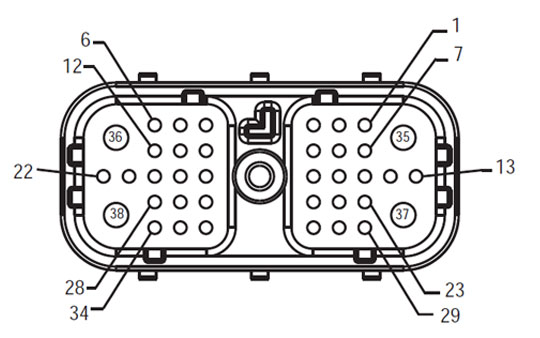
[/fusion_text][/fusion_builder_column][/fusion_builder_row][/fusion_builder_container][fusion_builder_container hundred_percent=”yes” hundred_percent_height=”no” hundred_percent_height_scroll=”no” hundred_percent_height_center_content=”yes” equal_height_columns=”no” menu_anchor=”” hide_on_mobile=”small-visibility,medium-visibility,large-visibility” status=”published” publish_date=”” class=”” id=”” background_color=”” background_image=”” background_position=”center center” background_repeat=”no-repeat” fade=”no” background_parallax=”none” enable_mobile=”no” parallax_speed=”0.3″ video_mp4=”” video_webm=”” video_ogv=”” video_url=”” video_aspect_ratio=”16:9″ video_loop=”yes” video_mute=”yes” video_preview_image=”” border_size=”” border_color=”” border_style=”solid” margin_top=”” margin_bottom=”” padding_top=”” padding_right=”10%” padding_bottom=”” padding_left=”10%”][fusion_builder_row][fusion_builder_column type=”1_3″ layout=”1_3″ spacing=”” center_content=”no” link=”” target=”_self” min_height=”” hide_on_mobile=”small-visibility,medium-visibility,large-visibility” class=”” id=”” background_color=”” background_image=”” background_image_id=”” background_position=”left top” background_repeat=”no-repeat” hover_type=”none” border_size=”0″ border_color=”” border_style=”solid” border_position=”all” padding_top=”” padding_right=”” padding_bottom=”” padding_left=”” margin_top=”” margin_bottom=”” animation_type=”” animation_direction=”left” animation_speed=”0.3″ animation_offset=”” last=”no”][fusion_imageframe image_id=”14135|full” max_width=”” style_type=”” blur=”” stylecolor=”” hover_type=”none” bordersize=”” bordercolor=”” borderradius=”” align=”center” lightbox=”no” gallery_id=”” lightbox_image=”” lightbox_image_id=”” alt=”TECU – Automjeteve Interface Connector” link=”” linktarget=”_self” hide_on_mobile=”small-visibility,medium-visibility,large-visibility” class=”” id=”” animation_type=”” animation_direction=”left” animation_speed=”0.3″ animation_offset=””]https://www.globaltransmissionsupply.com/wp-content/uploads/Fuller-Harness-Front-View-TECU-Vehicle-Interface-Connector.jpg[/fusion_imageframe][fusion_text columns=”” column_min_width=”” column_spacing=”” rule_style=”default” rule_size=”” rule_color=”” hide_on_mobile=”small-visibility,medium-visibility,large-visibility” class=”” id=””]
Shaloni Front View
(TECU – Automjeteve Interface Connector)
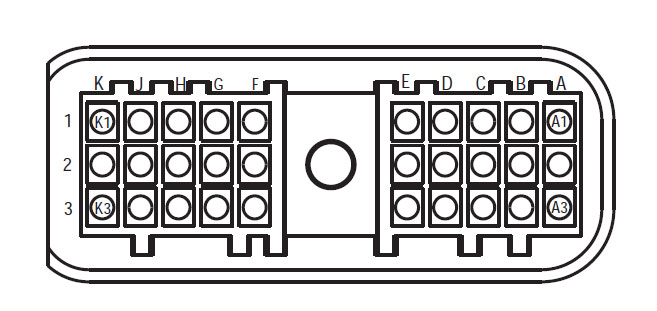
[/fusion_text][/fusion_builder_column][fusion_builder_column type=”1_3″ spacing=”” center_content=”no” link=”” target=”_self” min_height=”” hide_on_mobile=”small-visibility,medium-visibility,large-visibility” class=”” id=”” background_image_id=”” background_color=”” background_image=”” background_position=”left top” undefined=”” background_repeat=”no-repeat” hover_type=”none” border_size=”0″ border_color=”” border_style=”solid” border_position=”all” padding_top=”” padding_right=”” padding_bottom=”” padding_left=”” margin_top=”25″ margin_bottom=”” animation_type=”” animation_direction=”left” animation_speed=”0.3″ animation_offset=”” last=”no”][fusion_imageframe image_id=”14452|full” max_width=”” style_type=”” blur=”” stylecolor=”” hover_type=”none” bordersize=”” bordercolor=”” borderradius=”” align=”center” lightbox=”no” gallery_id=”” lightbox_image=”” lightbox_image_id=”” alt=”Push Button Shift Kontrollit të 30-Way Connector” link=”” linktarget=”_self” hide_on_mobile=”small-visibility,medium-visibility,large-visibility” class=”” id=”” animation_type=”” animation_direction=”left” animation_speed=”0.3″ animation_offset=””]https://www.globaltransmissionsupply.com/wp-content/uploads/Push-Button-Shift-Control-30-Way-Connector.jpg[/fusion_imageframe][fusion_text columns=”” column_min_width=”” column_spacing=”” rule_style=”default” rule_size=”” rule_color=”” hide_on_mobile=”small-visibility,medium-visibility,large-visibility” class=”” id=””]
Push Button Shift Kontrollit të 30-Way Connector
[/fusion_text][/fusion_builder_column][fusion_builder_column type=”1_3″ spacing=”” center_content=”no” link=”” target=”_self” min_height=”” hide_on_mobile=”small-visibility,medium-visibility,large-visibility” class=”” id=”” background_image_id=”” background_color=”” background_image=”” background_position=”left top” undefined=”” background_repeat=”no-repeat” hover_type=”none” border_size=”0″ border_color=”” border_style=”solid” border_position=”all” padding_top=”” padding_right=”” padding_bottom=”” padding_left=”” margin_top=”25″ margin_bottom=”” animation_type=”” animation_direction=”left” animation_speed=”0.3″ animation_offset=”” last=”no”][fusion_imageframe image_id=”14447|full” max_width=”” style_type=”” blur=”” stylecolor=”” hover_type=”none” bordersize=”” bordercolor=”” borderradius=”” align=”none” lightbox=”no” gallery_id=”” lightbox_image=”” lightbox_image_id=”” alt=”4-Pin Park Pawl Actuator Connector” link=”” linktarget=”_self” hide_on_mobile=”small-visibility,medium-visibility,large-visibility” class=”” id=”” animation_type=”” animation_direction=”left” animation_speed=”0.3″ animation_offset=””]https://www.globaltransmissionsupply.com/wp-content/uploads/4-Pin-Park-Pawl-Actuator-Connector.jpg[/fusion_imageframe][fusion_text columns=”” column_min_width=”” column_spacing=”” rule_style=”default” rule_size=”” rule_color=”” hide_on_mobile=”small-visibility,medium-visibility,large-visibility” class=”” id=””]
4-Pin Park Pawl Actuator Connector
[/fusion_text][/fusion_builder_column][/fusion_builder_row][/fusion_builder_container][fusion_builder_container hundred_percent=”no” hundred_percent_height=”no” hundred_percent_height_scroll=”no” hundred_percent_height_center_content=”yes” equal_height_columns=”no” menu_anchor=”” hide_on_mobile=”small-visibility,medium-visibility,large-visibility” status=”published” publish_date=”” class=”” id=”” background_color=”” background_image=”” background_position=”center center” background_repeat=”no-repeat” fade=”no” background_parallax=”none” enable_mobile=”no” parallax_speed=”0.3″ video_mp4=”” video_webm=”” video_ogv=”” video_url=”” video_aspect_ratio=”16:9″ video_loop=”yes” video_mute=”yes” video_preview_image=”” border_size=”” border_color=”” border_style=”solid” margin_top=”” margin_bottom=”” padding_top=”” padding_right=”” padding_bottom=”” padding_left=””][fusion_builder_row][fusion_builder_column type=”1_1″ layout=”1_1″ spacing=”” center_content=”no” link=”” target=”_self” min_height=”” hide_on_mobile=”small-visibility,medium-visibility,large-visibility” class=”” id=”” background_image_id=”” background_color=”#000000″ background_image=”” background_position=”left top” undefined=”” background_repeat=”no-repeat” hover_type=”none” border_size=”0″ border_color=”” border_style=”solid” border_position=”all” padding_top=”” padding_right=”” padding_bottom=”” padding_left=”” margin_top=”” margin_bottom=”” animation_type=”” animation_direction=”left” animation_speed=”0.3″ animation_offset=”” last=”no”][fusion_text columns=”” column_min_width=”” column_spacing=”” rule_style=”default” rule_size=”” rule_color=”” hide_on_mobile=”small-visibility,medium-visibility,large-visibility” class=”” id=””]
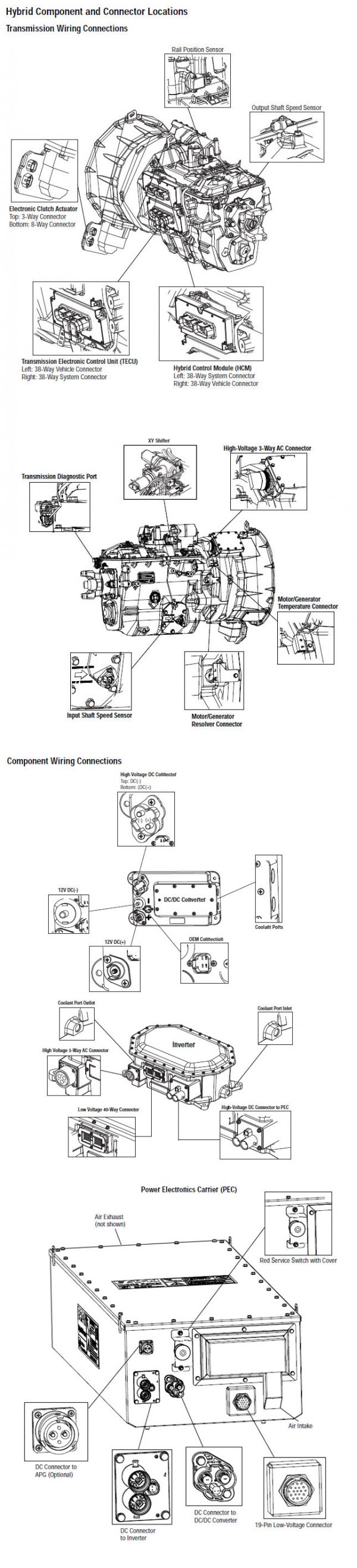
SHËNIM: Referojuni Eaton Komponenti Hybrid dhe Connector Vendndodhja për Locations lidhës në MY08 Systems
[/fusion_text][/fusion_builder_column][fusion_builder_column type=”1_1″ layout=”1_1″ spacing=”” center_content=”no” link=”” target=”_self” min_height=”” hide_on_mobile=”small-visibility,medium-visibility,large-visibility” class=”” id=”” background_image_id=”” background_color=”#000000″ background_image=”” background_position=”left top” undefined=”” background_repeat=”no-repeat” hover_type=”none” border_size=”0″ border_color=”” border_style=”solid” border_position=”all” padding_top=”” padding_right=”” padding_bottom=”” padding_left=”” margin_top=”20″ margin_bottom=”20″ animation_type=”” animation_direction=”left” animation_speed=”0.3″ animation_offset=”” last=”no”][fusion_text columns=”” column_min_width=”” column_spacing=”” rule_style=”default” rule_size=”” rule_color=”” hide_on_mobile=”small-visibility,medium-visibility,large-visibility” class=”” id=””]
SHËNIM: Referojuni Eaton Komponenti Hybrid dhe Connector Vendndodhja për Locations lidhës në MY09 Systems.
[/fusion_text][/fusion_builder_column][fusion_builder_column type=”1_1″ layout=”1_1″ spacing=”” center_content=”no” link=”” target=”_self” min_height=”” hide_on_mobile=”small-visibility,medium-visibility,large-visibility” class=”” id=”” background_color=”” background_image=”” background_image_id=”” background_position=”left top” background_repeat=”no-repeat” hover_type=”none” border_size=”0″ border_color=”” border_style=”solid” border_position=”all” padding_top=”” padding_right=”” padding_bottom=”” padding_left=”” margin_top=”” margin_bottom=”” animation_type=”” animation_direction=”left” animation_speed=”0.3″ animation_offset=”” last=”no”][fusion_imageframe image_id=”14454|full” max_width=”” style_type=”” blur=”” stylecolor=”” hover_type=”none” bordersize=”” bordercolor=”” borderradius=”” align=”center” lightbox=”no” gallery_id=”” lightbox_image=”” lightbox_image_id=”” alt=”TECU PBSC Shift levë Kontrolluesi lidhës” link=”” linktarget=”_self” hide_on_mobile=”small-visibility,medium-visibility,large-visibility” class=”” id=”” animation_type=”” animation_direction=”left” animation_speed=”0.3″ animation_offset=””]https://www.globaltransmissionsupply.com/wp-content/uploads/TECU-PBSC-Shift-Lever-Controller-connector.png[/fusion_imageframe][/fusion_builder_column][/fusion_builder_row][/fusion_builder_container][fusion_builder_container hundred_percent=”no” hundred_percent_height=”no” hundred_percent_height_scroll=”no” hundred_percent_height_center_content=”yes” equal_height_columns=”no” menu_anchor=”” hide_on_mobile=”small-visibility,medium-visibility,large-visibility” status=”published” publish_date=”” class=”” id=”” background_color=”” background_image=”” background_position=”center center” background_repeat=”no-repeat” fade=”no” background_parallax=”none” enable_mobile=”no” parallax_speed=”0.3″ video_mp4=”” video_webm=”” video_ogv=”” video_url=”” video_aspect_ratio=”16:9″ video_loop=”yes” video_mute=”yes” video_preview_image=”” border_size=”” border_color=”” border_style=”solid” margin_top=”” margin_bottom=”” padding_top=”” padding_right=”” padding_bottom=”” padding_left=””][fusion_builder_row][fusion_builder_column type=”1_1″ layout=”1_1″ spacing=”” center_content=”no” link=”” target=”_self” min_height=”” hide_on_mobile=”small-visibility,medium-visibility,large-visibility” class=”” id=”” background_color=”” background_image=”” background_image_id=”” background_position=”left top” background_repeat=”no-repeat” hover_type=”none” border_size=”0″ border_color=”” border_style=”solid” border_position=”all” padding_top=”” padding_right=”” padding_bottom=”” padding_left=”” margin_top=”” margin_bottom=”” animation_type=”” animation_direction=”left” animation_speed=”0.3″ animation_offset=”” last=”no”][fusion_modal name=”warnings_cautions” title=”Paralajmërimet & keshillon” size=”large” background=”” border_color=”” show_footer=”yes” class=”” id=””]rrezik: Rreziku tregon se do të plagoseni rëndë ose do të vriteni nëse nuk ndiqni procedurën e treguar.
paralajmërim: Warning tregon një rrezik të menjëhershëm, i cili mund të rezultojë në dëmtim të rëndë personal nëse nuk ndiqni procedurën e treguar.
Kujdes: Kujdes tregon që dëmtimi i automjetit ose pronës mund të ndodhë nëse nuk ndiqni procedurën e treguar.
shënim: Shënimi tregon detaje shtesë që do të ndihmojnë në diagnostikimin ose riparimin e një përbërësi / sistemi.
Ndjekin procedurat e përcaktuara në urdhrin e treguar për të shmangur dëmtimin personal:
1. Nëse kone e tensionit të lartë janë rreth automjetit dhe lokaut është i instaluar në PEC, i vetmi person që duhet të lejohet të fillojë të automjetit është personi që ka nënshkruar tag lokaut.
2. Para se të punuar në një automjet ose duke e lënë taksi, ndërsa motori është i rrjedhshëm, ju duhet të vendosni levë ndryshim në "N" të vendosur frenave parkimi, dhe bllokojnë rrotat.
3. Për arsye sigurie, gjithmonë të angazhuar frenat e shërbimit para se të zgjedhur pozicionet veshje nga "N."
4. Para fillimit të një automjeti gjithmonë të ulur në vendin e shoferit, zgjidhni "N" Për kontrollin shift, dhe të vendosur frenat e parkimit.
5. Në automjetet me ePTO, motor dhe / ose
Motor / Generator mund të fillojë në mënyrë të ePTO. Asnjëherë mos kryer ndonjë mirëmbajtjen ose punojnë në automjet, ndërsa në këtë mënyrë.
6. 12-Volt Battery pozitiv (+) dhe negative (-) duhet të jenë të shkyçur para çdo saldim në çdo makinë hibride pajisur.
Kujdes: Ndjekin procedurat e përcaktuara në urdhrin e treguar për të shmangur pajisjet keqfunksionim ose dëmtim.
Kujdes: Mos e lëshoni frenin e parkimit ose mos u përpiqni të zgjidhni një ingranazh derisa presioni i ajrit të jetë në nivelin e duhur.
Kujdes: Për të shmangur dëmtimin e transmisionit gjatë tërheqjes vendosni levën e ndërrimit në "N" dhe ngrini rrotat e makinës nga toka ose shkëputni vijën e makinës.
Paralajmërimet me tension të lartë & keshillon
- Përdorni CO2 apo të thatë kimike aparatet zjarr.
- Instalime elektrike të tensionit të lartë është e mbuluar në izolim portokalli ose tub ndërlikuar dhe të shënuara me etiketat paralajmërim në lidhje.
- Të gjitha Eaton® Hybrid Diesel / automjeteve elektrike do të shënohet "Hybrid’ në pjesën e jashtme të automjetit, së bashku me etiketën ndryshim në dash.
- Referojuni OEM për vend të veçantë e shasi montuar komponentëve hibride.
- A nuk e prerë në kabllot të tensionit të lartë portokalli.
- A nuk e prerë në ose hapni Pejës.
- A nuk e prerë në ose hapni Converter DC / DC.
- A nuk e prerë në ose të hapur inverter.
Një zonë tampon duhet të jenë të ngritur dhe të lartë të tensionit të izoluar doreza gome (klasë 0 me mbrojtës të lëkurës) janë të nevojshme para se të punojnë në tension të lartë. Dështimi për të ndjekur këto udhëzime mund të rezultojë në lëndime të rënda personale ose vdekje.
Të dorashka gome-izoluar që duhet të vishen duke punuar në sistemin e tensionit të lartë janë të klasit 0 me mbrojtës të lëkurës. Doreza gome duhet të testohet para çdo përdorimi pas procedurës gome doreza izoluese testimit gjendet në "Mjetet diagnostike / Publikime të Shërbimit" në faqen 6. Dështimi për të ndjekur këto udhëzime mund të rezultojë në lëndime të rënda personale ose vdekje.
Para inspektimin apo duke punuar në ndonjë kabllo të tensionit të lartë apo komponentëve të "High-Voltage Shërbimi Shutdown dhe Power-Up procedurës" në faqen 4 duhet të ndiqet. Dështimi për të ndjekur këto udhëzime mund të rezultojë në lëndime të rënda personale ose vdekje.
Pajisjet lokaut dhe Tagout duhet të hiqet vetëm nga tekniku që vendosen pajisjet Lokaut dhe Tagout në automjet. Dështimi për të ndjekur këto udhëzime mund të rezultojë në lëndime të rënda personale ose vdekje.
gome izoluar doreza të tensionit të lartë (klasë 0 me mbrojtës të lëkurës) duhet të jetë i veshur kur punojnë në ndonjë
kabllo të tensionit të lartë. E "High-Voltage Shërbimi Shutdown dhe Power-Up Procedura" në faqen 4 duhet të ndiqen para se të hequr ndonjë kabllo të tensionit të lartë. Dështimi për të ndjekur këto udhëzime mund të rezultojë në lëndime të rënda personale ose vdekje.
kabllo të tensionit të lartë dhe instalime elektrike janë portokalli dhe të përmbajë një etiketë paralajmëruese në lidhje. komponentëve të tensionit të lartë janë të shënuara me një etiketë. gome izoluar doreza të tensionit të lartë (klasë 0 me mbrojtës të lëkurës) duhet të përdoret kur punojnë në ndonjë nga këto komponente. Dështimi për të ndjekur këto udhëzime mund të rezultojë në lëndime të rënda personale ose vdekje.
Me tension të lartë Procedurat Shutdown Shërbimi
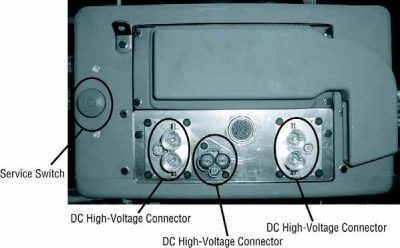
1. Follow "High-Voltage Work Area" Procedura.
2. Gjeni kuqe PEC Shërbimit të kaluar në pjesën e përparme të Pejës dhe të shtyjë kaloni off.
3. Hiqni kapakun Shërbimi Switch dhe instaloni Bracket lokaut (J48506).
4. tag kapem për lokaut Bracket.
5. Siguruar Switch PEC Shërbimit nuk mund të lëvizin nga pozicioni off.
6. Lejo sistemi për të vendosur për një minimum prej 5 minuta për shkarkimin tension të lartë.
7. Lidhu ServiceRanger dhe të parë të dhënat Monitor PID 116 quajtur "Potenciali High-Voltage Battery." Përdorimi SPN 520323 për lidhje J1939 "Battery Voltage RB" (Relay Box).
8. Tensioni duhet të jetë 30 volt ose më pak. Në qoftë se tensioni është më lart 30 volt, nuk punojnë në automjet dhe të kontaktoni Eaton® në 1-800-826-HELP (4357).
9. Kthehet kyç ndezjen off dhe të vazhdojë për të riparuar ose hap troubleshooting.
shënim: Tensioni bie në zero, kur çelësi është jashtë.
Procedura High-Voltage Shërbimi Power-Up
1. Instalo të gjitha lidhje të tensionit të lartë në pozicionet e tyre të mbyllura.
2. Nëse ju jeni personi punon në automjet, hiqni lokaut Bracket dhe tag.
3. Reinstall lokaut Bracket mbi Shërbimit Switch.
4. Pull Shërbimin Kaloni jashtë dhe le të vendosur automjetit për 2 minuta.
5. Start vehicle when appropriate.[/fusion_modal][fusion_modal name=”component_location” title=”Eaton Komponenti Hybrid dhe Connector Vendndodhja ” size=”large” background=”#ffffff” border_color=”” show_footer=”yes” class=”” id=””]
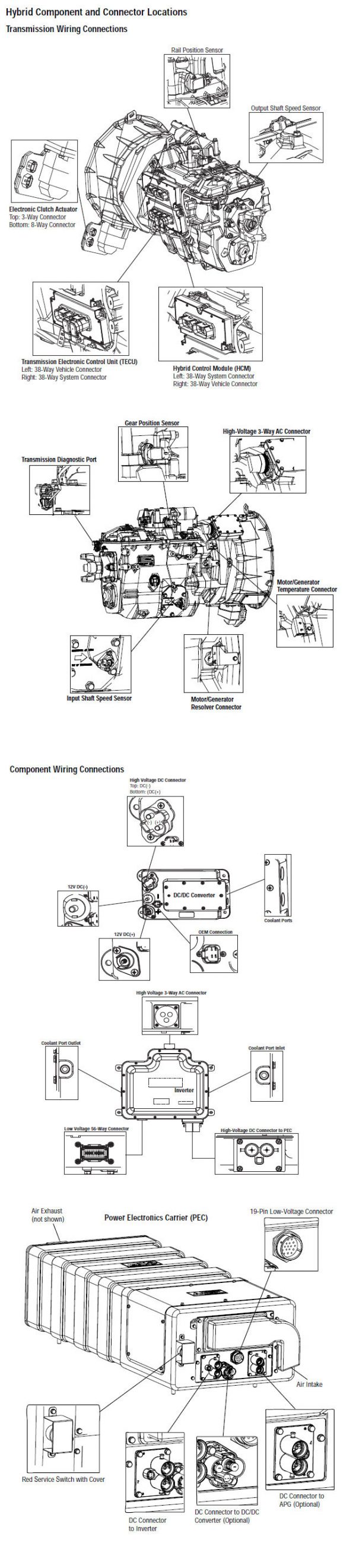
[/fusion_modal][fusion_modal name=”component_location2″ title=”Eaton Komponenti Hybrid dhe Connector Vendndodhja MY09 Systems” size=”large” background=”#ffffff” border_color=”” show_footer=”yes” class=”” id=””]

[/fusion_modal][/fusion_builder_column][/fusion_builder_row][/fusion_builder_container][fusion_builder_container hundred_percent=”no” hundred_percent_height=”no” hundred_percent_height_scroll=”no” hundred_percent_height_center_content=”yes” equal_height_columns=”no” menu_anchor=”” hide_on_mobile=”small-visibility,medium-visibility,large-visibility” status=”published” publish_date=”” class=”” id=”” background_color=”” background_image=”” background_position=”center center” background_repeat=”no-repeat” fade=”no” background_parallax=”none” enable_mobile=”no” parallax_speed=”0.3″ video_mp4=”” video_webm=”” video_ogv=”” video_url=”” video_aspect_ratio=”16:9″ video_loop=”yes” video_mute=”yes” video_preview_image=”” border_size=”” border_color=”” border_style=”solid” margin_top=”” margin_bottom=”” padding_top=”” padding_right=”” padding_bottom=”” padding_left=””][fusion_builder_row][fusion_builder_column type=”1_1″ layout=”1_1″ spacing=”” center_content=”no” link=”” target=”_self” min_height=”” hide_on_mobile=”small-visibility,medium-visibility,large-visibility” class=”” id=”” background_color=”” background_image=”” background_image_id=”” background_position=”left top” background_repeat=”no-repeat” hover_type=”none” border_size=”0″ border_color=”” border_style=”solid” border_position=”all” padding_top=”” padding_right=”” padding_bottom=”” padding_left=”” margin_top=”” margin_bottom=”” animation_type=”” animation_direction=”left” animation_speed=”0.3″ animation_offset=”” last=”no”][fusion_content_boxes layout=”clean-horizontal” columns=”1″ title_size=”18px” heading_size=”3″ title_color=”#ffffff” body_color=”#ffffff” backgroundcolor=”#4f4f4f” icon=”” iconflip=”” iconrotate=”” iconspin=”no” iconcolor=”” icon_circle=”” icon_circle_radius=”” circlecolor=”” circlebordersize=”” circlebordercolor=”” outercirclebordersize=”” outercirclebordercolor=”” icon_size=”” icon_hover_type=”” hover_accent_color=”” image=”” image_id=”” image_width=”” image_height=”” link_type=”” button_span=”” link_area=”” link_target=”” icon_align=”left” animation_type=”” animation_delay=”” animation_offset=”” animation_direction=”left” animation_speed=”0.3″ margin_top=”” margin_bottom=”” hide_on_mobile=”small-visibility,medium-visibility,large-visibility” class=”” id=””][fusion_content_box title=”HAPI 1. Verifikoni statusin e dritës shërbimin e transmetimit.” backgroundcolor=”” icon=”” iconflip=”” iconrotate=”” iconspin=”no” iconcolor=”” circlecolor=”” circlebordersize=”” circlebordercolor=”” outercirclebordersize=”” outercirclebordercolor=”” image=”” image_id=”” image_width=”” image_height=”” link=”” linktext=”Lexo më shumë” link_target=”” animation_type=”” animation_direction=”left” animation_speed=”0.3″ animation_offset=””]
- Merrni kodet aktive të defektit dhe FMI-të me ServiceRanger duke përdorur Lidhësin Diagnostikues me 9 Drejtime ose manualisht.
- off Key.
- Key në dhe të respektojë Push Button Shërbimit Lehta
- Nëse kuqe "Shërbimi" dritë vjen, shkoni në hapin .
- If red “Service” light does not turn on, shkoni në hapin .
- Nëse FMI 14 është i pranishëm, Call 1-800-826-HELP (4357). Shko tek Hapi V.
[/fusion_content_box][/fusion_content_boxes][fusion_content_boxes layout=”clean-horizontal” columns=”2″ title_size=”18px” heading_size=”3″ title_color=”#ffffff” body_color=”#ffffff” backgroundcolor=”#4f4f4f” icon=”” iconflip=”” iconrotate=”” iconspin=”no” iconcolor=”” icon_circle=”” icon_circle_radius=”” circlecolor=”” circlebordersize=”” circlebordercolor=”” outercirclebordersize=”” outercirclebordercolor=”” icon_size=”” icon_hover_type=”” hover_accent_color=”” image=”” image_id=”” image_width=”” image_height=”” link_type=”” button_span=”” link_area=”” link_target=”” icon_align=”left” animation_type=”” animation_delay=”” animation_offset=”” animation_direction=”left” animation_speed=”0.3″ margin_top=”” margin_bottom=”” hide_on_mobile=”small-visibility,medium-visibility,large-visibility” class=”” id=””][fusion_content_box title=”HAPI 2. Verifikuar funksionimin e PBSC Mode Dritat.” backgroundcolor=”” icon=”” iconflip=”” iconrotate=”” iconspin=”no” iconcolor=”” circlecolor=”” circlebordersize=”” circlebordercolor=”” outercirclebordersize=”” outercirclebordercolor=”” image=”” image_id=”” image_width=”” image_height=”” link=”” linktext=”Lexo më shumë” link_target=”” animation_type=”” animation_direction=”left” animation_speed=”0.3″ animation_offset=””]
- off Key dhe të gjatë vëzhgimit të gjelbër "Mode" dritat në PBSC:
- Në qoftë se drita jeshile Mode kthehet në, shkoni në hapin 6.
- Në qoftë se drita e gjelbër Mode nuk do të kthehet në, zëvendësojë PBSC, pastaj të shkojnë në hapin 9.
[/fusion_content_box][fusion_content_box title=”HAPI 3. Verifiko tension të PBSC.” backgroundcolor=”” icon=”” iconflip=”” iconrotate=”” iconspin=”” iconcolor=”” circlecolor=”” circlebordersize=”” circlebordercolor=”” outercirclebordersize=”” outercirclebordercolor=”” image=”” image_id=”” image_width=”” image_height=”” link=”” linktext=”” link_target=”” animation_type=”” animation_direction=”left” animation_speed=”0.3″ animation_offset=””]
- off Key.
- Shkëputje PBSC 30-Way Connector.
- Key në.
- Të matur tensionin mes Pin J3 dhe Pin C1 në 30-Way Connector:
- Në qoftë se tensioni është brenda 0.6 volt e tensionit të baterisë, zëvendësojë PBSC (shih Kontrollit Shift), pastaj të shkojnë në hapin 9.
- Në qoftë se tensioni është jashtë rrezes, shkoni në hapin 4.
[/fusion_content_box][/fusion_content_boxes][fusion_content_boxes layout=”clean-horizontal” columns=”2″ title_size=”18px” heading_size=”3″ title_color=”#ffffff” body_color=”#ffffff” backgroundcolor=”#4f4f4f” icon=”” iconflip=”” iconrotate=”” iconspin=”no” iconcolor=”” icon_circle=”” icon_circle_radius=”” circlecolor=”” circlebordersize=”” circlebordercolor=”” outercirclebordersize=”” outercirclebordercolor=”” icon_size=”” icon_hover_type=”” hover_accent_color=”” image=”” image_id=”” image_width=”” image_height=”” link_type=”” button_span=”” link_area=”” link_target=”” icon_align=”left” animation_type=”” animation_delay=”” animation_offset=”” animation_direction=”left” animation_speed=”0.3″ margin_top=”” margin_bottom=”” hide_on_mobile=”small-visibility,medium-visibility,large-visibility” class=”” id=””][fusion_content_box title=”HAPI 4. Verifikoni vazhdimësinë e qarqeve Shift Llozi në automjetin Shaloni.” backgroundcolor=”” icon=”” iconflip=”” iconrotate=”” iconspin=”no” iconcolor=”” circlecolor=”” circlebordersize=”” circlebordercolor=”” outercirclebordersize=”” outercirclebordercolor=”” image=”” image_id=”” image_width=”” image_height=”” link=”” linktext=”Lexo më shumë” link_target=”” animation_type=”” animation_direction=”left” animation_speed=”0.3″ animation_offset=””]
- off Key.
- kabllo Disconnect negative bateri.
- Disconnect Automjeteve Shaloni 38-Way Connector.
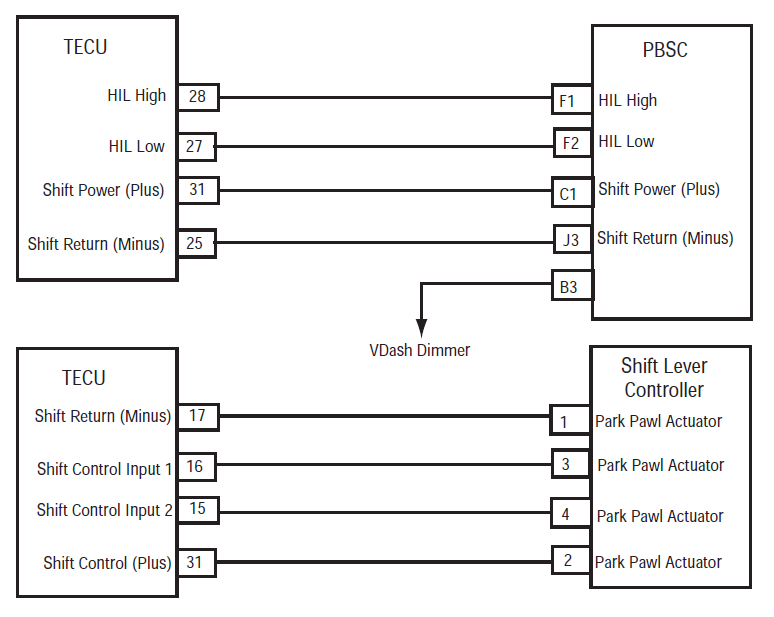
- Masa e rezistencë midis Pin J3 në Shift Kontrollin 30-Way Connector dhe pin 25 në mjetin Shaloni 38-Way Connector.
- Nëse rezistencë midis Pins J3 dhe Pin 25 është 0-0.3 ohms, shkoni në hapin 5.
- Në qoftë se rezistenca është jashtë rrezes, riparimin e automjeteve Shaloni midis PBSC dhe TECU, pastaj të shkojnë në hapin 9.
[/fusion_content_box][fusion_content_box title=”HAPI 5. Verifikoni vazhdimësinë e qarqeve Shift Llozi në automjetin Shaloni.” backgroundcolor=”” icon=”” iconflip=”” iconrotate=”” iconspin=”” iconcolor=”” circlecolor=”” circlebordersize=”” circlebordercolor=”” outercirclebordersize=”” outercirclebordercolor=”” image=”” image_id=”” image_width=”” image_height=”” link=”” linktext=”” link_target=”” animation_type=”” animation_direction=”left” animation_speed=”0.3″ animation_offset=””]
- off Key.
- kabllo Disconnect negative bateri.
- Disconnect Automjeteve Shaloni 38-Way Connector.
- Matur rezistencën mes vijon:
- Pin C1 në Shift Kontrollin 30-Way Connector dhe Pin 31 në mjetin Shaloni 38-Way Connector
- Pin C1 mbi Kontrollin Shift dhe toka
- Nëse rezistencë midis Pin C1 dhe Pin 31 është 0-0.3 ohms dhe rezistencë midis Pin C1 dhe terren është 10k ohms ose më e madhe, zëvendësuar njësinë e kontrollit elektronik të transmetimit (TECU)(vetëm nëse kodi faji është Aktiv). Shko tek Hapi 9.
- Në qoftë se rezistenca është jashtë rrezes, riparimin e automjeteve Shaloni midis PBSC dhe TECU, pastaj të shkojnë në hapin 9.
[/fusion_content_box][/fusion_content_boxes][fusion_content_boxes layout=”clean-horizontal” columns=”2″ title_size=”18px” heading_size=”3″ title_color=”#ffffff” body_color=”#ffffff” backgroundcolor=”#4f4f4f” icon=”” iconflip=”” iconrotate=”” iconspin=”no” iconcolor=”” icon_circle=”” icon_circle_radius=”” circlecolor=”” circlebordersize=”” circlebordercolor=”” outercirclebordersize=”” outercirclebordercolor=”” icon_size=”” icon_hover_type=”” hover_accent_color=”” image=”” image_id=”” image_width=”” image_height=”” link_type=”” button_span=”” link_area=”” link_target=”” icon_align=”left” animation_type=”” animation_delay=”” animation_offset=”” animation_direction=”left” animation_speed=”0.3″ margin_top=”” margin_bottom=”” hide_on_mobile=”small-visibility,medium-visibility,large-visibility” class=”” id=””][fusion_content_box title=”HAPI 6. Verifikoni tension AC në PBSC” backgroundcolor=”” icon=”” iconflip=”” iconrotate=”” iconspin=”no” iconcolor=”” circlecolor=”” circlebordersize=”” circlebordercolor=”” outercirclebordersize=”” outercirclebordercolor=”” image=”” image_id=”” image_width=”” image_height=”” link=”” linktext=”Lexo më shumë” link_target=”” animation_type=”” animation_direction=”left” animation_speed=”0.3″ animation_offset=””]
- off Key
- Shkëputje Shift Kontrollit 30-Way Connector.
- Key në.
- Masa e tensionit AC mes Pin F1 dhe F2 Pin:
shënim: Sigurohuni që metër është në funksion AC auto ose vendosur për AC 10 shkallë volt.- Nëse tensioni është 0.10 volt AC ose më e madhe, zëvendësojë Push Button Shift Kontrollit (PBSC), pastaj të shkojnë në hapin 9.
- Nëse tensioni është 0.10 volt AC ose më pak, shkoni në hapin 7.
[/fusion_content_box][fusion_content_box title=”HAPI 7. Verifikoni vazhdimësinë mes PBSC parzmore dhe Automjeteve Shaloni.” backgroundcolor=”” icon=”” iconflip=”” iconrotate=”” iconspin=”” iconcolor=”” circlecolor=”” circlebordersize=”” circlebordercolor=”” outercirclebordersize=”” outercirclebordercolor=”” image=”” image_id=”” image_width=”” image_height=”” link=”” linktext=”” link_target=”” animation_type=”” animation_direction=”left” animation_speed=”0.3″ animation_offset=””]
- off Key.
- kabllo Disconnect negative bateri.
- Disconnect Automjeteve Shaloni 38-Way Connector.
- Matur rezistencën mes vijon:
- Pin F1 në Shift Kontrollit 30-Way Connector dhe Pin 28 në mjetin Shaloni 38-Way Connector
- Pin F1 në Shift Kontrollit 30-Way Connector dhe toka
- Nëse rezistencë midis Pin F1 dhe Pin 28 është 0-0.3 ohms dhe rezistencë midis Pin F1 dhe toka është 10K ohms ose më e madhe, shkoni në hapin 8.
- Në qoftë se rezistenca është jashtë rrezes, riparimin e automjeteve Shaloni midis PBSC dhe TECU, pastaj të shkojnë në hapin 9.
[/fusion_content_box][/fusion_content_boxes][fusion_content_boxes layout=”clean-horizontal” columns=”2″ title_size=”18px” heading_size=”3″ title_color=”#ffffff” body_color=”#ffffff” backgroundcolor=”#4f4f4f” icon=”” iconflip=”” iconrotate=”” iconspin=”no” iconcolor=”” icon_circle=”” icon_circle_radius=”” circlecolor=”” circlebordersize=”” circlebordercolor=”” outercirclebordersize=”” outercirclebordercolor=”” icon_size=”” icon_hover_type=”” hover_accent_color=”#f41000″ image=”” image_id=”” image_width=”” image_height=”” link_type=”” button_span=”” link_area=”” link_target=”” icon_align=”left” animation_type=”” animation_delay=”” animation_offset=”” animation_direction=”left” animation_speed=”0.3″ margin_top=”” margin_bottom=”” hide_on_mobile=”small-visibility,medium-visibility,large-visibility” class=”” id=””][fusion_content_box title=”HAPI 8. Verifikoni vazhdimësinë mes PBSC parzmore dhe Automjeteve Shaloni.” backgroundcolor=”” icon=”” iconflip=”” iconrotate=”” iconspin=”” iconcolor=”” circlecolor=”” circlebordersize=”” circlebordercolor=”” outercirclebordersize=”” outercirclebordercolor=”” image=”” image_id=”” image_width=”” image_height=”” link=”” linktext=”” link_target=”” animation_type=”” animation_direction=”left” animation_speed=”0.3″ animation_offset=””]
- off Key.
- kabllo Disconnect negative bateri.
- Disconnect Automjeteve Shaloni 38-Way Connector.
- Matur rezistencën mes vijon:
- Pin F2 në Shift Kontrollit 30-Way Connector dhe Pin 27 në mjetin Shaloni 38-Way Connector
- Pin F2 në Shift Kontrollit 30-Way Connector dhe toka
- Nëse rezistencë midis Pin F2 dhe Pin 27 është 0-0.3 ohms dhe rezistencë midis Pin F2 dhe toka është 10K ohms ose më e madhe, zëvendësuar njësinë e kontrollit elektronik të Transmisionit (TECU). Shko tek Hapi 9.
- Në qoftë se rezistenca është jashtë rrezes, riparimin e automjeteve Shaloni midis PBSC dhe TECU, pastaj të shkojnë në hapin 9.
[/fusion_content_box][fusion_content_box title=”HAPI 9. Verifikoni riparim.” backgroundcolor=”” icon=”” iconflip=”” iconrotate=”” iconspin=”no” iconcolor=”” circlecolor=”” circlebordersize=”” circlebordercolor=”” outercirclebordersize=”” outercirclebordercolor=”” image=”” image_id=”” image_width=”” image_height=”” link=”” linktext=”Lexo më shumë” link_target=”” animation_type=”” animation_direction=”left” animation_speed=”0.3″ animation_offset=””]
- off Key.
- Reconnect gjitha lidhësit dhe kabllo negative e baterisë.
- Key në.
- Kodet e qarta, Shiko Gabimet qarta Inactive.
- Drive automjetin dhe përpjekje për të rivendosur kodin.
- Kontrollo për kodet, Shiko Shiko gabimet aktive dhe jo aktive.
- Nëse jo kodet, Testi është i plotë.
- Nëse Code faji 84 duket, gjetur gabim në testim, shkoni në hapin 1.
- Nëse një kod tjetër përveç 84 duket, Shiko Faji Lista Code Indeksi.
[/fusion_content_box][/fusion_content_boxes][/fusion_builder_column][/fusion_builder_row][/fusion_builder_container][fusion_global id=”13788″]