[fusion_builder_container hundred_percent=yeshundred_percent_height=nohundred_percent_height_scroll=nohundred_percent_height_center_content=yesequal_height_columns=nomenu_anchor=”” hide_on_mobile=small-visibility,medium-visibility,large-visibilitystatus=publishedpublish_date=”” class=”” id=”” background_color=”” background_image=”” background_position=center centerbackground_repeat=no-repeatfade=nobackground_parallax=noneenable_mobile=noparallax_speed=”0.3″ video_mp4=”” video_webm=”” video_ogv=”” video_url=”” video_aspect_ratio=”16:9″ video_loop=yesvideo_mute=yesvideo_preview_image=”” border_size=”” border_color=”” border_style=solidmargin_top=”35″ margin_bottom=”” padding_top=”” padding_right=”” padding_bottom=”” padding_left=””][fusion_builder_row][fusion_builder_column type=”1_1layout=”1_1spacing=”” center_content=nolink=”” target=_selfmin_height=”” hide_on_mobile=small-visibility,medium-visibility,large-visibilityclass=”” id=”” background_color=”” background_image=”” background_image_id=”” background_position=left topbackground_repeat=no-repeathover_type=noneborder_size=”0″ border_color=”” border_style=solidborder_position=allpadding_top=”” padding_right=”” padding_bottom=”” padding_left=”” margin_top=”” margin_bottom=”” animation_type=”” animation_direction=leftanimation_speed=”0.3″ animation_offset=”” last=no”][fusion_text columns=”” column_min_width=”” column_spacing=”” rule_style=defaultrule_size=”” rule_color=”” hide_on_mobile=small-visibility,medium-visibility,large-visibilityclass=”” id=””]

Eaton Fuller Hybrid Kod pogreške 3 – Motor Generator temperature

[/fusion_text][/fusion_builder_column][/fusion_builder_row][/fusion_builder_container][fusion_builder_container hundred_percent=nohundred_percent_height=nohundred_percent_height_scroll=nohundred_percent_height_center_content=yesequal_height_columns=nomenu_anchor=”” hide_on_mobile=small-visibility,medium-visibility,large-visibilitystatus=publishedpublish_date=”” class=”” id=”” background_color=”” background_image=”” background_position=center centerbackground_repeat=no-repeatfade=nobackground_parallax=noneenable_mobile=noparallax_speed=”0.3″ video_mp4=”” video_webm=”” video_ogv=”” video_url=”” video_aspect_ratio=”16:9″ video_loop=yesvideo_mute=yesvideo_preview_image=”” border_size=”” border_color=”” border_style=solidmargin_top=”” margin_bottom=”” padding_top=”” padding_right=”” padding_bottom=”” padding_left=””][fusion_builder_row][fusion_builder_column type=”1_1layout=”1_1spacing=”” center_content=nolink=”” target=_selfmin_height=”” hide_on_mobile=small-visibility,medium-visibility,large-visibilityclass=”” id=”” background_color=”” background_image=”” background_image_id=”” background_position=left topbackground_repeat=no-repeathover_type=noneborder_size=”0″ border_color=”” border_style=solidborder_position=allpadding_top=”” padding_right=”” padding_bottom=”” padding_left=”” margin_top=”” margin_bottom=”” animation_type=”” animation_direction=leftanimation_speed=”0.3″ animation_offset=”” last=no”][fusion_text columns=”” column_min_width=”” column_spacing=”” rule_style=defaultrule_size=”” rule_color=”” hide_on_mobile=small-visibility,medium-visibility,large-visibilityclass=”” id=””]

Kod pogreške za Eaton Hybrid Drive Systems modeli (MY08) EH-8E306A-U, EH-8E306A-UPG, EH-8E306A-UP, EH-8E306A-CD, EH-8E306A-T, EH-6E606B-CD, (MY09) EH-8E406A-U / P, EH-8E406A-UP, EH-8E406A-UPG, EH-8E406A-CD, EH-8E406A-CDG, EH-8E406A-CDR, EH-8E406A-T, EH-6E706B-CD, EH-6E706B-P i EH-6E706B-UPG. Temperature motora / generatora se mjeri kroz osjetnik, koja se nalazi unutar same jedinice. Vrijednost senzor promjene na osnovu temperature. Inverter isporučuje 5 V referentnog napona senzora i mjeri pad Volt u krug.
Kada je temperatura motora / generatora je topla otpor senzora je nizak i Inverter detektira niskog napona (0.2 volti jednaka 536 ° F [280 ° C]). Kada je motor / generator je hladno, otpor senzora je visok, a Inverter detektira visoki napon (4.1 volti jednaka 32 ° F [0 ° C]).

Kod pogreške 3 Motor / generatora detekciju toplote

Inverter Napon paljenja je veći od 7 volta i manje od 16 volti (MY08)

Fault is detected when Inverter ignition voltage is greater than 7 volta i manje od 16 volti (MY09)

Uslovi za Set Fault Kod Active

Kada je temperatura motora / generatora je topla otpor senzora je nizak i Inverter detektira niskog napona (0.2 volti jednaka 536 ° F [280 ° C]). Kada je motor / generator je hladno otpor senzora je visok, a Inverter detektira visokog napona (4.1 volti jednaka 32 ° F [0 ° C ]). (MY08)

When the temperature sensor value is greater than 365 ° F (185 ° C) za 1 sekunda. (MY09)

Fallback Kada Kod pogreške 3 je postavljen dođe do sledećeg:
• Amber "hibrida" lampica.
• Greška se čuva u hibridni kontrolni modul (HCM) memorija.
• Pomoć za električni motor/generator i regeneracija su onemogućeni; kako god, visokog napona releja ostane pogon.
• HCM nastavlja da kontroliše hibridno vozilo u režimu samo za dizel.
• Prenos default početi brzinu do 1..

[/fusion_text][fusion_text columns=”” column_min_width=”” column_spacing=”” rule_style=defaultrule_size=”” rule_color=”” hide_on_mobile=small-visibility,medium-visibility,large-visibilityclass=”” id=””]

Uslovi za Set Fault Kod Neaktivni

Samo Neaktivni greške mogu biti izbrisani iz Jedinice za Transmission Electronic Control (TECU) ili HCM povijest koristeći ServiceRanger. U TECU automatski briše greške iz istorije nakon 200 sati, a HCM automatski briše greške iz istorije nakon što su bili neaktivni za 200 sati.

Ovaj kod kvara može biti uzrokovan bilo koji od sljedećeg:

  • MMF 0 (MMF 0 je postavljen kada je vrijednost senzora temperature veća od 365 ° F [185 ° C] za 1 sekunda):
    • inverter
    • Motor / generatora
    • sistem vodenog hlađenja (niske sredstva za hlađenje, no za hlađenje protok, Pumpa rashladnog sredstva, radijator, Ventilator hladnjaka, rezervoar)

[/fusion_text][/fusion_builder_column][/fusion_builder_row][/fusion_builder_container][fusion_builder_container hundred_percent=nohundred_percent_height=nohundred_percent_height_scroll=nohundred_percent_height_center_content=yesequal_height_columns=nomenu_anchor=”” hide_on_mobile=small-visibility,medium-visibility,large-visibilitystatus=publishedpublish_date=”” class=”” id=”” background_color=”” background_image=”” background_position=center centerbackground_repeat=no-repeatfade=nobackground_parallax=noneenable_mobile=noparallax_speed=”0.3″ video_mp4=”” video_webm=”” video_ogv=”” video_url=”” video_aspect_ratio=”16:9″ video_loop=yesvideo_mute=yesvideo_preview_image=”” border_size=”” border_color=”” border_style=solidmargin_top=”” margin_bottom=”” padding_top=”” padding_right=”” padding_bottom=”” padding_left=””][fusion_builder_row][fusion_builder_column type=”1_1layout=”1_1spacing=”” center_content=nolink=”” target=_selfmin_height=”” hide_on_mobile=small-visibility,medium-visibility,large-visibilityclass=”” id=”” background_color=”” background_image=”” background_image_id=”” background_position=left topbackground_repeat=no-repeathover_type=noneborder_size=”0″ border_color=”” border_style=solidborder_position=allpadding_top=”” padding_right=”” padding_bottom=”” padding_left=”” margin_top=”” margin_bottom=”” animation_type=”” animation_direction=leftanimation_speed=”0.3″ animation_offset=”” last=no”][fusion_text columns=”” column_min_width=”” column_spacing=”” rule_style=defaultrule_size=”” rule_color=”” hide_on_mobile=small-visibility,medium-visibility,large-visibilityclass=”” id=””]

Kod pogreške 3 – Motor / generatora Temperatura Test

[/fusion_text][/fusion_builder_column][/fusion_builder_row][/fusion_builder_container][fusion_builder_container hundred_percent=nohundred_percent_height=nohundred_percent_height_scroll=nohundred_percent_height_center_content=yesequal_height_columns=nomenu_anchor=”” hide_on_mobile=small-visibility,medium-visibility,large-visibilitystatus=publishedpublish_date=”” class=”” id=”” background_color=”” background_image=”” background_position=center centerbackground_repeat=no-repeatfade=nobackground_parallax=noneenable_mobile=noparallax_speed=”0.3″ video_mp4=”” video_webm=”” video_ogv=”” video_url=”” video_aspect_ratio=”16:9″ video_loop=yesvideo_mute=yesvideo_preview_image=”” border_size=”” border_color=”” border_style=solidmargin_top=”” margin_bottom=”” padding_top=”” padding_right=”” padding_bottom=”” padding_left=””][fusion_builder_row][fusion_builder_column type=”1_1layout=”1_1spacing=”” center_content=nolink=”” target=_selfmin_height=”” hide_on_mobile=small-visibility,medium-visibility,large-visibilityclass=”” id=”” background_color=”” background_image=”” background_image_id=”” background_position=left topbackground_repeat=no-repeathover_type=noneborder_size=”0″ border_color=”” border_style=solidborder_position=allpadding_top=”” padding_right=”” padding_bottom=”” padding_left=”” margin_top=”” margin_bottom=”” animation_type=”” animation_direction=leftanimation_speed=”0.3″ animation_offset=”” last=no”][fusion_text columns=”” column_min_width=”” column_spacing=”” rule_style=defaultrule_size=”” rule_color=”” hide_on_mobile=small-visibility,medium-visibility,large-visibilityclass=”” id=””]

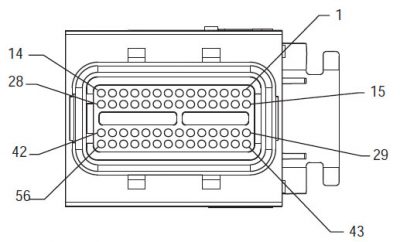
Komponenta Identifikacija MY08 Systems:
[/fusion_text][/fusion_builder_column][fusion_builder_column type=”2_3layout=”1_2spacing=”” center_content=nolink=”” target=_selfmin_height=”” hide_on_mobile=small-visibility,medium-visibility,large-visibilityclass=”” id=”” background_color=”” background_image=”” background_image_id=”” background_position=left topbackground_repeat=no-repeathover_type=noneborder_size=”0″ border_color=”” border_style=solidborder_position=allpadding_top=”” padding_right=”” padding_bottom=”” padding_left=”” margin_top=”” margin_bottom=”” animation_type=”” animation_direction=leftanimation_speed=”0.3″ animation_offset=”” last=no”][fusion_imageframe image_id=”13934|400″ max_width=”” style_type=”” blur=”” stylecolor=”” hover_type=nonebordersize=”” bordercolor=”” borderradius=”” align=centerlightbox=nogallery_id=”” lightbox_image=”” lightbox_image_id=”” alt=”Delphi 56-Way Mating Pregled priključaka” link=”” linktarget=_selfhide_on_mobile=small-visibility,medium-visibility,large-visibilityclass=”” id=”” animation_type=”” animation_direction=leftanimation_speed=”0.3″ animation_offset=””]https://www.globaltransmissionsupply.com/wp-content/uploads/Delphi-56-Way-Mating-Connector-View-400×242.jpg[/fusion_imageframe][fusion_text columns=”” column_min_width=”” column_spacing=”” rule_style=defaultrule_size=”” rule_color=”” hide_on_mobile=small-visibility,medium-visibility,large-visibilityclass=”” id=””]

Delphi 56-Way Mating Pregled priključaka
[/fusion_text][/fusion_builder_column][fusion_builder_column type=”1_3layout=”1_2spacing=”” center_content=nolink=”” target=_selfmin_height=”” hide_on_mobile=small-visibility,medium-visibility,large-visibilityclass=”” id=”” background_color=”” background_image=”” background_image_id=”” background_position=left topbackground_repeat=no-repeathover_type=noneborder_size=”0″ border_color=”” border_style=solidborder_position=allpadding_top=”” padding_right=”” padding_bottom=”” padding_left=”” margin_top=”” margin_bottom=”” animation_type=”” animation_direction=leftanimation_speed=”0.3″ animation_offset=”” last=no”][fusion_imageframe image_id=”13935|fullmax_width=”” style_type=”” blur=”” stylecolor=”” hover_type=nonebordersize=”” bordercolor=”” borderradius=”” align=centerlightbox=nogallery_id=”” lightbox_image=”” lightbox_image_id=”” alt=”Senzor temperature” link=”” linktarget=_selfhide_on_mobile=small-visibility,medium-visibility,large-visibilityclass=”” id=”” animation_type=”” animation_direction=leftanimation_speed=”0.3″ animation_offset=””]https://www.globaltransmissionsupply.com/wp-content/uploads/Temperature-Sensor.jpg[/fusion_imageframe][fusion_text columns=”” column_min_width=”” column_spacing=”” rule_style=defaultrule_size=”” rule_color=”” hide_on_mobile=small-visibility,medium-visibility,large-visibilityclass=”” id=””]

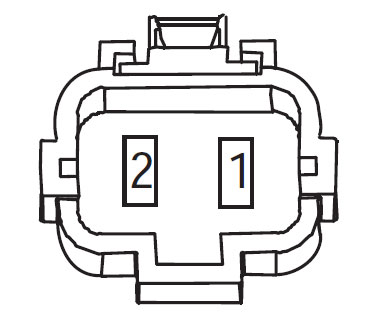
Senzor temperature
(Naramenice View – prednja strana)

[/fusion_text][/fusion_builder_column][fusion_builder_column type=”1_1layout=”1_1spacing=”” center_content=nolink=”” target=_selfmin_height=”” hide_on_mobile=small-visibility,medium-visibility,large-visibilityclass=”” id=”” background_image_id=”” background_color=”#000000″ background_image=”” background_position=left topundefined=”” background_repeat=no-repeathover_type=noneborder_size=”0″ border_color=”” border_style=solidborder_position=allpadding_top=”” padding_right=”” padding_bottom=”” padding_left=”” margin_top=”” margin_bottom=”10″ animation_type=”” animation_direction=leftanimation_speed=”0.3″ animation_offset=”” last=no”][fusion_text columns=”” column_min_width=”” column_spacing=”” rule_style=defaultrule_size=”” rule_color=”” hide_on_mobile=small-visibility,medium-visibility,large-visibilityclass=”” id=””]

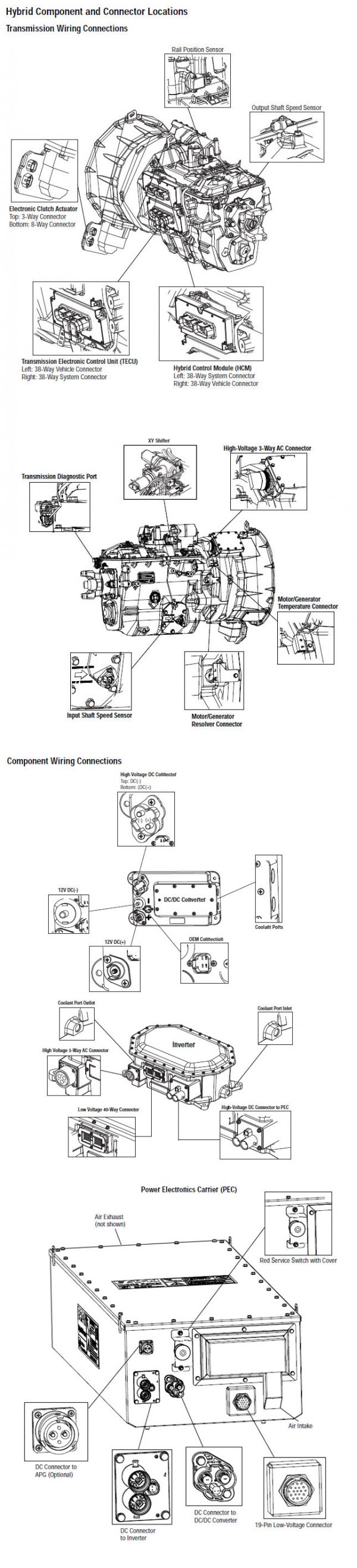
BILJEŠKA: Odnose se na Eaton hibridna komponenti i konektor Lokacija za priključak lokacije u MY08 Systems
[/fusion_text][/fusion_builder_column][fusion_builder_column type=”1_1layout=”1_1spacing=”” center_content=nolink=”” target=_selfmin_height=”” hide_on_mobile=small-visibility,medium-visibility,large-visibilityclass=”” id=”” background_color=”” background_image=”” background_image_id=”” background_position=left topbackground_repeat=no-repeathover_type=noneborder_size=”0″ border_color=”” border_style=solidborder_position=allpadding_top=”” padding_right=”” padding_bottom=”” padding_left=”” margin_top=”” margin_bottom=”” animation_type=”” animation_direction=leftanimation_speed=”0.3″ animation_offset=”” last=no”][fusion_imageframe image_id=”13904|800″ max_width=”” style_type=”” blur=”” stylecolor=”” hover_type=nonebordersize=”” bordercolor=”” borderradius=”” align=centerlightbox=nogallery_id=”” lightbox_image=”” lightbox_image_id=”” alt=”komponentni priključak” link=”” linktarget=_selfhide_on_mobile=small-visibility,medium-visibility,large-visibilityclass=”” id=”” animation_type=”” animation_direction=leftanimation_speed=”0.3″ animation_offset=””]https://www.globaltransmissionsupply.com/wp-content/uploads/eaton-component-connector-800×380.jpg[/fusion_imageframe][/fusion_builder_column][/fusion_builder_row][/fusion_builder_container][fusion_builder_container hundred_percent=nohundred_percent_height=nohundred_percent_height_scroll=nohundred_percent_height_center_content=yesequal_height_columns=nomenu_anchor=”” hide_on_mobile=small-visibility,medium-visibility,large-visibilitystatus=publishedpublish_date=”” class=”” id=”” background_color=”” background_image=”” background_position=center centerbackground_repeat=no-repeatfade=nobackground_parallax=noneenable_mobile=noparallax_speed=”0.3″ video_mp4=”” video_webm=”” video_ogv=”” video_url=”” video_aspect_ratio=”16:9″ video_loop=yesvideo_mute=yesvideo_preview_image=”” border_size=”” border_color=”” border_style=solidmargin_top=”” margin_bottom=”” padding_top=”” padding_right=”” padding_bottom=”” padding_left=””][fusion_builder_row][fusion_builder_column type=”1_1layout=”1_1spacing=”” center_content=nolink=”” target=_selfmin_height=”” hide_on_mobile=small-visibility,medium-visibility,large-visibilityclass=”” id=”” background_color=”” background_image=”” background_image_id=”” background_position=left topbackground_repeat=no-repeathover_type=noneborder_size=”0″ border_color=”” border_style=solidborder_position=allpadding_top=”” padding_right=”” padding_bottom=”” padding_left=”” margin_top=”” margin_bottom=”” animation_type=”” animation_direction=leftanimation_speed=”0.3″ animation_offset=”” last=no”][fusion_text columns=”” column_min_width=”” column_spacing=”” rule_style=defaultrule_size=”” rule_color=”” hide_on_mobile=small-visibility,medium-visibility,large-visibilityclass=”” id=””]

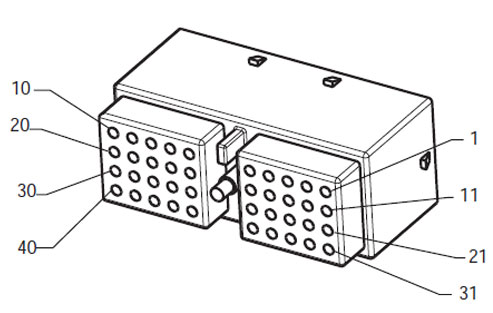
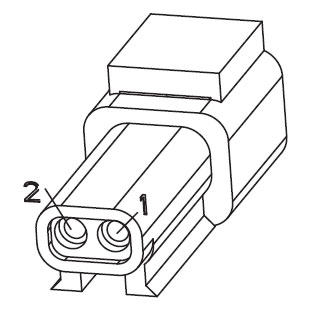
Komponenta Identifikacija MY09 Systems:
[/fusion_text][/fusion_builder_column][fusion_builder_column type=”2_3layout=”1_2spacing=”” center_content=nolink=”” target=_selfmin_height=”” hide_on_mobile=small-visibility,medium-visibility,large-visibilityclass=”” id=”” background_color=”” background_image=”” background_image_id=”” background_position=left topbackground_repeat=no-repeathover_type=noneborder_size=”0″ border_color=”” border_style=solidborder_position=allpadding_top=”” padding_right=”” padding_bottom=”” padding_left=”” margin_top=”” margin_bottom=”” animation_type=”” animation_direction=leftanimation_speed=”0.3″ animation_offset=”” last=no”][fusion_imageframe image_id=”14000|fullmax_width=”” style_type=”” blur=”” stylecolor=”” hover_type=nonebordersize=”” bordercolor=”” borderradius=”” align=centerlightbox=nogallery_id=”” lightbox_image=”” lightbox_image_id=”” alt=”Deutsch 40-Way Mating Pregled priključaka” link=”” linktarget=_selfhide_on_mobile=small-visibility,medium-visibility,large-visibilityclass=”” id=”” animation_type=”” animation_direction=leftanimation_speed=”0.3″ animation_offset=””]https://www.globaltransmissionsupply.com/wp-content/uploads/Deutsch-40-Way-Mating-Connector-View.jpg[/fusion_imageframe][fusion_text columns=”” column_min_width=”” column_spacing=”” rule_style=defaultrule_size=”” rule_color=”” hide_on_mobile=small-visibility,medium-visibility,large-visibilityclass=”” id=””]

Delphi 40-Way Mating Pregled priključaka
[/fusion_text][/fusion_builder_column][fusion_builder_column type=”1_3layout=”1_2spacing=”” center_content=nolink=”” target=_selfmin_height=”” hide_on_mobile=small-visibility,medium-visibility,large-visibilityclass=”” id=”” background_color=”” background_image=”” background_image_id=”” background_position=left topbackground_repeat=no-repeathover_type=noneborder_size=”0″ border_color=”” border_style=solidborder_position=allpadding_top=”” padding_right=”” padding_bottom=”” padding_left=”” margin_top=”” margin_bottom=”” animation_type=”” animation_direction=leftanimation_speed=”0.3″ animation_offset=”” last=no”][fusion_imageframe image_id=”14001|fullmax_width=”” style_type=”” blur=”” stylecolor=”” hover_type=nonebordersize=”” bordercolor=”” borderradius=”” align=centerlightbox=nogallery_id=”” lightbox_image=”” lightbox_image_id=”” alt=”terminal Side – Kabelskog svežnja osjetnika temperature” link=”” linktarget=_selfhide_on_mobile=small-visibility,medium-visibility,large-visibilityclass=”” id=”” animation_type=”” animation_direction=leftanimation_speed=”0.3″ animation_offset=””]https://www.globaltransmissionsupply.com/wp-content/uploads/Eaton-Fuller-Terminal-Side-Harness-Connector.jpg[/fusion_imageframe][fusion_text columns=”” column_min_width=”” column_spacing=”” rule_style=defaultrule_size=”” rule_color=”” hide_on_mobile=small-visibility,medium-visibility,large-visibilityclass=”” id=””]

terminal Side – Kabelskog svežnja osjetnika temperature

[/fusion_text][/fusion_builder_column][fusion_builder_column type=”1_1layout=”1_1spacing=”” center_content=nolink=”” target=_selfmin_height=”” hide_on_mobile=small-visibility,medium-visibility,large-visibilityclass=”” id=”” background_image_id=”” background_color=”#000000″ background_image=”” background_position=left topundefined=”” background_repeat=no-repeathover_type=noneborder_size=”0″ border_color=”” border_style=solidborder_position=allpadding_top=”” padding_right=”” padding_bottom=”” padding_left=”” margin_top=”10″ margin_bottom=”” animation_type=”” animation_direction=leftanimation_speed=”0.3″ animation_offset=”” last=no”][fusion_text columns=”” column_min_width=”” column_spacing=”” rule_style=defaultrule_size=”” rule_color=”” hide_on_mobile=small-visibility,medium-visibility,large-visibilityclass=”” id=””]

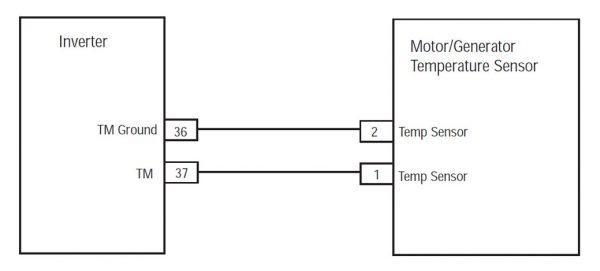
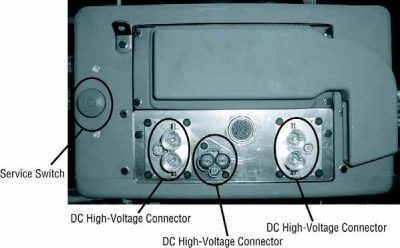
BILJEŠKA: Odnose se na Eaton hibridna komponenti i konektor Lokacija za priključak lokacije u MY09 Systems.
[/fusion_text][/fusion_builder_column][fusion_builder_column type=”1_1layout=”1_1spacing=”” center_content=nolink=”” target=_selfmin_height=”” hide_on_mobile=small-visibility,medium-visibility,large-visibilityclass=”” id=”” background_color=”” background_image=”” background_image_id=”” background_position=left topbackground_repeat=no-repeathover_type=noneborder_size=”0″ border_color=”” border_style=solidborder_position=allpadding_top=”” padding_right=”” padding_bottom=”” padding_left=”” margin_top=”” margin_bottom=”” animation_type=”” animation_direction=leftanimation_speed=”0.3″ animation_offset=”” last=no”][fusion_imageframe image_id=”14002|600″ max_width=”” style_type=”” blur=”” stylecolor=”” hover_type=nonebordersize=”” bordercolor=”” borderradius=”” align=centerlightbox=nogallery_id=”” lightbox_image=”” lightbox_image_id=”” alt=Eaton Fuller inverter motor/generatorlink=”” linktarget=_selfhide_on_mobile=small-visibility,medium-visibility,large-visibilityclass=”” id=”” animation_type=”” animation_direction=leftanimation_speed=”0.3″ animation_offset=””]https://www.globaltransmissionsupply.com/wp-content/uploads/Inverter-motor-generator-MY09-600×271.jpg[/fusion_imageframe][/fusion_builder_column][/fusion_builder_row][/fusion_builder_container][fusion_builder_container hundred_percent=nohundred_percent_height=nohundred_percent_height_scroll=nohundred_percent_height_center_content=yesequal_height_columns=nomenu_anchor=”” hide_on_mobile=small-visibility,medium-visibility,large-visibilitystatus=publishedpublish_date=”” class=”” id=”” background_color=”” background_image=”” background_position=center centerbackground_repeat=no-repeatfade=nobackground_parallax=noneenable_mobile=noparallax_speed=”0.3″ video_mp4=”” video_webm=”” video_ogv=”” video_url=”” video_aspect_ratio=”16:9″ video_loop=yesvideo_mute=yesvideo_preview_image=”” border_size=”” border_color=”” border_style=solidmargin_top=”” margin_bottom=”” padding_top=”” padding_right=”” padding_bottom=”” padding_left=””][fusion_builder_row][fusion_builder_column type=”1_1layout=”1_1spacing=”” center_content=nolink=”” target=_selfmin_height=”” hide_on_mobile=small-visibility,medium-visibility,large-visibilityclass=”” id=”” background_color=”” background_image=”” background_image_id=”” background_position=left topbackground_repeat=no-repeathover_type=noneborder_size=”0″ border_color=”” border_style=solidborder_position=allpadding_top=”” padding_right=”” padding_bottom=”” padding_left=”” margin_top=”” margin_bottom=”” animation_type=”” animation_direction=leftanimation_speed=”0.3″ animation_offset=”” last=no”][fusion_modal name=warnings_cautionstitle=”upozorenja & Oprez” size=largebackground=”” border_color=”” show_footer=yesclass=”” id=””]

opasnost: Opasnost pokazuje da će biti teško povrijeđen ili ubijeni ako ne prate navedene postupak.
upozorenje: Upozorenje ukazuje na neposrednu opasnost, što bi moglo dovesti do ozbiljne povrede ako ne pratite naznačeno postupak.
oprez: Oprez pokazuje vozila ili oštećenja imovine može doći ako se ne pridržavate navedenih postupak.

Bilješka: NAPOMENA ukazuje na dodatni detalj koji će pomoći u dijagnostici ili popravku komponente / system.

Pratite navedene procedure u naznačenom kako bi izbjegli povrede:

1. Ako je visokog napona čunjeva oko vozila i lockout instaliran na PEC, jedina osoba koja treba omogućiti da pokrenete vozilo je osoba koja je potpisala lockout tag.
2. Prije rada na vozilu ili napuštanja kabine dok motor radi, treba staviti ručica mjenjača u "N" povucite ručnu kočnicu, i blokirati točkove.
3. Iz sigurnosnih razloga, Uvijek se uključe uslugu kočnice prije izbora poluolivom iz "N."
4. Prije početka vozilo uvijek biti postavljen u vozača, odaberite "N" na kontrolnoj smjeni, i postaviti kočnice.
5. Kod vozila sa ePTO, motora i / ili
Motor / generator može početi u ePTO modu. Nikada obavljati održavanje ili rad na vozilu, U ovom režimu.
6. 12-Volt baterija pozitivan (+) i negativne (-) mora biti isključen prije bilo kakvih zavarivanja na bilo hibridna opremljeno vozilo.

oprez: Pratite navedene procedure u naznačenom kako bi izbjegli kvar opreme ili oštećenje.
oprez: Ne otpustite ručnu kočnicu ili pokušaj izbora u brzinu dok se tlak zraka je na pravoj razini.
oprez: Da biste izbjegli oštećenje mjenjača tokom vuče mjesto menjač u "N" i podignite pogonskih točkova od zemlje ili isključite pogonski sklop.

Visokog napona Upozorenja & Oprez

  • Koristite CO2 ili Kemijski Vatrogasni aparati.
  • Visoke struje je prekriven narandžastim izolaciju ili zamršena cijevi i označeni oznakama upozorenja na konektore.
  • Svi Eaton® Hybrid Diesel / Električna vozila će biti označeno 'Hybrid’ na vanjskoj strani vozila, uz pomak etiketa na tablu.
  • Odnose na OEM za određenu lokaciju šasija s hibridne komponente.
  • Ne prekidajte u narandžasto visokonaponskih kablova.
  • NEMOJTE cut u ili otvorite PEC.
  • NEMOJTE cut u ili otvorite DC / DC Converter.
  • NEMOJTE cut u ili otvorite Inverter.

A tampon zona mora biti postavljen i visokog napona izolirane gumene rukavice (razred 0 sa kožnim zaštitnici) su potrebne prije radi na visokom naponu. Nepridržavanje ovih uputa može dovesti do ozbiljne ozljede ili smrt.
Rukavice gumene izolacijom koja se mora nositi dok je radio na visokog napona sistema su klase 0 sa kožnim zaštitnici. Gumene rukavice treba ispitati prije svake upotrebe u skladu sa procedurom gumene izolacije rukavice testiranje naći u "Dijagnostički alati / usluge publikacije" na stranici 6. Nepridržavanje ovih uputa može dovesti do ozbiljne ozljede ili smrt.
Pre pregleda ili rade na bilo koji visokonaponskih kablova ili komponente "High-Voltage Service Gašenje i Power-Up postupku" na stranici 4 treba pratiti. Nepridržavanje ovih uputa može dovesti do ozbiljne ozljede ili smrt.
U Lockout i Tagout uređaja treba ukloniti samo tehničar koji je plasirao Lockout i Tagout uređaja na vozilu. Nepridržavanje ovih uputa može dovesti do ozbiljne ozljede ili smrt.
Visokonaponskih gumene izolirane rukavice (razred 0 sa kožnim zaštitnici) moraju se nositi kada se radi o bilo
visokonaponskih kablova. Na "High-Voltage Service Gašenje i Power-Up postupku" na stranici 4 moraju poštovati prije uklanjanja bilo visokonaponskih kablova. Nepridržavanje ovih uputa može dovesti do ozbiljne ozljede ili smrt.
Visokonaponskih kablova i žica su narandžaste i sadrže oznaku upozorenja na konektore. komponente visokog napona su označeni sa oznakom. Visokonaponskih gumene izolirane rukavice (razred 0 sa kožnim zaštitnici) mora se koristiti prilikom rada na bilo kojem od ovih komponenti. Nepridržavanje ovih uputa može dovesti do ozbiljne ozljede ili smrt.

Visokonaponskih Service Gašenje Procedure
Visokog napona Service Gašenje i Power-Up postupku1. Pratite "High-Voltage područja rada" postupak.
2. Locirati crveni PEC servisni prekidač na prednjem PEC i gurnuti isključiti.
3. Uklonite servisni poklopac prekidača i instalirati Lockout nosač (J48506).
4. Pričvrstite oznaku na Lockout nosač.
5. Osigurati PEC servisni prekidač ne može da se kreće od off položaja.
6. Dozvolite sistemu da postavi za najmanje 5 minuta do pražnjenja visokog napona.
7. Spojite ServiceRanger i pregled podataka monitora PID 116 pod nazivom "High-Voltage potencijal baterije." Upotreba SPN 520323 za J1939 vezu "napona baterije RB" (relej Box).
8. Napon bi trebao biti 30 volti ili manje. Ako je napon iznad 30 volti, ne rade na vozilo i obratite Eaton® na 1-800-826-HELP (4357).
9. Okrenite ključ za paljenje isključen i nastaviti da popravi ili korak za rješavanje problema.
Bilješka: Napon pada na nulu kada je ključ isključen.

Visokonaponskih servis Power-Up postupku

1. Instalirajte sve visokonaponskih konektora u svoj zaključan pozicije.
2. Ako ste vi osoba koja radi na vozilu, ukloniti Lockout nosača i citat.
3. Ponovo instalirajte Lockout nosač preko servisni prekidač.
4. Izvucite servisni prekidač napolje i pustiti set vozila za 2 zapisnik.
5. Pokrenite vozilo kada je to potrebno.

[/fusion_modal][fusion_modal name=component_locationtitle=”Eaton hibridna komponenti i konektor Lokacija ” size=largebackground=”#ffffffborder_color=”” show_footer=yesclass=”” id=””]
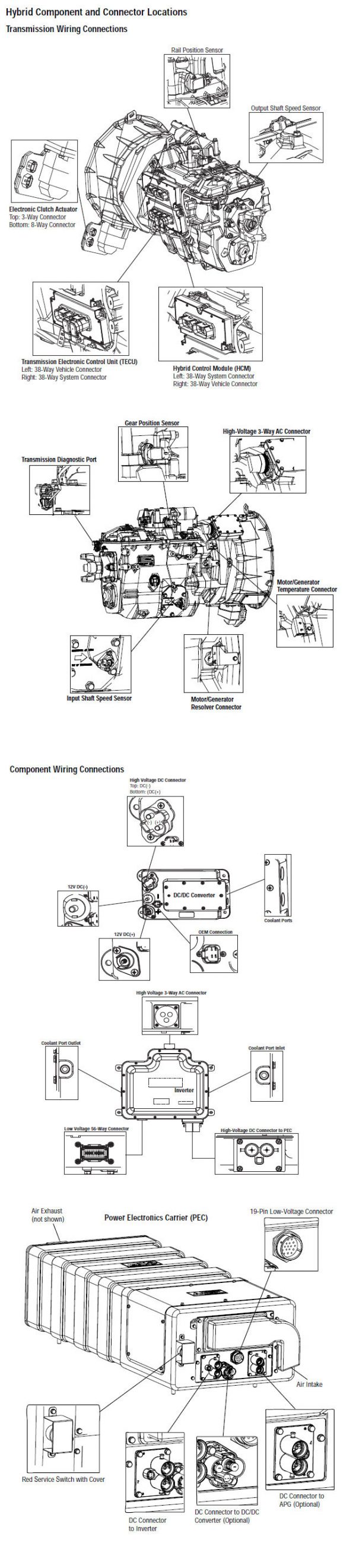
Eaton hibridna komponenta i konektora MY08 Systems

[/fusion_modal][fusion_modal name=component_location2title=”Eaton hibridna komponenti i konektor Lokacija MY09 Systems” size=largebackground=”#ffffffborder_color=”” show_footer=yesclass=”” id=””]

Eaton hibridna komponenta i konektora MY09 Systems

[/fusion_modal][/fusion_builder_column][/fusion_builder_row][/fusion_builder_container][fusion_builder_container hundred_percent=nohundred_percent_height=nohundred_percent_height_scroll=nohundred_percent_height_center_content=yesequal_height_columns=nomenu_anchor=”” hide_on_mobile=small-visibility,medium-visibility,large-visibilitystatus=publishedpublish_date=”” class=”” id=”” background_color=”” background_image=”” background_position=center centerbackground_repeat=no-repeatfade=nobackground_parallax=noneenable_mobile=noparallax_speed=”0.3″ video_mp4=”” video_webm=”” video_ogv=”” video_url=”” video_aspect_ratio=”16:9″ video_loop=yesvideo_mute=yesvideo_preview_image=”” border_size=”” border_color=”” border_style=solidmargin_top=”” margin_bottom=”” padding_top=”” padding_right=”” padding_bottom=”” padding_left=””][fusion_builder_row][fusion_builder_column type=”1_1layout=”1_1spacing=”” center_content=nolink=”” target=_selfmin_height=”” hide_on_mobile=small-visibility,medium-visibility,large-visibilityclass=”” id=”” background_color=”” background_image=”” background_image_id=”” background_position=left topbackground_repeat=no-repeathover_type=noneborder_size=”0″ border_color=”” border_style=solidborder_position=allpadding_top=”” padding_right=”” padding_bottom=”” padding_left=”” margin_top=”” margin_bottom=”” animation_type=”” animation_direction=leftanimation_speed=”0.3″ animation_offset=”” last=no”][fusion_content_boxes layout=clean-horizontalcolumns=”1″ title_size=”18pxheading_size=”3″ title_color=”#ffffffbody_color=”#ffffffbackgroundcolor=”#4f4f4ficon=”” iconflip=”” iconrotate=”” iconspin=noiconcolor=”” icon_circle=”” icon_circle_radius=”” circlecolor=”” circlebordersize=”” circlebordercolor=”” outercirclebordersize=”” outercirclebordercolor=”” icon_size=”” icon_hover_type=”” hover_accent_color=”#f41000image=”” image_id=”” image_width=”” image_height=”” link_type=”” button_span=”” link_area=”” link_target=”” icon_align=leftanimation_type=”” animation_delay=”” animation_offset=”” animation_direction=leftanimation_speed=”0.3″ margin_top=”” margin_bottom=”” hide_on_mobile=small-visibility,medium-visibility,large-visibilityclass=”” id=””][fusion_content_box title=KORAK 1. Provjerite za Aktivno ili Neaktivno status greške kod.backgroundcolor=”” icon=”” iconflip=”” iconrotate=”” iconspin=noiconcolor=”” circlecolor=”” circlebordersize=”” circlebordercolor=”” outercirclebordersize=”” outercirclebordercolor=”” image=”” image_id=”” image_width=”” image_height=”” link=”” linktext=”Čitaj više” link_target=”” animation_type=”” animation_direction=leftanimation_speed=”0.3″ animation_offset=””]

  1. Pregled i pratite upozorenja & Oprez.
  2. Povrat aktivnog kodova grešaka i FMIS sa ServiceRanger pomoću 9-Way dijagnostički konektor.
    upozorenje: vidjeti Visokog napona Service Gašenje i Power-Up Procedure. Pratite procedure izbjegli udar, izgorjeti ili smrt od nepravilno rukuje visokog napona.
  3. tipku na.
  4. Find initial temperature by selecting the “Data Monitor” option and view PID 113 “Motor/Generator Temperature” in the “Power Electronics” list.
  5. Pogledaj PID 113 ponovo nakon 20 zapisnik:
    • Ako PID 113 "Motor / Generator Temperature" pala iz prvog čitanja, idite na korak 2.
    • Ako PID 113 "Motor / Generator Temperature" ostao isti, idite na korak 8.

[/fusion_content_box][/fusion_content_boxes][fusion_content_boxes layout=clean-horizontalcolumns=”2″ title_size=”18pxheading_size=”3″ title_color=”#ffffffbody_color=”#ffffffbackgroundcolor=”#4f4f4ficon=”” iconflip=”” iconrotate=”” iconspin=noiconcolor=”” icon_circle=”” icon_circle_radius=”” circlecolor=”” circlebordersize=”” circlebordercolor=”” outercirclebordersize=”” outercirclebordercolor=”” icon_size=”” icon_hover_type=”” hover_accent_color=”” image=”” image_id=”” image_width=”” image_height=”” link_type=”” button_span=”” link_area=”” link_target=”” icon_align=leftanimation_type=”” animation_delay=”” animation_offset=”” animation_direction=leftanimation_speed=”0.3″ margin_top=”” margin_bottom=”” hide_on_mobile=small-visibility,medium-visibility,large-visibilityclass=”” id=””][fusion_content_box title=KORAK 2. Provjerite nivo hibridnog sistema za hlađenje.backgroundcolor=”” icon=”” iconflip=”” iconrotate=”” iconspin=noiconcolor=”” circlecolor=”” circlebordersize=”” circlebordercolor=”” outercirclebordersize=”” outercirclebordercolor=”” image=”” image_id=”” image_width=”” image_height=”” link=”” linktext=”Čitaj više” link_target=”” animation_type=”” animation_direction=leftanimation_speed=”0.3″ animation_offset=””]

  1. kljuc.
  2. Obratite pažnju na nivo tečnosti nakon što je sistem ohladi kako bi se osiguralo da li je ispunjen do odgovarajući nivo:
    • Ako rashladno sredstvo je u okviru preporučenih granica, idite na korak 3.
    • Ako rashladnog sredstva ispod preporučenih granica, odnose na OEM za tip za hlađenje i popuniti procedure. Provjerite za izvor za hlađenje curenja. When refilling the system it should be pressurized or vacuum bleed of air to ensure the coolant flows properly during normal operation.

[/fusion_content_box][fusion_content_box title=KORAK 3. Provjeriti integritet komponente hibridnog sistema hlađenja.backgroundcolor=”” icon=”” iconflip=”” iconrotate=”” iconspin=noiconcolor=”” circlecolor=”” circlebordersize=”” circlebordercolor=”” outercirclebordersize=”” outercirclebordercolor=”” image=”” image_id=”” image_width=”” image_height=”” link=”” linktext=”Čitaj više” link_target=”” animation_type=”” animation_direction=leftanimation_speed=”0.3″ animation_offset=””]

  1. kljuc
  2. Vizualno pregledajte hibridni tečnost sistem hlađenja radijator za otpatke, ometanje protok vazduha, ili oštrim zavojima u rashladnog sredstva linijama:
    • Ako je radijator je bez ostataka, a za hlađenje linije oštro nisu savijeni, idite na korak 4.
    • Ako je radijator ima ostataka, protoka vazduha se opstruira, ili rashladnog sredstva linije su savijena oštro, popraviti zabrinutost, onda idite na korak 10.

[/fusion_content_box][/fusion_content_boxes][fusion_content_boxes layout=clean-horizontalcolumns=”2″ title_size=”18pxheading_size=”3″ title_color=”#ffffffbody_color=”#ffffffbackgroundcolor=”#4f4f4ficon=”” iconflip=”” iconrotate=”” iconspin=noiconcolor=”” icon_circle=”” icon_circle_radius=”” circlecolor=”” circlebordersize=”” circlebordercolor=”” outercirclebordersize=”” outercirclebordercolor=”” icon_size=”” icon_hover_type=”” hover_accent_color=”” image=”” image_id=”” image_width=”” image_height=”” link_type=”” button_span=”” link_area=”” link_target=”” icon_align=leftanimation_type=”” animation_delay=”” animation_offset=”” animation_direction=leftanimation_speed=”0.3″ margin_top=”” margin_bottom=”” hide_on_mobile=small-visibility,medium-visibility,large-visibilityclass=”” id=””][fusion_content_box title=KORAK 4. Provjeriti rad pumpe hibridnih rashladne.backgroundcolor=”” icon=”” iconflip=”” iconrotate=”” iconspin=noiconcolor=”” circlecolor=”” circlebordersize=”” circlebordercolor=”” outercirclebordersize=”” outercirclebordercolor=”” image=”” image_id=”” image_width=”” image_height=”” link=”” linktext=”Čitaj više” link_target=”” animation_type=”” animation_direction=leftanimation_speed=”0.3″ animation_offset=””]

  1. tipku na.
  2. Povežite ServiceRanger do 9-pinski konektor je u kabini.
  3. Odaberite naprednih funkcija proizvoda opcije i odaberite "hlađenje Pumpa" opciju.
  4. Omogućite "hlađenje Pumpa" opciju:
    • Ako pumpa rashladne uključi, idite na korak 5.
    • Ako pumpa rashladne se ne uključuje, idite na korak 6.

[/fusion_content_box][fusion_content_box title=KORAK 5.Verify rad hibridnog toplote Fan.backgroundcolor=”” icon=”” iconflip=”” iconrotate=”” iconspin=noiconcolor=”” circlecolor=”” circlebordersize=”” circlebordercolor=”” outercirclebordersize=”” outercirclebordercolor=”” image=”” image_id=”” image_width=”” image_height=”” link=”” linktext=”Čitaj više” link_target=”” animation_type=”” animation_direction=leftanimation_speed=”0.3″ animation_offset=””]

  1. Odaberite naprednih funkcija proizvoda opcije i odaberite "toplote Fan" opciju.
  2. Omogućite opciju toplote Fan:
    • Ako je toplote Fan pali, sistem treba da bude očišćena od zraka, omogućavajući rashladno sredstvo da teče. Bleed zraku pomoću sredstva za hlađenje pod pritiskom alat ili vakuum alat, onda idite na korak 10.
    • Ako je toplote ventilatora se ne uključuje, idite na korak 8.

[/fusion_content_box][/fusion_content_boxes][fusion_content_boxes layout=clean-horizontalcolumns=”2″ title_size=”18pxheading_size=”3″ title_color=”#ffffffbody_color=”#ffffffbackgroundcolor=”#4f4f4ficon=”” iconflip=”” iconrotate=”” iconspin=noiconcolor=”” icon_circle=”” icon_circle_radius=”” circlecolor=”” circlebordersize=”” circlebordercolor=”” outercirclebordersize=”” outercirclebordercolor=”” icon_size=”” icon_hover_type=”” hover_accent_color=”” image=”” image_id=”” image_width=”” image_height=”” link_type=”” button_span=”” link_area=”” link_target=”” icon_align=leftanimation_type=”” animation_delay=”” animation_offset=”” animation_direction=leftanimation_speed=”0.3″ margin_top=”” margin_bottom=”” hide_on_mobile=small-visibility,medium-visibility,large-visibilityclass=”” id=””][fusion_content_box title=KORAK 6. Provjerite napon na pumpi hibrid rashladne.backgroundcolor=”” icon=”” iconflip=”” iconrotate=”” iconspin=noiconcolor=”” circlecolor=”” circlebordersize=”” circlebordercolor=”” outercirclebordersize=”” outercirclebordercolor=”” image=”” image_id=”” image_width=”” image_height=”” link=”” linktext=”Čitaj više” link_target=”” animation_type=”” animation_direction=leftanimation_speed=”0.3″ animation_offset=””]

  1. tipku na.
  2. Isključite rashladne pumpe 2-pinski konektor.
  3. Odaberite "Advanced Proizvodi Funkcija" opciju i odaberite "hlađenje pumpe."
  4. Omogućite "hlađenje Pumpa" opciju:
  5. Mjera napona na 2-pinski konektor od Pin A do Pin B:
    • Ako napon između Pin A i Pin B je ± 0,2 volti napona baterije, odnose na OEM za zabrinutost pumpe rashladne.
    • Ako napon između Pin A i Pin B je izvan opsega, odnose na OEM za procedure popravke na hlađenje pumpa snaga pojas ili oštećene osigurač.

[/fusion_content_box][fusion_content_box title=KORAK 7.Verify napon na hibridni toplote Fan.backgroundcolor=”” icon=”” iconflip=”” iconrotate=”” iconspin=noiconcolor=”” circlecolor=”” circlebordersize=”” circlebordercolor=”” outercirclebordersize=”” outercirclebordercolor=”” image=”” image_id=”” image_width=”” image_height=”” link=”” linktext=”Čitaj više” link_target=”” animation_type=”” animation_direction=leftanimation_speed=”0.3″ animation_offset=””]

  1. tipku na.
  2. Disconnect the Heat Exchanger Fan 2- pinski konektor.
  3. Odaberite "Advanced Proizvodi Funkcija" opciju i odaberite "toplote Fan".
  4. Omogućite opciju toplote Fan:
  5. Mjera napona na 2-pinski konektor od Pin A do Pin B:
    • Ako napon između Pin A i Pin B je ± 0,2 volti napona baterije, odnose na OEM za toplote Fan zabrinutost.
    • Ako napon između Pin A i Pin B je izvan opsega, odnose na OEM za procedure popravke na toplote Fan Power pojas ili oštećene osigurač.

[/fusion_content_box][/fusion_content_boxes][fusion_content_boxes layout=clean-horizontalcolumns=”2″ title_size=”18pxheading_size=”3″ title_color=”#ffffffbody_color=”#ffffffbackgroundcolor=”#4f4f4ficon=”” iconflip=”” iconrotate=”” iconspin=noiconcolor=”” icon_circle=”” icon_circle_radius=”” circlecolor=”” circlebordersize=”” circlebordercolor=”” outercirclebordersize=”” outercirclebordercolor=”” icon_size=”” icon_hover_type=”” hover_accent_color=”” image=”” image_id=”” image_width=”” image_height=”” link_type=”” button_span=”” link_area=”” link_target=”” icon_align=leftanimation_type=”” animation_delay=”” animation_offset=”” animation_direction=leftanimation_speed=”0.3″ margin_top=”” margin_bottom=”” hide_on_mobile=small-visibility,medium-visibility,large-visibilityclass=”” id=””][fusion_content_box title=KORAK 8. Potvrditi kontinuitet Inverter kola.backgroundcolor=”” icon=”” iconflip=”” iconrotate=”” iconspin=noiconcolor=”” circlecolor=”” circlebordersize=”” circlebordercolor=”” outercirclebordersize=”” outercirclebordercolor=”” image=”” image_id=”” image_width=”” image_height=”” link=”” linktext=”Čitaj više” link_target=”” animation_type=”” animation_direction=leftanimation_speed=”0.3″ animation_offset=””]

  1. kljuc.
  2. Isključite Inverter 56-pinski konektor.
  3. Odaberite "Advanced Proizvodi Funkcija" opciju i odaberite "hlađenje pumpe."
  4. Measure resistance between Pin 38 i Pin 50(MY08) / 36 & 37 (MY09) i Pin 50 (MY08) / 37 (MY09) na terenu od inverter 56-pinski konektor.
    • Ako je otpor je 0.8K-301.7K oma između Pin 50 i Pin 38 i otpor između Pin 50 i tlo je 10K ohma ili veća, zamijeniti Inverter, onda idite na korak 10.
    • Ako je otpor je izvan opsega, idite na korak 9.

[/fusion_content_box][fusion_content_box title=KORAK 9.Verify kontinuitet Temperature Sensor kola.backgroundcolor=”” icon=”” iconflip=”” iconrotate=”” iconspin=noiconcolor=”” circlecolor=”” circlebordersize=”” circlebordercolor=”” outercirclebordersize=”” outercirclebordercolor=”” image=”” image_id=”” image_width=”” image_height=”” link=”” linktext=”Čitaj više” link_target=”” animation_type=”” animation_direction=leftanimation_speed=”0.3″ animation_offset=””]

  1. kljuc.
  2. Odspojite motor / generatora Senzor temperature 2-pinski konektor koji se nalazi na desnoj strani motora / generatora.
  3. Measure resistance between the 2-Way Temperature Sensor Connector from Pin A to Pin B (MY08) / igla 1 na Pin 2 (MY09) :
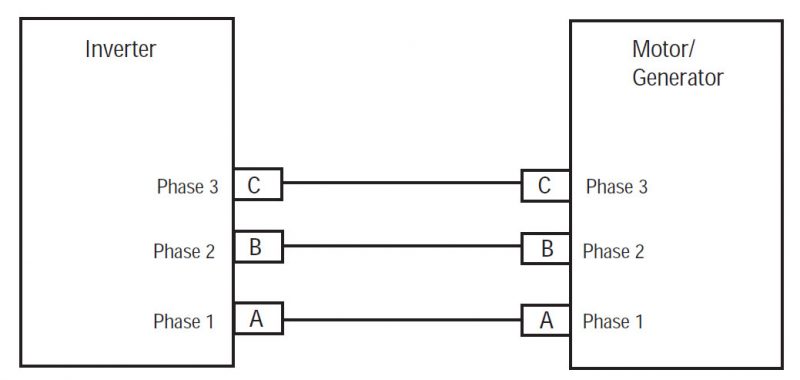
    • Ako je otpor je 0.8K-301.7K oma, repair the shorted HCM System Harness between the Inverter Connector and Motor/Generator 2-Way Connector.
    • Ako je otpor je izvan opsega, zamijeniti motor / generatora, onda idite na korak 10.

[/fusion_content_box][/fusion_content_boxes][fusion_content_boxes layout=clean-horizontalcolumns=”1″ title_size=”18pxheading_size=”3″ title_color=”#ffffffbody_color=”#ffffffbackgroundcolor=”#4f4f4ficon=”” iconflip=”” iconrotate=”” iconspin=noiconcolor=”” icon_circle=”” icon_circle_radius=”” circlecolor=”” circlebordersize=”” circlebordercolor=”” outercirclebordersize=”” outercirclebordercolor=”” icon_size=”” icon_hover_type=”” hover_accent_color=”#f41000image=”” image_id=”” image_width=”” image_height=”” link_type=”” button_span=”” link_area=”” link_target=”” icon_align=leftanimation_type=”” animation_delay=”” animation_offset=”” animation_direction=leftanimation_speed=”0.3″ margin_top=”” margin_bottom=”” hide_on_mobile=small-visibility,medium-visibility,large-visibilityclass=”” id=””][fusion_content_box title=KORAK 10.Verify popravak.backgroundcolor=”” icon=”” iconflip=”” iconrotate=”” iconspin=noiconcolor=”” circlecolor=”” circlebordersize=”” circlebordercolor=”” outercirclebordersize=”” outercirclebordercolor=”” image=”” image_id=”” image_width=”” image_height=”” link=”” linktext=”Čitaj više” link_target=”” animation_type=”” animation_direction=leftanimation_speed=”0.3″ animation_offset=””]

  1. kljuc.
  2. Reconnect all connectors and negative battery cable.
  3. tipku na.
  4. jasno kodovi, vidjeti Jasno Neaktivni Smetnje.
  5. Vozite vozilo i pokušati resetirati kod.
  6. Provjerite za kodova, vidjeti Pogledaj aktivnih i neaktivnih Greške.
    • Ako nema oznake, test dovrši.
    • Ako greška kod 3 pojavljuje, pronaći greška u testiranju, idite na korak 1.
    • Ako se kod osim 3 pojavljuje, vidjeti Kod pogreške Indeks List.

[/fusion_content_box][/fusion_content_boxes][/fusion_builder_column][/fusion_builder_row][/fusion_builder_container][fusion_global id=”13788″]