[fusion_builder_container hundred_percent=yeshundred_percent_height=nohundred_percent_height_scroll=nohundred_percent_height_center_content=yesequal_height_columns=nomenu_anchor=”” hide_on_mobile=small-visibility,medium-visibility,large-visibilitystatus=publishedpublish_date=”” class=”” id=”” background_color=”” background_image=”” background_position=center centerbackground_repeat=no-repeatfade=nobackground_parallax=noneenable_mobile=noparallax_speed=”0.3″ video_mp4=”” video_webm=”” video_ogv=”” video_url=”” video_aspect_ratio=”16:9″ video_loop=yesvideo_mute=yesvideo_preview_image=”” border_size=”” border_color=”” border_style=solidmargin_top=”35″ margin_bottom=”” padding_top=”” padding_right=”” padding_bottom=”” padding_left=””][fusion_builder_row][fusion_builder_column type=”1_1layout=”1_1spacing=”” center_content=nolink=”” target=_selfmin_height=”” hide_on_mobile=small-visibility,medium-visibility,large-visibilityclass=”” id=”” background_color=”” background_image=”” background_image_id=”” background_position=left topbackground_repeat=no-repeathover_type=noneborder_size=”0″ border_color=”” border_style=solidborder_position=allpadding_top=”” padding_right=”” padding_bottom=”” padding_left=”” margin_top=”” margin_bottom=”” animation_type=”” animation_direction=leftanimation_speed=”0.3″ animation_offset=”” last=no”][fusion_text columns=”” column_min_width=”” column_spacing=”” rule_style=defaultrule_size=”” rule_color=”” hide_on_mobile=small-visibility,medium-visibility,large-visibilityclass=”” id=””]

Eaton ਆਪੋ ਹਾਈਬ੍ਰਾਇਡ ਨੁਕਸ ਕੋਡ 24 – J1939 HCM ਸੁਨੇਹਾ (TECU)

[/fusion_text][/fusion_builder_column][/fusion_builder_row][/fusion_builder_container][fusion_builder_container hundred_percent=nohundred_percent_height=nohundred_percent_height_scroll=nohundred_percent_height_center_content=yesequal_height_columns=nomenu_anchor=”” hide_on_mobile=small-visibility,medium-visibility,large-visibilitystatus=publishedpublish_date=”” class=”” id=”” background_color=”” background_image=”” background_position=center centerbackground_repeat=no-repeatfade=nobackground_parallax=noneenable_mobile=noparallax_speed=”0.3″ video_mp4=”” video_webm=”” video_ogv=”” video_url=”” video_aspect_ratio=”16:9″ video_loop=yesvideo_mute=yesvideo_preview_image=”” border_size=”” border_color=”” border_style=solidmargin_top=”” margin_bottom=”” padding_top=”” padding_right=”” padding_bottom=”” padding_left=””][fusion_builder_row][fusion_builder_column type=”1_1layout=”1_1spacing=”” center_content=nolink=”” target=_selfmin_height=”” hide_on_mobile=small-visibility,medium-visibility,large-visibilityclass=”” id=”” background_color=”” background_image=”” background_image_id=”” background_position=left topbackground_repeat=no-repeathover_type=noneborder_size=”0″ border_color=”” border_style=solidborder_position=allpadding_top=”” padding_right=”” padding_bottom=”” padding_left=”” margin_top=”” margin_bottom=”” animation_type=”” animation_direction=leftanimation_speed=”0.3″ animation_offset=”” last=no”][fusion_text columns=”” column_min_width=”” column_spacing=”” rule_style=defaultrule_size=”” rule_color=”” hide_on_mobile=small-visibility,medium-visibility,large-visibilityclass=”” id=””]

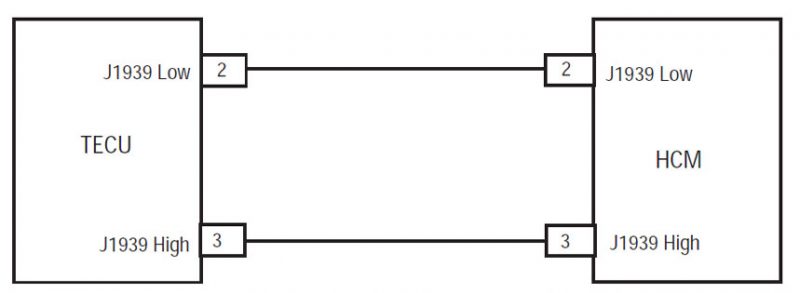
Eaton ਹਾਈਬ੍ਰਾਇਡ ਡਰਾਈਵ ਸਿਸਟਮ ਮਾਡਲ ਲਈ ਕੋਡ ਖਰਾਬ (MY08) EH-8E306A-ਯੂ, EH-8E306A-UPG, EH-8E306A-ਅੱਪ, EH-8E306A-ਸੀਡੀ, EH-8E306A-ਟੀ, EH-6E606B-ਸੀਡੀ, (my09) EH-8E406A-ਯੂ / ਪੀ, EH-8E406A-ਅੱਪ, EH-8E406A-UPG, EH-8E406A-ਸੀਡੀ, EH-8E406A-CDG, EH-8E406A-CDR, EH-8E406A-ਟੀ, EH-6E706B-ਸੀਡੀ, EH-6E706B-ਪੀ ਅਤੇ EH-6E706B-UPG. ਸੰਚਾਰ ਇਲੈਕਟ੍ਰਾਨਿਕ ਕੰਟਰੋਲ ਯੂਨਿਟ (TECU) ਹਾਈਬ੍ਰਾਇਡ ਕੰਟਰੋਲ ਮੋਡੀਊਲ ਨਾਲ ਗੱਲਬਾਤ (HCM) ਵਾਹਨ ਦੀ ਕਾਰਵਾਈ ਦੇ ਦੌਰਾਨ J1939 ਡਾਟਾ ਲਿੰਕ ਤੇ ਬੇਨਤੀ ਕੀਤੀ ਗੇਅਰ ਅਤੇ ਮੌਜੂਦਾ ਗੇਅਰ ਜਾਣਕਾਰੀ ਬਦਲਣ ਲਈ.

ਖਰਾਬ ਕੋਡ 24 – J1939 HCM ਸੁਨੇਹਾ (TECU) ਖੋਜ

ਅੱਗੇ ਸਿਸਟਮ ਕਸੂਰ ਖੋਜਦਾ ਹੈ ਹੇਠ ਸ਼ਰਤ ਨੂੰ ਮਿਲੇ ਕੀਤਾ ਜਾਣਾ ਚਾਹੀਦਾ ਹੈ:

  • TECU ਇਗਨੀਸ਼ਨ ਵੋਲਟੇਜ ਵੱਧ ਵੱਡਾ ਹੈ 7 ਵੋਲਟ ਅਤੇ ਵੱਧ ਘੱਟ 16 ਵੋਲਟ.
  • No J1939 data link fault currently Active in the TECU.

ਹਾਲਾਤ ਨੁਕਸ ਕੋਡ ਸਰਗਰਮ ਸੈੱਟ

  • ਐੱਫ 9 ਸੈੱਟ ਕੀਤਾ ਗਿਆ ਹੈ, ਜਦ ਕਿ TECU ਸੰਚਾਰ ਡਾਟਾ ਪ੍ਰਾਪਤ ਕਰਨ ਲਈ ਫੇਲ ਹੁੰਦਾ ਹੈ (ਅਜਿਹੇ ਇੱਕ ਦੀ ਬੇਨਤੀ ਸਾਮਾਨ ਦੇ ਤੌਰ ਤੇ) ਲਈ 2 ਸਕਿੰਟ ਜ HCM ਤੱਕ ਵੱਡਾ, ਅਤੇ ਇਸ ਨੂੰ ਹਾਲੇ ਵੀ J1939 ਤੇ ਹੋਰ ਮੈਡਿਊਲ ਨਾਲ ਸੰਚਾਰ ਕਰ ਰਿਹਾ ਹੈ.

ਫਾਲਬੈਕ ਜਦ ਨੁਕਸ ਕੋਡ 24 ਸੈੱਟ ਕੀਤਾ ਗਿਆ ਹੈ ਹੇਠ ਹਾਲਾਤ ਵਾਪਰ:

  • ਲਾਲ "ਸੇਵਾ" ਪ੍ਰਕਾਸ਼, ਅਤੇ ਸਾਮਾਨ ਡਿਸਪਲੇਅ ਵਿੱਚ "F" ਚਮਕਾ.
  • ਕਸੂਰ TECU ਮੈਮੋਰੀ ਵਿੱਚ ਸੰਭਾਲਿਆ ਗਿਆ ਹੈ.
  • AutoShift ਫਾਲਬੈਕ ਮੋਡ ਓਪਰੇਸ਼ਨ ਮੋਡ ਤਬਦੀਲੀ.
  • ਕਸੂਰ ਬਿਜਲੀ 'ਤੇ ਸੈੱਟ ਕਰਦਾ ਹੈ, ਜੇ, the engine does not crank.
  • ਜੇਕਰ ਨੁਕਸ ਸੈੱਟ ਗੱਡੀ, ਵਾਹਨ ਮੌਜੂਦਾ ਗੇਅਰ ਵਿਚ ਰਹਿੰਦਾ ਹੈ. ਜਦ ਵਾਹਨ ਰੁਕ ਪਕੜ ਖੋਲ੍ਹਦਾ ਹੈ ਅਤੇ ਇਸ ਸਥਿਤੀ ਵਿਚ ਰਹਿੰਦਾ ਹੈ.
  • Amber “Check Hybrid” light may display on the dash due to an Active ਖਰਾਬ ਕੋਡ 48.

[/fusion_text][fusion_text columns=”” column_min_width=”” column_spacing=”” rule_style=defaultrule_size=”” rule_color=”” hide_on_mobile=small-visibility,medium-visibility,large-visibilityclass=”” id=””]

ਹਾਲਾਤ ਨੁਕਸ ਕੋਡ ਸਰਗਰਮ ਸੈੱਟ

ਕੇਵਲ ਸਰਗਰਮ ਨੁਕਸ ServiceRanger ਵਰਤ TECU ਜ HCM ਇਤਿਹਾਸ ਨੂੰ ਸਾਫ਼ ਕੀਤਾ ਜਾ ਸਕਦਾ ਹੈ. TECU ਆਪ ਹੀ ਬਾਅਦ ਇਤਿਹਾਸ ਨੁਕਸ ਸਾਫ 200 ਘੰਟੇ. HCM ਆਪ ਹੀ ਇਤਿਹਾਸ ਨੂੰ ਇੱਕ ਨੁਕਸ ਸਾਫ ਬਾਅਦ ਇਸ ਨੂੰ ਲਈ ਸਰਗਰਮ ਕੀਤਾ ਗਿਆ ਹੈ, 200 ਘੰਟੇ.

ਇਹ ਕਸੂਰ ਕੋਡ ਹੇਠ ਦੇ ਕਿਸੇ ਵੀ ਦੇ ਕਾਰਨ ਕੀਤਾ ਜਾ ਸਕਦਾ ਹੈ:

  • ਐੱਫ 9
    • J1939 ਡਾਟਾ ਲਿੰਕ
    • HCM

[/fusion_text][/fusion_builder_column][/fusion_builder_row][/fusion_builder_container][fusion_builder_container hundred_percent=nohundred_percent_height=nohundred_percent_height_scroll=nohundred_percent_height_center_content=yesequal_height_columns=nomenu_anchor=”” hide_on_mobile=small-visibility,medium-visibility,large-visibilitystatus=publishedpublish_date=”” class=”” id=”” background_color=”” background_image=”” background_position=center centerbackground_repeat=no-repeatfade=nobackground_parallax=noneenable_mobile=noparallax_speed=”0.3″ video_mp4=”” video_webm=”” video_ogv=”” video_url=”” video_aspect_ratio=”16:9″ video_loop=yesvideo_mute=yesvideo_preview_image=”” border_size=”” border_color=”” border_style=solidmargin_top=”” margin_bottom=”” padding_top=”” padding_right=”” padding_bottom=”” padding_left=””][fusion_builder_row][fusion_builder_column type=”1_1layout=”1_1spacing=”” center_content=nolink=”” target=_selfmin_height=”” hide_on_mobile=small-visibility,medium-visibility,large-visibilityclass=”” id=”” background_color=”” background_image=”” background_image_id=”” background_position=left topbackground_repeat=no-repeathover_type=noneborder_size=”0″ border_color=”” border_style=solidborder_position=allpadding_top=”” padding_right=”” padding_bottom=”” padding_left=”” margin_top=”” margin_bottom=”” animation_type=”” animation_direction=leftanimation_speed=”0.3″ animation_offset=”” last=no”][fusion_text columns=”” column_min_width=”” column_spacing=”” rule_style=defaultrule_size=”” rule_color=”” hide_on_mobile=small-visibility,medium-visibility,large-visibilityclass=”” id=””]

ਖਰਾਬ ਕੋਡ 24 – J1939 HCM ਸੁਨੇਹਾ (TECU) ਟੈਸਟ

[/fusion_text][/fusion_builder_column][/fusion_builder_row][/fusion_builder_container][fusion_builder_container hundred_percent=nohundred_percent_height=nohundred_percent_height_scroll=nohundred_percent_height_center_content=yesequal_height_columns=nomenu_anchor=”” hide_on_mobile=small-visibility,medium-visibility,large-visibilitystatus=publishedpublish_date=”” class=”” id=”” background_color=”” background_image=”” background_position=center centerbackground_repeat=no-repeatfade=nobackground_parallax=noneenable_mobile=noparallax_speed=”0.3″ video_mp4=”” video_webm=”” video_ogv=”” video_url=”” video_aspect_ratio=”16:9″ video_loop=yesvideo_mute=yesvideo_preview_image=”” border_size=”” border_color=”” border_style=solidmargin_top=”” margin_bottom=”” padding_top=”” padding_right=”” padding_bottom=”” padding_left=””][fusion_builder_row][fusion_builder_column type=”1_1layout=”1_1spacing=”” center_content=nolink=”” target=_selfmin_height=”” hide_on_mobile=small-visibility,medium-visibility,large-visibilityclass=”” id=”” background_color=”” background_image=”” background_image_id=”” background_position=left topbackground_repeat=no-repeathover_type=noneborder_size=”0″ border_color=”” border_style=solidborder_position=allpadding_top=”” padding_right=”” padding_bottom=”” padding_left=”” margin_top=”” margin_bottom=”” animation_type=”” animation_direction=leftanimation_speed=”0.3″ animation_offset=”” last=no”][fusion_text columns=”” column_min_width=”” column_spacing=”” rule_style=defaultrule_size=”” rule_color=”” hide_on_mobile=small-visibility,medium-visibility,large-visibilityclass=”” id=””]

ਭਾਗ ਪਛਾਣ MY08 ਸਿਸਟਮ:

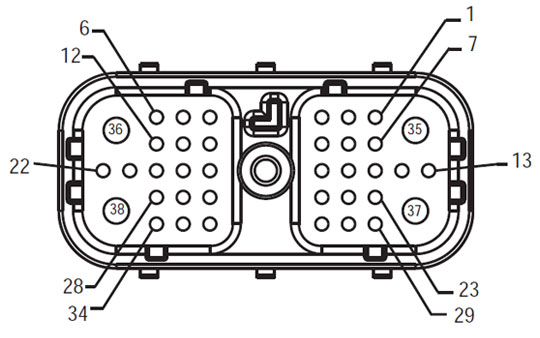
[/fusion_text][/fusion_builder_column][fusion_builder_column type=”1_2layout=”1_2spacing=”” center_content=nolink=”” target=_selfmin_height=”” hide_on_mobile=small-visibility,medium-visibility,large-visibilityclass=”” id=”” background_color=”” background_image=”” background_image_id=”” background_position=left topbackground_repeat=no-repeathover_type=noneborder_size=”0″ border_color=”” border_style=solidborder_position=allpadding_top=”” padding_right=”” padding_bottom=”” padding_left=”” margin_top=”” margin_bottom=”” animation_type=”” animation_direction=leftanimation_speed=”0.3″ animation_offset=”” last=no”][fusion_imageframe image_id=”14126|fullmax_width=”” style_type=”” blur=”” stylecolor=”” hover_type=nonebordersize=”” bordercolor=”” borderradius=”” align=centerlightbox=nogallery_id=”” lightbox_image=”” lightbox_image_id=”” alt=”ਕਵਚ ਫਰੰਟ ਦੇਖੋ TECU – ਵਾਹਨ ਇੰਟਰਫੇਸ ਕੁਨੈਕਟਰ” link=”” linktarget=_selfhide_on_mobile=small-visibility,medium-visibility,large-visibilityclass=”” id=”” animation_type=”” animation_direction=leftanimation_speed=”0.3″ animation_offset=””]https://www.globaltransmissionsupply.com/wp-content/uploads/Harness-Front-View-TECU.jpg[/fusion_imageframe][fusion_text columns=”” column_min_width=”” column_spacing=”” rule_style=defaultrule_size=”” rule_color=”” hide_on_mobile=small-visibility,medium-visibility,large-visibilityclass=”” id=””]

ਕਵਚ ਫਰੰਟ ਦੇਖੋ
TECU – ਵਾਹਨ ਇੰਟਰਫੇਸ ਕੁਨੈਕਟਰ
[/fusion_text][/fusion_builder_column][fusion_builder_column type=”1_2layout=”1_2spacing=”” center_content=nolink=”” target=_selfmin_height=”” hide_on_mobile=small-visibility,medium-visibility,large-visibilityclass=”” id=”” background_color=”” background_image=”” background_image_id=”” background_position=left topbackground_repeat=no-repeathover_type=noneborder_size=”0″ border_color=”” border_style=solidborder_position=allpadding_top=”” padding_right=”” padding_bottom=”” padding_left=”” margin_top=”” margin_bottom=”” animation_type=”” animation_direction=leftanimation_speed=”0.3″ animation_offset=”” last=no”][fusion_imageframe image_id=”14061|fullmax_width=”” style_type=”” blur=”” stylecolor=”” hover_type=nonebordersize=”” bordercolor=”” borderradius=”” align=centerlightbox=nogallery_id=”” lightbox_image=”” lightbox_image_id=”” alt=”Eaton ਹਾਰਨੈਸ ਫਰੰਟ ਦੇਖੋ (HCM – ਵਾਹਨ ਇੰਟਰਫੇਸ ਕੁਨੈਕਟਰ)” link=”” linktarget=_selfhide_on_mobile=small-visibility,medium-visibility,large-visibilityclass=”” id=”” animation_type=”” animation_direction=leftanimation_speed=”0.3″ animation_offset=””]https://www.globaltransmissionsupply.com/wp-content/uploads/Fuller-Front-Harness-View-HCM.jpg[/fusion_imageframe][fusion_text columns=”” column_min_width=”” column_spacing=”” rule_style=defaultrule_size=”” rule_color=”” hide_on_mobile=small-visibility,medium-visibility,large-visibilityclass=”” id=””]

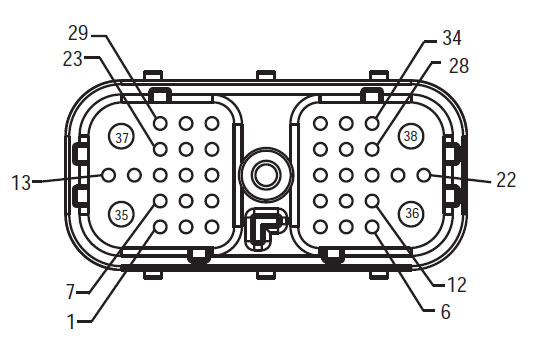
ਕਵਚ ਫਰੰਟ ਦੇਖੋ
(HCM – ਵਾਹਨ ਇੰਟਰਫੇਸ ਕੁਨੈਕਟਰ)

[/fusion_text][/fusion_builder_column][fusion_builder_column type=”1_1layout=”1_1spacing=”” center_content=nolink=”” target=_selfmin_height=”” hide_on_mobile=small-visibility,medium-visibility,large-visibilityclass=”” id=”” background_image_id=”” background_color=”#000000″ background_image=”” background_position=left topundefined=”” background_repeat=no-repeathover_type=noneborder_size=”0″ border_color=”” border_style=solidborder_position=allpadding_top=”” padding_right=”” padding_bottom=”” padding_left=”” margin_top=”” margin_bottom=”” animation_type=”” animation_direction=leftanimation_speed=”0.3″ animation_offset=”” last=no”][fusion_text columns=”” column_min_width=”” column_spacing=”” rule_style=defaultrule_size=”” rule_color=”” hide_on_mobile=small-visibility,medium-visibility,large-visibilityclass=”” id=””]

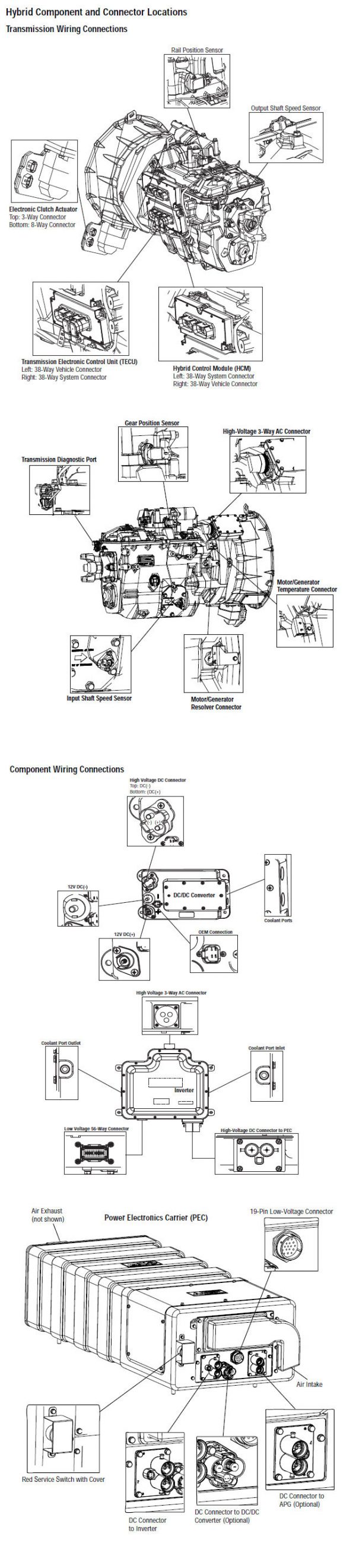
ਸੂਚਨਾ: ਵੇਖੋ Eaton ਹਾਈਬ੍ਰਾਇਡ ਭਾਗ ਅਤੇ ਕੁਨੈਕਟਰ ਸਥਿਤੀ MY08 ਸਿਸਟਮ ਵਿੱਚ ਕੁਨੈਕਟਰ ਸਥਾਨ ਲਈ

[/fusion_text][/fusion_builder_column][fusion_builder_column type=”1_1layout=”1_1spacing=”” center_content=nolink=”” target=_selfmin_height=”” hide_on_mobile=small-visibility,medium-visibility,large-visibilityclass=”” id=”” background_image_id=”” background_color=”#000000″ background_image=”” background_position=left topundefined=”” background_repeat=no-repeathover_type=noneborder_size=”0″ border_color=”” border_style=solidborder_position=allpadding_top=”” padding_right=”” padding_bottom=”” padding_left=”” margin_top=”25″ margin_bottom=”” animation_type=”” animation_direction=leftanimation_speed=”0.3″ animation_offset=”” last=no”][fusion_text columns=”” column_min_width=”” column_spacing=”” rule_style=defaultrule_size=”” rule_color=”” hide_on_mobile=small-visibility,medium-visibility,large-visibilityclass=”” id=””]

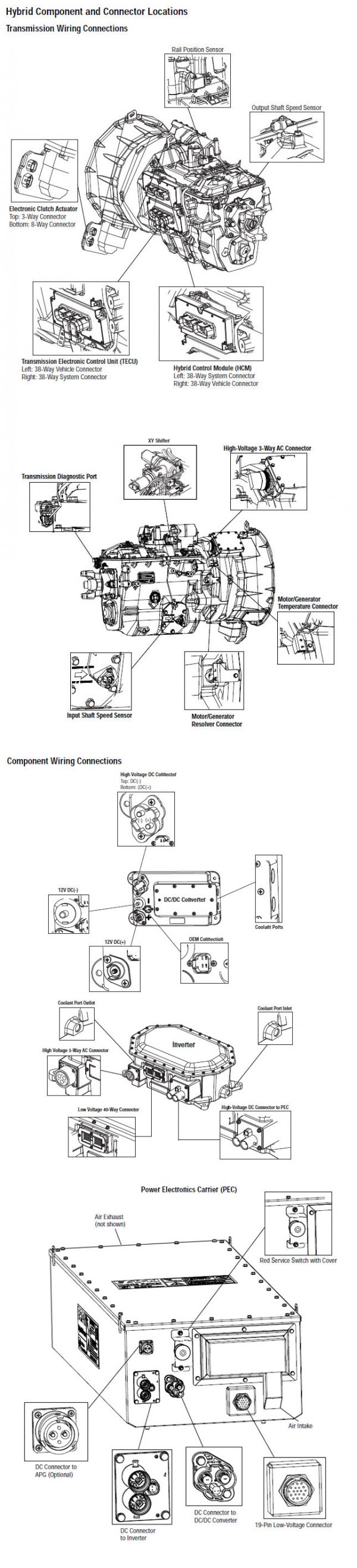
ਸੂਚਨਾ: ਵੇਖੋ Eaton ਹਾਈਬ੍ਰਾਇਡ ਭਾਗ ਅਤੇ ਕੁਨੈਕਟਰ ਸਥਿਤੀ My09 ਸਿਸਟਮ ਵਿੱਚ ਕੁਨੈਕਟਰ ਸਥਾਨ ਲਈ.
[/fusion_text][/fusion_builder_column][fusion_builder_column type=”1_1layout=”1_1spacing=”” center_content=nolink=”” target=_selfmin_height=”” hide_on_mobile=small-visibility,medium-visibility,large-visibilityclass=”” id=”” background_color=”” background_image=”” background_image_id=”” background_position=left topbackground_repeat=no-repeathover_type=noneborder_size=”0″ border_color=”” border_style=solidborder_position=allpadding_top=”” padding_right=”” padding_bottom=”” padding_left=”” margin_top=”” margin_bottom=”” animation_type=”” animation_direction=leftanimation_speed=”0.3″ animation_offset=”” last=no”][fusion_imageframe image_id=”14163|800″ max_width=”” style_type=”” blur=”” stylecolor=”” hover_type=nonebordersize=”” bordercolor=”” borderradius=”” align=centerlightbox=nogallery_id=”” lightbox_image=”” lightbox_image_id=”” alt=”Eaton ਆਪੋ TECU HCM ਕਨੈਕਟਰ” link=”” linktarget=_selfhide_on_mobile=small-visibility,medium-visibility,large-visibilityclass=”” id=”” animation_type=”” animation_direction=leftanimation_speed=”0.3″ animation_offset=””]https://www.globaltransmissionsupply.com/wp-content/uploads/Eaton-Fuller-TECU-HCM-connector-800×293.jpg[/fusion_imageframe][/fusion_builder_column][/fusion_builder_row][/fusion_builder_container][fusion_builder_container hundred_percent=nohundred_percent_height=nohundred_percent_height_scroll=nohundred_percent_height_center_content=yesequal_height_columns=nomenu_anchor=”” hide_on_mobile=small-visibility,medium-visibility,large-visibilitystatus=publishedpublish_date=”” class=”” id=”” background_color=”” background_image=”” background_position=center centerbackground_repeat=no-repeatfade=nobackground_parallax=noneenable_mobile=noparallax_speed=”0.3″ video_mp4=”” video_webm=”” video_ogv=”” video_url=”” video_aspect_ratio=”16:9″ video_loop=yesvideo_mute=yesvideo_preview_image=”” border_size=”” border_color=”” border_style=solidmargin_top=”” margin_bottom=”” padding_top=”” padding_right=”” padding_bottom=”” padding_left=””][fusion_builder_row][fusion_builder_column type=”1_1layout=”1_1spacing=”” center_content=nolink=”” target=_selfmin_height=”” hide_on_mobile=small-visibility,medium-visibility,large-visibilityclass=”” id=”” background_color=”” background_image=”” background_image_id=”” background_position=left topbackground_repeat=no-repeathover_type=noneborder_size=”0″ border_color=”” border_style=solidborder_position=allpadding_top=”” padding_right=”” padding_bottom=”” padding_left=”” margin_top=”” margin_bottom=”” animation_type=”” animation_direction=leftanimation_speed=”0.3″ animation_offset=”” last=no”][fusion_modal name=warnings_cautionstitle=”ਚੇਤਾਵਨੀ & ਚੇਤਾਵਨੀ” size=largebackground=”” border_color=”” show_footer=yesclass=”” id=””]ਖ਼ਤਰਾ: ਖ਼ਤਰੇ ਦੇ ਸੰਕੇਤ ਕਰਦਾ ਹੈ ਕਿ ਤੁਹਾਨੂੰ ਬੁਰੀ ਜ਼ਖਮੀ ਹੋ ਜ ਦੀ ਮੌਤ ਹੋ ਜਾਵੇਗਾ, ਜੇ ਸੰਕੇਤ ਵਿਧੀ ਦੀ ਪਾਲਣਾ ਨਾ ਕਰਦੇ,.
ਚੇਤਾਵਨੀ: ਚੇਤਾਵਨੀ ਤੁਰੰਤ ਖਤਰਾ ਲੱਗਦਾ ਹੈ, ਗੰਭੀਰ ਨਿਜੀ ਸੱਟ ਦਾ ਨਤੀਜਾ ਹੋ ਸਕਦਾ ਹੈ, ਜੋ ਕਿ ਜੇਕਰ ਤੁਹਾਨੂੰ ਸੰਕੇਤ ਵਿਧੀ ਦੀ ਪਾਲਣਾ ਨਾ ਕਰਦੇ,.
ਸਾਵਧਾਨ: ਸਾਵਧਾਨ ਲੱਗਦਾ ਹੈ ਵਾਹਨ ਜ ਸੰਪਤੀ ਨੂੰ ਨੁਕਸਾਨ ਵਾਪਰ ਸਕਦਾ ਹੈ, ਜੇ ਤੁਹਾਨੂੰ ਸੰਕੇਤ ਵਿਧੀ ਦੀ ਪਾਲਣਾ ਨਾ ਕਰਦੇ,.

ਸੂਚਨਾ: ਸੂਚਨਾ ਵਾਧੂ ਵਿਸਥਾਰ ਹੈ, ਜੋ ਕਿ ਤਸ਼ਖੀਸ ਜ ਇੱਕ ਭਾਗ ਨੂੰ / ਸਿਸਟਮ ਦੀ ਮੁਰੰਮਤ 'ਚ ਮਦਦ ਕਰੇਗਾ ਪਤਾ ਲੱਗਦਾ ਹੈ.

ਵੇਖਾਏ ਕ੍ਰਮ ਨੂੰ ਨਿਜੀ ਸੱਟ ਬਚਣ ਲਈ ਵਿੱਚ ਦਿੱਤਾ ਕਾਰਵਾਈ ਦੀ ਪਾਲਣਾ ਕਰੋ:

1. ਹਾਈ-ਵੋਲਟੇਜ ਸ਼ੰਕੂ ਵਾਹਨ ਦੇ ਆਲੇ-ਦੁਆਲੇ ਹਨ ਅਤੇ ਤਾਲਾਬੰਦੀ PEC ਤੇ ਇੰਸਟਾਲ ਹੈ, ਜੇ, ਸਿਰਫ ਵਿਅਕਤੀ ਹੈ, ਜੋ ਕਿ ਵਾਹਨ ਸ਼ੁਰੂ ਕਰਨ ਦੀ ਇਜਾਜ਼ਤ ਕੀਤਾ ਜਾਣਾ ਚਾਹੀਦਾ ਹੈ, ਜੋ ਵਿਅਕਤੀ ਤਾਲਾਬੰਦੀ ਟੈਗ ਸਾਈਨ ਕੀਤਾ ਗਿਆ ਹੈ.
2. ਇੱਕ ਵਾਹਨ 'ਤੇ ਕੰਮ ਕਰ ਜ ਕੈਬ ਨੂੰ ਛੱਡ ਕੇ ਅੱਗੇ ਇੰਜਣ ਚੱਲ ਰਿਹਾ ਹੈ, ਜਦਕਿ, ਤੁਹਾਨੂੰ "n" ਵਿਚ ਸ਼ਿਫਟ ਲੀਵਰ ਰੱਖਣ ਚਾਹੀਦਾ ਹੈ ਪਾਰਕਿੰਗ ਤੋੜੀ ਸੈੱਟ ਕੀਤਾ, ਅਤੇ ਪਹੀਏ ਨੂੰ ਬਲਾਕ.
3. ਸੁਰੱਖਿਆ ਦੇ ਕਾਰਨ ਲਈ, ਹਮੇਸ਼ਾ ਸੇਵਾ ਬ੍ਰੇਕ ਸ਼ਾਮਲ "ਐਨ" ਤੱਕ ਗੇਅਰ ਅਹੁਦੇ ਦੀ ਚੋਣ ਕਰਨ ਲਈ ਪੁਰਾਣੇ
4. ਅੱਗੇ ਸ਼ੁਰੂ ਕਰਨ ਲਈ ਇੱਕ ਵਾਹਨ ਨੂੰ ਹਮੇਸ਼ਾ ਡਰਾਈਵਰ ਦੀ ਸੀਟ 'ਤੇ ਬੈਠੇ ਕੀਤਾ ਜਾ, ਦੀ ਚੋਣ ਕਰੋ "n" ਸ਼ਿਫਟ ਕੰਟਰੋਲ 'ਤੇ, ਅਤੇ ਪਾਰਕਿੰਗ ਬ੍ਰੇਕ ਸੈੱਟ ਕੀਤਾ.
5. ePTO ਨਾਲ ਵਾਹਨ ਵਿੱਚ, ਇੰਜਣ ਅਤੇ / ਜ
ਮੋਟਰ / ਜੇਨਰੇਟਰ ePTO ਮੋਡ ਵਿੱਚ ਸ਼ੁਰੂ ਕਰ ਸਕਦੇ ਹੋ. ਕਦੇ ਵੀ ਕਿਸੇ ਵੀ ਨਿਗਰਾਨੀ ਕਰਨ ਜ ਵਾਹਨ 'ਤੇ ਕੰਮ, ਇਸ ਮੋਡ ਵਿੱਚ, ਜਦਕਿ.
6. 12-ਵੋਲਟ ਬੈਟਰੀ ਸਕਾਰਾਤਮਕ (+) ਅਤੇ ਨਕਾਰਾਤਮਕ (-) ਕਿਸੇ ਵੀ ਹਾਈਬ੍ਰਾਇਡ ਲੈਸ ਵਾਹਨ 'ਤੇ ਕਿਸੇ ਵੀ ਿਲਵਿੰਗ ਕਰਨ ਲਈ ਪੁਰਾਣੇ ਕੁਨੈਕਸ਼ਨ ਬੰਦ ਕੀਤਾ ਜਾਣਾ ਚਾਹੀਦਾ ਹੈ.

ਸਾਵਧਾਨ: ਵੇਖਾਏ ਲਈ ਕ੍ਰਮ ਦੇ ਸਾਮਾਨ ਖ਼ਰਾਬ ਨੁਕਸਾਨ ਬਚਣ ਲਈ ਵਿੱਚ ਦਿੱਤਾ ਕਾਰਵਾਈ ਦੀ ਪਾਲਣਾ ਕਰੋ.
ਸਾਵਧਾਨ: ਪਾਰਕਿੰਗ ਤੋੜੀ ਮੁਕਤ ਕਰ ਜ, ਜਦ ਤੱਕ ਕਿ ਹਵਾ ਦਾ ਪ੍ਰੈਸ਼ਰ ਸਹੀ ਪੱਧਰ 'ਤੇ ਹੁੰਦਾ ਹੈ, ਇੱਕ ਗੇਅਰ ਦੀ ਚੋਣ ਕਰਨ ਦੀ ਕੋਸ਼ਿਸ਼ ਨਾ ਕਰੋ.
ਸਾਵਧਾਨ: "N" ਵਿਚ ਜਗ੍ਹਾ ਸ਼ਿਫਟ ਲੀਵਰ ਫ਼ਰਾਰ ਦੌਰਾਨ ਸੰਚਾਰ ਨੂੰ ਨੁਕਸਾਨ ਬਚਣ ਅਤੇ ਜ਼ਮੀਨ ਬੰਦ ਡਰਾਈਵ ਪਹੀਏ ਚੁੱਕਣ ਜ driveline ਕੁਨੈਕਸ਼ਨ ਬੰਦ ਕਰਨ ਲਈ.

ਹਾਈ-ਵੋਲਟੇਜ ਚੇਤਾਵਨੀ & ਚੇਤਾਵਨੀ

  • CO2 ਜ ਡਰਾਈ ਕੈਮੀਕਲ Fire Extinguishers ਵਰਤੋ.
  • ਹਾਈ-ਵੋਲਟੇਜ ਤਾਰ ਸੰਤਰੀ ਇਨਸੂਲੇਸ਼ਨ ਜ ਪੇਚੀਦਾ ਵਟਊਵਬੰਗ ਵਿਚ ਕਵਰ ਕੀਤਾ ਹੈ ਅਤੇ ਕੁਨੈਕਟਰ 'ਤੇ ਚੇਤਾਵਨੀ ਦੇ ਲੇਬਲ ਦੇ ਨਾਲ ਮਾਰਕ ਕੀਤਾ ਗਿਆ ਹੈ.
  • ਸਾਰੇ Eaton® ਹਾਈਬ੍ਰਾਇਡ ਡੀਜ਼ਲ / ਇਲੈਕਟ੍ਰਿਕ ਵਾਹਨ ਮਾਰਕ ਕੀਤਾ ਜਾਵੇਗਾ, 'ਹਾਈਬ੍ਰਾਇਡ’ ਵਾਹਨ ਦੇ ਬਾਹਰ ਤੇ, ਡੈਸ਼ 'ਤੇ ਸ਼ਿਫਟ ਲੇਬਲ ਨੂੰ ਨਾਲ-ਨਾਲ.
  • ਚੈਸੀ ਮਾਊਟ ਹਾਈਬ੍ਰਿਡ ਭਾਗ ਦੇ ਖਾਸ ਸਥਾਨ ਲਈ OEM ਵੇਖੋ.
  • ਸੰਤਰੀ ਹਾਈ-ਵੋਲਟੇਜ ਕੇਬਲ ਵਿੱਚ ਕੱਟ ਨਾ ਕਰੋ.
  • ਵਿੱਚ ਕੱਟ ਜ ਨਾ ਖੋਲ੍ਹੋ ਪੈਕ.
  • ਵਿੱਚ ਕੱਟ ਜ ਡੀ.ਸੀ. / ਡੀ.ਸੀ. ਪਰਿਵਰਤਕ ਨਾ ਖੋਲ੍ਹੋ.
  • ਵਿੱਚ ਕੱਟ ਜ Inverter ਨਾ ਖੋਲ੍ਹੋ.

ਇੱਕ ਬਫਰ ਜ਼ੋਨ ਸਥਾਪਤ ਹੋਣਾ ਚਾਹੀਦਾ ਹੈ ਅਤੇ ਉੱਚ-ਵੋਲਟੇਜ ਰਬੜ ਦੇ ਦਸਤਾਨੇ ਗਰਮੀ ਨੂੰ (ਕਲਾਸ 0 ਚਮੜੇ ਸੁਰੱਖਿਆ ਦੇ ਨਾਲ) ਹਾਈ-ਵੋਲਟੇਜ 'ਤੇ ਕੰਮ ਕਰ ਰਹੇ ਹਨ, ਨੂੰ ਪੁਰਾਣੇ ਦੀ ਲੋੜ. ਅਸਫ਼ਲਤਾ ਇਹ ਹਦਾਇਤ ਦੀ ਪਾਲਣਾ ਕਰਨ ਲਈ ਗੰਭੀਰ ਨਿਜੀ ਸੱਟ ਮੌਤ ਦਾ ਨਤੀਜਾ ਹੋ ਸਕਦਾ.
ਰਬੜ ਦੇ ਦਸਤਾਨੇ-ਗਰਮੀ ਨੂੰ ਹੈ, ਜੋ ਕਿ ਹੈ, ਜਦਕਿ ਹਾਈ-ਵੋਲਟੇਜ ਸਿਸਟਮ 'ਤੇ ਕੰਮ ਕਰ ਪਾਉਣਾ ਲਾਜ਼ਮੀ ਹੋਵੇਗਾ ਕਲਾਸ ਹਨ 0 ਚਮੜੇ ਸੁਰੱਖਿਆ ਦੇ ਨਾਲ. ਰਬੜ ਦੇ ਦਸਤਾਨੇ ਰਬੜ ਇਨਸੂਲੇਸ਼ਨ ਦਸਤਾਨੇ ਟੈਸਟਿੰਗ ਵਿਧੀ ਸਫ਼ਾ 'ਤੇ "ਡਾਇਗਨੋਸਟਿਕ ਲਈ ਸੰਦ / ਸੇਵਾ ਪ੍ਰਕਾਸ਼ਨ" ਵਿੱਚ ਪਾਇਆ ਹੇਠ ਹਰ ਵਰਤਣ ਅੱਗੇ ਟੈਸਟ ਕੀਤਾ ਜਾਣਾ ਚਾਹੀਦਾ ਹੈ 6. ਅਸਫ਼ਲਤਾ ਇਹ ਹਦਾਇਤ ਦੀ ਪਾਲਣਾ ਕਰਨ ਲਈ ਗੰਭੀਰ ਨਿਜੀ ਸੱਟ ਮੌਤ ਦਾ ਨਤੀਜਾ ਹੋ ਸਕਦਾ.
ਸਫ਼ੇ 'ਤੇ ਮੁਆਇਨਾ ਜ ਕੋਈ ਵੀ ਹਾਈ-ਵੋਲਟੇਜ ਕੇਬਲ ਜ ਭਾਗ' ਤੇ ਕੰਮ ਕਰ "ਹਾਈ-ਵੋਲਟੇਜ ਸੇਵਾ ਬੰਦ ਹੈ ਅਤੇ ਪਾਵਰ-ਅੱਪ ਵਿਧੀ" ਅੱਗੇ 4 ਬਾਅਦ ਵਿੱਚ ਕੀਤਾ ਜਾਣਾ ਚਾਹੀਦਾ ਹੈ. ਅਸਫ਼ਲਤਾ ਇਹ ਹਦਾਇਤ ਦੀ ਪਾਲਣਾ ਕਰਨ ਲਈ ਗੰਭੀਰ ਨਿਜੀ ਸੱਟ ਮੌਤ ਦਾ ਨਤੀਜਾ ਹੋ ਸਕਦਾ.
ਲਾਕਆਉਟ ਤੇ ਟੈਗਆਉਟ ਜੰਤਰ ਸਿਰਫ ਤਕਨੀਸ਼ੀਅਨ ਹੈ, ਜੋ ਕਿ ਗੱਡੀ 'ਤੇ ਲਾਕਆਉਟ ਤੇ ਟੈਗਆਉਟ ਜੰਤਰ ਰੱਖਿਆ ਕੇ ਹਟਾਇਆ ਜਾਣਾ ਚਾਹੀਦਾ ਹੈ. ਅਸਫ਼ਲਤਾ ਇਹ ਹਦਾਇਤ ਦੀ ਪਾਲਣਾ ਕਰਨ ਲਈ ਗੰਭੀਰ ਨਿਜੀ ਸੱਟ ਮੌਤ ਦਾ ਨਤੀਜਾ ਹੋ ਸਕਦਾ.
ਹਾਈ-ਵੋਲਟੇਜ ਰਬੜ ਦੇ ਦਸਤਾਨੇ ਗਰਮੀ ਨੂੰ (ਕਲਾਸ 0 ਚਮੜੇ ਸੁਰੱਖਿਆ ਦੇ ਨਾਲ) ਜਦ ਕਿਸੇ ਵੀ 'ਤੇ ਕੰਮ ਕਰ ਪਾਉਣਾ ਲਾਜ਼ਮੀ ਹੋਵੇਗਾ
ਹਾਈ-ਵੋਲਟੇਜ ਕੇਬਲ. "ਹਾਈ-ਵੋਲਟੇਜ ਸੇਵਾ ਬੰਦ ਹੈ ਅਤੇ ਪਾਵਰ-ਅੱਪ ਵਿਧੀ" ਸਫ਼ੇ 'ਤੇ 4 ਕਿਸੇ ਵੀ ਹਾਈ-ਵੋਲਟੇਜ ਕੇਬਲ ਨੂੰ ਹਟਾਉਣ ਲਈ ਪੁਰਾਣੇ ਬਾਅਦ ਵਿੱਚ ਕੀਤਾ ਜਾਣਾ ਚਾਹੀਦਾ ਹੈ. ਅਸਫ਼ਲਤਾ ਇਹ ਹਦਾਇਤ ਦੀ ਪਾਲਣਾ ਕਰਨ ਲਈ ਗੰਭੀਰ ਨਿਜੀ ਸੱਟ ਮੌਤ ਦਾ ਨਤੀਜਾ ਹੋ ਸਕਦਾ.
ਹਾਈ-ਵੋਲਟੇਜ ਕੇਬਲ ਅਤੇ ਵਾਇਰਿੰਗ ਸੰਤਰੀ ਹਨ ਅਤੇ ਕੁਨੈਕਟਰ 'ਤੇ ਇੱਕ ਚੇਤਾਵਨੀ ਦੇ ਲੇਬਲ ਸ਼ਾਮਿਲ ਹਨ. ਹਾਈ-ਵੋਲਟੇਜ ਭਾਗ ਇੱਕ ਲੇਬਲ ਨਾਲ ਮਾਰਕ ਕੀਤੇ ਹਨ,. ਹਾਈ-ਵੋਲਟੇਜ ਰਬੜ ਦੇ ਦਸਤਾਨੇ ਗਰਮੀ ਨੂੰ (ਕਲਾਸ 0 ਚਮੜੇ ਸੁਰੱਖਿਆ ਦੇ ਨਾਲ) ਇਹ ਭਾਗ ਦੇ ਕਿਸੇ ਵੀ 'ਤੇ ਕੰਮ ਕਰ ਲਈ ਵਰਤਿਆ ਜਾਣਾ ਚਾਹੀਦਾ ਹੈ. ਅਸਫ਼ਲਤਾ ਇਹ ਹਦਾਇਤ ਦੀ ਪਾਲਣਾ ਕਰਨ ਲਈ ਗੰਭੀਰ ਨਿਜੀ ਸੱਟ ਮੌਤ ਦਾ ਨਤੀਜਾ ਹੋ ਸਕਦਾ.

ਹਾਈ-ਵੋਲਟੇਜ ਸੇਵਾ ਬੰਦ ਨੇਮਾਵਲੀ
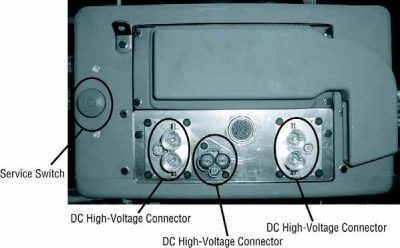
ਹਾਈ-ਵੋਲਟੇਜ ਸੇਵਾ ਬੰਦ ਹੈ ਅਤੇ ਪਾਵਰ-ਅੱਪ ਵਿਧੀ1. ਮਗਰ "ਹਾਈ-ਵੋਲਟੇਜ ਕੰਮ ਖੇਤਰ 'ਵਿਧੀ.
2. ਪੈਕ ਦੇ ਮੋਰਚੇ 'ਤੇ ਲਾਲ ਪੈਕ ਸਰਵਿਸ ਸਵਿੱਚ ਨੂੰ ਲੱਭੋ ਅਤੇ ਧੱਕਣ ਨੂੰ ਬੰਦ.
3. ਸਰਵਿਸ ਸਵਿੱਚ ਦਾ ਢੱਕਣ ਹਟਾਓ ਅਤੇ ਤਾਲਾਬੰਦੀ ਬਰੈਕਟ ਇੰਸਟਾਲ (J48506).
4. ਲਾੱਕਆਉਟ ਬਰੈਕਟ ਨੂੰ ਠੀਕ ਟੈਗ.
5. ਪੈਕ ਸਰਵਿਸ ਸਵਿੱਚ ਯਕੀਨੀ ਬੰਦ ਸਥਿਤੀ ਤੱਕ ਜਾਣ ਨਾ ਕਰ ਸਕਦਾ ਹੈ.
6. ਸਿਸਟਮ ਦੇ ਇੱਕ ਘੱਟੋ ਘੱਟ ਕਰਨ ਲਈ ਸੈੱਟ ਕਰਨ ਲਈ ਆਗਿਆ ਦਿਓ 5 ਮਿੰਟ ਹਾਈ ਵੋਲਟੇਜ ਉਤਾਰਨਾ.
7. ServiceRanger ਜੁੜੋ ਅਤੇ ਵੇਖਣ ਲਈ ਡਾਟਾ ਦੀ ਨਿਗਰਾਨੀ PID 116 ਕਹਿੰਦੇ ਹਨ, "ਹਾਈ-ਵੋਲਟੇਜ ਬੈਟਰੀ ਸੰਭਾਵੀ." SPN ਵਰਤੋ 520323 J1939 ਕੁਨੈਕਸ਼ਨ ਲਈ "ਬੈਟਰੀ ਵੋਲਟੇਜ ਆਰ.ਬੀ." (ਰੀਲੇਅ ਬਾਕਸ).
8. ਵੋਲਟੇਜ ਹੋਣਾ ਚਾਹੀਦਾ ਹੈ 30 ਵੋਲਟ ਜ ਘੱਟ. ਜੇ ਵੋਲਟੇਜ ਉਪਰ ਹੈ 30 ਵੋਲਟ, ਵਾਹਨ 'ਤੇ ਕੰਮ ਨਾ ਕਰਦੇ ਅਤੇ 1-800-826-ਮਦਦ' ਤੇ Eaton® ਸੰਪਰਕ ਕਰੋ (4357).
9. ਇਗਨੀਸ਼ਨ ਕੁੰਜੀ ਨੂੰ ਬੰਦ ਕਰ ਦਿਓ ਅਤੇ ਦੀ ਮੁਰੰਮਤ ਜ ਕਦਮ ਹੈ ਨਿਪਟਾਰਾ ਕਰਨ ਲਈ ਅੱਗੇ ਜਾਰੀ.
ਸੂਚਨਾ: ਵੋਲਟੇਜ ਫਿਲਹਾਲ ਜਦ ਕੁੰਜੀ ਬੰਦ ਹੈ ਦੇ ਤੁਪਕੇ.

ਹਾਈ-ਵੋਲਟੇਜ ਸਰਵਿਸ ਪਾਵਰ-ਅੱਪ ਵਿਧੀ

1. ਆਪਣੇ ਨੂੰ ਜਿੰਦਰਾ ਅਹੁਦੇ ਨੂੰ ਸਭ ਹਾਈ-ਵੋਲਟੇਜ ਕੁਨੈਕਟਰ ਇੰਸਟਾਲ.
2. ਵਿਅਕਤੀ ਨੂੰ ਵਾਹਨ 'ਤੇ ਕੰਮ ਕਰ ਤੁਹਾਨੂੰ ਹਨ, ਜੇ, ਲਾੱਕਆਉਟ ਬਰੈਕਟ ਅਤੇ ਟੈਗ ਹਟਾਉਣ ਲਈ.
3. ਸਰਵਿਸ ਸਵਿੱਚ ਵੱਧ ਲਾੱਕਆਉਟ ਬਰੈਕਟ ਮੁੜ.
4. ਸਰਵਿਸ ਕੱਢਣ ਬਾਹਰ ਜਾਓ ਅਤੇ ਇਸ ਲਈ ਵਾਹਨ ਦਾ ਸਮੂਹ ਚਾਹੀਦਾ ਹੈ 2 ਮਿੰਟ.
5. Start vehicle when appropriate.[/fusion_modal][fusion_modal name=component_locationtitle=”Eaton ਹਾਈਬ੍ਰਾਇਡ ਭਾਗ ਅਤੇ ਕੁਨੈਕਟਰ ਸਥਿਤੀ ” size=largebackground=”#ffffffborder_color=”” show_footer=yesclass=”” id=””]

Eaton ਹਾਈਬ੍ਰਾਇਡ ਭਾਗ ਅਤੇ ਕੁਨੈਕਟਰ ਸਥਾਨ MY08 ਸਿਸਟਮ

[/fusion_modal][fusion_modal name=component_location2title=”Eaton ਹਾਈਬ੍ਰਾਇਡ ਭਾਗ ਅਤੇ ਕੁਨੈਕਟਰ ਸਥਿਤੀ my09 ਸਿਸਟਮ” size=largebackground=”#ffffffborder_color=”” show_footer=yesclass=”” id=””]

Eaton ਹਾਈਬ੍ਰਾਇਡ ਭਾਗ ਅਤੇ ਕੁਨੈਕਟਰ ਸਥਾਨ my09 ਸਿਸਟਮ

[/fusion_modal][/fusion_builder_column][/fusion_builder_row][/fusion_builder_container][fusion_builder_container hundred_percent=nohundred_percent_height=nohundred_percent_height_scroll=nohundred_percent_height_center_content=yesequal_height_columns=nomenu_anchor=”” hide_on_mobile=small-visibility,medium-visibility,large-visibilitystatus=publishedpublish_date=”” class=”” id=”” background_color=”” background_image=”” background_position=center centerbackground_repeat=no-repeatfade=nobackground_parallax=noneenable_mobile=noparallax_speed=”0.3″ video_mp4=”” video_webm=”” video_ogv=”” video_url=”” video_aspect_ratio=”16:9″ video_loop=yesvideo_mute=yesvideo_preview_image=”” border_size=”” border_color=”” border_style=solidmargin_top=”” margin_bottom=”” padding_top=”” padding_right=”” padding_bottom=”” padding_left=””][fusion_builder_row][fusion_builder_column type=”1_1layout=”1_1spacing=”” center_content=nolink=”” target=_selfmin_height=”” hide_on_mobile=small-visibility,medium-visibility,large-visibilityclass=”” id=”” background_color=”” background_image=”” background_image_id=”” background_position=left topbackground_repeat=no-repeathover_type=noneborder_size=”0″ border_color=”” border_style=solidborder_position=allpadding_top=”” padding_right=”” padding_bottom=”” padding_left=”” margin_top=”” margin_bottom=”” animation_type=”” animation_direction=leftanimation_speed=”0.3″ animation_offset=”” last=no”][fusion_content_boxes layout=clean-horizontalcolumns=”1″ title_size=”18pxheading_size=”3″ title_color=”#ffffffbody_color=”#ffffffbackgroundcolor=”#4f4f4ficon=”” iconflip=”” iconrotate=”” iconspin=noiconcolor=”” icon_circle=”” icon_circle_radius=”” circlecolor=”” circlebordersize=”” circlebordercolor=”” outercirclebordersize=”” outercirclebordercolor=”” icon_size=”” icon_hover_type=”” hover_accent_color=”” image=”” image_id=”” image_width=”” image_height=”” link_type=”” button_span=”” link_area=”” link_target=”” icon_align=leftanimation_type=”” animation_delay=”” animation_offset=”” animation_direction=leftanimation_speed=”0.3″ margin_top=”” margin_bottom=”” hide_on_mobile=small-visibility,medium-visibility,large-visibilityclass=”” id=””][fusion_content_box title=ਕਦਮ 1. ਐਕਟਿਵ ਜ ਸਰਗਰਮ ਨੁਕਸ ਕੋਡ ਹਾਲਤ ਲਈ ਚੈੱਕ ਕਰੋ ਅਤੇ ਇਲੈਕਟ੍ਰੀਕਲ Pretest ਕਰਨ.backgroundcolor=”” icon=”” iconflip=”” iconrotate=”” iconspin=noiconcolor=”” circlecolor=”” circlebordersize=”” circlebordercolor=”” outercirclebordersize=”” outercirclebordercolor=”” image=”” image_id=”” image_width=”” image_height=”” link=”” linktext=”ਹੋਰ ਪੜ੍ਹੋ” link_target=”” animation_type=”” animation_direction=leftanimation_speed=”0.3″ animation_offset=””]

  1. 9-ਰਾਹ ਡਾਇਗਨੋਸਟਿਕ ਕੁਨੈਕਟਰ ਵਰਤ ServiceRanger ਨਾਲ ਸਰਗਰਮ ਨੁਕਸ ਕੋਡ ਅਤੇ FMIs ਪ੍ਰਾਪਤ.
  2. ਇਲੈਕਟ੍ਰੀਕਲ Pretest ਕਰਨ.
    • ਕੋਈ ਮੁੱਦੇ ਇਲੈਕਟ੍ਰੀਕਲ Pretest ਦੌਰਾਨ ਪਾਇਆ ਹੈ, ਜੇ, ਕਦਮ ਨੂੰ ਜਾਣ 2.
    • ਜੇ ਇਸ ਮੁੱਦੇ 'ਇਲੈਕਟ੍ਰੀਕਲ Pretest ਦੌਰਾਨ ਮੁਰੰਮਤ ਕੀਤਾ ਗਿਆ ਹੈ, ਕਦਮ ਨੂੰ ਜਾਣ 3.

[/fusion_content_box][/fusion_content_boxes][fusion_content_boxes layout=clean-horizontalcolumns=”2″ title_size=”18pxheading_size=”3″ title_color=”#ffffffbody_color=”#ffffffbackgroundcolor=”#4f4f4ficon=”” iconflip=”” iconrotate=”” iconspin=noiconcolor=”” icon_circle=”” icon_circle_radius=”” circlecolor=”” circlebordersize=”” circlebordercolor=”” outercirclebordersize=”” outercirclebordercolor=”” icon_size=”” icon_hover_type=”” hover_accent_color=”” image=”” image_id=”” image_width=”” image_height=”” link_type=”” button_span=”” link_area=”” link_target=”” icon_align=leftanimation_type=”” animation_delay=”” animation_offset=”” animation_direction=leftanimation_speed=”0.3″ margin_top=”” margin_bottom=”” hide_on_mobile=small-visibility,medium-visibility,large-visibilityclass=”” id=””][fusion_content_box title=ਕਦਮ 2. ਵਾਹਨ ਹਾਰਨੈਸ ਦੀ ਨਿਰੰਤਰਤਾ ਦੀ ਪੜਤਾਲ.backgroundcolor=”” icon=”” iconflip=”” iconrotate=”” iconspin=noiconcolor=”” circlecolor=”” circlebordersize=”” circlebordercolor=”” outercirclebordersize=”” outercirclebordercolor=”” image=”” image_id=”” image_width=”” image_height=”” link=”” linktext=”ਹੋਰ ਪੜ੍ਹੋ” link_target=”” animation_type=”” animation_direction=leftanimation_speed=”0.3″ animation_offset=””]

  1. ਕੁੰਜੀ ਬੰਦ.
  2. ਕੁਨੈਕਸ਼ਨ ਨਕਾਰਾਤਮਕ ਬੈਟਰੀ ਕੇਬਲ.
  3. Disconnect HCM Vehicle Harness 38- ਰਾਹ ਕੁਨੈਕਟਰ.
  4. Measure resistance between HCM Vehicle Harness 38- ਰਾਹ ਕੁਨੈਕਟਰ ਪਿੰਨ 2 ਅਤੇ ਪਿੰਨ 3:
    ਸੂਚਨਾ: ਇਹ ਯਕੀਨੀ ਬਣਾਓ ਵੋਲਟ / Ohm ਮੀਟਰ ਸਹੀ ਪੈਮਾਨੇ 'ਤੇ ਹੈ, (ਆਲੇ-ਦੁਆਲੇ ਦੇ 200 ohm ਪੈਮਾਨੇ).

    • ਜੇ ਪਿੰਨ ਵਿਚਕਾਰ ਟਾਕਰੇ 2 ਅਤੇ ਪਿੰਨ 3 50-70 ohms ਵਿਚਕਾਰ ਹੈ, ਹਾਈਬ੍ਰਾਇਡ ਕੰਟਰੋਲ ਮੋਡੀਊਲ ਨੂੰ ਤਬਦੀਲ (HCM), ਫਿਰ ਕਦਮ ਨੂੰ ਜਾਣ 3.
    • ਟਾਕਰੇ ਸੀਮਾ ਦੇ ਬਾਹਰ ਹੈ, ਜੇ, ਮੁਰੰਮਤ J1939 ਡਾਟਾ ਲਿੰਕ ਨੂੰ ਹਾਰਨੈਸ, ਫਿਰ ਕਦਮ ਨੂੰ ਜਾਣ 3.

[/fusion_content_box][fusion_content_box title=ਕਦਮ 3. ਮੁਰੰਮਤ ਦੀ ਪੜਤਾਲbackgroundcolor=”” icon=”” iconflip=”” iconrotate=”” iconspin=”” iconcolor=”” circlecolor=”” circlebordersize=”” circlebordercolor=”” outercirclebordersize=”” outercirclebordercolor=”” image=”” image_id=”” image_width=”” image_height=”” link=”” linktext=”” link_target=”” animation_type=”” animation_direction=leftanimation_speed=”0.3″ animation_offset=””]

  1. ਕੁੰਜੀ ਬੰਦ.
  2. ਸਾਰੇ ਕੁਨੈਕਟਰ ਤੇ ਰਿਣਾਤਮਕ ਬੈਟਰੀ ਕੇਬਲ ਮੁੜ ਜੁੜਨ.
  3. ਕੁੰਜੀ 'ਤੇ.
  4. ਕੋਡ ਆਸਮਾਨ, ਵੇਖੋ, ਆਸਮਾਨ ਸਰਗਰਮ ਨੁਕਸ.
  5. ਵਾਹਨ ਗੱਡੀ ਅਤੇ ਕੋਡ ਸੈੱਟ ਕਰਨ ਲਈ ਕੋਸ਼ਿਸ਼.
  6. ਕੋਡ ਲਈ ਚੈੱਕ ਕਰੋ, ਵੇਖੋ, ਸਰਗਰਮ ਅਤੇ ਸਰਗਰਮ ਨੁਕਸ ਦੇਖੋ.
    • ਕੋਈ ਕੋਡ ਜੇ, ਟੈਸਟ ਮੁਕੰਮਲ ਹੋ ਗਈ ਹੈ.
    • ਜੇ ਨੁਕਸ ਕੋਡ 24 ਦਿਸਦਾ ਹੈ, ਟੈਸਟਿੰਗ ਵਿੱਚ ਗਲਤੀ ਦਾ ਪਤਾ, ਕਦਮ ਨੂੰ ਜਾਣ 1.
    • ਇੱਕ ਕੋਡ ਦੇ ਇਲਾਵਾ ਹੋਰ, ਜੇ 24 ਦਿਸਦਾ ਹੈ, ਵੇਖੋ, ਕੋਡ ਇੰਡੈਕਸ ਸੂਚੀ ਖਰਾਬ.

[/fusion_content_box][/fusion_content_boxes][/fusion_builder_column][/fusion_builder_row][/fusion_builder_container][fusion_global id=”13788″]