[fusion_builder_container hundred_percent=yeshundred_percent_height=nohundred_percent_height_scroll=nohundred_percent_height_center_content=yesequal_height_columns=nomenu_anchor=”” hide_on_mobile=small-visibility,medium-visibility,large-visibilitystatus=publishedpublish_date=”” class=”” id=”” background_color=”” background_image=https://www.globaltransmissionsupply.com/wp-content/uploads/gears-dark-overlay.jpgbackground_position=center centerbackground_repeat=no-repeatfade=nobackground_parallax=noneenable_mobile=noparallax_speed=”0.3″ video_mp4=”” video_webm=”” video_ogv=”” video_url=”” video_aspect_ratio=”16:9″ video_loop=yesvideo_mute=yesvideo_preview_image=”” border_size=”” border_color=”” border_style=solidmargin_top=”” margin_bottom=”” padding_top=”3%” padding_right=”” padding_bottom=”3%” padding_left=””][fusion_builder_row][fusion_builder_column type=”1_1layout=”1_1spacing=”” center_content=nolink=”” target=_selfmin_height=”” hide_on_mobile=small-visibility,medium-visibility,large-visibilityclass=”” id=”” background_image_id=”” background_color=rgba(0,0,0,0.4)” background_image=”” background_position=left topundefined=”” background_repeat=no-repeathover_type=noneborder_size=”0″ border_color=”” border_style=solidborder_position=allpadding_top=”” padding_right=”” padding_bottom=”” padding_left=”” margin_top=”” margin_bottom=”” animation_type=”” animation_direction=leftanimation_speed=”0.3″ animation_offset=”” last=no”][fusion_text columns=”” column_min_width=”” column_spacing=”” rule_style=defaultrule_size=”” rule_color=”” hide_on_mobile=small-visibility,medium-visibility,large-visibilityclass=”” id=””]

Eaton ਆਪੋ ਸੰਚਾਰਨ ਨੁਕਸ ਕੋਡ

[/fusion_text][/fusion_builder_column][/fusion_builder_row][/fusion_builder_container][fusion_builder_container hundred_percent=nohundred_percent_height=nohundred_percent_height_scroll=nohundred_percent_height_center_content=yesequal_height_columns=nomenu_anchor=”” hide_on_mobile=small-visibility,medium-visibility,large-visibilitystatus=publishedpublish_date=”” class=”” id=”” background_color=”” background_image=”” background_position=center centerbackground_repeat=no-repeatfade=nobackground_parallax=noneenable_mobile=noparallax_speed=”0.3″ video_mp4=”” video_webm=”” video_ogv=”” video_url=”” video_aspect_ratio=”16:9″ video_loop=yesvideo_mute=yesvideo_preview_image=”” border_size=”” border_color=”” border_style=solidmargin_top=”25″ margin_bottom=”” padding_top=”” padding_right=”” padding_bottom=”” padding_left=””][fusion_builder_row][fusion_builder_column type=”1_1layout=”1_1spacing=”” center_content=nolink=”” target=_selfmin_height=”” hide_on_mobile=small-visibility,medium-visibility,large-visibilityclass=”” id=”” background_color=”” background_image=”” background_image_id=”” background_position=left topbackground_repeat=no-repeathover_type=noneborder_size=”0″ border_color=”” border_style=solidborder_position=allpadding_top=”” padding_right=”” padding_bottom=”” padding_left=”” margin_top=”” margin_bottom=”” animation_type=”” animation_direction=leftanimation_speed=”0.3″ animation_offset=”” last=no”][fusion_text columns=”” column_min_width=”” column_spacing=”” rule_style=defaultrule_size=”” rule_color=”” hide_on_mobile=small-visibility,medium-visibility,large-visibilityclass=”” id=””]

Eaton ਆਪੋ ਸੰਚਾਰ ਨੁਕਸ ਕੋਡ ਪ੍ਰਾਪਤ ਕੀਤੀ ਜਾ ਰਹੀ ਦਸਤੀ

[/fusion_text][fusion_separator style_type=defaulthide_on_mobile=small-visibility,medium-visibility,large-visibilityclass=”” id=”” sep_color=”#0038a0top_margin=”” bottom_margin=”20″ border_size=”” icon=”” icon_circle=”” icon_circle_color=”” width=”20%” alignment=left” /][fusion_text columns=”” column_min_width=”” column_spacing=”” rule_style=defaultrule_size=”” rule_color=”” hide_on_mobile=small-visibility,medium-visibility,large-visibilityclass=”” id=””]

ਇਸ ਸਫ਼ੇ 'ਤੇ ਹਦਾਇਤ ਦੀ ਪਾਲਣਾ ਕਰੋ ਦਾ ਪਤਾ ਕਰਨ ਲਈ, ਟੈਸਟ ਕਰਨ ਅਤੇ ਆਪਣੇ Freightliner ਲਈ ਕਸੂਰ ਕੋਡ ਗਲਤੀ ਨੂੰ ਠੀਕ ਕਰਨ ਲਈ ਸਿੱਖ, mack, Peterbilt, Kenworth, ਵੋਲਵੋ ਅਤੇ ਅੰਤਰਰਾਸ਼ਟਰੀ ਟਰੱਕ. ਸਿਸਟਮ ਦੇ ਸਵੈ-ਡਾਇਗਨੌਸਟਿਕ ਢੰਗ ਨੂੰ ਯੋਗ ਕਰਨ ਨਾਲ ਪ੍ਰਾਪਤ Eaton ਆਪੋ ਪ੍ਰਸਾਰਣ ਨੁਕਸ ਕੋਡ. ਤੁਹਾਨੂੰ ਆਪਣੇ ਨੁਕਸ ਕੋਡ ਹੈ, ਸਾਰਣੀ ਵਿੱਚ ਤੱਕ ਸਕ ੋਲ ਕਰੋ ਹੇਠ ਵੇਰਵਾ ਹੈ ਇਹ ਪਤਾ ਕਰਨ ਲਈ.

Fault code pointing to a failed unit? Rebuilt Eaton Fuller transmissions ਅਤੇ replacement transmission parts ship same day from Pro Gear & ਸੰਚਾਰਨ — or call 877-776-4600.

ਸੂਚਨਾ: ਤੁਹਾਨੂੰ ਇਹ ਵੀ ਇੱਕ PC ਇਸਤੇਮਾਲ ਕਰ ਸਕਦੇ ਹੋ- ਅਧਾਰਿਤ ਸਰਵਿਸ ਸੰਦ ਹੈ, ਜਿਵੇਂ ਕਿ ਨੁਕਸ ਕੋਡ ਮੁੜ ਪ੍ਰਾਪਤ ਕਰਨ ਲਈ ਸਰਵਿਸਰੇਂਜਰ.

[/fusion_text][/fusion_builder_column][fusion_builder_column type=”1_2layout=”1_2spacing=”” center_content=nolink=”” target=_selfmin_height=”” hide_on_mobile=small-visibility,medium-visibility,large-visibilityclass=”” id=”” background_color=”” background_image=”” background_image_id=”” background_position=left topbackground_repeat=no-repeathover_type=noneborder_size=”0″ border_color=”” border_style=solidborder_position=allpadding_top=”” padding_right=”” padding_bottom=”” padding_left=”” margin_top=”” margin_bottom=”” animation_type=”” animation_direction=leftanimation_speed=”0.3″ animation_offset=”” last=no”][fusion_text columns=”” column_min_width=”” column_spacing=”” rule_style=defaultrule_size=”” rule_color=”” hide_on_mobile=small-visibility,medium-visibility,large-visibilityclass=”” id=””]

    1. ਨਿਰਪੱਖ ਵਿਚ ਸ਼ਿਫਟ ਲੀਵਰ ਰੱਖੋ.
    2. ਪਾਰਕਿੰਗ ਤੋੜੀ ਤੇ ਸੈੱਟ ਕਰੋ.
    3. ਇੰਜਣ ਬੰਦ ਨਾਲ ਚਾਲੂ ਕੁੰਜੀ.
      ਸੂਚਨਾ: ਇੰਜਣ ਹੀ ਚੱਲ ਰਿਹਾ ਹੈ, ਜੇ, ਤੁਸੀਂ ਅਜੇ ਵੀ ਕੋਡ ਮੁੜ ਪ੍ਰਾਪਤ ਕਰ ਸਕਦੇ ਹੋ; ਪਰ, ਜੇਕਰ ਇੰਜਣ ਰੁਕ ਜਾਵੇ ਤਾਂ ਸਟਾਰਟਰ ਨੂੰ ਨਾ ਲਗਾਓ.
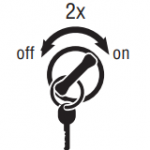
    4. ਸਰਗਰਮ ਕੋਡ ਮੁੜ ਪ੍ਰਾਪਤ ਕਰਨ ਲਈ: ਕੁੰਜੀ 'ਤੇ. ਬੰਦ ਅਤੇ ਚਾਲੂ ਕੁੰਜੀ 2 ਤੇ ਕੁੰਜੀ ਦੇ ਨਾਲ ਖਤਮ ਪੰਜ ਸਕਿੰਟ ਦੇ ਅੰਦਰ ਵਾਰ. ਦੇ ਬਾਅਦ 5 ਸਕਿੰਟ, ਸੇਵਾ ਦਾ ਚਾਨਣ ਦੋ-ਅੰਕ ਦਾ ਕਸੂਰ ਕੋਡ ਚਮਕਾਉਣੀ ਸ਼ੁਰੂ. ਕੋਈ ਨੁਕਸ ਸਰਗਰਮ ਹਨ, ਜੇ, ਸਰਵਿਸ ਲਾਈਟ ਕੋਡ ਫਲੈਸ਼ ਕਰੇਗੀ 25 (ਕੋਈ ਕੋਡ).
      ਸੂਚਨਾ: ਇੱਕ “88” ਡੈਸ਼ ਐਟ ਕੁੰਜੀ ਵਿੱਚ ਦਿਖਾਈ ਦੇ ਸਕਦਾ ਹੈ ਜਿਸ ਉੱਤੇ ਡਿਸਪਲੇਅ ਦਾ ਇੱਕ ਆਮ ਪਾਵਰ-ਅੱਪ ਟੈਸਟ ਹੁੰਦਾ ਹੈ ਨੁਕਸ ਕੋਡ ਦਸਤਾਵੇਜ਼ ਟੈਸਟ
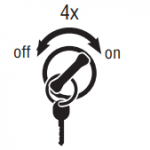
    5. ਸਰਗਰਮ ਕੋਡ ਪ੍ਰਾਪਤ ਕਰਨ ਲਈ: ਚਾਲੂ ਕੁੰਜੀ. ਕੁੰਜੀ ਨੂੰ ਬੰਦ ਅਤੇ ਚਾਲੂ ਕਰੋ 4 ਸਥਿਤੀ 'ਤੇ ਵਿੱਚ ਕੁੰਜੀ ਦੇ ਨਾਲ ਖਤਮ ਪੰਜ ਸਕਿੰਟ ਦੇ ਅੰਦਰ ਵਾਰ. ਦੇ ਬਾਅਦ 5 ਸਕਿੰਟ, ਸੇਵਾ ਦਾ ਚਾਨਣ ਦੋ-ਅੰਕ ਦਾ ਕਸੂਰ ਕੋਡ ਚਮਕਾਉਣੀ ਸ਼ੁਰੂ. ਕੋਈ ਨੁਕਸ ਸਰਗਰਮ ਹਨ, ਜੇ, ਸਰਵਿਸ ਲਾਈਟ ਕੋਡ ਫਲੈਸ਼ ਕਰੇਗੀ 25 (ਕੋਈ ਕੋਡ).ਖਰਾਬ ਕੋਡ ਦਸਤਾਵੇਜ਼ ਪ੍ਰਾਪਤ
      • ਗੇਅਰ ਡਿਸਪਲੇਅ ਵਿੱਚ ਦੋ ਅੰਕਾਂ ਦੇ ਫਾਲਟ ਕੋਡ ਪ੍ਰਦਰਸ਼ਿਤ ਹੋਣਗੇ. ਕੁਝ ਵਾਹਨ ਇੱਕ ਸੇਵਾ ਦੀ ਰੌਸ਼ਨੀ ਨਾਲ ਲੈਸ ਕੀਤਾ ਜਾ ਸਕਦਾ ਹੈ.
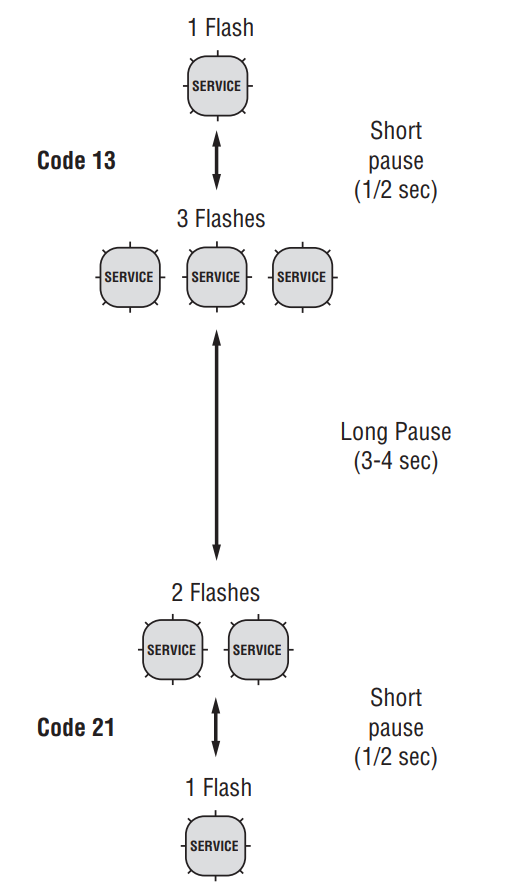
    6. ਸਰਵਿਸ ਲਾਈਟ 'ਤੇ ਫਲੈਸ਼ਾਂ ਦੇ ਕ੍ਰਮ ਨੂੰ ਵੇਖੋ ਅਤੇ ਕੋਡਾਂ ਨੂੰ ਰਿਕਾਰਡ ਕਰੋ. ਇੱਕ 1- 2-ਸਕਿੰਟ ਦਾ ਵਿਰਾਮ ਹਰੇਕ ਸਟੋਰ ਕੀਤੇ ਕੋਡ ਨੂੰ ਵੱਖ ਕਰਦਾ ਹੈ, ਅਤੇ ਸਾਰੇ ਕੋਡ ਫਲੈਸ਼ ਕੀਤੇ ਜਾਣ ਤੋਂ ਬਾਅਦ ਕ੍ਰਮ ਆਪਣੇ ਆਪ ਹੀ ਦੁਹਰਾਉਂਦਾ ਹੈ.
[/fusion_text][/fusion_builder_column][fusion_builder_column type=”1_2layout=”1_2spacing=”” center_content=nolink=”” target=_selfmin_height=”” hide_on_mobile=small-visibility,medium-visibility,large-visibilityclass=”” id=”” background_color=”” background_image=”” background_image_id=”” background_position=left topbackground_repeat=no-repeathover_type=noneborder_size=”0″ border_color=”” border_style=solidborder_position=allpadding_top=”” padding_right=”” padding_bottom=”” padding_left=”” margin_top=”” margin_bottom=”” animation_type=”” animation_direction=leftanimation_speed=”0.3″ animation_offset=”” last=no”][fusion_imageframe image_id=”13871|fullmax_width=”” style_type=”” blur=”” stylecolor=”” hover_type=nonebordersize=”” bordercolor=”” borderradius=”” align=nonelightbox=nogallery_id=”” lightbox_image=”” lightbox_image_id=”” alt=”Eaton ਆਪੋ ਪ੍ਰਸਾਰਣ ਨੁਕਸ ਕੋਡ- ਨੂੰ ਦਸਤੀ ਨੁਕਸ ਕੋਡ ਕ੍ਰਮ ਨੂੰ ਪੜ੍ਹਨ ਲਈ ” link=”” linktarget=_selfhide_on_mobile=small-visibility,medium-visibility,large-visibilityclass=”” id=”” animation_type=”” animation_direction=leftanimation_speed=”0.3″ animation_offset=””]https://www.globaltransmissionsupply.com/wp-content/uploads/fault-code-sequence-flash-e1553099338337.png[/fusion_imageframe][/fusion_builder_column][fusion_builder_column type=”1_1layout=”1_1spacing=”” center_content=nolink=”” target=_selfmin_height=”” hide_on_mobile=small-visibility,medium-visibility,large-visibilityclass=”” id=”” background_color=”” background_image=”” background_image_id=”” background_position=left topbackground_repeat=no-repeathover_type=noneborder_size=”0″ border_color=”” border_style=solidborder_position=allpadding_top=”” padding_right=”” padding_bottom=”” padding_left=”” margin_top=”” margin_bottom=”” animation_type=”” animation_direction=leftanimation_speed=”0.3″ animation_offset=”” last=no”][fusion_text columns=”” column_min_width=”” column_spacing=”” rule_style=defaultrule_size=”” rule_color=”” hide_on_mobile=small-visibility,medium-visibility,large-visibilityclass=”” id=””]

Fault ਕੋਡ ਨੂੰ ਸਾਫ਼ ਦਸਤੀ

[/fusion_text][fusion_separator style_type=defaulthide_on_mobile=small-visibility,medium-visibility,large-visibilityclass=”” id=”” sep_color=”#0038a0top_margin=”” bottom_margin=”20″ border_size=”” icon=”” icon_circle=”” icon_circle_color=”” width=”20%” alignment=left” /][fusion_text columns=”” column_min_width=”” column_spacing=”” rule_style=defaultrule_size=”” rule_color=”” hide_on_mobile=small-visibility,medium-visibility,large-visibilityclass=”” id=””]

ਹੇਠ ਦਿੱਤੀ ਪ੍ਰਕਿਰਿਆ TECU ਦੀ ਮੈਮੋਰੀ ਤੋਂ ਸਾਰੇ ਅਕਿਰਿਆਸ਼ੀਲ ਫਾਲਟ ਕੋਡਾਂ ਨੂੰ ਸਾਫ਼ ਕਰਦੀ ਹੈ. ਜਦੋਂ ਨੁਕਸ ਠੀਕ ਕੀਤਾ ਜਾਂਦਾ ਹੈ ਤਾਂ ਕਿਰਿਆਸ਼ੀਲ ਫਾਲਟ ਕੋਡ ਆਪਣੇ ਆਪ ਸਾਫ਼ ਹੋ ਜਾਂਦੇ ਹਨ.
ਸੂਚਨਾ: ਤੁਹਾਨੂੰ ਇੱਕ ਪੀਸੀ-ਅਧਾਰਿਤ ਸੇਵਾ ਸੰਦ ਨੂੰ ਇਸਤੇਮਾਲ ਕਰ ਸਕਦੇ ਹੋ, ਅਜਿਹੇ ServiceRanger ਤੌਰ, ਕਸੂਰ ਕੋਡ ਨੂੰ ਸਾਫ ਕਰਨ ਲਈ.
1. ਨਿਰਪੱਖ ਵਿਚ ਪਲੇਸ ਤਬਦੀਲੀ ਲੀਵਰ.
2. ਪਾਰਕਿੰਗ ਤੋੜੀ ਤੇ ਸੈੱਟ ਕਰੋ.
3. ਇੰਜਣ ਬੰਦ ਨਾਲ ਚਾਲੂ ਕੁੰਜੀ.
4. ਬੰਦ ਅਤੇ ਚਾਲੂ ਕੁੰਜੀ 6 ਦੇ ਅੰਦਰ ਵਾਰ 5 ਕੁੰਜੀ ਚਾਲੂ ਨਾਲ ਖਤਮ ਹੋਣ ਵਾਲੇ ਸਕਿੰਟ. ਸੂਚਨਾ: ਕੋਡ ਸਫਲਤਾਪੂਰਕ ਸਾਫ਼ ਕਰ ਦਿੱਤਾ ਗਿਆ ਹੈ, ਜੇ, ਸਰਵਿਸ ਲਾਈਟ ਆ ਜਾਵੇਗੀ ਅਤੇ ਪੰਜ ਸਕਿੰਟਾਂ ਲਈ ਚਾਲੂ ਰਹੇਗੀ. ਗੇਅਰ ਡਿਸਪਲੇਅ ਦਿਖਾ ਜਾਵੇਗਾ 25 (ਕੋਈ ਕੋਡ).
5. ਕੁੰਜੀ ਨੂੰ ਬੰਦ ਕਰ ਦਿਓ ਅਤੇ ਸ਼ਕਤੀ ਨੂੰ ਸਿਸਟਮ ਸਹਾਇਕ ਹੈ
ਥੱਲੇ, ਹੇਠਾਂ, ਨੀਂਵਾ.

[/fusion_text][/fusion_builder_column][/fusion_builder_row][/fusion_builder_container][fusion_builder_container hundred_percent=nohundred_percent_height=nohundred_percent_height_scroll=nohundred_percent_height_center_content=yesequal_height_columns=nomenu_anchor=”” hide_on_mobile=small-visibility,medium-visibility,large-visibilitystatus=publishedpublish_date=”” class=”” id=”” background_color=”” background_image=”” background_position=center centerbackground_repeat=no-repeatfade=nobackground_parallax=noneenable_mobile=noparallax_speed=”0.3″ video_mp4=”” video_webm=”” video_ogv=”” video_url=”” video_aspect_ratio=”16:9″ video_loop=yesvideo_mute=yesvideo_preview_image=”” border_size=”” border_color=”” border_style=solidmargin_top=”” margin_bottom=”” padding_top=”” padding_right=”” padding_bottom=”” padding_left=””][fusion_builder_row][fusion_builder_column type=”1_1layout=”1_1spacing=”” center_content=nolink=”” target=_selfmin_height=”” hide_on_mobile=small-visibility,medium-visibility,large-visibilityclass=”” id=”” background_color=”” background_image=”” background_image_id=”” background_position=left topbackground_repeat=no-repeathover_type=noneborder_size=”0″ border_color=”” border_style=solidborder_position=allpadding_top=”” padding_right=”” padding_bottom=”” padding_left=”” margin_top=”” margin_bottom=”” animation_type=”” animation_direction=leftanimation_speed=”0.3″ animation_offset=”” last=no”][fusion_text columns=”” column_min_width=”” column_spacing=”” rule_style=defaultrule_size=”” rule_color=”” hide_on_mobile=small-visibility,medium-visibility,large-visibilityclass=”” id=””]

ਸਰਵਿਸ ਰੇਂਜਰ ਵਿੱਚ ਫਾਲਟ ਕੋਡ ਰੀਟਰੀਵਲ ਅਤੇ ਕਲੀਅਰਿੰਗ

[/fusion_text][fusion_separator style_type=defaulthide_on_mobile=small-visibility,medium-visibility,large-visibilityclass=”” id=”” sep_color=”#0038a0top_margin=”” bottom_margin=”20″ border_size=”” icon=”” icon_circle=”” icon_circle_color=”” width=”20%” alignment=left” /][fusion_text columns=”” column_min_width=”” column_spacing=”” rule_style=defaultrule_size=”” rule_color=”” hide_on_mobile=small-visibility,medium-visibility,large-visibilityclass=”” id=””]

ਕਸੂਰ ਕੋਡ ਨੂੰ ਵੇਖਣ ਲਈ ਜ ਨੂੰ ਸਾਫ ਕਰਨ ਲਈ, ਹੇਠਾਂ ਦਿੱਤੀਆਂ ਪ੍ਰਕਿਰਿਆਵਾਂ ਦੀ ਪਾਲਣਾ ਕਰੋ.

[/fusion_text][/fusion_builder_column][fusion_builder_column type=”1_2layout=”1_2spacing=”” center_content=nolink=”” target=_selfmin_height=”” hide_on_mobile=small-visibility,medium-visibility,large-visibilityclass=”” id=”” background_color=”” background_image=”” background_image_id=”” background_position=left topbackground_repeat=no-repeathover_type=noneborder_size=”0″ border_color=”” border_style=solidborder_position=allpadding_top=”” padding_right=”” padding_bottom=”” padding_left=”” margin_top=”” margin_bottom=”” animation_type=”” animation_direction=leftanimation_speed=”0.3″ animation_offset=”” last=no”][fusion_text columns=”” column_min_width=”” column_spacing=”” rule_style=defaultrule_size=”” rule_color=”” hide_on_mobile=small-visibility,medium-visibility,large-visibilityclass=”” id=””]

ਸਰਗਰਮ ਅਤੇ ਸਰਗਰਮ ਨੁਕਸ ਦੇਖੋ

1. 9-ਰਾਹ ਡਾਇਗਨੋਸਟਿਕ ਕੁਨੈਕਟਰ ਨੂੰ ServiceRanger ਕਨੈਕਟ ਕਰੋ.
2. "ਟੂਲਜ਼" 'ਮੇਨੂ' ਤੇ ਜਾਓ ਅਤੇ "ਸੰਚਾਰ" ਟੈਬ ਦੀ ਚੋਣ ਕਰੋ.
3. J1587 ਅਤੇ J1939 ਲਈ ਉਚਿਤ ਸੰਚਾਰ ਯੰਤਰ ਚੁਣੋ.
4. ਮੁੱਖ ਪੰਨੇ 'ਤੇ "ਜੋੜੋ" ਨੂੰ ਚੁਣੋ.
5. "ਵੇਖੋ ਨੁਕਸ ਕੋਡ" ਟੈਬ ਦੀ ਚੋਣ ਕਰੋ.
ਸੂਚਨਾ: ਸ਼ੁਰੂਆਤੀ ਵਰਤਣ ਸਾਰੇ ਕਦਮ ਦੀ ਲੋੜ ਹੈ; ਹਾਲਾਂਕਿ ਬਾਅਦ ਦੀ ਵਰਤੋਂ ਲਈ ਸਿਰਫ਼ ਕਦਮ ਦੀ ਲੋੜ ਹੁੰਦੀ ਹੈ 4 ਅਤੇ ਕਦਮ 5.

[/fusion_text][/fusion_builder_column][fusion_builder_column type=”1_2layout=”1_2spacing=”” center_content=nolink=”” target=_selfmin_height=”” hide_on_mobile=small-visibility,medium-visibility,large-visibilityclass=”” id=”” background_color=”” background_image=”” background_image_id=”” background_position=left topbackground_repeat=no-repeathover_type=noneborder_size=”0″ border_color=”” border_style=solidborder_position=allpadding_top=”” padding_right=”” padding_bottom=”” padding_left=”” margin_top=”” margin_bottom=”” animation_type=”” animation_direction=leftanimation_speed=”0.3″ animation_offset=”” last=no”][fusion_text columns=”” column_min_width=”” column_spacing=”” rule_style=defaultrule_size=”” rule_color=”” hide_on_mobile=small-visibility,medium-visibility,large-visibilityclass=”” id=””]

ਆਸਮਾਨ ਸਰਗਰਮ ਨੁਕਸ

1. 9-ਰਾਹ ਡਾਇਗਨੋਸਟਿਕ ਕੁਨੈਕਟਰ ਨੂੰ ServiceRanger ਕਨੈਕਟ ਕਰੋ.
2. "ਟੂਲਜ਼" 'ਮੇਨੂ' ਤੇ ਜਾਓ ਅਤੇ "ਸੰਚਾਰ" ਟੈਬ ਦੀ ਚੋਣ ਕਰੋ.
3. J1587 ਅਤੇ J1939 ਲਈ ਉਚਿਤ ਸੰਚਾਰ ਯੰਤਰ ਚੁਣੋ.
4. ਮੁੱਖ ਪੰਨੇ 'ਤੇ "ਜੋੜੋ" ਨੂੰ ਚੁਣੋ.
5. "ਵੇਖੋ ਨੁਕਸ ਕੋਡ" ਟੈਬ ਦੀ ਚੋਣ ਕਰੋ.
6. "ਆਸਮਾਨ ਸਾਫ ਨੁਕਸ" ਬਟਨ ਨੂੰ ਚੁਣੋ.
ਸੂਚਨਾ: ਸ਼ੁਰੂਆਤੀ ਵਰਤਣ ਸਾਰੇ ਕਦਮ ਦੀ ਲੋੜ ਹੈ, ਪਰ, ਇਸ ਉਪਰੰਤ ਵਰਤਦਾ ਸਿਰਫ ਕਦਮ ਦੀ ਲੋੜ ਹੈ 4 ਅਤੇ ਕਦਮ 5.

[/fusion_text][/fusion_builder_column][/fusion_builder_row][/fusion_builder_container][fusion_builder_container hundred_percent=nohundred_percent_height=nohundred_percent_height_scroll=nohundred_percent_height_center_content=yesequal_height_columns=nomenu_anchor=”” hide_on_mobile=small-visibility,medium-visibility,large-visibilitystatus=publishedpublish_date=”” class=”” id=”” background_color=”” background_image=”” background_position=center centerbackground_repeat=no-repeatfade=nobackground_parallax=noneenable_mobile=noparallax_speed=”0.3″ video_mp4=”” video_webm=”” video_ogv=”” video_url=”” video_aspect_ratio=”16:9″ video_loop=yesvideo_mute=yesvideo_preview_image=”” border_size=”” border_color=”” border_style=solidmargin_top=”” margin_bottom=”” padding_top=”” padding_right=”” padding_bottom=”” padding_left=””][fusion_builder_row][fusion_builder_column type=”1_1layout=”1_1spacing=”” center_content=nolink=”” target=_selfmin_height=”” hide_on_mobile=small-visibility,medium-visibility,large-visibilityclass=”” id=”” background_color=”” background_image=”” background_image_id=”” background_position=left topbackground_repeat=no-repeathover_type=noneborder_size=”0″ border_color=”” border_style=solidborder_position=allpadding_top=”” padding_right=”” padding_bottom=”” padding_left=”” margin_top=”” margin_bottom=”” animation_type=”” animation_direction=leftanimation_speed=”0.3″ animation_offset=”” last=no”][fusion_text columns=”” column_min_width=”” column_spacing=”” rule_style=defaultrule_size=”” rule_color=”” hide_on_mobile=small-visibility,medium-visibility,large-visibilityclass=”” id=””]

ਉਤਪਾਦ ਡਾਇਗਨੋਸਟਿਕ ਮੋਡ (PDM)

[/fusion_text][fusion_text columns=”” column_min_width=”” column_spacing=”” rule_style=defaultrule_size=”” rule_color=”” hide_on_mobile=small-visibility,medium-visibility,large-visibilityclass=”” id=””]

ਉਤਪਾਦ ਡਾਇਗਨੋਸਟਿਕ ਮੋਡ (PDM)
ਉਤਪਾਦ ਡਾਇਗਨੋਸਟਿਕ ਮੋਡ (PDM) ਸਰਗਰਮ ਕੋਡ ਆਮ ਗੱਡੀ ਚਲਾਉਣ ਦੇ ਦੌਰਾਨ ਕੀਤਾ ਗਿਆ ਹੈ, ਹੋ ਸਕਦਾ ਹੈ, ਜੋ ਕਿ ਨਿਦਾਨ ਦੀ ਮਦਦ ਕਰਨ ਲਈ ਵਰਤਿਆ ਗਿਆ ਹੈ,. ਇਹ ਨਿਦਾਨ ਮੋਡ ਕਸੂਰ ਚੇਤਨਾ ਸਮਰੱਥਾ ਦੀ ਸੰਵੇਦਨਸ਼ੀਲਤਾ ਨੂੰ ਵਧਾ.
ਇਹ ਵਿਧੀ ਢਿੱਲੀ ਨੂੰ ਪਰਖਦੀ ਹੈ, ਡੀਗਰੇਡ ਅਤੇ ਰੁਕ ਕੁਨੈਕਸ਼ਨ. "ਵੇਖੋ, ault ਕੋਡ ਨੂੰ ਇਕੱਲਤਾ ਦੀ ਵਿਧੀ ਹੇਠ ਇੰਡੈਕਸ. ਵਾਇਰਿੰਗ ਅਤੇ ਕੁਨੈਕਟਰ ਹੈ, ਜੋ ਕਿ ਨਾ-ਸਰਗਰਮ ਨੁਕਸ ਕੋਡ ਨਾਲ ਸਬੰਧਿਤ ਰਹੇ ਹਨ ਨੂੰ ਇੱਕ ਗਾਈਡ ਦੇ ਤੌਰ ਤੇ ਵਰਤੋ ਇੰਡੈਕਸ. ਵਾਇਰਿੰਗ ਕਵਚ ਅਤੇ ਕੁਨੈਕਟਰ Flex ਅਤੇ PDM ਨੂੰ ਸਰਗਰਮ ਕਰਨ ਦੇ ਬਾਅਦ ਨੁਕਸ ਨੂੰ ਮੁੜ ਕਰਨ ਦੀ ਕੋਸ਼ਿਸ਼.
PDM ਸਿਰਫ ਇੱਕ ਅਧਿਕਾਰਤ ਡੀਲਰ 'ਚ ਇਕ ਸਿਖਲਾਈ ਸੇਵਾ ਤਕਨੀਸ਼ੀਅਨ ਦੁਆਰਾ ਵਰਤਿਆ ਜਾ ਕਰਨ ਲਈ ਹੈ.
PDM ਮੋਡ ਦਰਜ ਕਰਨ ਲਈ:
ਸੂਚਨਾ: ਵਾਹਨ ਉਤਪਾਦ ਨੂੰ ਨਿਦਾਨ ਮੋਡ ਵਿੱਚ ਸ਼ੁਰੂ ਨਹੀ ਕੀਤਾ ਜਾਵੇਗਾ.
(PDM). ਨੂੰ ਬੰਦ ਕਰਨ ਦੀ PDM ਨੂੰ ਬੰਦ ਕਰਨ ਲਈ ਵਾਹਨ ਦੀ ਕੁੰਜੀ "ਬੰਦ" ਚਾਲੂ ਕਰੋ ਅਤੇ ਸਿਸਟਮ ਦੀ ਇਜਾਜ਼ਤ.

        1. ਵਾਹਨ ਸਟੇਸ਼ਨਰੀ ਹੋਣਾ ਚਾਹੀਦਾ ਹੈ, ਇੰਜਣ ਚੱਲ ਨਾ ਕੀਤਾ ਜਾਣਾ ਚਾਹੀਦਾ ਹੈ, ਵਾਹਨ ਪਾਰਕਿੰਗ ਤੋੜੀ ਕੀਤਾ ਜਾਣਾ ਚਾਹੀਦਾ ਹੈ.
        2. 9-ਰਾਹ ਡਾਇਗਨੋਸਟਿਕ ਕੁਨੈਕਟਰ ਨੂੰ ServiceRanger ਕਨੈਕਟ ਕਰੋ.
        3. "ਵੇਖੋ ਨੁਕਸ ਕੋਡ" ਚੁਣੋ ਸਕਰੀਨ.
        4. ਤੇ ਕੁੰਜੀ ਨਾਲ ਸ਼ੁਰੂ ਇਗਨੀਸ਼ਨ ਸਵਿੱਚ ਦੇ ਦੋ ਕੁੰਜੀ ਦਬਾਉਣ ਕਰਨ, ਅਤੇ 'ਤੇ ਕੁੰਜੀ ਦੇ ਨਾਲ ਖਤਮ.
          ਸੂਚਨਾ: ਇੱਕ “88” ਤੇ ਕੁੰਜੀ 'ਤੇ ਡੈਸ਼ ਵਿਚ ਦਿਖਾ ਸਕਦਾ ਹੈ, ਜੋ ਕਿ ਡਿਸਪਲੇਅ ਦੀ ਇੱਕ ਸਧਾਰਨ ਊਰਜਾ ਟੈਸਟ ਹੁੰਦਾ ਹੈ.
        5. ਗੇਅਰ ਡਿਸਪਲੇਅ ਇੱਕ ਠੋਸ "ਪੀ.ਡੀ." ਜਗਣ ਜਾਵੇਗਾ (ਉਤਪਾਦ ਡਾਇਗਨੋਸਟਿਕ ਮੋਡ) ਅਤੇ ਮੋਡ ਸਰਗਰਮ ਕੀਤਾ ਜਾਵੇਗਾ.
        6. ਵਾਇਰਿੰਗ ਕਵਚ ਅਤੇ ਕੁਨੈਕਟਰ Flex ਅਤੇ ਨੁਕਸ ਨੂੰ ਮੁੜ ਕਰਨ ਦੀ ਕੋਸ਼ਿਸ਼. ਇੱਕ ਨੁਕਸ PDM ਦੌਰਾਨ ਸਰਗਰਮ ਹੋ ਜਾਵੇ, ServiceRanger ਸਰਗਰਮ ਦੀ ਹਾਲਤ ਦੇ ਨਾਲ ਨੁਕਸ ਵੇਖਾਇਆ ਜਾਵੇਗਾ.
        7. ਇੱਕ ਨੁਕਸ PDM ਦੌਰਾਨ ਸਰਗਰਮ ਹੋ ਜਾਵੇ, ServiceRanger ਸਰਗਰਮ ਦੀ ਹਾਲਤ ਦੇ ਨਾਲ ਨੁਕਸ ਵੇਖਾਇਆ ਜਾਵੇਗਾ.
        8. ਜੇਕਰ ਕੋਈ ਨੁਕਸ ਪਾਇਆ ਜਾਂਦਾ ਹੈ, ਬੰਦ ਕਰੋ PDM ਢੰਗ ਅਤੇ ਇਸ ਦੇ ਅਨੁਸਾਰੀ ਨੁਕਸ ਕੋਡ ਨਿਪਟਾਰਾ ਵਿਧੀ ਨੂੰ ਕਰਨ. ਹੇਠਾਂ ਫਾਲਟ ਕੋਡ ਆਈਸੋਲੇਸ਼ਨ ਪ੍ਰਕਿਰਿਆ ਸੂਚਕਾਂਕ ਦੇਖੋ.
          ਸੂਚਨਾ:
          ਸਰਗਰਮ PDM ਮੋਡ ਦੌਰਾਨ ਤੈਅ ਕੋਡ ਸਰਗਰਮ ਤੌਰ 'ਤੇ ਸੰਭਾਲਿਆ ਜਾ ਜਾਵੇਗਾ.
        9. PDM ਮੋਡ ਬੰਦ ਕਰਨ ਲਈ, ਕੁੰਜੀ ਨੂੰ ਬੰਦ ਕਰ ਦਿਓ ਕੇ ਸਿਸਟਮ ਨੂੰ ਬੰਦ.

[/fusion_text][fusion_text columns=”” column_min_width=”” column_spacing=”” rule_style=defaultrule_size=”” rule_color=”” hide_on_mobile=small-visibility,medium-visibility,large-visibilityclass=”” id=””]

PDM ਸਿਰਫ ਹੇਠ ਸਰਗਰਮ ਕੋਡ ਨਾਲ ਕੰਮ ਕਰੇਗਾ

9, 10, 14, 16, 17, 18, 19, 22, 24, 32, 33, 34, 35, 36, 38, 39, 40, 48, 49, 50, 51, 52, 56, 58, 59, 60, 61, 63, 76, 87, 88, 89, 95, 118

[/fusion_text][/fusion_builder_column][/fusion_builder_row][/fusion_builder_container][fusion_builder_container hundred_percent=nohundred_percent_height=nohundred_percent_height_scroll=nohundred_percent_height_center_content=yesequal_height_columns=nomenu_anchor=”” hide_on_mobile=small-visibility,medium-visibility,large-visibilitystatus=publishedpublish_date=”” class=”” id=”” background_color=”” background_image=”” background_position=center centerbackground_repeat=no-repeatfade=nobackground_parallax=noneenable_mobile=noparallax_speed=”0.3″ video_mp4=”” video_webm=”” video_ogv=”” video_url=”” video_aspect_ratio=”16:9″ video_loop=yesvideo_mute=yesvideo_preview_image=”” border_size=”” border_color=”” border_style=solidmargin_top=”” margin_bottom=”” padding_top=”” padding_right=”” padding_bottom=”” padding_left=””][fusion_builder_row][fusion_builder_column type=”1_1layout=”1_1spacing=”” center_content=nolink=”” target=_selfmin_height=”” hide_on_mobile=small-visibility,medium-visibility,large-visibilityclass=”” id=”” background_color=”” background_image=”” background_image_id=”” background_position=left topbackground_repeat=no-repeathover_type=noneborder_size=”0″ border_color=”” border_style=solidborder_position=allpadding_top=”” padding_right=”” padding_bottom=”” padding_left=”” margin_top=”” margin_bottom=”” animation_type=”” animation_direction=leftanimation_speed=”0.3″ animation_offset=”” last=no”][fusion_text columns=”” column_min_width=”” column_spacing=”” rule_style=defaultrule_size=”” rule_color=”” hide_on_mobile=small-visibility,medium-visibility,large-visibilityclass=”” id=””]

FMI (ਅਸਫ਼ਲਤਾ ਮੋਡ ਪਛਾਣਕਰਤਾ)

[/fusion_text][fusion_text columns=”” column_min_width=”” column_spacing=”” rule_style=defaultrule_size=”” rule_color=”” hide_on_mobile=small-visibility,medium-visibility,large-visibilityclass=”” id=””]

FMI (ਅਸਫ਼ਲਤਾ ਮੋਡ ਪਛਾਣਕਰਤਾ) ਖਾਸ ਜਾਣਕਾਰੀ ਹੈ, ਜੋ ਕਿ ਡਾਇਗਨੌਸਟਿਕ ਸਮੱਸਿਆ ਕੋਡ ਨਾਲ ਸਬੰਧਤ ਹੈ ਮੁਹੱਈਆ ਕਰਨ ਲਈ SPN ਦੇ ਨਾਲ-ਨਾਲ ਵਰਤਿਆ ਗਿਆ ਹੈ (ਡੀਟੀਸੀ). FMI ਦਾ ਸੰਕੇਤ ਹੋ ਸਕਦਾ ਹੈ, ਜੋ ਕਿ ਇੱਕ ਇਲੈਕਟ੍ਰਾਨਿਕ ਸਰਕਟ ਜ ਇੱਕ ਇਲੈਕਟ੍ਰਾਨਿਕ ਭਾਗ ਨੂੰ ਨਾਲ ਇੱਕ ਸਮੱਸਿਆ ਖੋਜਿਆ ਗਿਆ ਹੈ. FMI ਨੂੰ ਵੀ ਸੰਕੇਤ ਹੋ ਸਕਦਾ ਹੈ, ਜੋ ਕਿ ਇੱਕ ਅਸਾਧਾਰਣ ਓਪਰੇਟਿੰਗ ਹਾਲਤ ਖੋਜਿਆ ਗਿਆ ਹੈ.

[/fusion_text][fusion_text columns=”” column_min_width=”” column_spacing=”” rule_style=defaultrule_size=”” rule_color=”” hide_on_mobile=small-visibility,medium-visibility,large-visibilityclass=”” id=””]

ਐੱਫ – ਵੇਰਵਾ

[/fusion_text][fusion_text columns=”2″ column_min_width=”” column_spacing=”” rule_style=defaultrule_size=”” rule_color=”” hide_on_mobile=small-visibility,medium-visibility,large-visibilityclass=”” id=””]

0 ਹਾਈ - ਸਭ ਗੰਭੀਰ
1 ਹੇਠਲੀ - ਸਭ ਗੰਭੀਰ
2 ਅਸਥਿਰ, ਰੁਕ-, ਜ ਗਲਤ
3 ਵੋਲਟਜ ਉੱਪਰ ਸਧਾਰਨ
4 ਆਮ ਵੋਲਟਜ
5 ਆਮ ਵਰਤਮਾਨ
6 ਵਰਤਮਾਨ ਉੱਪਰ ਸਧਾਰਨ
7 ਠੀਕ ਜਵਾਬ ਨਾ
8 ਅਸਧਾਰਨ ਵਕਫ਼ਾ, ਪਲਸ ਚੌੜਾਈ, ਜ ਪੀਰੀਅਡ
9 ਅਸਧਾਰਨ ਅੱਪਡੇਟ ਦਰ
10 ਬਦਲੋ ਦੀ ਅਸਧਾਰਨ ਦਰ
11 ਹੋਰ ਅਸਫਲ ਮੋਡ
12 ਅਸਫ਼ਲਤਾ
13 ਕੈਲੀਬਰੇਸ਼ਨ ਦੇ ਬਾਹਰ
14 ਵਿਸ਼ੇਸ਼ ਸਿੱਖਿਆ
15 ਹਾਈ - ਘੱਟੋ-ਘੱਟ ਗੰਭੀਰ
16 ਹਾਈ - ਦਰਮਿਆਨੀ ਤੀਬਰਤਾ
17 ਹੇਠਲੀ - ਘੱਟੋ-ਘੱਟ ਗੰਭੀਰ
18 ਹੇਠਲੀ - ਦਰਮਿਆਨੀ ਤੀਬਰਤਾ
19 ਡਾਟਾ ਵਿੱਚ ਗਲਤੀ
20 ਡਾਟਾ ਹਾਈ ਵਹਿ
21 ਡਾਟਾ ਹੇਠਲੀ ਵਹਿ
31 -

[/fusion_text][/fusion_builder_column][/fusion_builder_row][/fusion_builder_container][fusion_builder_container hundred_percent=nohundred_percent_height=nohundred_percent_height_scroll=nohundred_percent_height_center_content=yesequal_height_columns=nomenu_anchor=”” hide_on_mobile=small-visibility,medium-visibility,large-visibilitystatus=publishedpublish_date=”” class=”” id=”” background_color=”” background_image=”” background_position=center centerbackground_repeat=no-repeatfade=nobackground_parallax=noneenable_mobile=noparallax_speed=”0.3″ video_mp4=”” video_webm=”” video_ogv=”” video_url=”” video_aspect_ratio=”16:9″ video_loop=yesvideo_mute=yesvideo_preview_image=”” border_size=”” border_color=”” border_style=solidmargin_top=”” margin_bottom=”” padding_top=”” padding_right=”” padding_bottom=”” padding_left=””][fusion_builder_row][fusion_builder_column type=”1_1layout=”1_1spacing=”” center_content=nolink=”” target=_selfmin_height=”” hide_on_mobile=small-visibility,medium-visibility,large-visibilityclass=”” id=”” background_color=”” background_image=”” background_image_id=”” background_position=left topbackground_repeat=no-repeathover_type=noneborder_size=”0″ border_color=”” border_style=solidborder_position=allborder_radius=”” box_shadow=nodimension_box_shadow=”” box_shadow_blur=”0″ box_shadow_spread=”0″ box_shadow_color=”” box_shadow_style=”” padding_top=”” padding_right=”” padding_bottom=”” padding_left=”” margin_top=”” margin_bottom=”” animation_type=”” animation_direction=leftanimation_speed=”0.3″ animation_offset=”” last=no”][fusion_text columns=”” column_min_width=”” column_spacing=”” rule_style=defaultrule_size=”” rule_color=”” hide_on_mobile=small-visibility,medium-visibility,large-visibilityclass=”” id=””]

ਈਟਨ ਫੁੱਲਰ ਟ੍ਰਾਂਸਮਿਸ਼ਨ ਫਾਲਟ ਕੋਡ ਆਈਸੋਲੇਸ਼ਨ ਪ੍ਰੋਸੀਜਰ ਇੰਡੈਕਸ ਦੇਖੋ

[/fusion_text][/fusion_builder_column][fusion_builder_column type=”1_1layout=”1_1spacing=”” center_content=nolink=”” target=_selfmin_height=”” hide_on_mobile=small-visibility,medium-visibility,large-visibilityclass=”” id=”” background_image_id=”” background_color=”” background_image=”” background_position=left topundefined=”” background_repeat=no-repeathover_type=noneborder_size=”0″ border_color=”” border_style=solidborder_position=allpadding_top=”” padding_right=”” padding_bottom=”” padding_left=”” margin_top=”” margin_bottom=”” animation_type=”” animation_direction=leftanimation_speed=”0.3″ animation_offset=”” last=no”][fusion_separator style_type=nonehide_on_mobile=small-visibility,medium-visibility,large-visibilityclass=”” id=”” sep_color=”” top_margin=”20″ bottom_margin=”20″ border_size=”0″ icon=”” icon_circle=”” icon_circle_color=”” width=”” alignment=center” /][fusion_text columns=”” column_min_width=”” column_spacing=”” rule_style=defaultrule_size=”” rule_color=”” class=”” id=””]

ਦਸਤਾਵੇਜ਼ ਅਤੇ ਹੋਰ ਮੁਫਤ ਸਰੋਤ ਦੇ ਲਈ ਕਿਰਪਾ ਕਰਕੇ ਸਾਡੇ ਡਾਉਨਲੋਡਸ ਸਫ਼ੇ ਤੇ ਜਾਓ

ਪ੍ਰਸਾਰਣ ਮੈਨੁਅਲ PDF

[/fusion_text][fusion_button link=https://globaltransmissionsupply.com/transmission-manualstext_transform=uppercasetitle=”ਡਾਇਆਗ੍ਰਾਮ, ਦਸਤਾਵੇਜ਼ ਅਤੇ ਭਾਗ PDF ਦਾ” target=_selflink_attributes=”ਡਾਇਆਗ੍ਰਾਮ, ਦਸਤਾਵੇਜ਼ ਅਤੇ ਭਾਗ PDF ਦਾ” alignment=centermodal=”” hide_on_mobile=small-visibility,medium-visibility,large-visibilityclass=”” id=”” color=custombutton_gradient_top_color=”#000000″ button_gradient_bottom_color=”#000000″ button_gradient_top_color_hover=”#f44336button_gradient_bottom_color_hover=”#f44336accent_color=”#ffffffaccent_hover_color=”#fffffftype=flatbevel_color=”” border_width=”” size=mediumstretch=defaultshape=squareicon=”” icon_position=lefticon_divider=noanimation_type=”” animation_direction=leftanimation_speed=”0.3″ animation_offset=””]ਡਾਇਆਗ੍ਰਾਮ, ਦਸਤਾਵੇਜ਼ ਅਤੇ ਅੰਗ PDF ਦਾ >>>[/fusion_button][fusion_separator style_type=nonehide_on_mobile=small-visibility,medium-visibility,large-visibilityclass=”” id=”” sep_color=”” top_margin=”20″ bottom_margin=”20″ border_size=”0″ icon=”” icon_circle=”” icon_circle_color=”” width=”” alignment=center” /][/fusion_builder_column][/fusion_builder_row][/fusion_builder_container][fusion_global id=”13788″]