[fusion_builder_container hundred_percent=yeshundred_percent_height=nohundred_percent_height_scroll=nohundred_percent_height_center_content=yesequal_height_columns=nomenu_anchor=”” hide_on_mobile=small-visibility,medium-visibility,large-visibilitystatus=publishedpublish_date=”” class=”” id=”” background_color=”” background_image=”” background_position=center centerbackground_repeat=no-repeatfade=nobackground_parallax=noneenable_mobile=noparallax_speed=”0.3″ video_mp4=”” video_webm=”” video_ogv=”” video_url=”” video_aspect_ratio=”16:9″ video_loop=yesvideo_mute=yesvideo_preview_image=”” border_size=”” border_color=”” border_style=solidmargin_top=”35″ margin_bottom=”” padding_top=”” padding_right=”” padding_bottom=”” padding_left=””][fusion_builder_row][fusion_builder_column type=”1_1layout=”1_1spacing=”” center_content=nolink=”” target=_selfmin_height=”” hide_on_mobile=small-visibility,medium-visibility,large-visibilityclass=”” id=”” background_color=”” background_image=”” background_image_id=”” background_position=left topbackground_repeat=no-repeathover_type=noneborder_size=”0″ border_color=”” border_style=solidborder_position=allpadding_top=”” padding_right=”” padding_bottom=”” padding_left=”” margin_top=”” margin_bottom=”” animation_type=”” animation_direction=leftanimation_speed=”0.3″ animation_offset=”” last=no”][fusion_text columns=”” column_min_width=”” column_spacing=”” rule_style=defaultrule_size=”” rule_color=”” hide_on_mobile=small-visibility,medium-visibility,large-visibilityclass=”” id=””]

Eaton Fuller lai Mã lỗi 3 – Động cơ Generator Nhiệt độ

[/fusion_text][/fusion_builder_column][/fusion_builder_row][/fusion_builder_container][fusion_builder_container hundred_percent=nohundred_percent_height=nohundred_percent_height_scroll=nohundred_percent_height_center_content=yesequal_height_columns=nomenu_anchor=”” hide_on_mobile=small-visibility,medium-visibility,large-visibilitystatus=publishedpublish_date=”” class=”” id=”” background_color=”” background_image=”” background_position=center centerbackground_repeat=no-repeatfade=nobackground_parallax=noneenable_mobile=noparallax_speed=”0.3″ video_mp4=”” video_webm=”” video_ogv=”” video_url=”” video_aspect_ratio=”16:9″ video_loop=yesvideo_mute=yesvideo_preview_image=”” border_size=”” border_color=”” border_style=solidmargin_top=”” margin_bottom=”” padding_top=”” padding_right=”” padding_bottom=”” padding_left=””][fusion_builder_row][fusion_builder_column type=”1_1layout=”1_1spacing=”” center_content=nolink=”” target=_selfmin_height=”” hide_on_mobile=small-visibility,medium-visibility,large-visibilityclass=”” id=”” background_color=”” background_image=”” background_image_id=”” background_position=left topbackground_repeat=no-repeathover_type=noneborder_size=”0″ border_color=”” border_style=solidborder_position=allpadding_top=”” padding_right=”” padding_bottom=”” padding_left=”” margin_top=”” margin_bottom=”” animation_type=”” animation_direction=leftanimation_speed=”0.3″ animation_offset=”” last=no”][fusion_text columns=”” column_min_width=”” column_spacing=”” rule_style=defaultrule_size=”” rule_color=”” hide_on_mobile=small-visibility,medium-visibility,large-visibilityclass=”” id=””]

Lỗi mã cho Hệ thống lái Eaton lai mô hình (MY08) EH-8E306A-U, EH-8E306A-UPG, EH-8E306A-UP, EH-8E306A-CD, EH-8E306A-T, EH-6E606B-CD, (MY09) EH-8E406A-U / P, EH-8E406A-UP, EH-8E406A-UPG, EH-8E406A-CD, EH-8E406A-CDG, EH-8E406A-CDR, EH-8E406A-T, EH-6E706B-CD, EH-6E706B-P và EH-6E706B-UPG. Nhiệt độ Motor / Generator được đo thông qua một cảm biến nhiệt điện trở, mà nằm bên trong để các đơn vị. Những thay đổi cảm biến giá trị dựa vào nhiệt độ. Các Inverter cung cấp một điện áp tham chiếu 5-volt để các cảm biến và đo lường thả volt trong mạch.
Khi nhiệt độ động cơ / Generator là ấm áp kháng cảm biến là thấp và Inverter phát hiện một điện áp thấp (0.2 volt bằng 536 ° F [280 ° C]). Khi Motor / Generator là lạnh, kháng cảm biến là cao và Inverter phát hiện một điện áp cao (4.1 volt bằng 32 ° F [0 ° C]).

Mã lỗi 3 Motor / Generator Detection Nhiệt độ

điện áp Inverter đánh lửa lớn hơn 7 volt và ít hơn 16 volt (MY08)

Fault is detected when Inverter ignition voltage is greater than 7 volt và ít hơn 16 volt (MY09)

Điều kiện để Đặt lỗi Mã kích hoạt

Khi nhiệt độ động cơ / Generator là ấm áp kháng cảm biến là thấp và Inverter phát hiện một điện áp thấp (0.2 volt bằng 536 ° F [280 ° C]). Khi Motor / Generator là lạnh kháng cảm biến là cao và Inverter phát hiện một điện áp cao (4.1 volt bằng 32 ° F [0 ° C ]). (MY08)

When the temperature sensor value is greater than 365 ° F (185 ° C) vì 1 thứ hai. (MY09)

Fallback Khi lỗi Mã 3 được thiết lập các điều kiện sau xảy ra:
• Amber “Kiểm tra Hybrid” soi ánh sáng.
• lỗi được lưu trữ in Hybrid Control Module (HCM) ký ức.
• Hỗ trợ và tái tạo động cơ điện/máy phát điện bị tắt; Tuy nhiên, các rơle điện áp cao vẫn được hỗ trợ.
• HCM tiếp tục kiểm soát xe hybrid ở chế độ chỉ dùng diesel.
• giá trị mặc định truyền bắt đầu thiết để 1st.

[/fusion_text][fusion_text columns=”” column_min_width=”” column_spacing=”” rule_style=defaultrule_size=”” rule_color=”” hide_on_mobile=small-visibility,medium-visibility,large-visibilityclass=”” id=””]

Điều kiện để Đặt lỗi Mã Inactive

Chỉ lỗi không hoạt động có thể được xóa khỏi Transmission Unit Electronic Control (TECU) hoặc lịch sử Hồ Chí Minh sử dụng ServiceRanger. Các TECU tự động xóa các lỗi từ lịch sử sau 200 giờ và HCM sẽ tự động xóa những lỗi lầm trong lịch sử sau khi họ đã không hoạt động cho 200 giờ.

mã lỗi này có thể được gây ra bởi bất kỳ những điều sau đây:

  • IMF 0 (IMF 0 được thiết lập khi giá trị cảm biến nhiệt độ lớn hơn 365 ° F [185 ° C] vì 1 thứ hai):
    • biến tần
    • Motor / Generator
    • hệ thống làm mát chất lỏng (nước làm mát thấp, không có dòng nước làm mát, bơm nước làm mát, tản nhiệt, Quạt tản nhiệt, Hồ chứa)

[/fusion_text][/fusion_builder_column][/fusion_builder_row][/fusion_builder_container][fusion_builder_container hundred_percent=nohundred_percent_height=nohundred_percent_height_scroll=nohundred_percent_height_center_content=yesequal_height_columns=nomenu_anchor=”” hide_on_mobile=small-visibility,medium-visibility,large-visibilitystatus=publishedpublish_date=”” class=”” id=”” background_color=”” background_image=”” background_position=center centerbackground_repeat=no-repeatfade=nobackground_parallax=noneenable_mobile=noparallax_speed=”0.3″ video_mp4=”” video_webm=”” video_ogv=”” video_url=”” video_aspect_ratio=”16:9″ video_loop=yesvideo_mute=yesvideo_preview_image=”” border_size=”” border_color=”” border_style=solidmargin_top=”” margin_bottom=”” padding_top=”” padding_right=”” padding_bottom=”” padding_left=””][fusion_builder_row][fusion_builder_column type=”1_1layout=”1_1spacing=”” center_content=nolink=”” target=_selfmin_height=”” hide_on_mobile=small-visibility,medium-visibility,large-visibilityclass=”” id=”” background_color=”” background_image=”” background_image_id=”” background_position=left topbackground_repeat=no-repeathover_type=noneborder_size=”0″ border_color=”” border_style=solidborder_position=allpadding_top=”” padding_right=”” padding_bottom=”” padding_left=”” margin_top=”” margin_bottom=”” animation_type=”” animation_direction=leftanimation_speed=”0.3″ animation_offset=”” last=no”][fusion_text columns=”” column_min_width=”” column_spacing=”” rule_style=defaultrule_size=”” rule_color=”” hide_on_mobile=small-visibility,medium-visibility,large-visibilityclass=”” id=””]

Mã lỗi 3 – Motor / Generator Nhiệt độ thử nghiệm

[/fusion_text][/fusion_builder_column][/fusion_builder_row][/fusion_builder_container][fusion_builder_container hundred_percent=nohundred_percent_height=nohundred_percent_height_scroll=nohundred_percent_height_center_content=yesequal_height_columns=nomenu_anchor=”” hide_on_mobile=small-visibility,medium-visibility,large-visibilitystatus=publishedpublish_date=”” class=”” id=”” background_color=”” background_image=”” background_position=center centerbackground_repeat=no-repeatfade=nobackground_parallax=noneenable_mobile=noparallax_speed=”0.3″ video_mp4=”” video_webm=”” video_ogv=”” video_url=”” video_aspect_ratio=”16:9″ video_loop=yesvideo_mute=yesvideo_preview_image=”” border_size=”” border_color=”” border_style=solidmargin_top=”” margin_bottom=”” padding_top=”” padding_right=”” padding_bottom=”” padding_left=””][fusion_builder_row][fusion_builder_column type=”1_1layout=”1_1spacing=”” center_content=nolink=”” target=_selfmin_height=”” hide_on_mobile=small-visibility,medium-visibility,large-visibilityclass=”” id=”” background_color=”” background_image=”” background_image_id=”” background_position=left topbackground_repeat=no-repeathover_type=noneborder_size=”0″ border_color=”” border_style=solidborder_position=allpadding_top=”” padding_right=”” padding_bottom=”” padding_left=”” margin_top=”” margin_bottom=”” animation_type=”” animation_direction=leftanimation_speed=”0.3″ animation_offset=”” last=no”][fusion_text columns=”” column_min_width=”” column_spacing=”” rule_style=defaultrule_size=”” rule_color=”” hide_on_mobile=small-visibility,medium-visibility,large-visibilityclass=”” id=””]

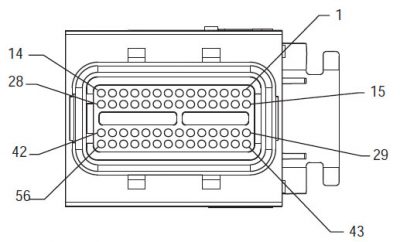
Hợp phần Hệ thống MY08 Identification:
[/fusion_text][/fusion_builder_column][fusion_builder_column type=”2_3layout=”1_2spacing=”” center_content=nolink=”” target=_selfmin_height=”” hide_on_mobile=small-visibility,medium-visibility,large-visibilityclass=”” id=”” background_color=”” background_image=”” background_image_id=”” background_position=left topbackground_repeat=no-repeathover_type=noneborder_size=”0″ border_color=”” border_style=solidborder_position=allpadding_top=”” padding_right=”” padding_bottom=”” padding_left=”” margin_top=”” margin_bottom=”” animation_type=”” animation_direction=leftanimation_speed=”0.3″ animation_offset=”” last=no”][fusion_imageframe image_id=”13934|400″ max_width=”” style_type=”” blur=”” stylecolor=”” hover_type=nonebordersize=”” bordercolor=”” borderradius=”” align=centerlightbox=nogallery_id=”” lightbox_image=”” lightbox_image_id=”” alt=”Delphi 56-Way giao phối Connector Xem” link=”” linktarget=_selfhide_on_mobile=small-visibility,medium-visibility,large-visibilityclass=”” id=”” animation_type=”” animation_direction=leftanimation_speed=”0.3″ animation_offset=””]https://www.globaltransmissionsupply.com/wp-content/uploads/Delphi-56-Way-Mating-Connector-View-400×242.jpg[/fusion_imageframe][fusion_text columns=”” column_min_width=”” column_spacing=”” rule_style=defaultrule_size=”” rule_color=”” hide_on_mobile=small-visibility,medium-visibility,large-visibilityclass=”” id=””]

Delphi 56-Way giao phối Connector Xem
[/fusion_text][/fusion_builder_column][fusion_builder_column type=”1_3layout=”1_2spacing=”” center_content=nolink=”” target=_selfmin_height=”” hide_on_mobile=small-visibility,medium-visibility,large-visibilityclass=”” id=”” background_color=”” background_image=”” background_image_id=”” background_position=left topbackground_repeat=no-repeathover_type=noneborder_size=”0″ border_color=”” border_style=solidborder_position=allpadding_top=”” padding_right=”” padding_bottom=”” padding_left=”” margin_top=”” margin_bottom=”” animation_type=”” animation_direction=leftanimation_speed=”0.3″ animation_offset=”” last=no”][fusion_imageframe image_id=”13935|fullmax_width=”” style_type=”” blur=”” stylecolor=”” hover_type=nonebordersize=”” bordercolor=”” borderradius=”” align=centerlightbox=nogallery_id=”” lightbox_image=”” lightbox_image_id=”” alt=”Sensor nhiệt độ” link=”” linktarget=_selfhide_on_mobile=small-visibility,medium-visibility,large-visibilityclass=”” id=”” animation_type=”” animation_direction=leftanimation_speed=”0.3″ animation_offset=””]https://www.globaltransmissionsupply.com/wp-content/uploads/Temperature-Sensor.jpg[/fusion_imageframe][fusion_text columns=”” column_min_width=”” column_spacing=”” rule_style=defaultrule_size=”” rule_color=”” hide_on_mobile=small-visibility,medium-visibility,large-visibilityclass=”” id=””]

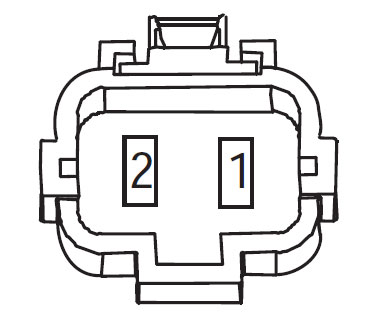
Sensor nhiệt độ
(Harness Xem – Mặt trước)

[/fusion_text][/fusion_builder_column][fusion_builder_column type=”1_1layout=”1_1spacing=”” center_content=nolink=”” target=_selfmin_height=”” hide_on_mobile=small-visibility,medium-visibility,large-visibilityclass=”” id=”” background_image_id=”” background_color=”#000000″ background_image=”” background_position=left topundefined=”” background_repeat=no-repeathover_type=noneborder_size=”0″ border_color=”” border_style=solidborder_position=allpadding_top=”” padding_right=”” padding_bottom=”” padding_left=”” margin_top=”” margin_bottom=”10″ animation_type=”” animation_direction=leftanimation_speed=”0.3″ animation_offset=”” last=no”][fusion_text columns=”” column_min_width=”” column_spacing=”” rule_style=defaultrule_size=”” rule_color=”” hide_on_mobile=small-visibility,medium-visibility,large-visibilityclass=”” id=””]

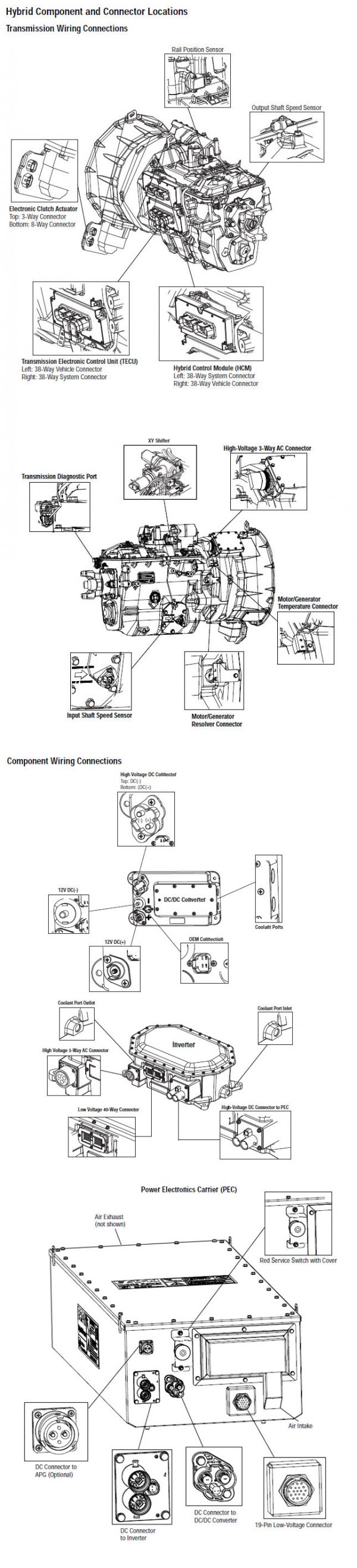
CHÚ THÍCH: Tham khảo đến Eaton Component Hybrid và kết nối Location cho địa điểm kết nối trong hệ thống MY08
[/fusion_text][/fusion_builder_column][fusion_builder_column type=”1_1layout=”1_1spacing=”” center_content=nolink=”” target=_selfmin_height=”” hide_on_mobile=small-visibility,medium-visibility,large-visibilityclass=”” id=”” background_color=”” background_image=”” background_image_id=”” background_position=left topbackground_repeat=no-repeathover_type=noneborder_size=”0″ border_color=”” border_style=solidborder_position=allpadding_top=”” padding_right=”” padding_bottom=”” padding_left=”” margin_top=”” margin_bottom=”” animation_type=”” animation_direction=leftanimation_speed=”0.3″ animation_offset=”” last=no”][fusion_imageframe image_id=”13904|800″ max_width=”” style_type=”” blur=”” stylecolor=”” hover_type=nonebordersize=”” bordercolor=”” borderradius=”” align=centerlightbox=nogallery_id=”” lightbox_image=”” lightbox_image_id=”” alt=”kết nối thành phần” link=”” linktarget=_selfhide_on_mobile=small-visibility,medium-visibility,large-visibilityclass=”” id=”” animation_type=”” animation_direction=leftanimation_speed=”0.3″ animation_offset=””]https://www.globaltransmissionsupply.com/wp-content/uploads/eaton-component-connector-800×380.jpg[/fusion_imageframe][/fusion_builder_column][/fusion_builder_row][/fusion_builder_container][fusion_builder_container hundred_percent=nohundred_percent_height=nohundred_percent_height_scroll=nohundred_percent_height_center_content=yesequal_height_columns=nomenu_anchor=”” hide_on_mobile=small-visibility,medium-visibility,large-visibilitystatus=publishedpublish_date=”” class=”” id=”” background_color=”” background_image=”” background_position=center centerbackground_repeat=no-repeatfade=nobackground_parallax=noneenable_mobile=noparallax_speed=”0.3″ video_mp4=”” video_webm=”” video_ogv=”” video_url=”” video_aspect_ratio=”16:9″ video_loop=yesvideo_mute=yesvideo_preview_image=”” border_size=”” border_color=”” border_style=solidmargin_top=”” margin_bottom=”” padding_top=”” padding_right=”” padding_bottom=”” padding_left=””][fusion_builder_row][fusion_builder_column type=”1_1layout=”1_1spacing=”” center_content=nolink=”” target=_selfmin_height=”” hide_on_mobile=small-visibility,medium-visibility,large-visibilityclass=”” id=”” background_color=”” background_image=”” background_image_id=”” background_position=left topbackground_repeat=no-repeathover_type=noneborder_size=”0″ border_color=”” border_style=solidborder_position=allpadding_top=”” padding_right=”” padding_bottom=”” padding_left=”” margin_top=”” margin_bottom=”” animation_type=”” animation_direction=leftanimation_speed=”0.3″ animation_offset=”” last=no”][fusion_text columns=”” column_min_width=”” column_spacing=”” rule_style=defaultrule_size=”” rule_color=”” hide_on_mobile=small-visibility,medium-visibility,large-visibilityclass=”” id=””]

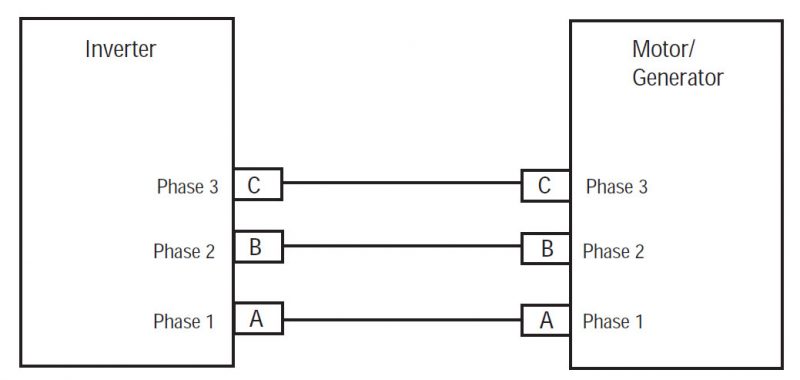
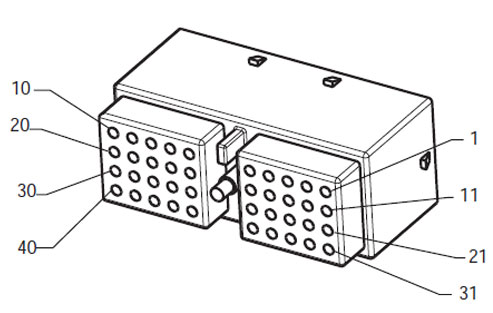
Hợp phần Hệ thống MY09 Identification:
[/fusion_text][/fusion_builder_column][fusion_builder_column type=”2_3layout=”1_2spacing=”” center_content=nolink=”” target=_selfmin_height=”” hide_on_mobile=small-visibility,medium-visibility,large-visibilityclass=”” id=”” background_color=”” background_image=”” background_image_id=”” background_position=left topbackground_repeat=no-repeathover_type=noneborder_size=”0″ border_color=”” border_style=solidborder_position=allpadding_top=”” padding_right=”” padding_bottom=”” padding_left=”” margin_top=”” margin_bottom=”” animation_type=”” animation_direction=leftanimation_speed=”0.3″ animation_offset=”” last=no”][fusion_imageframe image_id=”14000|fullmax_width=”” style_type=”” blur=”” stylecolor=”” hover_type=nonebordersize=”” bordercolor=”” borderradius=”” align=centerlightbox=nogallery_id=”” lightbox_image=”” lightbox_image_id=”” alt=”Deutsch 40-Way giao phối Connector Xem” link=”” linktarget=_selfhide_on_mobile=small-visibility,medium-visibility,large-visibilityclass=”” id=”” animation_type=”” animation_direction=leftanimation_speed=”0.3″ animation_offset=””]https://www.globaltransmissionsupply.com/wp-content/uploads/Deutsch-40-Way-Mating-Connector-View.jpg[/fusion_imageframe][fusion_text columns=”” column_min_width=”” column_spacing=”” rule_style=defaultrule_size=”” rule_color=”” hide_on_mobile=small-visibility,medium-visibility,large-visibilityclass=”” id=””]

Delphi 40-Way giao phối Connector Xem
[/fusion_text][/fusion_builder_column][fusion_builder_column type=”1_3layout=”1_2spacing=”” center_content=nolink=”” target=_selfmin_height=”” hide_on_mobile=small-visibility,medium-visibility,large-visibilityclass=”” id=”” background_color=”” background_image=”” background_image_id=”” background_position=left topbackground_repeat=no-repeathover_type=noneborder_size=”0″ border_color=”” border_style=solidborder_position=allpadding_top=”” padding_right=”” padding_bottom=”” padding_left=”” margin_top=”” margin_bottom=”” animation_type=”” animation_direction=leftanimation_speed=”0.3″ animation_offset=”” last=no”][fusion_imageframe image_id=”14001|fullmax_width=”” style_type=”” blur=”” stylecolor=”” hover_type=nonebordersize=”” bordercolor=”” borderradius=”” align=centerlightbox=nogallery_id=”” lightbox_image=”” lightbox_image_id=”” alt=”Đầu cuối – Khai thác kết nối cảm biến nhiệt độ” link=”” linktarget=_selfhide_on_mobile=small-visibility,medium-visibility,large-visibilityclass=”” id=”” animation_type=”” animation_direction=leftanimation_speed=”0.3″ animation_offset=””]https://www.globaltransmissionsupply.com/wp-content/uploads/Eaton-Fuller-Terminal-Side-Harness-Connector.jpg[/fusion_imageframe][fusion_text columns=”” column_min_width=”” column_spacing=”” rule_style=defaultrule_size=”” rule_color=”” hide_on_mobile=small-visibility,medium-visibility,large-visibilityclass=”” id=””]

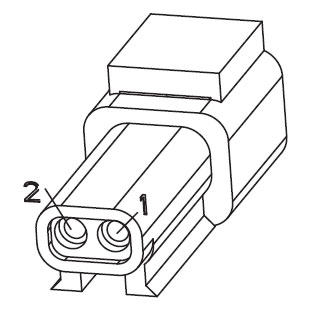
Đầu cuối – Khai thác kết nối cảm biến nhiệt độ

[/fusion_text][/fusion_builder_column][fusion_builder_column type=”1_1layout=”1_1spacing=”” center_content=nolink=”” target=_selfmin_height=”” hide_on_mobile=small-visibility,medium-visibility,large-visibilityclass=”” id=”” background_image_id=”” background_color=”#000000″ background_image=”” background_position=left topundefined=”” background_repeat=no-repeathover_type=noneborder_size=”0″ border_color=”” border_style=solidborder_position=allpadding_top=”” padding_right=”” padding_bottom=”” padding_left=”” margin_top=”10″ margin_bottom=”” animation_type=”” animation_direction=leftanimation_speed=”0.3″ animation_offset=”” last=no”][fusion_text columns=”” column_min_width=”” column_spacing=”” rule_style=defaultrule_size=”” rule_color=”” hide_on_mobile=small-visibility,medium-visibility,large-visibilityclass=”” id=””]

CHÚ THÍCH: Tham khảo đến Eaton Component Hybrid và kết nối Location cho địa điểm kết nối trong hệ thống MY09.
[/fusion_text][/fusion_builder_column][fusion_builder_column type=”1_1layout=”1_1spacing=”” center_content=nolink=”” target=_selfmin_height=”” hide_on_mobile=small-visibility,medium-visibility,large-visibilityclass=”” id=”” background_color=”” background_image=”” background_image_id=”” background_position=left topbackground_repeat=no-repeathover_type=noneborder_size=”0″ border_color=”” border_style=solidborder_position=allpadding_top=”” padding_right=”” padding_bottom=”” padding_left=”” margin_top=”” margin_bottom=”” animation_type=”” animation_direction=leftanimation_speed=”0.3″ animation_offset=”” last=no”][fusion_imageframe image_id=”14002|600″ max_width=”” style_type=”” blur=”” stylecolor=”” hover_type=nonebordersize=”” bordercolor=”” borderradius=”” align=centerlightbox=nogallery_id=”” lightbox_image=”” lightbox_image_id=”” alt=Eaton Fuller inverter motor/generatorlink=”” linktarget=_selfhide_on_mobile=small-visibility,medium-visibility,large-visibilityclass=”” id=”” animation_type=”” animation_direction=leftanimation_speed=”0.3″ animation_offset=””]https://www.globaltransmissionsupply.com/wp-content/uploads/Inverter-motor-generator-MY09-600×271.jpg[/fusion_imageframe][/fusion_builder_column][/fusion_builder_row][/fusion_builder_container][fusion_builder_container hundred_percent=nohundred_percent_height=nohundred_percent_height_scroll=nohundred_percent_height_center_content=yesequal_height_columns=nomenu_anchor=”” hide_on_mobile=small-visibility,medium-visibility,large-visibilitystatus=publishedpublish_date=”” class=”” id=”” background_color=”” background_image=”” background_position=center centerbackground_repeat=no-repeatfade=nobackground_parallax=noneenable_mobile=noparallax_speed=”0.3″ video_mp4=”” video_webm=”” video_ogv=”” video_url=”” video_aspect_ratio=”16:9″ video_loop=yesvideo_mute=yesvideo_preview_image=”” border_size=”” border_color=”” border_style=solidmargin_top=”” margin_bottom=”” padding_top=”” padding_right=”” padding_bottom=”” padding_left=””][fusion_builder_row][fusion_builder_column type=”1_1layout=”1_1spacing=”” center_content=nolink=”” target=_selfmin_height=”” hide_on_mobile=small-visibility,medium-visibility,large-visibilityclass=”” id=”” background_color=”” background_image=”” background_image_id=”” background_position=left topbackground_repeat=no-repeathover_type=noneborder_size=”0″ border_color=”” border_style=solidborder_position=allpadding_top=”” padding_right=”” padding_bottom=”” padding_left=”” margin_top=”” margin_bottom=”” animation_type=”” animation_direction=leftanimation_speed=”0.3″ animation_offset=”” last=no”][fusion_modal name=warnings_cautionstitle=”cảnh báo & Lưu ý” size=largebackground=”” border_color=”” show_footer=yesclass=”” id=””]

nguy hiểm: Danger cho thấy bạn sẽ bị tổn thương nghiêm trọng hoặc bị giết nếu không tuân theo các thủ tục chỉ định.
Cảnh báo: Cảnh báo chỉ ra một mối nguy hiểm ngay lập tức, mà có thể dẫn đến thương tích cá nhân nghiêm trọng nếu bạn không tuân theo các thủ tục chỉ định.
Chú ý: Chú ý chỉ xe hoặc tài sản thiệt hại có thể xảy ra nếu bạn không tuân theo các thủ tục chỉ định.

chú thích: Lưu ý chỉ ra chi tiết bổ sung mà sẽ hỗ trợ trong việc chẩn đoán hoặc sửa chữa một bộ phận / hệ thống.

Thực hiện theo các thủ tục quy định trong thứ tự được chỉ để tránh thương tích cá nhân:

1. Nếu nón cao áp là xung quanh chiếc xe và khóa được cài đặt trên PEC, người duy nhất được phép khởi động xe là người ký thẻ khóa.
2. Trước khi làm việc trên một chiếc xe hoặc rời khỏi buồng lái trong khi động cơ đang chạy, bạn nên đặt các đòn bẩy thay đổi trong “N” đặt phanh đậu xe, và chặn các bánh xe.
3. Vì lý do an toàn, luôn tham gia vào các dịch vụ hệ thống phanh trước khi lựa chọn vị trí thiết bị từ “N.”
4. Trước khi bắt đầu một chiếc xe luôn được ngồi ở ghế của người lái xe, chọn “N” trên điều khiển thay đổi, và thiết lập hệ thống phanh xe.
5. Trong xe có ePTO, động cơ và / hoặc
Motor / Generator có thể bắt đầu trong chế độ ePTO. Không bao giờ thực hiện bất kỳ bảo dưỡng hoặc làm việc trên xe, trong khi ở chế độ này.
6. 12-Volt Pin tích cực (+) và tiêu cực (-) phải bị ngắt kết nối trước khi bất kỳ hàn trên bất kỳ trang bị lai xe.

Chú ý: Thực hiện theo các thủ tục quy định trong thứ tự được chỉ để tránh bị trục trặc hoặc hư hỏng.
Chú ý: Đừng thả phanh đậu xe hoặc cố chọn một thiết bị cho đến khi áp suất không khí ở mức độ chính xác.
Chú ý: Để tránh thiệt hại cho việc truyền tải trong kéo ra đòn bẩy thay đổi trong “N” và nâng bánh dẫn động lên khỏi mặt đất hoặc ngắt kết nối driveline.

Cảnh báo cao áp & Lưu ý

  • Sử dụng CO2 hoặc khô Hóa bình chữa cháy.
  • Hệ thống dây điện cao áp được bao phủ trong cách cam hoặc ống phức tạp và được đánh dấu bằng nhãn cảnh báo tại đầu nối.
  • Tất cả Eaton® lai Diesel / Xe điện sẽ được đánh dấu ‘lai’ ở bên ngoài của xe, cùng với các nhãn thay đổi trên bảng điều khiển.
  • Tham khảo OEM cho vị trí cụ thể của khung gầm có gắn linh kiện hybrid.
  • ĐỪNG cắt vào cáp cao áp cam.
  • ĐỪNG cắt thành hoặc mở PEC.
  • ĐỪNG cắt thành hoặc mở Chuyển đổi DC / DC.
  • ĐỪNG cắt thành hoặc mở Inverter.

Một vùng đệm phải được thiết lập và cao áp cách điện găng tay cao su (lớp học 0 với bảo vệ da) được yêu cầu trước khi làm việc trên cao áp. Thất bại trong việc làm theo những hướng dẫn này có thể dẫn đến thương tích cá nhân nghiêm trọng hoặc tử vong.
Găng tay cao su cách nhiệt phải được đeo khi làm việc trên các hệ thống cao áp là lớp 0 với bảo vệ da. Găng tay cao su phải được kiểm tra trước khi sử dụng MỌI theo thủ tục cao su găng tay cách kiểm tra tìm thấy trong “Công cụ Chẩn đoán / Dịch vụ Ấn phẩm” trên trang 6. Thất bại trong việc làm theo những hướng dẫn này có thể dẫn đến thương tích cá nhân nghiêm trọng hoặc tử vong.
Trước khi kiểm tra hoặc làm việc trên bất kỳ loại cáp cao áp hoặc các thành phần “Dịch vụ cao áp Shutdown và Power-Up Thủ tục” trên trang 4 nên được tuân thủ. Thất bại trong việc làm theo những hướng dẫn này có thể dẫn đến thương tích cá nhân nghiêm trọng hoặc tử vong.
Các thiết bị Lockout và Tagout chỉ nên được gỡ bỏ bởi các kỹ thuật viên mà đặt các thiết bị Lockout và Tagout trên xe. Thất bại trong việc làm theo những hướng dẫn này có thể dẫn đến thương tích cá nhân nghiêm trọng hoặc tử vong.
găng tay cao su cách điện cao áp (lớp học 0 với bảo vệ da) phải được đeo khi làm việc trên bất kỳ
cáp cao áp. Các “Shutdown cao Voltage Dịch vụ và Power-Up Thủ tục” trên trang 4 phải được tuân thủ trước khi loại bỏ bất kỳ loại cáp cao áp. Thất bại trong việc làm theo những hướng dẫn này có thể dẫn đến thương tích cá nhân nghiêm trọng hoặc tử vong.
cáp cao áp và hệ thống dây điện là cam và chứa một nhãn cảnh báo tại đầu nối. linh kiện cao áp được đánh dấu bằng nhãn. găng tay cao su cách điện cao áp (lớp học 0 với bảo vệ da) phải được sử dụng khi làm việc trên bất kỳ của các thành phần. Thất bại trong việc làm theo những hướng dẫn này có thể dẫn đến thương tích cá nhân nghiêm trọng hoặc tử vong.

High-Voltage Thủ tục Dịch vụ Shutdown
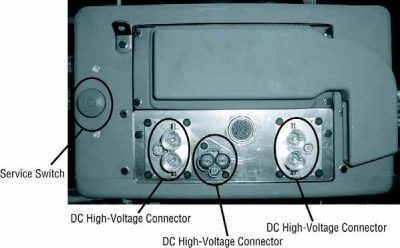
High-Voltage Shutdown Dịch vụ và thủ tục Power-Up1. Làm theo “High-Voltage Work Area” thủ tục.
2. Xác định vị trí đỏ PEC Dịch vụ Chuyển dữ liệu trên phía trước của PEC và đẩy tắt.
3. Tháo Dịch vụ Chuyển Bìa và cài đặt các giá đỡ Lockout (J48506).
4. tag Vặn chặt vào Lockout Bracket.
5. Đảm bảo PEC Dịch vụ Chuyển không thể di chuyển từ vị trí tắt.
6. Cho phép hệ thống để thiết lập tối thiểu 5 phút để xả điện áp cao.
7. Kết nối ServiceRanger và xem các dữ liệu Màn hình PID 116 gọi là “High-Voltage tiềm năng Pin.” Sử dụng SPN 520323 để kết nối J1939 “Battery Voltage RB” (Hộp rơ-le).
8. Điện áp nên 30 volt hoặc ít hơn. Nếu điện áp là trên 30 volt, không làm việc trên chiếc xe và liên hệ với Eaton® tại 1-800-826-HELP (4357).
9. Bật khóa điện ra và tiến hành sửa chữa hoặc bước khắc phục sự cố.
chú thích: Điện áp xuống hết khi phím tắt.

Thủ tục cao Voltage Sở Điện Lực-Up

1. Cài đặt tất cả kết nối cao áp vào vị trí của họ bị khóa.
2. Nếu bạn là người làm việc trên xe, loại bỏ các Lockout Bracket và thẻ.
3. Cài đặt lại Lockout Bracket qua dịch vụ chuyển mạch.
4. Kéo Dịch vụ Chuyển ra và cho xe bộ cho 2 từ phút.
5. Bắt đầu xe khi cần thiết.

[/fusion_modal][fusion_modal name=component_locationtitle=”Eaton Component Hybrid và kết nối Location ” size=largebackground=”#ffffffborder_color=”” show_footer=yesclass=”” id=””]
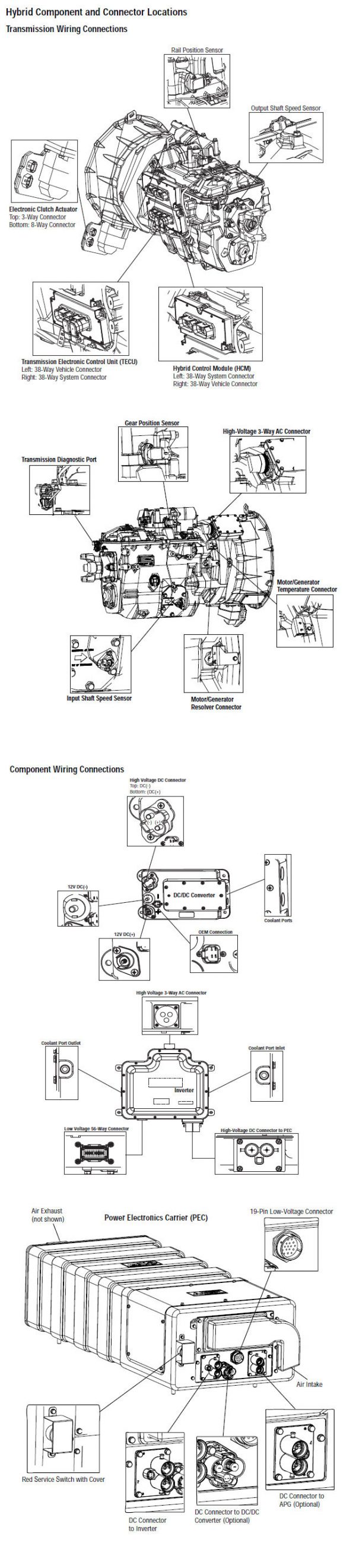
Eaton Component Hybrid và địa điểm kết nối hệ thống MY08

[/fusion_modal][fusion_modal name=component_location2title=”Eaton Component Hybrid và kết nối Location Systems MY09” size=largebackground=”#ffffffborder_color=”” show_footer=yesclass=”” id=””]

Eaton Component Hybrid và địa điểm kết nối hệ thống MY09

[/fusion_modal][/fusion_builder_column][/fusion_builder_row][/fusion_builder_container][fusion_builder_container hundred_percent=nohundred_percent_height=nohundred_percent_height_scroll=nohundred_percent_height_center_content=yesequal_height_columns=nomenu_anchor=”” hide_on_mobile=small-visibility,medium-visibility,large-visibilitystatus=publishedpublish_date=”” class=”” id=”” background_color=”” background_image=”” background_position=center centerbackground_repeat=no-repeatfade=nobackground_parallax=noneenable_mobile=noparallax_speed=”0.3″ video_mp4=”” video_webm=”” video_ogv=”” video_url=”” video_aspect_ratio=”16:9″ video_loop=yesvideo_mute=yesvideo_preview_image=”” border_size=”” border_color=”” border_style=solidmargin_top=”” margin_bottom=”” padding_top=”” padding_right=”” padding_bottom=”” padding_left=””][fusion_builder_row][fusion_builder_column type=”1_1layout=”1_1spacing=”” center_content=nolink=”” target=_selfmin_height=”” hide_on_mobile=small-visibility,medium-visibility,large-visibilityclass=”” id=”” background_color=”” background_image=”” background_image_id=”” background_position=left topbackground_repeat=no-repeathover_type=noneborder_size=”0″ border_color=”” border_style=solidborder_position=allpadding_top=”” padding_right=”” padding_bottom=”” padding_left=”” margin_top=”” margin_bottom=”” animation_type=”” animation_direction=leftanimation_speed=”0.3″ animation_offset=”” last=no”][fusion_content_boxes layout=clean-horizontalcolumns=”1″ title_size=”18pxheading_size=”3″ title_color=”#ffffffbody_color=”#ffffffbackgroundcolor=”#4f4f4ficon=”” iconflip=”” iconrotate=”” iconspin=noiconcolor=”” icon_circle=”” icon_circle_radius=”” circlecolor=”” circlebordersize=”” circlebordercolor=”” outercirclebordersize=”” outercirclebordercolor=”” icon_size=”” icon_hover_type=”” hover_accent_color=”#f41000image=”” image_id=”” image_width=”” image_height=”” link_type=”” button_span=”” link_area=”” link_target=”” icon_align=leftanimation_type=”” animation_delay=”” animation_offset=”” animation_direction=leftanimation_speed=”0.3″ margin_top=”” margin_bottom=”” hide_on_mobile=small-visibility,medium-visibility,large-visibilityclass=”” id=””][fusion_content_box title=BẬC THANG 1. Kiểm tra tình trạng mã lỗi hoạt động hoặc không hoạt động.backgroundcolor=”” icon=”” iconflip=”” iconrotate=”” iconspin=noiconcolor=”” circlecolor=”” circlebordersize=”” circlebordercolor=”” outercirclebordersize=”” outercirclebordercolor=”” image=”” image_id=”” image_width=”” image_height=”” link=”” linktext=”Đọc thêm” link_target=”” animation_type=”” animation_direction=leftanimation_speed=”0.3″ animation_offset=””]

  1. Xem và làm theo cảnh báo & Lưu ý.
  2. Lấy mã lỗi hoạt động và FMIS với ServiceRanger sử dụng chẩn đoán kết nối 9-Way.
    Cảnh báo: Xem High-Voltage Shutdown Dịch vụ và thủ tục Power-Up. Thực hiện theo các thủ tục để tránh sốc, đốt hoặc tử vong do không đúng cách xử lý điện áp cao.
  3. Bật khoa.
  4. Find initial temperature by selecting the “Data Monitor” option and view PID 113 “Motor/Generator Temperature” in the “Power Electronics” list.
  5. Xem PID 113 một lần nữa sau 20 từ phút:
    • Nếu PID 113 “Motor / Generator Nhiệt độ” giảm từ bài đọc thứ nhất, chuyển sang Bước 2.
    • Nếu PID 113 “Motor / Generator Nhiệt độ” vẫn giữ nguyên, chuyển sang Bước 8.

[/fusion_content_box][/fusion_content_boxes][fusion_content_boxes layout=clean-horizontalcolumns=”2″ title_size=”18pxheading_size=”3″ title_color=”#ffffffbody_color=”#ffffffbackgroundcolor=”#4f4f4ficon=”” iconflip=”” iconrotate=”” iconspin=noiconcolor=”” icon_circle=”” icon_circle_radius=”” circlecolor=”” circlebordersize=”” circlebordercolor=”” outercirclebordersize=”” outercirclebordercolor=”” icon_size=”” icon_hover_type=”” hover_accent_color=”” image=”” image_id=”” image_width=”” image_height=”” link_type=”” button_span=”” link_area=”” link_target=”” icon_align=leftanimation_type=”” animation_delay=”” animation_offset=”” animation_direction=leftanimation_speed=”0.3″ margin_top=”” margin_bottom=”” hide_on_mobile=small-visibility,medium-visibility,large-visibilityclass=”” id=””][fusion_content_box title=BẬC THANG 2. Xác minh mức độ hệ thống nước làm mát lai.backgroundcolor=”” icon=”” iconflip=”” iconrotate=”” iconspin=noiconcolor=”” circlecolor=”” circlebordersize=”” circlebordercolor=”” outercirclebordersize=”” outercirclebordercolor=”” image=”” image_id=”” image_width=”” image_height=”” link=”” linktext=”Đọc thêm” link_target=”” animation_type=”” animation_direction=leftanimation_speed=”0.3″ animation_offset=””]

  1. Phím tắt.
  2. Quan sát mực nước làm mát sau khi hệ thống đã hạ nhiệt để đảm bảo nếu được lấp đầy đến mức thích hợp:
    • Nếu nước làm mát là trong giới hạn khuyến cáo, chuyển sang Bước 3.
    • Nếu nước làm mát nằm dưới giới hạn khuyến cáo, tham khảo các OEM cho loại nước làm mát và làm thủ tục. Kiểm tra nguồn nước làm mát rò rỉ. When refilling the system it should be pressurized or vacuum bleed of air to ensure the coolant flows properly during normal operation.

[/fusion_content_box][fusion_content_box title=BẬC THANG 3. Xác minh tính toàn vẹn của các thành phần hệ thống làm mát lai.backgroundcolor=”” icon=”” iconflip=”” iconrotate=”” iconspin=noiconcolor=”” circlecolor=”” circlebordersize=”” circlebordercolor=”” outercirclebordersize=”” outercirclebordercolor=”” image=”” image_id=”” image_width=”” image_height=”” link=”” linktext=”Đọc thêm” link_target=”” animation_type=”” animation_direction=leftanimation_speed=”0.3″ animation_offset=””]

  1. Phím tắt
  2. Nhìn bề ngoài kiểm tra chất lỏng hệ thống làm mát tản nhiệt lai cho các mảnh vụn, cản trở luồng không khí, hoặc uốn cong sắc nét trong các dòng nước làm mát:
    • Nếu tản nhiệt là không có cặn và các dòng nước làm mát không cúi mạnh, chuyển sang Bước 4.
    • Nếu tản nhiệt có mảnh vụn, các luồng không khí bị che khuất, hoặc các dòng nước làm mát được uốn cong mạnh, sửa chữa mối quan tâm, sau đó quay trở lại bước 10.

[/fusion_content_box][/fusion_content_boxes][fusion_content_boxes layout=clean-horizontalcolumns=”2″ title_size=”18pxheading_size=”3″ title_color=”#ffffffbody_color=”#ffffffbackgroundcolor=”#4f4f4ficon=”” iconflip=”” iconrotate=”” iconspin=noiconcolor=”” icon_circle=”” icon_circle_radius=”” circlecolor=”” circlebordersize=”” circlebordercolor=”” outercirclebordersize=”” outercirclebordercolor=”” icon_size=”” icon_hover_type=”” hover_accent_color=”” image=”” image_id=”” image_width=”” image_height=”” link_type=”” button_span=”” link_area=”” link_target=”” icon_align=leftanimation_type=”” animation_delay=”” animation_offset=”” animation_direction=leftanimation_speed=”0.3″ margin_top=”” margin_bottom=”” hide_on_mobile=small-visibility,medium-visibility,large-visibilityclass=”” id=””][fusion_content_box title=BẬC THANG 4. Kiểm tra hoạt động của bơm làm mát lai.backgroundcolor=”” icon=”” iconflip=”” iconrotate=”” iconspin=noiconcolor=”” circlecolor=”” circlebordersize=”” circlebordercolor=”” outercirclebordersize=”” outercirclebordercolor=”” image=”” image_id=”” image_width=”” image_height=”” link=”” linktext=”Đọc thêm” link_target=”” animation_type=”” animation_direction=leftanimation_speed=”0.3″ animation_offset=””]

  1. Bật khoa.
  2. Kết nối ServiceRanger đến 9-Way kết nối trong xe taxi.
  3. Chọn chức năng tùy chọn nâng cao sản phẩm và chọn “làm mát bơm” tùy chọn.
  4. Kích hoạt tính năng “làm mát bơm” tùy chọn:
    • Nếu làm mát bơm bật, chuyển sang Bước 5.
    • Nếu làm mát bơm không bật, chuyển sang Bước 6.

[/fusion_content_box][fusion_content_box title=BƯỚC 5.Verify hoạt động của hybrid Heat Exchanger Fan.backgroundcolor=”” icon=”” iconflip=”” iconrotate=”” iconspin=noiconcolor=”” circlecolor=”” circlebordersize=”” circlebordercolor=”” outercirclebordersize=”” outercirclebordercolor=”” image=”” image_id=”” image_width=”” image_height=”” link=”” linktext=”Đọc thêm” link_target=”” animation_type=”” animation_direction=leftanimation_speed=”0.3″ animation_offset=””]

  1. Chọn chức năng tùy chọn nâng cao sản phẩm và chọn “Heat Exchanger Fan” tùy chọn.
  2. Kích hoạt tính năng tùy chọn Heat Exchanger Fan:
    • Nếu trao đổi nhiệt Fan bật, hệ thống cần phải được tẩy không khí, cho phép làm mát chảy. Chảy máu không khí bằng cách sử dụng một công cụ aùp hệ thống nước làm mát hoặc một công cụ chân không, sau đó quay trở lại bước 10.
    • Nếu trao đổi nhiệt Quạt không bật, chuyển sang Bước 8.

[/fusion_content_box][/fusion_content_boxes][fusion_content_boxes layout=clean-horizontalcolumns=”2″ title_size=”18pxheading_size=”3″ title_color=”#ffffffbody_color=”#ffffffbackgroundcolor=”#4f4f4ficon=”” iconflip=”” iconrotate=”” iconspin=noiconcolor=”” icon_circle=”” icon_circle_radius=”” circlecolor=”” circlebordersize=”” circlebordercolor=”” outercirclebordersize=”” outercirclebordercolor=”” icon_size=”” icon_hover_type=”” hover_accent_color=”” image=”” image_id=”” image_width=”” image_height=”” link_type=”” button_span=”” link_area=”” link_target=”” icon_align=leftanimation_type=”” animation_delay=”” animation_offset=”” animation_direction=leftanimation_speed=”0.3″ margin_top=”” margin_bottom=”” hide_on_mobile=small-visibility,medium-visibility,large-visibilityclass=”” id=””][fusion_content_box title=BẬC THANG 6. Xác nhận điện áp tại bơm làm mát lai.backgroundcolor=”” icon=”” iconflip=”” iconrotate=”” iconspin=noiconcolor=”” circlecolor=”” circlebordersize=”” circlebordercolor=”” outercirclebordersize=”” outercirclebordercolor=”” image=”” image_id=”” image_width=”” image_height=”” link=”” linktext=”Đọc thêm” link_target=”” animation_type=”” animation_direction=leftanimation_speed=”0.3″ animation_offset=””]

  1. Bật khoa.
  2. Ngắt kết nối làm mát bơm 2-Way nối.
  3. Chọn “Advanced Sản phẩm Chức năng” tùy chọn và chọn “làm mát bơm.”
  4. Kích hoạt tính năng “làm mát bơm” tùy chọn:
  5. điện áp đo tại 2-Way nối từ A đến Pin Pin B:
    • Nếu điện áp giữa A và Pin Pin B là ± 0,2 volt điện áp pin, tham khảo OEM cho mối quan tâm làm mát bơm.
    • Nếu điện áp giữa A và Pin Pin B nằm ngoài giới hạn, tham khảo OEM cho các thủ tục sửa chữa trên Cooling bơm điện Harness hoặc cầu chì bị hư hỏng.

[/fusion_content_box][fusion_content_box title=BƯỚC 7.Verify điện áp tại lai Heat Exchanger Fan.backgroundcolor=”” icon=”” iconflip=”” iconrotate=”” iconspin=noiconcolor=”” circlecolor=”” circlebordersize=”” circlebordercolor=”” outercirclebordersize=”” outercirclebordercolor=”” image=”” image_id=”” image_width=”” image_height=”” link=”” linktext=”Đọc thêm” link_target=”” animation_type=”” animation_direction=leftanimation_speed=”0.3″ animation_offset=””]

  1. Bật khoa.
  2. Disconnect the Heat Exchanger Fan 2- kết nối đường.
  3. Chọn “Advanced Sản phẩm Chức năng” tùy chọn và chọn “Heat Exchanger Fan.”
  4. Kích hoạt tính năng tùy chọn Heat Exchanger Fan:
  5. điện áp đo tại 2-Way nối từ A đến Pin Pin B:
    • Nếu điện áp giữa A và Pin Pin B là ± 0,2 volt điện áp pin, tham khảo OEM cho Heat Exchanger Fan quan tâm.
    • Nếu điện áp giữa A và Pin Pin B nằm ngoài giới hạn, tham khảo OEM cho các thủ tục sửa chữa trên trao đổi nhiệt Quạt điện Harness hoặc cầu chì bị hư hỏng.

[/fusion_content_box][/fusion_content_boxes][fusion_content_boxes layout=clean-horizontalcolumns=”2″ title_size=”18pxheading_size=”3″ title_color=”#ffffffbody_color=”#ffffffbackgroundcolor=”#4f4f4ficon=”” iconflip=”” iconrotate=”” iconspin=noiconcolor=”” icon_circle=”” icon_circle_radius=”” circlecolor=”” circlebordersize=”” circlebordercolor=”” outercirclebordersize=”” outercirclebordercolor=”” icon_size=”” icon_hover_type=”” hover_accent_color=”” image=”” image_id=”” image_width=”” image_height=”” link_type=”” button_span=”” link_area=”” link_target=”” icon_align=leftanimation_type=”” animation_delay=”” animation_offset=”” animation_direction=leftanimation_speed=”0.3″ margin_top=”” margin_bottom=”” hide_on_mobile=small-visibility,medium-visibility,large-visibilityclass=”” id=””][fusion_content_box title=BẬC THANG 8. Xác minh tính liên tục của mạch Inverter.backgroundcolor=”” icon=”” iconflip=”” iconrotate=”” iconspin=noiconcolor=”” circlecolor=”” circlebordersize=”” circlebordercolor=”” outercirclebordersize=”” outercirclebordercolor=”” image=”” image_id=”” image_width=”” image_height=”” link=”” linktext=”Đọc thêm” link_target=”” animation_type=”” animation_direction=leftanimation_speed=”0.3″ animation_offset=””]

  1. Phím tắt.
  2. Ngắt kết nối Inverter 56-Way nối.
  3. Chọn “Advanced Sản phẩm Chức năng” tùy chọn và chọn “làm mát bơm.”
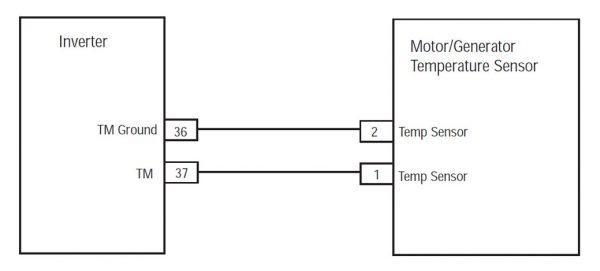
  4. Measure resistance between Pin 38 và Pin 50(MY08) / 36 & 37 (MY09) và Pin 50 (MY08) / 37 (MY09) xuống đất của Inverter 56-Way nối.
    • Nếu kháng là 0.8K-301.7K ohms giữa Pin 50 và Pin 38 và kháng giữa Pin 50 và mặt đất là 10K ohms hoặc cao hơn, thay thế Inverter, sau đó quay trở lại bước 10.
    • Nếu kháng nằm ngoài phạm vi, chuyển sang Bước 9.

[/fusion_content_box][fusion_content_box title=BƯỚC 9.Verify tính liên tục của cảm biến nhiệt độ mạch.backgroundcolor=”” icon=”” iconflip=”” iconrotate=”” iconspin=noiconcolor=”” circlecolor=”” circlebordersize=”” circlebordercolor=”” outercirclebordersize=”” outercirclebordercolor=”” image=”” image_id=”” image_width=”” image_height=”” link=”” linktext=”Đọc thêm” link_target=”” animation_type=”” animation_direction=leftanimation_speed=”0.3″ animation_offset=””]

  1. Phím tắt.
  2. Ngắt kết nối Motor / Generator Nhiệt độ cảm biến 2-Way nối nằm ở phía bên phải của ô tô / Generator.
  3. Measure resistance between the 2-Way Temperature Sensor Connector from Pin A to Pin B (MY08) / Ghim 1 Pin 2 (MY09) :
    • Nếu kháng là 0.8K-301.7K ohms, repair the shorted HCM System Harness between the Inverter Connector and Motor/Generator 2-Way Connector.
    • Nếu kháng nằm ngoài phạm vi, thay Motor / Generator, sau đó quay trở lại bước 10.

[/fusion_content_box][/fusion_content_boxes][fusion_content_boxes layout=clean-horizontalcolumns=”1″ title_size=”18pxheading_size=”3″ title_color=”#ffffffbody_color=”#ffffffbackgroundcolor=”#4f4f4ficon=”” iconflip=”” iconrotate=”” iconspin=noiconcolor=”” icon_circle=”” icon_circle_radius=”” circlecolor=”” circlebordersize=”” circlebordercolor=”” outercirclebordersize=”” outercirclebordercolor=”” icon_size=”” icon_hover_type=”” hover_accent_color=”#f41000image=”” image_id=”” image_width=”” image_height=”” link_type=”” button_span=”” link_area=”” link_target=”” icon_align=leftanimation_type=”” animation_delay=”” animation_offset=”” animation_direction=leftanimation_speed=”0.3″ margin_top=”” margin_bottom=”” hide_on_mobile=small-visibility,medium-visibility,large-visibilityclass=”” id=””][fusion_content_box title=BƯỚC 10.Verify sửa chữa.backgroundcolor=”” icon=”” iconflip=”” iconrotate=”” iconspin=noiconcolor=”” circlecolor=”” circlebordersize=”” circlebordercolor=”” outercirclebordersize=”” outercirclebordercolor=”” image=”” image_id=”” image_width=”” image_height=”” link=”” linktext=”Đọc thêm” link_target=”” animation_type=”” animation_direction=leftanimation_speed=”0.3″ animation_offset=””]

  1. Phím tắt.
  2. Kết nối lại tất cả các kết nối và cáp pin tiêu cực.
  3. Bật khoa.
  4. rõ ràng mã, xem Lỗi không hoạt động rõ ràng.
  5. Lái xe và cố gắng để thiết lập lại mã.
  6. Kiểm tra mã, xem Xem những lỗi Active và Inactive.
    • Nếu không có mã, kiểm tra hoàn tất.
    • Nếu Mã lỗi 3 xuất hiện, tìm lỗi trong thử nghiệm, chuyển sang Bước 1.
    • Nếu một mã khác hơn 3 xuất hiện, xem Fault Danh sách Mã Index.

[/fusion_content_box][/fusion_content_boxes][/fusion_builder_column][/fusion_builder_row][/fusion_builder_container][fusion_global id=”13788″]