[fusion_builder_container hundred_percent=nohundred_percent_height=nohundred_percent_height_scroll=nohundred_percent_height_center_content=yesequal_height_columns=nomenu_anchor=”” hide_on_mobile=small-visibility,medium-visibility,large-visibilitystatus=publishedpublish_date=”” class=”” id=”” background_color=”” background_image=”” background_position=center centerbackground_repeat=no-repeatfade=nobackground_parallax=noneenable_mobile=noparallax_speed=”0.3″ video_mp4=”” video_webm=”” video_ogv=”” video_url=”” video_aspect_ratio=”16:9″ video_loop=yesvideo_mute=yesvideo_preview_image=”” border_size=”” border_color=”” border_style=solidmargin_top=”35″ margin_bottom=”” padding_top=”” padding_right=”” padding_bottom=”” padding_left=””][fusion_builder_row][fusion_builder_column type=”1_1layout=”1_1spacing=”” center_content=nolink=”” target=_selfmin_height=”” hide_on_mobile=small-visibility,medium-visibility,large-visibilityclass=”” id=”” background_color=”” background_image=”” background_image_id=”” background_position=left topbackground_repeat=no-repeathover_type=noneborder_size=”0″ border_color=”” border_style=solidborder_position=allpadding_top=”” padding_right=”” padding_bottom=”” padding_left=”” margin_top=”” margin_bottom=”” animation_type=”” animation_direction=leftanimation_speed=”0.3″ animation_offset=”” last=no”][fusion_text columns=”” column_min_width=”” column_spacing=”” rule_style=defaultrule_size=”” rule_color=”” hide_on_mobile=small-visibility,medium-visibility,large-visibilityclass=”” id=””]

Eaton ਆਪੋ ਹਾਈਬ੍ਰਾਇਡ ਸੰਚਾਰਨ ਨੁਕਸ ਕੋਡ 40 – ਠੰਡਾ ਪੁੰਪ ਰੀਲੇਅ

[/fusion_text][/fusion_builder_column][/fusion_builder_row][/fusion_builder_container][fusion_builder_container hundred_percent=nohundred_percent_height=nohundred_percent_height_scroll=nohundred_percent_height_center_content=yesequal_height_columns=nomenu_anchor=”” hide_on_mobile=small-visibility,medium-visibility,large-visibilitystatus=publishedpublish_date=”” class=”” id=”” background_color=”” background_image=”” background_position=center centerbackground_repeat=no-repeatfade=nobackground_parallax=noneenable_mobile=noparallax_speed=”0.3″ video_mp4=”” video_webm=”” video_ogv=”” video_url=”” video_aspect_ratio=”16:9″ video_loop=yesvideo_mute=yesvideo_preview_image=”” border_size=”” border_color=”” border_style=solidmargin_top=”” margin_bottom=”” padding_top=”” padding_right=”” padding_bottom=”” padding_left=””][fusion_builder_row][fusion_builder_column type=”1_1layout=”1_1spacing=”” center_content=nolink=”” target=_selfmin_height=”” hide_on_mobile=small-visibility,medium-visibility,large-visibilityclass=”” id=”” background_color=”” background_image=”” background_image_id=”” background_position=left topbackground_repeat=no-repeathover_type=noneborder_size=”0″ border_color=”” border_style=solidborder_position=allpadding_top=”” padding_right=”” padding_bottom=”” padding_left=”” margin_top=”” margin_bottom=”” animation_type=”” animation_direction=leftanimation_speed=”0.3″ animation_offset=”” last=no”][fusion_text columns=”” column_min_width=”” column_spacing=”” rule_style=defaultrule_size=”” rule_color=”” hide_on_mobile=small-visibility,medium-visibility,large-visibilityclass=”” id=””]

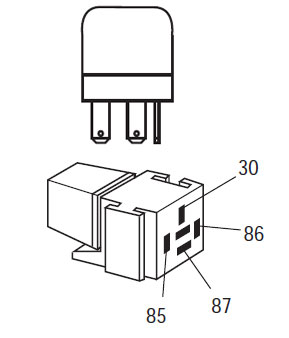
Eaton ਹਾਈਬ੍ਰਾਇਡ ਡਰਾਈਵ ਸਿਸਟਮ ਮਾਡਲ ਲਈ ਕੋਡ ਖਰਾਬ (MY08) EH-8E306A-ਯੂ, EH-8E306A-UPG, EH-8E306A-ਅੱਪ, EH-8E306A-ਸੀਡੀ, EH-8E306A-ਟੀ, EH-6E606B-ਸੀਡੀ, (my09) EH-8E406A-ਯੂ / ਪੀ, EH-8E406A-ਅੱਪ, EH-8E406A-UPG, EH-8E406A-ਸੀਡੀ, EH-8E406A-CDG, EH-8E406A-CDR, EH-8E406A-ਟੀ, EH-6E706B-ਸੀਡੀ, EH-6E706B-ਪੀ ਅਤੇ EH-6E706B-UPG. ਟੈਸਟ ਕਿਵੇਂ ਕਰਨਾ ਹੈ ਬਾਰੇ ਸਿੱਖਣ ਲਈ ਹੇਠਾਂ ਪੜ੍ਹੋ, ਨੂੰ ਸਾਫ ਕਰੋ ਅਤੇ ਆਪਣੇ Freightliner ਲਈ ਕਸੂਰ ਕੋਡ ਗਲਤੀ ਨੂੰ ਠੀਕ, mack, Peterbilt, Kenworth, ਵੋਲਵੋ ਅਤੇ ਅੰਤਰਰਾਸ਼ਟਰੀ ਟਰੱਕ. ਠੰਡਾ ਪੁੰਪ ਰੀਲੇਅ ਹਾਈਬ੍ਰਾਇਡ ਕੰਟਰੋਲ ਮੋਡੀਊਲ ਨਾਲ ਜੁੜਿਆ ਇੱਕ ਓਪਨ ਰੀਲੇਅ ਹੈ (HCM) ਕੰਟਰੋਲ ਪਾਸੇ 'ਤੇ. ਜਦ HCM ਅਧਿਕਾਰ ਕੰਟਰੋਲ ਸਰਕਟ, ਇਸ ਨੂੰ ਰੀਲੇਅ ਸੰਪਰਕ ਬੰਦ ਹੈ ਅਤੇ ਰੀਲੇਅ 'ਤੇ ਕਾਮੁਕ. ਠੰਡਾ ਪੁੰਪ ਰੀਲੇਅ ਅਧਿਕਾਰ ਠੰਡਾ ਪੁੰਪ, ਜੋ ਕਿ ਹਾਈਬ੍ਰਿਡ ਤਰਲ ਸਿਸਟਮ ਤੇ coolant circulates.

ਖਰਾਬ ਕੋਡ 40 – Cooling Pump Relay Detection

ਅੱਗੇ ਸਿਸਟਮ ਕਸੂਰ ਖੋਜਦਾ ਹੈ ਹੇਠ ਸ਼ਰਤ ਨੂੰ ਮਿਲੇ ਕੀਤਾ ਜਾਣਾ ਚਾਹੀਦਾ ਹੈ:

  • HCM ਇਗਨੀਸ਼ਨ ਵੋਲਟੇਜ ਵੱਧ ਵੱਡਾ ਹੈ 7 ਵੋਲਟ ਅਤੇ ਵੱਧ ਘੱਟ 16 ਵੋਲਟ.

ਸੂਚਨਾ: ਇੱਕ ਸਰਗਰਮ ਕੋਡ ਨੂੰ ਹੱਲ ਕਰਨ ਲਈ ਵੇਖੋ ਉਤਪਾਦ ਡਾਇਗਨੋਸਟਿਕ ਮੋਡ (PDM)

ਹਾਲਾਤ ਨੁਕਸ ਕੋਡ ਸਰਗਰਮ ਸੈੱਟ

  • ਐੱਫ 3 is set when the HCM detects a short to battery in the coil circuit of the Cooling Pump Relay.
  • ਐੱਫ 4 is set when the HCM detects a short to ground in the coil circuit of the Cooling Pump Relay.
  • ਐੱਫ 5 ਸੈੱਟ ਕੀਤਾ ਗਿਆ ਹੈ, ਜਦ ਕਿ HCM ਠੰਡਾ ਪੁੰਪ ਰੀਲੇਅ ਦੇ ਕੁਆਇਲ ਸਰਕਟ ਵਿਚ ਇੱਕ ਓਪਨ ਖੋਜਦਾ ਹੈ.
  • ਐੱਫ 14 ਸੈੱਟ ਕੀਤਾ ਗਿਆ ਹੈ, ਜਦ ਕਿ ਹੇਠ ਦਿੱਤੀ ਲਈ ਹੁੰਦੀ ਹੈ 10 ਮਿੰਟ ਜ ਹੁਣ:
    • Inverter ਦਾ ਤਾਪਮਾਨ ਵੱਧ ਮਹਾਨ ਹੈ 122 ° F (50 ° C)
    • ਵੱਧ ਬੈਟਰੀ ਦਾ ਤਾਪਮਾਨ ਅਤੇ Inverter ਦਾ ਤਾਪਮਾਨ ਵਿਚਕਾਰ ਫਰਕ ਵੱਧ ਵੱਡਾ ਹੈ 68 ° F (20 ° C)
    • ਕੋਈ ਬੈਟਰੀ ਦਾ ਤਾਪਮਾਨ ਜ ਮੋਟਰ ਦਾ ਤਾਪਮਾਨ ਨੁਕਸ

ਫਾਲਬੈਕ ਜਦ ਨੁਕਸ ਕੋਡ 40 ਸੈੱਟ ਕੀਤਾ ਗਿਆ ਹੈ ਹੇਠ ਹਾਲਾਤ ਵਾਪਰ:

  • ਅੰਬਰ "ਚੈੱਕ ਹਾਈਬ੍ਰਾਇਡ" ਪ੍ਰਕਾਸ਼.
  • ਕਸੂਰ ਹਾਈਬ੍ਰਾਇਡ ਕੰਟਰੋਲ ਮੋਡੀਊਲ ਵਿੱਚ ਸੰਭਾਲਿਆ ਗਿਆ ਹੈ (HCM) ਮੈਮੋਰੀ.

[/fusion_text][fusion_text columns=”” column_min_width=”” column_spacing=”” rule_style=defaultrule_size=”” rule_color=”” hide_on_mobile=small-visibility,medium-visibility,large-visibilityclass=”” id=””]

ਹਾਲਾਤ ਨੁਕਸ ਕੋਡ ਸਰਗਰਮ ਸੈੱਟ

ਕੇਵਲ ਸਰਗਰਮ ਨੁਕਸ ਸੰਚਾਰ ਇਲੈਕਟ੍ਰਾਨਿਕ ਕੰਟਰੋਲ ਯੂਨਿਟ ਤੱਕ ਸਾਫ਼ ਕਰ ਕੀਤਾ ਜਾ ਸਕਦਾ ਹੈ (TECU) ਜ HCM ਦਾ ਇਤਿਹਾਸ ServiceRanger ਵਰਤ. TECU ਆਪ ਹੀ ਬਾਅਦ ਇਤਿਹਾਸ ਨੁਕਸ ਸਾਫ 200 ਘੰਟੇ ਅਤੇ HCM ਆਪ ਹੀ ਨੁਕਸ ਬਾਅਦ ਇਤਿਹਾਸ ਨੁਕਸ ਸਾਫ ਕਰਨ ਲਈ ਸਰਗਰਮ ਕੀਤਾ ਗਿਆ ਹੈ, 200 ਘੰਟੇ.

ਇਹ ਕਸੂਰ ਕੋਡ ਹੇਠ ਦੇ ਕਿਸੇ ਵੀ ਦੇ ਕਾਰਨ ਕੀਤਾ ਜਾ ਸਕਦਾ ਹੈ:

  • ਐੱਫ 3, 4, 5
    • Vehicle Harness from HCM to Cooling Pump Relay
    • ਠੰਡਾ ਪੁੰਪ ਰੀਲੇਅ
    • HCM
  • ਐੱਫ 14
    • ਠੰਡਾ ਪੁੰਪ ਰੀਲੇਅ
    • ਠੰਡਾ ਪੁੰਪ
    • ਠੰਡਾ ਪੁੰਪ ਰੀਲੇਅ ਮੁੱਖ ਬਿਜਲੀ ਦੀ ਸਪਲਾਈ
    • ਹੇਠਲੀ coolant, ਹੇਠਲੀ coolant ਵਹਾਅ, ਪਲੱਗ ਰੇਡੀਏਟਰ, ਪੱਖਾ ਕਾਰਵਾਈ

[/fusion_text][/fusion_builder_column][/fusion_builder_row][/fusion_builder_container][fusion_builder_container hundred_percent=nohundred_percent_height=nohundred_percent_height_scroll=nohundred_percent_height_center_content=yesequal_height_columns=nomenu_anchor=”” hide_on_mobile=small-visibility,medium-visibility,large-visibilitystatus=publishedpublish_date=”” class=”” id=”” background_color=”” background_image=”” background_position=center centerbackground_repeat=no-repeatfade=nobackground_parallax=noneenable_mobile=noparallax_speed=”0.3″ video_mp4=”” video_webm=”” video_ogv=”” video_url=”” video_aspect_ratio=”16:9″ video_loop=yesvideo_mute=yesvideo_preview_image=”” border_size=”” border_color=”” border_style=solidmargin_top=”” margin_bottom=”” padding_top=”” padding_right=”” padding_bottom=”” padding_left=””][fusion_builder_row][fusion_builder_column type=”1_1layout=”1_1spacing=”” center_content=nolink=”” target=_selfmin_height=”” hide_on_mobile=small-visibility,medium-visibility,large-visibilityclass=”” id=”” background_color=”” background_image=”” background_image_id=”” background_position=left topbackground_repeat=no-repeathover_type=noneborder_size=”0″ border_color=”” border_style=solidborder_position=allpadding_top=”” padding_right=”” padding_bottom=”” padding_left=”” margin_top=”” margin_bottom=”” animation_type=”” animation_direction=leftanimation_speed=”0.3″ animation_offset=”” last=no”][fusion_text columns=”” column_min_width=”” column_spacing=”” rule_style=defaultrule_size=”” rule_color=”” hide_on_mobile=small-visibility,medium-visibility,large-visibilityclass=”” id=””]

ਖਰਾਬ ਕੋਡ 40 – Cooling Pump Relay Test

[/fusion_text][/fusion_builder_column][/fusion_builder_row][/fusion_builder_container][fusion_builder_container hundred_percent=nohundred_percent_height=nohundred_percent_height_scroll=nohundred_percent_height_center_content=yesequal_height_columns=nomenu_anchor=”” hide_on_mobile=small-visibility,medium-visibility,large-visibilitystatus=publishedpublish_date=”” class=”” id=”” background_color=”” background_image=”” background_position=center centerbackground_repeat=no-repeatfade=nobackground_parallax=noneenable_mobile=noparallax_speed=”0.3″ video_mp4=”” video_webm=”” video_ogv=”” video_url=”” video_aspect_ratio=”16:9″ video_loop=yesvideo_mute=yesvideo_preview_image=”” border_size=”” border_color=”” border_style=solidmargin_top=”” margin_bottom=”” padding_top=”” padding_right=”” padding_bottom=”” padding_left=””][fusion_builder_row][fusion_builder_column type=”1_1layout=”1_1spacing=”” center_content=nolink=”” target=_selfmin_height=”” hide_on_mobile=small-visibility,medium-visibility,large-visibilityclass=”” id=”” background_color=”” background_image=”” background_image_id=”” background_position=left topbackground_repeat=no-repeathover_type=noneborder_size=”0″ border_color=”” border_style=solidborder_position=allpadding_top=”” padding_right=”” padding_bottom=”” padding_left=”” margin_top=”” margin_bottom=”” animation_type=”” animation_direction=leftanimation_speed=”0.3″ animation_offset=”” last=no”][fusion_text columns=”” column_min_width=”” column_spacing=”” rule_style=defaultrule_size=”” rule_color=”” hide_on_mobile=small-visibility,medium-visibility,large-visibilityclass=”” id=””]

ਭਾਗ ਪਛਾਣ:

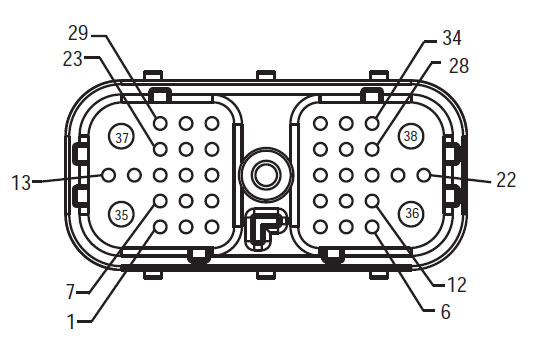
[/fusion_text][/fusion_builder_column][fusion_builder_column type=”2_3layout=”1_2spacing=”” center_content=nolink=”” target=_selfmin_height=”” hide_on_mobile=small-visibility,medium-visibility,large-visibilityclass=”” id=”” background_color=”” background_image=”” background_image_id=”” background_position=left topbackground_repeat=no-repeathover_type=noneborder_size=”0″ border_color=”” border_style=solidborder_position=allpadding_top=”” padding_right=”” padding_bottom=”” padding_left=”” margin_top=”” margin_bottom=”” animation_type=”” animation_direction=leftanimation_speed=”0.3″ animation_offset=”” last=no”][fusion_imageframe image_id=”14061|fullmax_width=”” style_type=”” blur=”” stylecolor=”” hover_type=nonebordersize=”” bordercolor=”” borderradius=”” align=centerlightbox=nogallery_id=”” lightbox_image=”” lightbox_image_id=”” alt=”ਕਵਚ ਫਰੰਟ ਦੇਖੋ HCM – ਹਾਈਬ੍ਰਾਇਡ ਸਿਸਟਮ ਇੰਟਰਫੇਸ ਕੁਨੈਕਟਰ” link=”” linktarget=_selfhide_on_mobile=small-visibility,medium-visibility,large-visibilityclass=”” id=”” animation_type=”” animation_direction=leftanimation_speed=”0.3″ animation_offset=””]https://www.globaltransmissionsupply.com/wp-content/uploads/Fuller-Front-Harness-View-HCM.jpg[/fusion_imageframe][fusion_text columns=”” column_min_width=”” column_spacing=”” rule_style=defaultrule_size=”” rule_color=”” hide_on_mobile=small-visibility,medium-visibility,large-visibilityclass=”” id=””]

ਕਵਚ ਫਰੰਟ ਦੇਖੋ
HCM – ਹਾਈਬ੍ਰਾਇਡ ਸਿਸਟਮ ਇੰਟਰਫੇਸ ਕੁਨੈਕਟਰ
[/fusion_text][/fusion_builder_column][fusion_builder_column type=”1_3layout=”1_2spacing=”” center_content=nolink=”” target=_selfmin_height=”” hide_on_mobile=small-visibility,medium-visibility,large-visibilityclass=”” id=”” background_color=”” background_image=”” background_image_id=”” background_position=left topbackground_repeat=no-repeathover_type=noneborder_size=”0″ border_color=”” border_style=solidborder_position=allpadding_top=”” padding_right=”” padding_bottom=”” padding_left=”” margin_top=”” margin_bottom=”” animation_type=”” animation_direction=leftanimation_speed=”0.3″ animation_offset=”” last=no”][fusion_imageframe image_id=”14063|fullmax_width=”” style_type=”” blur=”” stylecolor=”” hover_type=nonebordersize=”” bordercolor=”” borderradius=”” align=centerlightbox=nogallery_id=”” lightbox_image=”” lightbox_image_id=”” alt=”ਰੀਲੇਅ ਸਵਿੱਚ” link=”” linktarget=_selfhide_on_mobile=small-visibility,medium-visibility,large-visibilityclass=”” id=”” animation_type=”” animation_direction=leftanimation_speed=”0.3″ animation_offset=””]https://www.globaltransmissionsupply.com/wp-content/uploads/Typical-Relay-Switch.jpg[/fusion_imageframe][fusion_text columns=”” column_min_width=”” column_spacing=”” rule_style=defaultrule_size=”” rule_color=”” hide_on_mobile=small-visibility,medium-visibility,large-visibilityclass=”” id=””]

ਤਾਪਮਾਨ ਸੈਸਰ
(ਕਵਚ ਦੇਖੋ – ਸਾਹਮਣੇ ਵਾਲੇ ਪਾਸੇ)

[/fusion_text][/fusion_builder_column][fusion_builder_column type=”1_1layout=”1_1spacing=”” center_content=nolink=”” target=_selfmin_height=”” hide_on_mobile=small-visibility,medium-visibility,large-visibilityclass=”” id=”” background_image_id=”” background_color=”#000000″ background_image=”” background_position=left topundefined=”” background_repeat=no-repeathover_type=noneborder_size=”0″ border_color=”” border_style=solidborder_position=allpadding_top=”” padding_right=”” padding_bottom=”” padding_left=”” margin_top=”” margin_bottom=”” animation_type=”” animation_direction=leftanimation_speed=”0.3″ animation_offset=”” last=no”][fusion_text columns=”” column_min_width=”” column_spacing=”” rule_style=defaultrule_size=”” rule_color=”” hide_on_mobile=small-visibility,medium-visibility,large-visibilityclass=”” id=””]

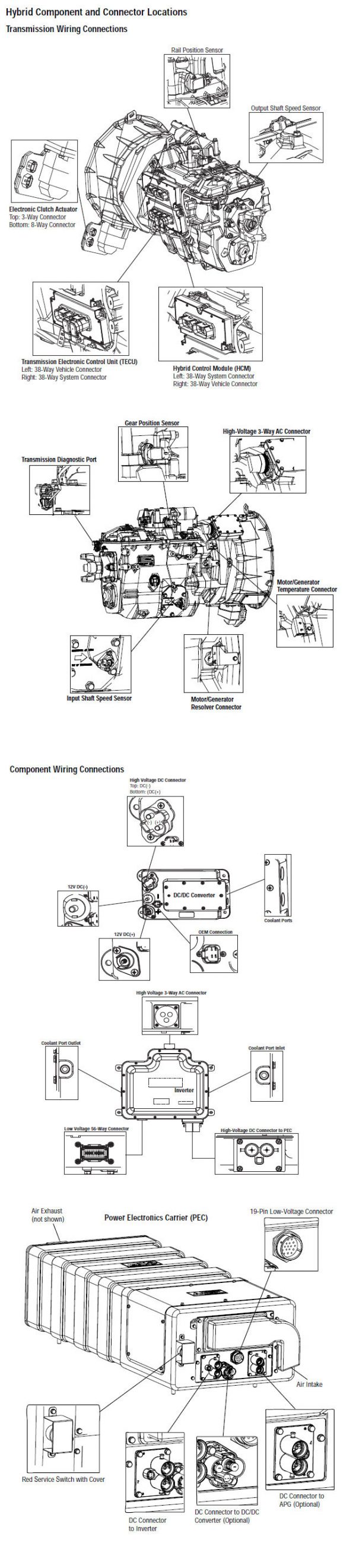
ਸੂਚਨਾ: ਵੇਖੋ Eaton ਹਾਈਬ੍ਰਾਇਡ ਭਾਗ ਅਤੇ ਕੁਨੈਕਟਰ ਸਥਿਤੀ MY08 ਸਿਸਟਮ ਵਿੱਚ ਕੁਨੈਕਟਰ ਸਥਾਨ ਲਈ

[/fusion_text][/fusion_builder_column][fusion_builder_column type=”1_1layout=”1_1spacing=”” center_content=nolink=”” target=_selfmin_height=”” hide_on_mobile=small-visibility,medium-visibility,large-visibilityclass=”” id=”” background_image_id=”” background_color=”#000000″ background_image=”” background_position=left topundefined=”” background_repeat=no-repeathover_type=noneborder_size=”0″ border_color=”” border_style=solidborder_position=allpadding_top=”” padding_right=”” padding_bottom=”” padding_left=”” margin_top=”20″ margin_bottom=”” animation_type=”” animation_direction=leftanimation_speed=”0.3″ animation_offset=”” last=no”][fusion_text columns=”” column_min_width=”” column_spacing=”” rule_style=defaultrule_size=”” rule_color=”” hide_on_mobile=small-visibility,medium-visibility,large-visibilityclass=”” id=””]

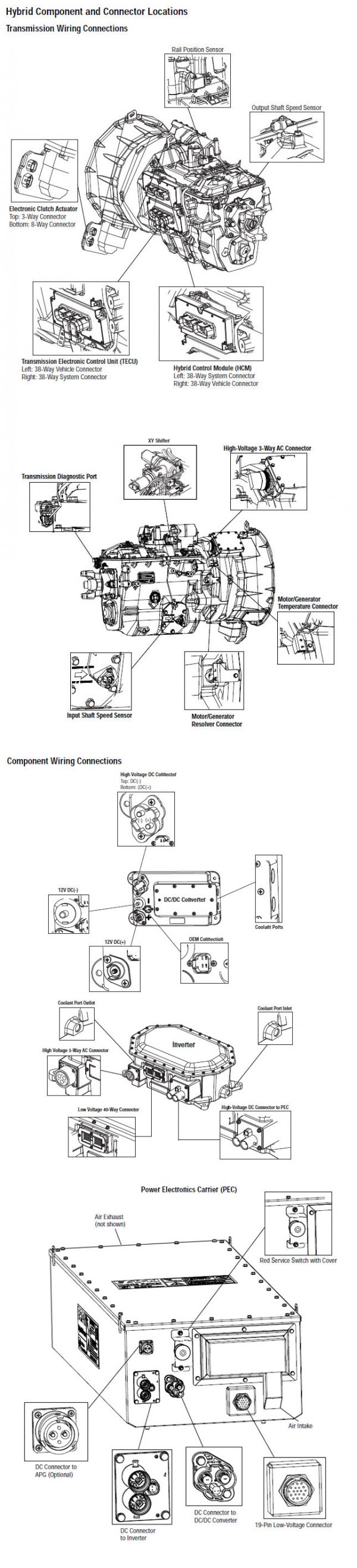
ਸੂਚਨਾ: ਵੇਖੋ Eaton ਹਾਈਬ੍ਰਾਇਡ ਭਾਗ ਅਤੇ ਕੁਨੈਕਟਰ ਸਥਿਤੀ My09 ਸਿਸਟਮ ਵਿੱਚ ਕੁਨੈਕਟਰ ਸਥਾਨ ਲਈ.
[/fusion_text][/fusion_builder_column][fusion_builder_column type=”1_1layout=”1_1spacing=”” center_content=nolink=”” target=_selfmin_height=”” hide_on_mobile=small-visibility,medium-visibility,large-visibilityclass=”” id=”” background_image_id=”” background_color=”” background_image=”” background_position=left topundefined=”” background_repeat=no-repeathover_type=noneborder_size=”0″ border_color=”” border_style=solidborder_position=allpadding_top=”” padding_right=”” padding_bottom=”” padding_left=”” margin_top=”20″ margin_bottom=”” animation_type=”” animation_direction=leftanimation_speed=”0.3″ animation_offset=”” last=no”][fusion_imageframe image_id=”14229|fullmax_width=”” style_type=”” blur=”” stylecolor=”” hover_type=nonebordersize=”” bordercolor=”” borderradius=”” align=centerlightbox=nogallery_id=”” lightbox_image=”” lightbox_image_id=”” alt=”Eaton ਆਪੋ HCM coolant ਪੁੰਪ ਕੁਨੈਕਟਰ” link=”” linktarget=_selfhide_on_mobile=small-visibility,medium-visibility,large-visibilityclass=”” id=”” animation_type=”” animation_direction=leftanimation_speed=”0.3″ animation_offset=””]https://www.globaltransmissionsupply.com/wp-content/uploads/HCM-Coolant-Pump-Connector.jpg[/fusion_imageframe][/fusion_builder_column][/fusion_builder_row][/fusion_builder_container][fusion_builder_container hundred_percent=nohundred_percent_height=nohundred_percent_height_scroll=nohundred_percent_height_center_content=yesequal_height_columns=nomenu_anchor=”” hide_on_mobile=small-visibility,medium-visibility,large-visibilitystatus=publishedpublish_date=”” class=”” id=”” background_color=”” background_image=”” background_position=center centerbackground_repeat=no-repeatfade=nobackground_parallax=noneenable_mobile=noparallax_speed=”0.3″ video_mp4=”” video_webm=”” video_ogv=”” video_url=”” video_aspect_ratio=”16:9″ video_loop=yesvideo_mute=yesvideo_preview_image=”” border_size=”” border_color=”” border_style=solidmargin_top=”” margin_bottom=”” padding_top=”” padding_right=”” padding_bottom=”” padding_left=””][fusion_builder_row][fusion_builder_column type=”1_1layout=”1_1spacing=”” center_content=nolink=”” target=_selfmin_height=”” hide_on_mobile=small-visibility,medium-visibility,large-visibilityclass=”” id=”” background_color=”” background_image=”” background_image_id=”” background_position=left topbackground_repeat=no-repeathover_type=noneborder_size=”0″ border_color=”” border_style=solidborder_position=allpadding_top=”” padding_right=”” padding_bottom=”” padding_left=”” margin_top=”” margin_bottom=”” animation_type=”” animation_direction=leftanimation_speed=”0.3″ animation_offset=”” last=no”][fusion_modal name=warnings_cautionstitle=”ਚੇਤਾਵਨੀ & ਚੇਤਾਵਨੀ” size=largebackground=”” border_color=”” show_footer=yesclass=”” id=””]ਖ਼ਤਰਾ: ਖ਼ਤਰੇ ਦੇ ਸੰਕੇਤ ਕਰਦਾ ਹੈ ਕਿ ਤੁਹਾਨੂੰ ਬੁਰੀ ਜ਼ਖਮੀ ਹੋ ਜ ਦੀ ਮੌਤ ਹੋ ਜਾਵੇਗਾ, ਜੇ ਸੰਕੇਤ ਵਿਧੀ ਦੀ ਪਾਲਣਾ ਨਾ ਕਰਦੇ,.
ਚੇਤਾਵਨੀ: ਚੇਤਾਵਨੀ ਤੁਰੰਤ ਖਤਰਾ ਲੱਗਦਾ ਹੈ, ਗੰਭੀਰ ਨਿਜੀ ਸੱਟ ਦਾ ਨਤੀਜਾ ਹੋ ਸਕਦਾ ਹੈ, ਜੋ ਕਿ ਜੇਕਰ ਤੁਹਾਨੂੰ ਸੰਕੇਤ ਵਿਧੀ ਦੀ ਪਾਲਣਾ ਨਾ ਕਰਦੇ,.
ਸਾਵਧਾਨ: ਸਾਵਧਾਨ ਲੱਗਦਾ ਹੈ ਵਾਹਨ ਜ ਸੰਪਤੀ ਨੂੰ ਨੁਕਸਾਨ ਵਾਪਰ ਸਕਦਾ ਹੈ, ਜੇ ਤੁਹਾਨੂੰ ਸੰਕੇਤ ਵਿਧੀ ਦੀ ਪਾਲਣਾ ਨਾ ਕਰਦੇ,.

ਸੂਚਨਾ: ਸੂਚਨਾ ਵਾਧੂ ਵਿਸਥਾਰ ਹੈ, ਜੋ ਕਿ ਤਸ਼ਖੀਸ ਜ ਇੱਕ ਭਾਗ ਨੂੰ / ਸਿਸਟਮ ਦੀ ਮੁਰੰਮਤ 'ਚ ਮਦਦ ਕਰੇਗਾ ਪਤਾ ਲੱਗਦਾ ਹੈ.

ਵੇਖਾਏ ਕ੍ਰਮ ਨੂੰ ਨਿਜੀ ਸੱਟ ਬਚਣ ਲਈ ਵਿੱਚ ਦਿੱਤਾ ਕਾਰਵਾਈ ਦੀ ਪਾਲਣਾ ਕਰੋ:

1. ਹਾਈ-ਵੋਲਟੇਜ ਸ਼ੰਕੂ ਵਾਹਨ ਦੇ ਆਲੇ-ਦੁਆਲੇ ਹਨ ਅਤੇ ਤਾਲਾਬੰਦੀ PEC ਤੇ ਇੰਸਟਾਲ ਹੈ, ਜੇ, ਸਿਰਫ ਵਿਅਕਤੀ ਹੈ, ਜੋ ਕਿ ਵਾਹਨ ਸ਼ੁਰੂ ਕਰਨ ਦੀ ਇਜਾਜ਼ਤ ਕੀਤਾ ਜਾਣਾ ਚਾਹੀਦਾ ਹੈ, ਜੋ ਵਿਅਕਤੀ ਤਾਲਾਬੰਦੀ ਟੈਗ ਸਾਈਨ ਕੀਤਾ ਗਿਆ ਹੈ.
2. ਇੱਕ ਵਾਹਨ 'ਤੇ ਕੰਮ ਕਰ ਜ ਕੈਬ ਨੂੰ ਛੱਡ ਕੇ ਅੱਗੇ ਇੰਜਣ ਚੱਲ ਰਿਹਾ ਹੈ, ਜਦਕਿ, ਤੁਹਾਨੂੰ "n" ਵਿਚ ਸ਼ਿਫਟ ਲੀਵਰ ਰੱਖਣ ਚਾਹੀਦਾ ਹੈ ਪਾਰਕਿੰਗ ਤੋੜੀ ਸੈੱਟ ਕੀਤਾ, ਅਤੇ ਪਹੀਏ ਨੂੰ ਬਲਾਕ.
3. ਸੁਰੱਖਿਆ ਦੇ ਕਾਰਨ ਲਈ, ਹਮੇਸ਼ਾ ਸੇਵਾ ਬ੍ਰੇਕ ਸ਼ਾਮਲ "ਐਨ" ਤੱਕ ਗੇਅਰ ਅਹੁਦੇ ਦੀ ਚੋਣ ਕਰਨ ਲਈ ਪੁਰਾਣੇ
4. ਅੱਗੇ ਸ਼ੁਰੂ ਕਰਨ ਲਈ ਇੱਕ ਵਾਹਨ ਨੂੰ ਹਮੇਸ਼ਾ ਡਰਾਈਵਰ ਦੀ ਸੀਟ 'ਤੇ ਬੈਠੇ ਕੀਤਾ ਜਾ, ਦੀ ਚੋਣ ਕਰੋ "n" ਸ਼ਿਫਟ ਕੰਟਰੋਲ 'ਤੇ, ਅਤੇ ਪਾਰਕਿੰਗ ਬ੍ਰੇਕ ਸੈੱਟ ਕੀਤਾ.
5. ePTO ਨਾਲ ਵਾਹਨ ਵਿੱਚ, ਇੰਜਣ ਅਤੇ / ਜ
ਮੋਟਰ / ਜੇਨਰੇਟਰ ePTO ਮੋਡ ਵਿੱਚ ਸ਼ੁਰੂ ਕਰ ਸਕਦੇ ਹੋ. ਕਦੇ ਵੀ ਕਿਸੇ ਵੀ ਨਿਗਰਾਨੀ ਕਰਨ ਜ ਵਾਹਨ 'ਤੇ ਕੰਮ, ਇਸ ਮੋਡ ਵਿੱਚ, ਜਦਕਿ.
6. 12-ਵੋਲਟ ਬੈਟਰੀ ਸਕਾਰਾਤਮਕ (+) ਅਤੇ ਨਕਾਰਾਤਮਕ (-) ਕਿਸੇ ਵੀ ਹਾਈਬ੍ਰਾਇਡ ਲੈਸ ਵਾਹਨ 'ਤੇ ਕਿਸੇ ਵੀ ਿਲਵਿੰਗ ਕਰਨ ਲਈ ਪੁਰਾਣੇ ਕੁਨੈਕਸ਼ਨ ਬੰਦ ਕੀਤਾ ਜਾਣਾ ਚਾਹੀਦਾ ਹੈ.

ਸਾਵਧਾਨ: ਵੇਖਾਏ ਲਈ ਕ੍ਰਮ ਦੇ ਸਾਮਾਨ ਖ਼ਰਾਬ ਨੁਕਸਾਨ ਬਚਣ ਲਈ ਵਿੱਚ ਦਿੱਤਾ ਕਾਰਵਾਈ ਦੀ ਪਾਲਣਾ ਕਰੋ.
ਸਾਵਧਾਨ: ਪਾਰਕਿੰਗ ਤੋੜੀ ਮੁਕਤ ਕਰ ਜ, ਜਦ ਤੱਕ ਕਿ ਹਵਾ ਦਾ ਪ੍ਰੈਸ਼ਰ ਸਹੀ ਪੱਧਰ 'ਤੇ ਹੁੰਦਾ ਹੈ, ਇੱਕ ਗੇਅਰ ਦੀ ਚੋਣ ਕਰਨ ਦੀ ਕੋਸ਼ਿਸ਼ ਨਾ ਕਰੋ.
ਸਾਵਧਾਨ: "N" ਵਿਚ ਜਗ੍ਹਾ ਸ਼ਿਫਟ ਲੀਵਰ ਫ਼ਰਾਰ ਦੌਰਾਨ ਸੰਚਾਰ ਨੂੰ ਨੁਕਸਾਨ ਬਚਣ ਅਤੇ ਜ਼ਮੀਨ ਬੰਦ ਡਰਾਈਵ ਪਹੀਏ ਚੁੱਕਣ ਜ driveline ਕੁਨੈਕਸ਼ਨ ਬੰਦ ਕਰਨ ਲਈ.

ਹਾਈ-ਵੋਲਟੇਜ ਚੇਤਾਵਨੀ & ਚੇਤਾਵਨੀ

  • CO2 ਜ ਡਰਾਈ ਕੈਮੀਕਲ Fire Extinguishers ਵਰਤੋ.
  • ਹਾਈ-ਵੋਲਟੇਜ ਤਾਰ ਸੰਤਰੀ ਇਨਸੂਲੇਸ਼ਨ ਜ ਪੇਚੀਦਾ ਵਟਊਵਬੰਗ ਵਿਚ ਕਵਰ ਕੀਤਾ ਹੈ ਅਤੇ ਕੁਨੈਕਟਰ 'ਤੇ ਚੇਤਾਵਨੀ ਦੇ ਲੇਬਲ ਦੇ ਨਾਲ ਮਾਰਕ ਕੀਤਾ ਗਿਆ ਹੈ.
  • ਸਾਰੇ Eaton® ਹਾਈਬ੍ਰਾਇਡ ਡੀਜ਼ਲ / ਇਲੈਕਟ੍ਰਿਕ ਵਾਹਨ ਮਾਰਕ ਕੀਤਾ ਜਾਵੇਗਾ, 'ਹਾਈਬ੍ਰਾਇਡ’ ਵਾਹਨ ਦੇ ਬਾਹਰ ਤੇ, ਡੈਸ਼ 'ਤੇ ਸ਼ਿਫਟ ਲੇਬਲ ਨੂੰ ਨਾਲ-ਨਾਲ.
  • ਚੈਸੀ ਮਾਊਟ ਹਾਈਬ੍ਰਿਡ ਭਾਗ ਦੇ ਖਾਸ ਸਥਾਨ ਲਈ OEM ਵੇਖੋ.
  • ਸੰਤਰੀ ਹਾਈ-ਵੋਲਟੇਜ ਕੇਬਲ ਵਿੱਚ ਕੱਟ ਨਾ ਕਰੋ.
  • ਵਿੱਚ ਕੱਟ ਜ ਨਾ ਖੋਲ੍ਹੋ ਪੈਕ.
  • ਵਿੱਚ ਕੱਟ ਜ ਡੀ.ਸੀ. / ਡੀ.ਸੀ. ਪਰਿਵਰਤਕ ਨਾ ਖੋਲ੍ਹੋ.
  • ਵਿੱਚ ਕੱਟ ਜ Inverter ਨਾ ਖੋਲ੍ਹੋ.

ਇੱਕ ਬਫਰ ਜ਼ੋਨ ਸਥਾਪਤ ਹੋਣਾ ਚਾਹੀਦਾ ਹੈ ਅਤੇ ਉੱਚ-ਵੋਲਟੇਜ ਰਬੜ ਦੇ ਦਸਤਾਨੇ ਗਰਮੀ ਨੂੰ (ਕਲਾਸ 0 ਚਮੜੇ ਸੁਰੱਖਿਆ ਦੇ ਨਾਲ) ਹਾਈ-ਵੋਲਟੇਜ 'ਤੇ ਕੰਮ ਕਰ ਰਹੇ ਹਨ, ਨੂੰ ਪੁਰਾਣੇ ਦੀ ਲੋੜ. ਅਸਫ਼ਲਤਾ ਇਹ ਹਦਾਇਤ ਦੀ ਪਾਲਣਾ ਕਰਨ ਲਈ ਗੰਭੀਰ ਨਿਜੀ ਸੱਟ ਮੌਤ ਦਾ ਨਤੀਜਾ ਹੋ ਸਕਦਾ.
ਰਬੜ ਦੇ ਦਸਤਾਨੇ-ਗਰਮੀ ਨੂੰ ਹੈ, ਜੋ ਕਿ ਹੈ, ਜਦਕਿ ਹਾਈ-ਵੋਲਟੇਜ ਸਿਸਟਮ 'ਤੇ ਕੰਮ ਕਰ ਪਾਉਣਾ ਲਾਜ਼ਮੀ ਹੋਵੇਗਾ ਕਲਾਸ ਹਨ 0 ਚਮੜੇ ਸੁਰੱਖਿਆ ਦੇ ਨਾਲ. ਰਬੜ ਦੇ ਦਸਤਾਨੇ ਰਬੜ ਇਨਸੂਲੇਸ਼ਨ ਦਸਤਾਨੇ ਟੈਸਟਿੰਗ ਵਿਧੀ ਸਫ਼ਾ 'ਤੇ "ਡਾਇਗਨੋਸਟਿਕ ਲਈ ਸੰਦ / ਸੇਵਾ ਪ੍ਰਕਾਸ਼ਨ" ਵਿੱਚ ਪਾਇਆ ਹੇਠ ਹਰ ਵਰਤਣ ਅੱਗੇ ਟੈਸਟ ਕੀਤਾ ਜਾਣਾ ਚਾਹੀਦਾ ਹੈ 6. ਅਸਫ਼ਲਤਾ ਇਹ ਹਦਾਇਤ ਦੀ ਪਾਲਣਾ ਕਰਨ ਲਈ ਗੰਭੀਰ ਨਿਜੀ ਸੱਟ ਮੌਤ ਦਾ ਨਤੀਜਾ ਹੋ ਸਕਦਾ.
ਸਫ਼ੇ 'ਤੇ ਮੁਆਇਨਾ ਜ ਕੋਈ ਵੀ ਹਾਈ-ਵੋਲਟੇਜ ਕੇਬਲ ਜ ਭਾਗ' ਤੇ ਕੰਮ ਕਰ "ਹਾਈ-ਵੋਲਟੇਜ ਸੇਵਾ ਬੰਦ ਹੈ ਅਤੇ ਪਾਵਰ-ਅੱਪ ਵਿਧੀ" ਅੱਗੇ 4 ਬਾਅਦ ਵਿੱਚ ਕੀਤਾ ਜਾਣਾ ਚਾਹੀਦਾ ਹੈ. ਅਸਫ਼ਲਤਾ ਇਹ ਹਦਾਇਤ ਦੀ ਪਾਲਣਾ ਕਰਨ ਲਈ ਗੰਭੀਰ ਨਿਜੀ ਸੱਟ ਮੌਤ ਦਾ ਨਤੀਜਾ ਹੋ ਸਕਦਾ.
ਲਾਕਆਉਟ ਤੇ ਟੈਗਆਉਟ ਜੰਤਰ ਸਿਰਫ ਤਕਨੀਸ਼ੀਅਨ ਹੈ, ਜੋ ਕਿ ਗੱਡੀ 'ਤੇ ਲਾਕਆਉਟ ਤੇ ਟੈਗਆਉਟ ਜੰਤਰ ਰੱਖਿਆ ਕੇ ਹਟਾਇਆ ਜਾਣਾ ਚਾਹੀਦਾ ਹੈ. ਅਸਫ਼ਲਤਾ ਇਹ ਹਦਾਇਤ ਦੀ ਪਾਲਣਾ ਕਰਨ ਲਈ ਗੰਭੀਰ ਨਿਜੀ ਸੱਟ ਮੌਤ ਦਾ ਨਤੀਜਾ ਹੋ ਸਕਦਾ.
ਹਾਈ-ਵੋਲਟੇਜ ਰਬੜ ਦੇ ਦਸਤਾਨੇ ਗਰਮੀ ਨੂੰ (ਕਲਾਸ 0 ਚਮੜੇ ਸੁਰੱਖਿਆ ਦੇ ਨਾਲ) ਜਦ ਕਿਸੇ ਵੀ 'ਤੇ ਕੰਮ ਕਰ ਪਾਉਣਾ ਲਾਜ਼ਮੀ ਹੋਵੇਗਾ
ਹਾਈ-ਵੋਲਟੇਜ ਕੇਬਲ. "ਹਾਈ-ਵੋਲਟੇਜ ਸੇਵਾ ਬੰਦ ਹੈ ਅਤੇ ਪਾਵਰ-ਅੱਪ ਵਿਧੀ" ਸਫ਼ੇ 'ਤੇ 4 ਕਿਸੇ ਵੀ ਹਾਈ-ਵੋਲਟੇਜ ਕੇਬਲ ਨੂੰ ਹਟਾਉਣ ਲਈ ਪੁਰਾਣੇ ਬਾਅਦ ਵਿੱਚ ਕੀਤਾ ਜਾਣਾ ਚਾਹੀਦਾ ਹੈ. ਅਸਫ਼ਲਤਾ ਇਹ ਹਦਾਇਤ ਦੀ ਪਾਲਣਾ ਕਰਨ ਲਈ ਗੰਭੀਰ ਨਿਜੀ ਸੱਟ ਮੌਤ ਦਾ ਨਤੀਜਾ ਹੋ ਸਕਦਾ.
ਹਾਈ-ਵੋਲਟੇਜ ਕੇਬਲ ਅਤੇ ਵਾਇਰਿੰਗ ਸੰਤਰੀ ਹਨ ਅਤੇ ਕੁਨੈਕਟਰ 'ਤੇ ਇੱਕ ਚੇਤਾਵਨੀ ਦੇ ਲੇਬਲ ਸ਼ਾਮਿਲ ਹਨ. ਹਾਈ-ਵੋਲਟੇਜ ਭਾਗ ਇੱਕ ਲੇਬਲ ਨਾਲ ਮਾਰਕ ਕੀਤੇ ਹਨ,. ਹਾਈ-ਵੋਲਟੇਜ ਰਬੜ ਦੇ ਦਸਤਾਨੇ ਗਰਮੀ ਨੂੰ (ਕਲਾਸ 0 ਚਮੜੇ ਸੁਰੱਖਿਆ ਦੇ ਨਾਲ) ਇਹ ਭਾਗ ਦੇ ਕਿਸੇ ਵੀ 'ਤੇ ਕੰਮ ਕਰ ਲਈ ਵਰਤਿਆ ਜਾਣਾ ਚਾਹੀਦਾ ਹੈ. ਅਸਫ਼ਲਤਾ ਇਹ ਹਦਾਇਤ ਦੀ ਪਾਲਣਾ ਕਰਨ ਲਈ ਗੰਭੀਰ ਨਿਜੀ ਸੱਟ ਮੌਤ ਦਾ ਨਤੀਜਾ ਹੋ ਸਕਦਾ.

ਹਾਈ-ਵੋਲਟੇਜ ਸੇਵਾ ਬੰਦ ਨੇਮਾਵਲੀ
ਹਾਈ-ਵੋਲਟੇਜ ਸੇਵਾ ਬੰਦ ਹੈ ਅਤੇ ਪਾਵਰ-ਅੱਪ ਵਿਧੀ1. ਮਗਰ "ਹਾਈ-ਵੋਲਟੇਜ ਕੰਮ ਖੇਤਰ 'ਵਿਧੀ.
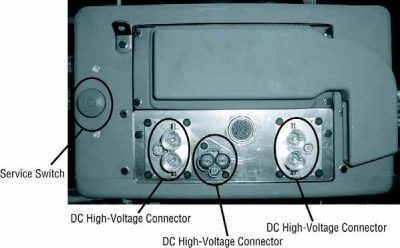
2. ਪੈਕ ਦੇ ਮੋਰਚੇ 'ਤੇ ਲਾਲ ਪੈਕ ਸਰਵਿਸ ਸਵਿੱਚ ਨੂੰ ਲੱਭੋ ਅਤੇ ਧੱਕਣ ਨੂੰ ਬੰਦ.
3. ਸਰਵਿਸ ਸਵਿੱਚ ਦਾ ਢੱਕਣ ਹਟਾਓ ਅਤੇ ਤਾਲਾਬੰਦੀ ਬਰੈਕਟ ਇੰਸਟਾਲ (J48506).
4. ਲਾੱਕਆਉਟ ਬਰੈਕਟ ਨੂੰ ਠੀਕ ਟੈਗ.
5. ਪੈਕ ਸਰਵਿਸ ਸਵਿੱਚ ਯਕੀਨੀ ਬੰਦ ਸਥਿਤੀ ਤੱਕ ਜਾਣ ਨਾ ਕਰ ਸਕਦਾ ਹੈ.
6. ਸਿਸਟਮ ਦੇ ਇੱਕ ਘੱਟੋ ਘੱਟ ਕਰਨ ਲਈ ਸੈੱਟ ਕਰਨ ਲਈ ਆਗਿਆ ਦਿਓ 5 ਮਿੰਟ ਹਾਈ ਵੋਲਟੇਜ ਉਤਾਰਨਾ.
7. ServiceRanger ਜੁੜੋ ਅਤੇ ਵੇਖਣ ਲਈ ਡਾਟਾ ਦੀ ਨਿਗਰਾਨੀ PID 116 ਕਹਿੰਦੇ ਹਨ, "ਹਾਈ-ਵੋਲਟੇਜ ਬੈਟਰੀ ਸੰਭਾਵੀ." SPN ਵਰਤੋ 520323 J1939 ਕੁਨੈਕਸ਼ਨ ਲਈ "ਬੈਟਰੀ ਵੋਲਟੇਜ ਆਰ.ਬੀ." (ਰੀਲੇਅ ਬਾਕਸ).
8. ਵੋਲਟੇਜ ਹੋਣਾ ਚਾਹੀਦਾ ਹੈ 30 ਵੋਲਟ ਜ ਘੱਟ. ਜੇ ਵੋਲਟੇਜ ਉਪਰ ਹੈ 30 ਵੋਲਟ, ਵਾਹਨ 'ਤੇ ਕੰਮ ਨਾ ਕਰਦੇ ਅਤੇ 1-800-826-ਮਦਦ' ਤੇ Eaton® ਸੰਪਰਕ ਕਰੋ (4357).
9. ਇਗਨੀਸ਼ਨ ਕੁੰਜੀ ਨੂੰ ਬੰਦ ਕਰ ਦਿਓ ਅਤੇ ਦੀ ਮੁਰੰਮਤ ਜ ਕਦਮ ਹੈ ਨਿਪਟਾਰਾ ਕਰਨ ਲਈ ਅੱਗੇ ਜਾਰੀ.
ਸੂਚਨਾ: ਵੋਲਟੇਜ ਫਿਲਹਾਲ ਜਦ ਕੁੰਜੀ ਬੰਦ ਹੈ ਦੇ ਤੁਪਕੇ.

ਹਾਈ-ਵੋਲਟੇਜ ਸਰਵਿਸ ਪਾਵਰ-ਅੱਪ ਵਿਧੀ

1. ਆਪਣੇ ਨੂੰ ਜਿੰਦਰਾ ਅਹੁਦੇ ਨੂੰ ਸਭ ਹਾਈ-ਵੋਲਟੇਜ ਕੁਨੈਕਟਰ ਇੰਸਟਾਲ.
2. ਵਿਅਕਤੀ ਨੂੰ ਵਾਹਨ 'ਤੇ ਕੰਮ ਕਰ ਤੁਹਾਨੂੰ ਹਨ, ਜੇ, ਲਾੱਕਆਉਟ ਬਰੈਕਟ ਅਤੇ ਟੈਗ ਹਟਾਉਣ ਲਈ.
3. ਸਰਵਿਸ ਸਵਿੱਚ ਵੱਧ ਲਾੱਕਆਉਟ ਬਰੈਕਟ ਮੁੜ.
4. ਸਰਵਿਸ ਕੱਢਣ ਬਾਹਰ ਜਾਓ ਅਤੇ ਇਸ ਲਈ ਵਾਹਨ ਦਾ ਸਮੂਹ ਚਾਹੀਦਾ ਹੈ 2 ਮਿੰਟ.
5. Start vehicle when appropriate.[/fusion_modal][fusion_modal name=component_locationtitle=”Eaton ਹਾਈਬ੍ਰਾਇਡ ਭਾਗ ਅਤੇ ਕੁਨੈਕਟਰ ਸਥਿਤੀ ” size=largebackground=”#ffffffborder_color=”” show_footer=yesclass=”” id=””]

Eaton ਹਾਈਬ੍ਰਾਇਡ ਭਾਗ ਅਤੇ ਕੁਨੈਕਟਰ ਸਥਾਨ MY08 ਸਿਸਟਮ

[/fusion_modal][fusion_modal name=component_location2title=”Eaton ਹਾਈਬ੍ਰਾਇਡ ਭਾਗ ਅਤੇ ਕੁਨੈਕਟਰ ਸਥਿਤੀ my09 ਸਿਸਟਮ” size=largebackground=”#ffffffborder_color=”” show_footer=yesclass=”” id=””]

Eaton ਹਾਈਬ੍ਰਾਇਡ ਭਾਗ ਅਤੇ ਕੁਨੈਕਟਰ ਸਥਾਨ my09 ਸਿਸਟਮ

[/fusion_modal][/fusion_builder_column][/fusion_builder_row][/fusion_builder_container][fusion_builder_container hundred_percent=nohundred_percent_height=nohundred_percent_height_scroll=nohundred_percent_height_center_content=yesequal_height_columns=nomenu_anchor=”” hide_on_mobile=small-visibility,medium-visibility,large-visibilitystatus=publishedpublish_date=”” class=”” id=”” background_color=”” background_image=”” background_position=center centerbackground_repeat=no-repeatfade=nobackground_parallax=noneenable_mobile=noparallax_speed=”0.3″ video_mp4=”” video_webm=”” video_ogv=”” video_url=”” video_aspect_ratio=”16:9″ video_loop=yesvideo_mute=yesvideo_preview_image=”” border_size=”” border_color=”” border_style=solidmargin_top=”” margin_bottom=”” padding_top=”” padding_right=”” padding_bottom=”” padding_left=””][fusion_builder_row][fusion_builder_column type=”1_1layout=”1_1spacing=”” center_content=nolink=”” target=_selfmin_height=”” hide_on_mobile=small-visibility,medium-visibility,large-visibilityclass=”” id=”” background_color=”” background_image=”” background_image_id=”” background_position=left topbackground_repeat=no-repeathover_type=noneborder_size=”0″ border_color=”” border_style=solidborder_position=allpadding_top=”” padding_right=”” padding_bottom=”” padding_left=”” margin_top=”” margin_bottom=”” animation_type=”” animation_direction=leftanimation_speed=”0.3″ animation_offset=”” last=no”][fusion_content_boxes layout=clean-horizontalcolumns=”1″ title_size=”18pxheading_size=”3″ title_color=”#ffffffbody_color=”#ffffffbackgroundcolor=”#4f4f4ficon=”” iconflip=”” iconrotate=”” iconspin=noiconcolor=”” icon_circle=”” icon_circle_radius=”” circlecolor=”” circlebordersize=”” circlebordercolor=”” outercirclebordersize=”” outercirclebordercolor=”” icon_size=”” icon_hover_type=”” hover_accent_color=”” image=”” image_id=”” image_width=”” image_height=”” link_type=”” button_span=”” link_area=”” link_target=”” icon_align=leftanimation_type=”” animation_delay=”” animation_offset=”” animation_direction=leftanimation_speed=”0.3″ margin_top=”” margin_bottom=”” hide_on_mobile=small-visibility,medium-visibility,large-visibilityclass=”” id=””][fusion_content_box title=ਕਦਮ 1. ਐਕਟਿਵ ਜ ਸਰਗਰਮ ਨੁਕਸ ਕੋਡ ਹਾਲਤ ਲਈ ਚੈੱਕ ਕਰੋ.backgroundcolor=”” icon=”” iconflip=”” iconrotate=”” iconspin=noiconcolor=”” circlecolor=”” circlebordersize=”” circlebordercolor=”” outercirclebordersize=”” outercirclebordercolor=”” image=”” image_id=”” image_width=”” image_height=”” link=”” linktext=”ਹੋਰ ਪੜ੍ਹੋ” link_target=”” animation_type=”” animation_direction=leftanimation_speed=”0.3″ animation_offset=””]

  1. ਦੀ ਸਮੀਖਿਆ ਅਤੇ ਪਾਲਣਾ ਕਰੋ ਚੇਤਾਵਨੀ & ਚੇਤਾਵਨੀ.
  2. 9-ਰਾਹ ਡਾਇਗਨੋਸਟਿਕ ਕੁਨੈਕਟਰ ਵਰਤ ServiceRanger ਨਾਲ ਸਰਗਰਮ ਨੁਕਸ ਕੋਡ ਅਤੇ FMIs ਪ੍ਰਾਪਤ.
  3. ਕੁੰਜੀ ਬੰਦ.
  4. Disconnect the Temperature Sensor Connector at the Motor/Generator.
    ਖ਼ਤਰਾ: ਦੇਖੋ ਉੱਚ-ਵੋਲਟੇਜ ਸੇਵਾ ਬੰਦ ਅਤੇ ਪਾਵਰ-ਅਪ ਪ੍ਰਕਿਰਿਆ. ਸਦਮਾ ਬਚਣ ਲਈ ਕਾਰਵਾਈ ਦੀ ਪਾਲਣਾ ਕਰੋ, ਸਾੜ ਜ ਗਲਤ ਪਰਬੰਧਨ ਹਾਈ-ਵੋਲਟੇਜ ਮੌਤ.
  5. ਐਕਸਚੇਜ਼ ਇਕ ਹੋਰ ਰੀਲੇਅ ਨਾਲ ਪੁੰਪ ਰੀਲੇਅ ਠੰਡਾ ਅਤੇ ਨੁਕਸ ਰਿਟਰਨ ਜੇ ਇਹ ਵੇਖਣ:
    • ਨੁਕਸ ਨਵ ਰੀਲੇਅ ਨਾਲ ਵਾਪਸ ਨਾ ਕਰਦਾ, ਜੇ, ਠੰਡਾ ਪੁੰਪ ਰੀਲੇਅ ਨੂੰ ਤਬਦੀਲ, ਫਿਰ ਕਦਮ ਨੂੰ ਜਾਣ 9.
    • ਨੁਕਸ ਨਵ ਰੀਲੇਅ ਨਾਲ ਵਾਪਸ ਹੋ, ਕਦਮ ਨੂੰ ਜਾਣ 2.

[/fusion_content_box][/fusion_content_boxes][fusion_content_boxes layout=clean-horizontalcolumns=”2″ title_size=”18pxheading_size=”3″ title_color=”#ffffffbody_color=”#ffffffbackgroundcolor=”#4f4f4ficon=”” iconflip=”” iconrotate=”” iconspin=noiconcolor=”” icon_circle=”” icon_circle_radius=”” circlecolor=”” circlebordersize=”” circlebordercolor=”” outercirclebordersize=”” outercirclebordercolor=”” icon_size=”” icon_hover_type=”” hover_accent_color=”” image=”” image_id=”” image_width=”” image_height=”” link_type=”” button_span=”” link_area=”” link_target=”” icon_align=leftanimation_type=”” animation_delay=”” animation_offset=”” animation_direction=leftanimation_speed=”0.3″ margin_top=”” margin_bottom=”” hide_on_mobile=small-visibility,medium-visibility,large-visibilityclass=”” id=””][fusion_content_box title=ਕਦਮ 2. FMI ਮੌਜੂਦ ਪੁਸ਼ਟੀ ਕਰੋ.backgroundcolor=”” icon=”” iconflip=”” iconrotate=”” iconspin=noiconcolor=”” circlecolor=”” circlebordersize=”” circlebordercolor=”” outercirclebordersize=”” outercirclebordercolor=”” image=”” image_id=”” image_width=”” image_height=”” link=”” linktext=”ਹੋਰ ਪੜ੍ਹੋ” link_target=”” animation_type=”” animation_direction=leftanimation_speed=”0.3″ animation_offset=””]

  1. ਕਿਹੜੇ FMIs ਕਦਮ ਦਿੱਤੇ ਗਏ ਸਨ, 1?
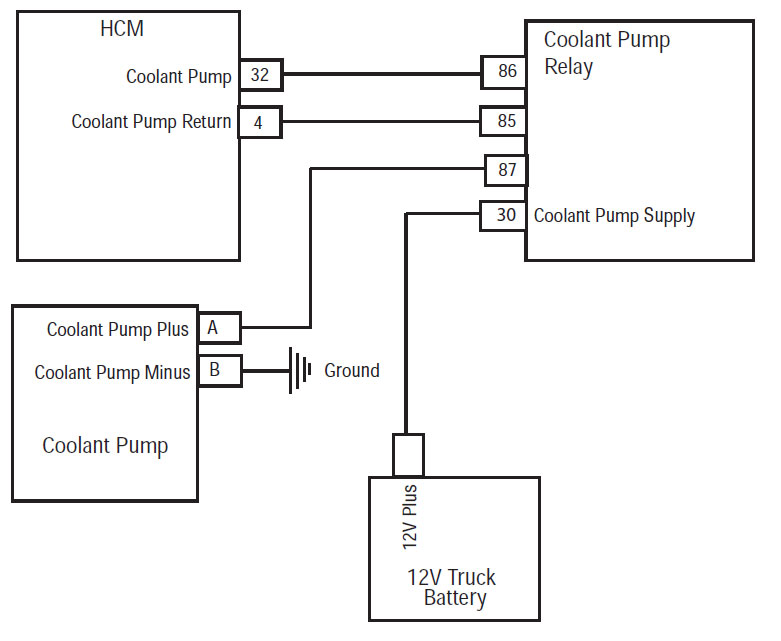
    ਸੂਚਨਾ: ਕੂਲਿੰਗ ਪੰਪ ਰੀਲੇਅ Eaton® ਲੋੜ ਅਨੁਸਾਰ ਤਾਰ ਕੀਤਾ ਜਾਣਾ ਚਾਹੀਦਾ ਹੈ (ਪਿਛਲੇ ਸਫ਼ੇ 'ਤੇ ਦਿਖਾਇਆ ਗਿਆ) ਇਸ ਟੈਸਟ ਨੂੰ ਠੀਕ ਕੰਮ ਕਰਨ ਲਈ. ਜੇ ਵੱਖਰੇ ਤਾਰ, ਸਲਾਹ-ਮਸ਼ਵਰਾ ਸਹੀ ਤਾਰ ਯੋਜਨਾਬੱਧ ਲਈ OEM.

    • ਜੇ FMI 5 ਸੂਚੀਬੱਧ ਹੈ, ਕਦਮ ਨੂੰ ਜਾਣ 3.
    • ਜੇ FMI 3 ਸੂਚੀਬੱਧ ਹੈ, ਕਦਮ ਨੂੰ ਜਾਣ 4.
    • ਜੇ FMI 4 ਸੂਚੀਬੱਧ ਹੈ, ਕਦਮ ਨੂੰ ਜਾਣ 5.
    • ਜੇ FMI 14 ਸੂਚੀਬੱਧ ਹੈ, ਕਦਮ ਨੂੰ ਜਾਣ 6.

[/fusion_content_box][fusion_content_box title=ਕਦਮ 3. HCM ਹਾਰਨੈਸ ਸਰਕਟ ਦੀ ਨਿਰੰਤਰਤਾ ਦੀ ਪੜਤਾਲ.backgroundcolor=”” icon=”” iconflip=”” iconrotate=”” iconspin=”” iconcolor=”” circlecolor=”” circlebordersize=”” circlebordercolor=”” outercirclebordersize=”” outercirclebordercolor=”” image=”” image_id=”” image_width=”” image_height=”” link=”” linktext=”” link_target=”” animation_type=”” animation_direction=leftanimation_speed=”0.3″ animation_offset=””]

  1. ਕੁੰਜੀ ਬੰਦ.
  2. ਕੁਨੈਕਸ਼ਨ ਨਕਾਰਾਤਮਕ ਬੈਟਰੀ ਕੇਬਲ.
  3. ਨੂੰ ਬੰਦ HCM ਹਾਰਨੈਸ 38-ਰਾਹ ਕੁਨੈਕਟਰ.
  4. Measure the resistance between the HCM Harness 38- ਰਾਹ ਕੁਨੈਕਟਰ ਪਿੰਨ 32 ਅਤੇ ਪਿੰਨ 4.
    • ਜੇ ਪਿੰਨ ਵਿਚਕਾਰ ਟਾਕਰੇ 32 ਅਤੇ ਪਿੰਨ 4 40-120 ohms ਹੈ, ਹਾਈਬ੍ਰਾਇਡ ਕੰਟਰੋਲ ਮੋਡੀਊਲ ਨੂੰ ਤਬਦੀਲ (HCM) (ਸਿਰਫ ਜੇ ਨੁਕਸ ਕੋਡ ਸਰਗਰਮ ਹੈ), ਫਿਰ ਕਦਮ ਨੂੰ ਜਾਣ 9.
    • ਟਾਕਰੇ ਸੀਮਾ ਦੇ ਬਾਹਰ ਹੈ, ਜੇ, ਇੱਕ ਓਪਨ ਸਰਕਟ ਕਾਰਨ ਵਾਹਨ ਹਾਰਨੈਸ ਦੀ ਮੁਰੰਮਤ, ਫਿਰ ਕਦਮ ਨੂੰ ਜਾਣ 9.

[/fusion_content_box][/fusion_content_boxes][fusion_content_boxes layout=clean-horizontalcolumns=”2″ title_size=”18pxheading_size=”3″ title_color=”#ffffffbody_color=”#ffffffbackgroundcolor=”#4f4f4ficon=”” iconflip=”” iconrotate=”” iconspin=noiconcolor=”” icon_circle=”” icon_circle_radius=”” circlecolor=”” circlebordersize=”” circlebordercolor=”” outercirclebordersize=”” outercirclebordercolor=”” icon_size=”” icon_hover_type=”” hover_accent_color=”” image=”” image_id=”” image_width=”” image_height=”” link_type=”” button_span=”” link_area=”” link_target=”” icon_align=leftanimation_type=”” animation_delay=”” animation_offset=”” animation_direction=leftanimation_speed=”0.3″ margin_top=”” margin_bottom=”” hide_on_mobile=small-visibility,medium-visibility,large-visibilityclass=”” id=””][fusion_content_box title=ਕਦਮ 4. ਜ਼ਮੀਨ ਨੂੰ HCM ਹਾਰਨੈਸ ਸਰਕਟ ਦੇ voltages ਦੀ ਪੜਤਾਲ.backgroundcolor=”” icon=”” iconflip=”” iconrotate=”” iconspin=noiconcolor=”” circlecolor=”” circlebordersize=”” circlebordercolor=”” outercirclebordersize=”” outercirclebordercolor=”” image=”” image_id=”” image_width=”” image_height=”” link=”” linktext=”ਹੋਰ ਪੜ੍ਹੋ” link_target=”” animation_type=”” animation_direction=leftanimation_speed=”0.3″ animation_offset=””]

  1. ਕੁੰਜੀ 'ਤੇ.
  2. ਵਿਚਕਾਰ HCM ਹਾਰਨੈਸ 38-ਰਾਹ ਕੁਨੈਕਟਰ ਪਿੰਨ ਰਾਗ ਵੋਲਟੇਜ 32 ਅਤੇ 'ਤੇ ਕੁੰਜੀ' ਤੇ ਜ਼ਮੀਨ.
    • ਜੇ ਪਿੰਨ ਵਿਚਕਾਰ ਵੋਲਟੇਜ 32 ਅਤੇ ਜ਼ਮੀਨ ਹੈ 0 ਵੋਲਟ, ਹਾਈਬ੍ਰਾਇਡ ਕੰਟਰੋਲ ਮੋਡੀਊਲ ਨੂੰ ਤਬਦੀਲ (HCM) (ਸਿਰਫ ਜੇ ਨੁਕਸ ਕੋਡ ਸਰਗਰਮ ਹੈ), ਫਿਰ ਕਦਮ ਨੂੰ ਜਾਣ 9.
    • ਜੇ ਪਿੰਨ ਵਿਚਕਾਰ ਵੋਲਟੇਜ 32 ਅਤੇ ਜ਼ਮੀਨ ਹੈ 12 ਵੋਲਟ, ਕਵਚ 'ਤੇ VBATT ਲਈ ਆਉਣ ਦੀ ਮੁਰੰਮਤ, ਫਿਰ ਕਦਮ ਨੂੰ ਜਾਣ 9.

[/fusion_content_box][fusion_content_box title=ਕਦਮ 5. ਜ਼ਮੀਨ ਨੂੰ HCM ਹਾਰਨੈਸ ਸਰਕਟ ਦੀ ਨਿਰੰਤਰਤਾ ਦੀ ਪੜਤਾਲ.backgroundcolor=”” icon=”” iconflip=”” iconrotate=”” iconspin=”” iconcolor=”” circlecolor=”” circlebordersize=”” circlebordercolor=”” outercirclebordersize=”” outercirclebordercolor=”” image=”” image_id=”” image_width=”” image_height=”” link=”” linktext=”” link_target=”” animation_type=”” animation_direction=leftanimation_speed=”0.3″ animation_offset=””]

  1. ਕੁੰਜੀ ਬੰਦ.
  2. ਕੁਨੈਕਸ਼ਨ ਨਕਾਰਾਤਮਕ ਬੈਟਰੀ ਕੇਬਲ.
  3. Disconnect the HCM System Harness 38- ਰਾਹ ਕੁਨੈਕਟਰ.
  4. HCM ਸਿਸਟਮ ਹਾਰਨੈਸ 38-ਰਾਹ ਕੁਨੈਕਟਰ ਪਿੰਨ੍ਹ ਵਿਚਕਾਰ ਟਾਕਰੇ ਰਾਗ 32 ਅਤੇ ਜ਼ਮੀਨ:
    • ਜੇ ਪਿੰਨ ਵਿਚਕਾਰ ਟਾਕਰੇ 32 ਅਤੇ ਜ਼ਮੀਨ 10K ohms ਜ ਵੱਡਾ ਹੈ, ਹਾਈਬ੍ਰਾਇਡ ਕੰਟਰੋਲ ਮੋਡੀਊਲ ਨੂੰ ਤਬਦੀਲ (HCM) (ਸਿਰਫ ਜੇ ਨੁਕਸ ਕੋਡ ਸਰਗਰਮ ਹੈ), ਫਿਰ ਕਦਮ ਨੂੰ ਜਾਣ 9.
    • ਟਾਕਰੇ ਸੀਮਾ ਦੇ ਬਾਹਰ ਹੈ, ਜੇ, ਇੱਕ ਛੋਟਾ ਜ਼ਮੀਨ ਲਈ ਵਾਹਨ ਹਾਰਨੈਸ ਦੀ ਮੁਰੰਮਤ, ਫਿਰ ਕਦਮ ਨੂੰ ਜਾਣ 9.

[/fusion_content_box][/fusion_content_boxes][fusion_content_boxes layout=clean-horizontalcolumns=”2″ title_size=”18pxheading_size=”3″ title_color=”#ffffffbody_color=”#ffffffbackgroundcolor=”#4f4f4ficon=”” iconflip=”” iconrotate=”” iconspin=noiconcolor=”” icon_circle=”” icon_circle_radius=”” circlecolor=”” circlebordersize=”” circlebordercolor=”” outercirclebordersize=”” outercirclebordercolor=”” icon_size=”” icon_hover_type=”” hover_accent_color=”” image=”” image_id=”” image_width=”” image_height=”” link_type=”” button_span=”” link_area=”” link_target=”” icon_align=leftanimation_type=”” animation_delay=”” animation_offset=”” animation_direction=leftanimation_speed=”0.3″ margin_top=”” margin_bottom=”” hide_on_mobile=small-visibility,medium-visibility,large-visibilityclass=”” id=””][fusion_content_box title=ਕਦਮ 6. ਹਾਈਬ੍ਰਾਇਡ ਸਿਸਟਮ coolant ਦੇ ਪੱਧਰ ਦੀ ਪੜਤਾਲ.backgroundcolor=”” icon=”” iconflip=”” iconrotate=”” iconspin=noiconcolor=”” circlecolor=”” circlebordersize=”” circlebordercolor=”” outercirclebordersize=”” outercirclebordercolor=”” image=”” image_id=”” image_width=”” image_height=”” link=”” linktext=”ਹੋਰ ਪੜ੍ਹੋ” link_target=”” animation_type=”” animation_direction=leftanimation_speed=”0.3″ animation_offset=””]

  1. ਕੁੰਜੀ ਬੰਦ.
  2. Note the level of the coolant in the Hybrid Liquid Cooling System:
    • coolant ਦੀ ਸਿਫਾਰਸ਼ ਕੀਤੀ ਸੀਮਾ ਦੇ ਅੰਦਰ ਹੈ, ਜੇ, ਕਦਮ ਨੂੰ ਜਾਣ 7.
    • coolant ਦੀ ਸਿਫਾਰਸ਼ ਕੀਤੀ ਸੀਮਾ ਹੇਠ ਹੈ, ਜੇ, coolant ਕਿਸਮ ਅਤੇ ਭਰੋ, ਵਿਧੀ ਲਈ OEM ਵੇਖੋ. ਕਦਮ ਜਾਓ 9.

[/fusion_content_box][fusion_content_box title=ਕਦਮ 7. ਹਾਈਬ੍ਰਾਇਡ ਸਿਸਟਮ coolant ਪੁੰਪ ਦੀ ਕਾਰਵਾਈ ਦੀ ਪੜਤਾਲ.backgroundcolor=”” icon=”” iconflip=”” iconrotate=”” iconspin=”” iconcolor=”” circlecolor=”” circlebordersize=”” circlebordercolor=”” outercirclebordersize=”” outercirclebordercolor=”” image=”” image_id=”” image_width=”” image_height=”” link=”” linktext=”” link_target=”” animation_type=”” animation_direction=leftanimation_speed=”0.3″ animation_offset=””]

  1. ਕੁੰਜੀ ਬੰਦ.
  2. ਕੈਬ ਵਿਚ 9-ਰਾਹ ਡਾਇਗਨੋਸਟਿਕ ਕੁਨੈਕਟਰ ਨੂੰ ServiceRanger ਕਨੈਕਟ ਕਰੋ.
  3. ਕੁੰਜੀ 'ਤੇ.
  4. ServiceRanger ਵਿਚ ਹੇਠ ਲਿਖੇ ਵਿਕਲਪ ਦੀ ਚੋਣ ਕਰੋ:
    "ਤਕਨੀਕੀ ਉਤਪਾਦ ਕੰਮ,"" ਹਾਈਬ੍ਰਾਇਡ ਕੰਟਰੋਲ ਮੋਡੀਊਲ,"ਅਤੇ" APF ਚਲਾਓ. "
  5. Go to “Product Tests” and select “Coolant Pump Relay.”
  6. Coolant ਪੰਪ 'ਤੇ ਚਾਲੂ ਕਰਨ ਲਈ ਸੁਣੋ ਅਤੇ ਸਰੋਵਰ ਵਿਚ coolant ਵਹਾਅ ਦੇਖਣ.
    • Coolant ਪੁੰਪ coolant ਸਰੋਵਰ ਦੁਆਰਾ ਵਧਣਾ ਨਾਲ ਚੱਲਦਾ ਹੈ, ਜੇ, ਅਤੇ ਨੁਕਸ ਕੋਡ ਸਰਗਰਮ ਹੈ, 'ਤੇ Eaton® ਸੰਪਰਕ ਕਰੋ 1-800-826-4357.
    • Coolant ਪੰਪ ਚਲਾਉਣ ਨਹੀ ਕਰਦਾ ਹੈ, ਜੇ, ਕਦਮ ਨੂੰ ਜਾਣ 8.
    • Coolant ਪੁੰਪ ਚੱਲਦਾ ਹੈ ਅਤੇ ਜੇ coolant ਵਹਿਣਾ ਨਹੀ ਹੈ, kinks ਜ coolant ਲਾਈਨ ਵਿੱਚ ਤਿੱਖੀ ਆਸਪਾਸ ਦੇ ਲਈ ਚੈੱਕ ਕਰੋ. ਜੇ ਠੀਕ, OEM ਨਾਲ ਸੰਪਰਕ coolant ਪੰਪ ਦੇ ਨਾਲ ਚਿੰਤਾ ਕਰਨ ਲਈ.

[/fusion_content_box][/fusion_content_boxes][fusion_content_boxes layout=clean-horizontalcolumns=”2″ title_size=”18pxheading_size=”3″ title_color=”#ffffffbody_color=”#ffffffbackgroundcolor=”#4f4f4ficon=”” iconflip=”” iconrotate=”” iconspin=noiconcolor=”” icon_circle=”” icon_circle_radius=”” circlecolor=”” circlebordersize=”” circlebordercolor=”” outercirclebordersize=”” outercirclebordercolor=”” icon_size=”” icon_hover_type=”” hover_accent_color=”#f41000image=”” image_id=”” image_width=”” image_height=”” link_type=”” button_span=”” link_area=”” link_target=”” icon_align=leftanimation_type=”” animation_delay=”” animation_offset=”” animation_direction=leftanimation_speed=”0.3″ margin_top=”” margin_bottom=”” hide_on_mobile=small-visibility,medium-visibility,large-visibilityclass=”” id=””][fusion_content_box title=ਕਦਮ 8. ਹਾਈਬ੍ਰਾਇਡ ਸਿਸਟਮ coolant ਪੁੰਪ 'ਤੇ voltages ਦੀ ਪੜਤਾਲ.backgroundcolor=”” icon=”” iconflip=”” iconrotate=”” iconspin=”” iconcolor=”” circlecolor=”” circlebordersize=”” circlebordercolor=”” outercirclebordersize=”” outercirclebordercolor=”” image=”” image_id=”” image_width=”” image_height=”” link=”” linktext=”” link_target=”” animation_type=”” animation_direction=leftanimation_speed=”0.3″ animation_offset=””]

  1. ਕੁੰਜੀ 'ਤੇ.
  2. Disconnect the 2-Way Connector at the Coolant Pump.
  3. ਪਿੰਨ ਬੀ ਪਿੰਨ ਇੱਕ 2-ਰਾਹ ਕੁਨੈਕਟਰ ਤੇ ਰਾਗ ਵੋਲਟੇਜ.
    • ਪਿੰਨ ਇੱਕ ਅਤੇ ਪਿੰਨ ਬੀ ਦੇ ਵਿਚਕਾਰ ਵੋਲਟੇਜ ± ਬੈਟਰੀ ਵੋਲਟੇਜ ਦੇ 0.2 ਵੋਲਟ ਹੈ, ਜੇ, Coolant ਪੁੰਪ ਸਮੱਸਿਆ ਲਈ OEM ਵੇਖੋ.
    • ਪਿੰਨ ਇੱਕ ਅਤੇ ਪਿੰਨ ਬੀ ਦੇ ਵਿਚਕਾਰ ਵੋਲਟੇਜ ਸੀਮਾ ਦੇ ਬਾਹਰ ਹੈ, ਜੇ, ਮੁਰੰਮਤ ਤਾਰ ਜ ਰੀਲੇਅ ਸਮੱਸਿਆ. OEM ਵੇਖੋ.

[/fusion_content_box][fusion_content_box title=ਕਦਮ 9. ਮੁਰੰਮਤ ਦੀ ਪੜਤਾਲ.backgroundcolor=”” icon=”” iconflip=”” iconrotate=”” iconspin=noiconcolor=”” circlecolor=”” circlebordersize=”” circlebordercolor=”” outercirclebordersize=”” outercirclebordercolor=”” image=”” image_id=”” image_width=”” image_height=”” link=”” linktext=”ਹੋਰ ਪੜ੍ਹੋ” link_target=”” animation_type=”” animation_direction=leftanimation_speed=”0.3″ animation_offset=””]

  1. ਕੁੰਜੀ ਬੰਦ.
  2. ਸਾਰੇ ਕੁਨੈਕਟਰ ਤੇ ਰਿਣਾਤਮਕ ਬੈਟਰੀ ਕੇਬਲ ਮੁੜ ਜੁੜਨ.
  3. ਕੁੰਜੀ 'ਤੇ.
  4. ਕੋਡ ਆਸਮਾਨ, ਵੇਖੋ, ਆਸਮਾਨ ਸਰਗਰਮ ਨੁਕਸ.
  5. ਵਾਹਨ ਗੱਡੀ ਅਤੇ ਕੋਡ ਸੈੱਟ ਕਰਨ ਲਈ ਕੋਸ਼ਿਸ਼.
  6. ਕੋਡ ਲਈ ਚੈੱਕ ਕਰੋ, ਵੇਖੋ, ਸਰਗਰਮ ਅਤੇ ਸਰਗਰਮ ਨੁਕਸ ਦੇਖੋ.
    • ਕੋਈ ਕੋਡ ਜੇ, ਟੈਸਟ ਮੁਕੰਮਲ ਹੋ ਗਈ ਹੈ.
    • ਜੇ ਨੁਕਸ ਕੋਡ 40 ਦਿਸਦਾ ਹੈ, ਟੈਸਟਿੰਗ ਵਿੱਚ ਗਲਤੀ ਦਾ ਪਤਾ, ਕਦਮ ਨੂੰ ਜਾਣ 1.
    • ਇੱਕ ਕੋਡ ਦੇ ਇਲਾਵਾ ਹੋਰ, ਜੇ 40 ਦਿਸਦਾ ਹੈ, ਵੇਖੋ, ਕੋਡ ਇੰਡੈਕਸ ਸੂਚੀ ਖਰਾਬ.

[/fusion_content_box][/fusion_content_boxes][/fusion_builder_column][/fusion_builder_row][/fusion_builder_container][fusion_global id=”13788″]