[fusion_builder_container hundred_percent=nohundred_percent_height=nohundred_percent_height_scroll=nohundred_percent_height_center_content=yesequal_height_columns=nomenu_anchor=”” hide_on_mobile=small-visibility,medium-visibility,large-visibilitystatus=publishedpublish_date=”” class=”” id=”” background_color=”” background_image=”” background_position=center centerbackground_repeat=no-repeatfade=nobackground_parallax=noneenable_mobile=noparallax_speed=”0.3″ video_mp4=”” video_webm=”” video_ogv=”” video_url=”” video_aspect_ratio=”16:9″ video_loop=yesvideo_mute=yesvideo_preview_image=”” border_size=”” border_color=”” border_style=solidmargin_top=”35″ margin_bottom=”” padding_top=”” padding_right=”” padding_bottom=”” padding_left=””][fusion_builder_row][fusion_builder_column type=”1_1layout=”1_1spacing=”” center_content=nolink=”” target=_selfmin_height=”” hide_on_mobile=small-visibility,medium-visibility,large-visibilityclass=”” id=”” background_color=”” background_image=”” background_image_id=”” background_position=left topbackground_repeat=no-repeathover_type=noneborder_size=”0″ border_color=”” border_style=solidborder_position=allpadding_top=”” padding_right=”” padding_bottom=”” padding_left=”” margin_top=”” margin_bottom=”” animation_type=”” animation_direction=leftanimation_speed=”0.3″ animation_offset=”” last=no”][fusion_text columns=”” column_min_width=”” column_spacing=”” rule_style=defaultrule_size=”” rule_color=”” hide_on_mobile=small-visibility,medium-visibility,large-visibilityclass=”” id=””]

קוד היברידי איטון פולר הילוכים Fault 35 – קישור תקשורת J1939 (TECU)

[/fusion_text][/fusion_builder_column][/fusion_builder_row][/fusion_builder_container][fusion_builder_container hundred_percent=nohundred_percent_height=nohundred_percent_height_scroll=nohundred_percent_height_center_content=yesequal_height_columns=nomenu_anchor=”” hide_on_mobile=small-visibility,medium-visibility,large-visibilitystatus=publishedpublish_date=”” class=”” id=”” background_color=”” background_image=”” background_position=center centerbackground_repeat=no-repeatfade=nobackground_parallax=noneenable_mobile=noparallax_speed=”0.3″ video_mp4=”” video_webm=”” video_ogv=”” video_url=”” video_aspect_ratio=”16:9″ video_loop=yesvideo_mute=yesvideo_preview_image=”” border_size=”” border_color=”” border_style=solidmargin_top=”” margin_bottom=”” padding_top=”” padding_right=”” padding_bottom=”” padding_left=””][fusion_builder_row][fusion_builder_column type=”1_1layout=”1_1spacing=”” center_content=nolink=”” target=_selfmin_height=”” hide_on_mobile=small-visibility,medium-visibility,large-visibilityclass=”” id=”” background_color=”” background_image=”” background_image_id=”” background_position=left topbackground_repeat=no-repeathover_type=noneborder_size=”0″ border_color=”” border_style=solidborder_position=allpadding_top=”” padding_right=”” padding_bottom=”” padding_left=”” margin_top=”” margin_bottom=”” animation_type=”” animation_direction=leftanimation_speed=”0.3″ animation_offset=”” last=no”][fusion_text columns=”” column_min_width=”” column_spacing=”” rule_style=defaultrule_size=”” rule_color=”” hide_on_mobile=small-visibility,medium-visibility,large-visibilityclass=”” id=””]

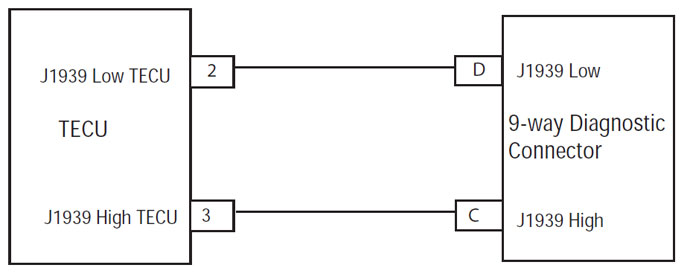
תקלת קוד עבור דגמי מערכות כונן היברידי איטון (MY08) EH-8E306A-U, EH-8E306A-UPG, EH-8E306A-UP, EH-8E306A-CD, EH-8E306A-T, EH-6E606B-CD, (MY09) EH-8E406A-U / P, EH-8E406A-UP, EH-8E406A-UPG, EH-8E406A-CD, EH-8E406A-CDG, EH-8E406A-CDR, EH-8E406A-T, EH-6E706B-CD, EH-6E706B-P ו- EH-6E706B-UPG. 1939 הוא קישור נתונים מעווה במהירות גבוהה זוג 250K עם אחד 120 נגד אוהם בכל קצה של הקישור. יחידת הבקרה הילוכים אלקטרונית (TECU) מחוברת קישור נתוני J1939 בבית המחבר 38-Way. קישור זה משמש להעביר מידע אל מודול הבקרה ההיברידי (HCM) כמו גם תקשורת עם או לקבל נתונים מן מודולים האחרים ברשת כדוגמת יחידת הבקרה האלקטרונית (ECU).

תקלת קוד 35 – קישור תקשורת J1939 (TECU) איתור

התנאים המוקדמים הבאים חייבים להתקיים לפני שהמערכת מזהה את התקלה:

  • מתח הצתה TECU עולה 7 וולט פחות 16 וולט.
  • תקלות מתח סוללה חלשות TECU אינן פעילות.

תנאים כדי להגדיר קוד תקלת Active

  • קרן המטבע הבינלאומית 2 נקבע כאשר TECU מאבד תקשורת עם כל המודולים על קישור נתוני J1939 עבור 5 שניות או יותר.

כאשר חלופי קוד תקלה 35 מוגדר מהתנאים הבאים:

  • אדום "שירות", נדלק נורית וכן הבזקים "F" בתצוגת ההילוך.
  • תקלת מאוחסן בזיכרון TECU.
  • השינויים במצב פעולה למצב AutoShift חלופי.
  • אם התקלה קובע בכל הכוח למעלה, המנוע לא לארכב.
  • אם סטי התקלות תוך כדי נהיגה, הרכב נשאר בהילוך הנוכחי ואת המצמד נפתח כאשר מהירות הרכב מתקרב סרק.

[/fusion_text][fusion_text columns=”” column_min_width=”” column_spacing=”” rule_style=defaultrule_size=”” rule_color=”” hide_on_mobile=small-visibility,medium-visibility,large-visibilityclass=”” id=””]

תנאים כדי להגדיר קוד תקלה פעיל

רק יכולות להיות מסומנות תקלות שאינן פעילות מתוך יחידת הבקרה אלקטרונית הילוכים (TECU) או היסטורית HCM באמצעות ServiceRanger. TECU אוטומטי מנקה את הפגמים מההיסטוריה לאחר 200 שעות ואת HCM אוטומטי מנקה את הפגמים מההיסטוריה לאחר תקלה לא הייתה פעילות 200 שעות.

קוד תקלה זו יכולה להיגרם על ידי כל אחת מהפעולות הבאות:

  • קרן המטבע הבינלאומית 2
    • קישור נתוני J1939
    • TECU

[/fusion_text][/fusion_builder_column][/fusion_builder_row][/fusion_builder_container][fusion_builder_container hundred_percent=nohundred_percent_height=nohundred_percent_height_scroll=nohundred_percent_height_center_content=yesequal_height_columns=nomenu_anchor=”” hide_on_mobile=small-visibility,medium-visibility,large-visibilitystatus=publishedpublish_date=”” class=”” id=”” background_color=”” background_image=”” background_position=center centerbackground_repeat=no-repeatfade=nobackground_parallax=noneenable_mobile=noparallax_speed=”0.3″ video_mp4=”” video_webm=”” video_ogv=”” video_url=”” video_aspect_ratio=”16:9″ video_loop=yesvideo_mute=yesvideo_preview_image=”” border_size=”” border_color=”” border_style=solidmargin_top=”” margin_bottom=”” padding_top=”” padding_right=”” padding_bottom=”” padding_left=””][fusion_builder_row][fusion_builder_column type=”1_1layout=”1_1spacing=”” center_content=nolink=”” target=_selfmin_height=”” hide_on_mobile=small-visibility,medium-visibility,large-visibilityclass=”” id=”” background_color=”” background_image=”” background_image_id=”” background_position=left topbackground_repeat=no-repeathover_type=noneborder_size=”0″ border_color=”” border_style=solidborder_position=allpadding_top=”” padding_right=”” padding_bottom=”” padding_left=”” margin_top=”” margin_bottom=”” animation_type=”” animation_direction=leftanimation_speed=”0.3″ animation_offset=”” last=no”][fusion_text columns=”” column_min_width=”” column_spacing=”” rule_style=defaultrule_size=”” rule_color=”” hide_on_mobile=small-visibility,medium-visibility,large-visibilityclass=”” id=””]

תקלת קוד 35 – קישור תקשורת J1939 (TECU) מבחן

[/fusion_text][/fusion_builder_column][/fusion_builder_row][/fusion_builder_container][fusion_builder_container hundred_percent=nohundred_percent_height=nohundred_percent_height_scroll=nohundred_percent_height_center_content=yesequal_height_columns=nomenu_anchor=”” hide_on_mobile=small-visibility,medium-visibility,large-visibilitystatus=publishedpublish_date=”” class=”” id=”” background_color=”” background_image=”” background_position=center centerbackground_repeat=no-repeatfade=nobackground_parallax=noneenable_mobile=noparallax_speed=”0.3″ video_mp4=”” video_webm=”” video_ogv=”” video_url=”” video_aspect_ratio=”16:9″ video_loop=yesvideo_mute=yesvideo_preview_image=”” border_size=”” border_color=”” border_style=solidmargin_top=”” margin_bottom=”” padding_top=”” padding_right=”” padding_bottom=”” padding_left=””][fusion_builder_row][fusion_builder_column type=”1_1layout=”1_1spacing=”” center_content=nolink=”” target=_selfmin_height=”” hide_on_mobile=small-visibility,medium-visibility,large-visibilityclass=”” id=”” background_color=”” background_image=”” background_image_id=”” background_position=left topbackground_repeat=no-repeathover_type=noneborder_size=”0″ border_color=”” border_style=solidborder_position=allpadding_top=”” padding_right=”” padding_bottom=”” padding_left=”” margin_top=”” margin_bottom=”” animation_type=”” animation_direction=leftanimation_speed=”0.3″ animation_offset=”” last=no”][fusion_text columns=”” column_min_width=”” column_spacing=”” rule_style=defaultrule_size=”” rule_color=”” hide_on_mobile=small-visibility,medium-visibility,large-visibilityclass=”” id=””]

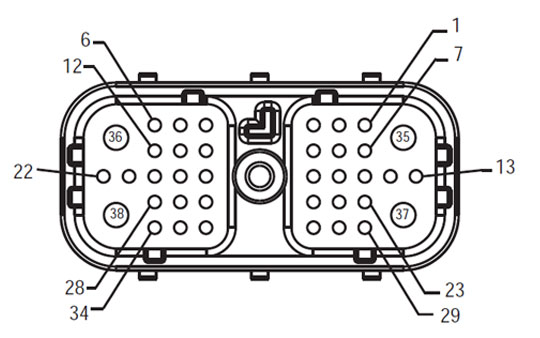
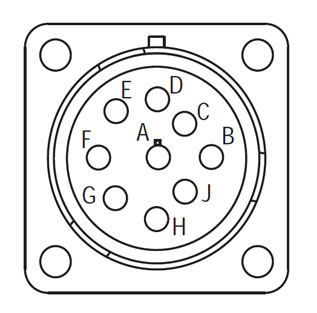
זיהוי רכיב:

[/fusion_text][/fusion_builder_column][fusion_builder_column type=”2_3layout=”1_2spacing=”” center_content=nolink=”” target=_selfmin_height=”” hide_on_mobile=small-visibility,medium-visibility,large-visibilityclass=”” id=”” background_color=”” background_image=”” background_image_id=”” background_position=left topbackground_repeat=no-repeathover_type=noneborder_size=”0″ border_color=”” border_style=solidborder_position=allpadding_top=”” padding_right=”” padding_bottom=”” padding_left=”” margin_top=”” margin_bottom=”” animation_type=”” animation_direction=leftanimation_speed=”0.3″ animation_offset=”” last=no”][fusion_imageframe image_id=”14135|fullmax_width=”” style_type=”” blur=”” stylecolor=”” hover_type=nonebordersize=”” bordercolor=”” borderradius=”” align=centerlightbox=nogallery_id=”” lightbox_image=”” lightbox_image_id=”” alt=”רתמה איטון שידור מבט מלפנים TECU – מחבר ממשק רכב” link=”” linktarget=_selfhide_on_mobile=small-visibility,medium-visibility,large-visibilityclass=”” id=”” animation_type=”” animation_direction=leftanimation_speed=”0.3″ animation_offset=””]https://www.globaltransmissionsupply.com/wp-content/uploads/Fuller-Harness-Front-View-TECU-Vehicle-Interface-Connector.jpg[/fusion_imageframe][fusion_text columns=”” column_min_width=”” column_spacing=”” rule_style=defaultrule_size=”” rule_color=”” hide_on_mobile=small-visibility,medium-visibility,large-visibilityclass=”” id=””]

חזית רתם צפו
TECU – מחבר ממשק רכב

[/fusion_text][/fusion_builder_column][fusion_builder_column type=”1_3layout=”1_2spacing=”” center_content=nolink=”” target=_selfmin_height=”” hide_on_mobile=small-visibility,medium-visibility,large-visibilityclass=”” id=”” background_color=”” background_image=”” background_image_id=”” background_position=left topbackground_repeat=no-repeathover_type=noneborder_size=”0″ border_color=”” border_style=solidborder_position=allpadding_top=”” padding_right=”” padding_bottom=”” padding_left=”” margin_top=”” margin_bottom=”” animation_type=”” animation_direction=leftanimation_speed=”0.3″ animation_offset=”” last=no”][fusion_imageframe image_id=”14191|fullmax_width=”” style_type=”” blur=”” stylecolor=”” hover_type=nonebordersize=”” bordercolor=”” borderradius=”” align=centerlightbox=nogallery_id=”” lightbox_image=”” lightbox_image_id=”” alt=”פולר 9-דרך אבחון Connector” link=”” linktarget=_selfhide_on_mobile=small-visibility,medium-visibility,large-visibilityclass=”” id=”” animation_type=”” animation_direction=leftanimation_speed=”0.3″ animation_offset=””]https://www.globaltransmissionsupply.com/wp-content/uploads/Fuller-9-way-Diagnostic-Connector.jpg[/fusion_imageframe][fusion_text columns=”” column_min_width=”” column_spacing=”” rule_style=defaultrule_size=”” rule_color=”” hide_on_mobile=small-visibility,medium-visibility,large-visibilityclass=”” id=””]

9-דרך אבחון Connector

[/fusion_text][/fusion_builder_column][fusion_builder_column type=”1_1layout=”1_1spacing=”” center_content=nolink=”” target=_selfmin_height=”” hide_on_mobile=small-visibility,medium-visibility,large-visibilityclass=”” id=”” background_image_id=”” background_color=”#000000″ background_image=”” background_position=left topundefined=”” background_repeat=no-repeathover_type=noneborder_size=”0″ border_color=”” border_style=solidborder_position=allpadding_top=”” padding_right=”” padding_bottom=”” padding_left=”” margin_top=”” margin_bottom=”” animation_type=”” animation_direction=leftanimation_speed=”0.3″ animation_offset=”” last=no”][fusion_text columns=”” column_min_width=”” column_spacing=”” rule_style=defaultrule_size=”” rule_color=”” hide_on_mobile=small-visibility,medium-visibility,large-visibilityclass=”” id=””]

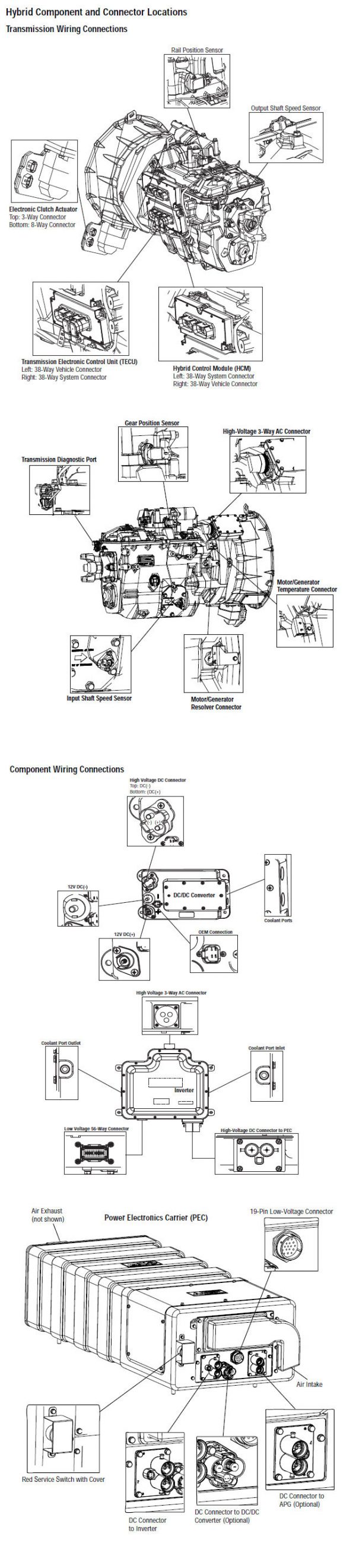
הערה: עיין רכיב איטון היברידי ואת מיקום Connector עבור מיקומים Connector במערכות MY08

[/fusion_text][/fusion_builder_column][fusion_builder_column type=”1_1layout=”1_1spacing=”” center_content=nolink=”” target=_selfmin_height=”” hide_on_mobile=small-visibility,medium-visibility,large-visibilityclass=”” id=”” background_image_id=”” background_color=”#000000″ background_image=”” background_position=left topundefined=”” background_repeat=no-repeathover_type=noneborder_size=”0″ border_color=”” border_style=solidborder_position=allpadding_top=”” padding_right=”” padding_bottom=”” padding_left=”” margin_top=”20″ margin_bottom=”” animation_type=”” animation_direction=leftanimation_speed=”0.3″ animation_offset=”” last=no”][fusion_text columns=”” column_min_width=”” column_spacing=”” rule_style=defaultrule_size=”” rule_color=”” hide_on_mobile=small-visibility,medium-visibility,large-visibilityclass=”” id=””]

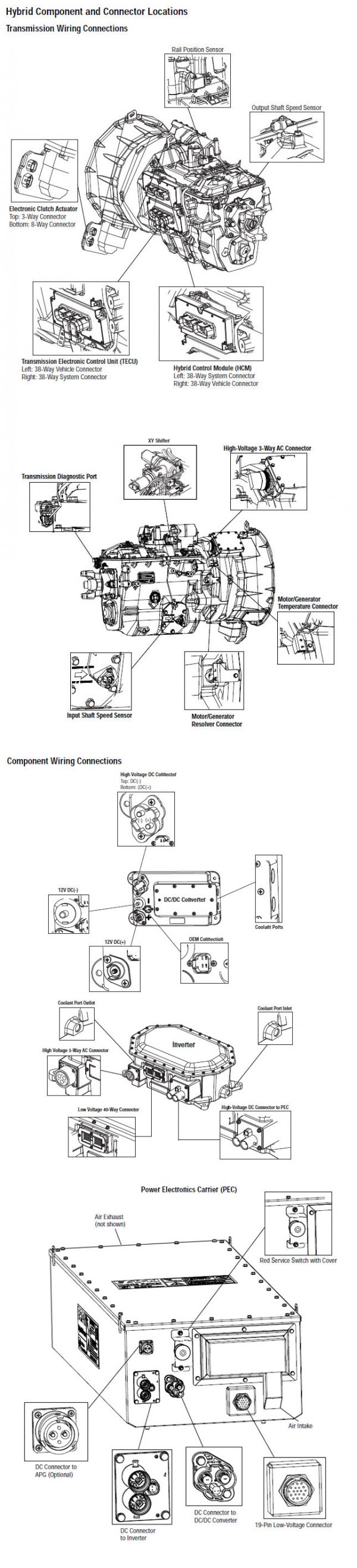
הערה: עיין רכיב איטון היברידי ואת מיקום Connector עבור מיקומים Connector במערכות MY09.
[/fusion_text][/fusion_builder_column][fusion_builder_column type=”1_1layout=”1_1spacing=”” center_content=nolink=”” target=_selfmin_height=”” hide_on_mobile=small-visibility,medium-visibility,large-visibilityclass=”” id=”” background_color=”” background_image=”” background_image_id=”” background_position=left topbackground_repeat=no-repeathover_type=noneborder_size=”0″ border_color=”” border_style=solidborder_position=allpadding_top=”” padding_right=”” padding_bottom=”” padding_left=”” margin_top=”” margin_bottom=”” animation_type=”” animation_direction=leftanimation_speed=”0.3″ animation_offset=”” last=no”][fusion_imageframe image_id=”14192|fullmax_width=”” style_type=”” blur=”” stylecolor=”” hover_type=nonebordersize=”” bordercolor=”” borderradius=”” align=centerlightbox=nogallery_id=”” lightbox_image=”” lightbox_image_id=”” alt=”TECU כדי 9 מחבר אבחון דרך להעברת איטון פולר” link=”” linktarget=_selfhide_on_mobile=small-visibility,medium-visibility,large-visibilityclass=”” id=”” animation_type=”” animation_direction=leftanimation_speed=”0.3″ animation_offset=””]https://www.globaltransmissionsupply.com/wp-content/uploads/TECU-to-9-way-diagnostic-connector.jpg[/fusion_imageframe][/fusion_builder_column][/fusion_builder_row][/fusion_builder_container][fusion_builder_container hundred_percent=nohundred_percent_height=nohundred_percent_height_scroll=nohundred_percent_height_center_content=yesequal_height_columns=nomenu_anchor=”” hide_on_mobile=small-visibility,medium-visibility,large-visibilitystatus=publishedpublish_date=”” class=”” id=”” background_color=”” background_image=”” background_position=center centerbackground_repeat=no-repeatfade=nobackground_parallax=noneenable_mobile=noparallax_speed=”0.3″ video_mp4=”” video_webm=”” video_ogv=”” video_url=”” video_aspect_ratio=”16:9″ video_loop=yesvideo_mute=yesvideo_preview_image=”” border_size=”” border_color=”” border_style=solidmargin_top=”” margin_bottom=”” padding_top=”” padding_right=”” padding_bottom=”” padding_left=””][fusion_builder_row][fusion_builder_column type=”1_1layout=”1_1spacing=”” center_content=nolink=”” target=_selfmin_height=”” hide_on_mobile=small-visibility,medium-visibility,large-visibilityclass=”” id=”” background_color=”” background_image=”” background_image_id=”” background_position=left topbackground_repeat=no-repeathover_type=noneborder_size=”0″ border_color=”” border_style=solidborder_position=allpadding_top=”” padding_right=”” padding_bottom=”” padding_left=”” margin_top=”” margin_bottom=”” animation_type=”” animation_direction=leftanimation_speed=”0.3″ animation_offset=”” last=no”][fusion_modal name=warnings_cautionstitle=”אזהרות & זהיר” size=largebackground=”” border_color=”” show_footer=yesclass=”” id=””]Danger: Danger מציין שאתה תיפגע באופן חמור או נהרג אם לא פעל לפי הנוהל המצוין.
אזהרה: אזהרה מצביעה על סכנה מיידית, אשר עלול לגרום לפציעה חמורה אם לא פעל לפי הנוהל המצוין.
זהיר: זהירות מציינת נזק לרכב או רכוש יכול להתרחש אם אתה לא מבין את ההליך שצוין.

הערה: הערה מציינת פרט נוסף שיסייע אבחנה או תיקון של רכיב / מערכת.

פעל על פי ההליכים המפורטים בסדר המצוין כדי למנוע פציעה:

1. אם הקונוסים המתח הגבוה הם סביב הרכב ואת ההשבתה מותקנת על PEC, האדם היחיד שיש לאפשר להפעיל את הרכב הוא מי שחתם על תג ההשבתה.
2. לפני תחילת העבודה על רכב או השארת מונית כאשר המנוע פועל, כדאי למקם את משמרת מנוף ב "N" להגדיר את בלם החניה, ולחסום את הגלגלים.
3. בשביל סיבות ביטחוניות, תמיד להעסיק את בלמי השירות לקראת בחירת תפקידי הילוך מ "נ"
4. לפני שמתחיל ברכב תמיד לשבת במושב הנהג, בחר "N" בשלט המשמרת, ולהגדיר את בלמי החניה.
5. ברכבים עם ePTO, המנוע ו / או
מנוע / מחולל יכול להתחיל במצב ePTO. לעולם לבצע כל תחזוקה או לעבוד על הרכב, כשהוא במצב זה.
6. 12-וולט סוללה חיובית (+) ושלילי (-) יש לנתק קודם כל ריתוך על כל רכב מצויד היברידי.

זהיר: פעל על פי ההליכים המפורטים בסדר המצוין כדי למנוע תקלה בציוד או נזק.
זהיר: אין לשחרר את בלם החנייה או לנסות לבחור הילוך עד שלחץ האוויר הוא ברמה הנכונה.
זהיר: כדי למנוע ניזק השידור במהלך גרירה במקום מנוף השינוי "N" ולהרים את הגלגלים המניעים מהקרקע או לנתק את מערכת ההינע.

אזהרות מתח גבוה & זהיר

  • השתמש CO2 או מטפים כימיים יבשים.
  • חיווט המתח הגבוה מכוסה בידוד כתום או צינורות מפותלים ומסומן עם תוויות אזהרה על המחברים.
  • כל דיזל היברידי Eaton® / כלי רכב חשמליים יסומנו "היברידי’ על החלק החיצוני של הרכב, יחד עם התווית המשמרת על לוח השעונים.
  • עיין OEM עבור מיקום ספציפי של רכיבים היברידיים רכוב מארז.
  • אין לחתוך לתוך כבלי מתח גבוה תפוז.
  • אין לחתוך לתוך או לפתוח את PEC.
  • אין לחתוך לתוך או לפתוח את ממיר DC / DC.
  • אין לחתוך לתוך או לפתוח את המהפך.

אזור חיץ יש להגדיר ו-מתח גבוה מבודד כפפות גומי (מעמד 0 עם מגיני עור) נדרשים קודם עובדים על מתח גבוה. אי ציות להוראות אלה עלול לגרום לפציעה חמורה או מוות.
הכפפות בידוד הגומי כי יש ללבוש תוך כדי עבודה על מערכת המתח הגבוה הן בכיתה 0 עם מגיני עור. כפפות הגומי צריכות להיבדק לפני כל שימוש לאחר הליך בדיקת כפפות בידוד גומי נמצא "כלי אבחון / פרסומי שירות" בעמוד 6. אי ציות להוראות אלה עלול לגרום לפציעה חמורה או מוות.
לפני הבדיקה או עובדים על כל כבלי מתח גבוה או רכיבים "נוהל מתח גבוה שירות כיבוי ואת הכח-Up" בעמוד 4 יש לפעול. אי ציות להוראות אלה עלול לגרום לפציעה חמורה או מוות.
המכשירים הנעולים ו Tagout להסירו רק על ידי הטכנאי כי הניח את התקני הנעילה ו Tagout על הרכב. אי ציות להוראות אלה עלול לגרום לפציעה חמורה או מוות.
כפפות במתח גבוה מבודד גומי (מעמד 0 עם מגיני עור) חייב להיות משוחק כאשר עובדים על כל
כבלי מתח גבוה. את "כיבוי שירות במתח גבוה Power-Up נוהל" בעמוד 4 חייב להיות מלווה לפני הסרת כל כבלי מתח גבוה. אי ציות להוראות אלה עלול לגרום לפציעה חמורה או מוות.
כבלי חיווט מתח גבוה הם כתומים המכילים תווית אזהרה על המחברים. רכיבי מתח גבוה מסומנים בתווית. כפפות במתח גבוה מבודד גומי (מעמד 0 עם מגיני עור) יש להשתמש בעת עבודה על כל אחד מהמרכיבים הללו. אי ציות להוראות אלה עלול לגרום לפציעה חמורה או מוות.

נהלי כיבוי שירות מתח גבוה
כיבוי שירות במתח גבוה נוהל Power-Up1. עקוב "פינת עבודה מתח-גבוה" נוהל.
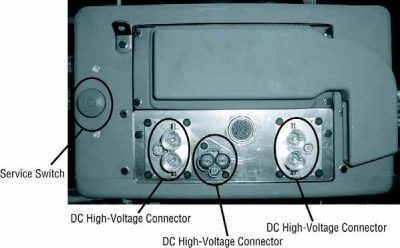
2. אתר את מתג PEC השירות האדום בחזית של PEC ולדחוף לכבות.
3. הסר את כיסוי חלף השירות ולהתקין את תושבת Lockout (J48506).
4. תג שנדבק תושבת Lockout.
5. ודא חלף שירות PEC לא יכול לעבור למצב הכבוי.
6. אפשר המערכת להגדיר עבור מינימום של 5 דקות כדי לפרוק מתח גבוה.
7. חבר ServiceRanger ולהציג את PID צג נתונים 116 שנקרא "פוטנציאל סוללה מתח גבוה." השתמש SPN 520323 עבור חיבור J1939 "RB מתח סוללה" (תיבת ממסר).
8. המתח צריך להיות 30 וולט או פחות. אם המתח הוא מעל 30 וולט, לא עובדים על הרכב ולפנות Eaton® ב 1-800-826-HELP (4357).
9. הפעל מפתח ההצתה כבוי ולהמשיך לתקן או צעד לפתרון בעיות.
הערה: המתח יורד לאפס כאשר המפתח הוא כבוי.

נוהל מתח גבוה חשמל-השכמה

1. התקן את כל המחברים במתח גבוה לעמדות הנעולות שלהם.
2. אם אתה האדם לעבוד על הרכב, הסר את תושבת ותגית Lockout.
3. התקן מחדש את תושבת Lockout על מתג השירות.
4. משוך את שירות חלף החוצה ולתת סט רכב 2 דקות.
5. Start vehicle when appropriate.[/fusion_modal][fusion_modal name=component_locationtitle=”רכיב איטון היברידי ואת מיקום Connector ” size=largebackground=”#ffffffborder_color=”” show_footer=yesclass=”” id=””]

רכיב איטון היברידי מיקומי Connector Systems MY08

[/fusion_modal][fusion_modal name=component_location2title=”רכיב איטון היברידי ואת מיקום Connector Systems MY09” size=largebackground=”#ffffffborder_color=”” show_footer=yesclass=”” id=””]

רכיב איטון היברידי מיקומי Connector Systems MY09

[/fusion_modal][/fusion_builder_column][/fusion_builder_row][/fusion_builder_container][fusion_builder_container hundred_percent=nohundred_percent_height=nohundred_percent_height_scroll=nohundred_percent_height_center_content=yesequal_height_columns=nomenu_anchor=”” hide_on_mobile=small-visibility,medium-visibility,large-visibilitystatus=publishedpublish_date=”” class=”” id=”” background_color=”” background_image=”” background_position=center centerbackground_repeat=no-repeatfade=nobackground_parallax=noneenable_mobile=noparallax_speed=”0.3″ video_mp4=”” video_webm=”” video_ogv=”” video_url=”” video_aspect_ratio=”16:9″ video_loop=yesvideo_mute=yesvideo_preview_image=”” border_size=”” border_color=”” border_style=solidmargin_top=”” margin_bottom=”” padding_top=”” padding_right=”” padding_bottom=”” padding_left=””][fusion_builder_row][fusion_builder_column type=”1_1layout=”1_1spacing=”” center_content=nolink=”” target=_selfmin_height=”” hide_on_mobile=small-visibility,medium-visibility,large-visibilityclass=”” id=”” background_color=”” background_image=”” background_image_id=”” background_position=left topbackground_repeat=no-repeathover_type=noneborder_size=”0″ border_color=”” border_style=solidborder_position=allpadding_top=”” padding_right=”” padding_bottom=”” padding_left=”” margin_top=”” margin_bottom=”” animation_type=”” animation_direction=leftanimation_speed=”0.3″ animation_offset=”” last=no”][fusion_content_boxes layout=clean-horizontalcolumns=”1″ title_size=”18pxheading_size=”3″ title_color=”#ffffffbody_color=”#ffffffbackgroundcolor=”#4f4f4ficon=”” iconflip=”” iconrotate=”” iconspin=noiconcolor=”” icon_circle=”” icon_circle_radius=”” circlecolor=”” circlebordersize=”” circlebordercolor=”” outercirclebordersize=”” outercirclebordercolor=”” icon_size=”” icon_hover_type=”” hover_accent_color=”” image=”” image_id=”” image_width=”” image_height=”” link_type=”” button_span=”” link_area=”” link_target=”” icon_align=leftanimation_type=”” animation_delay=”” animation_offset=”” animation_direction=leftanimation_speed=”0.3″ margin_top=”” margin_bottom=”” hide_on_mobile=small-visibility,medium-visibility,large-visibilityclass=”” id=””][fusion_content_box title=שלב 1. בדקו מצב קוד תקלה מופעל או מופסק.backgroundcolor=”” icon=”” iconflip=”” iconrotate=”” iconspin=noiconcolor=”” circlecolor=”” circlebordersize=”” circlebordercolor=”” outercirclebordersize=”” outercirclebordercolor=”” image=”” image_id=”” image_width=”” image_height=”” link=”” linktext=”קרא עוד” link_target=”” animation_type=”” animation_direction=leftanimation_speed=”0.3″ animation_offset=””]

  1. לאחזר קודי תקלות פעילים FMIs עם ServiceRanger באמצעות מחבר אבחון 9-Way.
  2. מפתח על.
  3. בחר את המסך "רכיבי רכב" ולהציג את המודולים השונים דיווח על הקישור J1939:
    • אם TECU אינו מדווח על J1939, אבל HCM רשום, עבור אל שלב 2.
    • אם גם חברת HCM ולא TECU מדווח על J1939, עבור אל שלב 3.

[/fusion_content_box][/fusion_content_boxes][fusion_content_boxes layout=clean-horizontalcolumns=”2″ title_size=”18pxheading_size=”3″ title_color=”#ffffffbody_color=”#ffffffbackgroundcolor=”#4f4f4ficon=”” iconflip=”” iconrotate=”” iconspin=noiconcolor=”” icon_circle=”” icon_circle_radius=”” circlecolor=”” circlebordersize=”” circlebordercolor=”” outercirclebordersize=”” outercirclebordercolor=”” icon_size=”” icon_hover_type=”” hover_accent_color=”” image=”” image_id=”” image_width=”” image_height=”” link_type=”” button_span=”” link_area=”” link_target=”” icon_align=leftanimation_type=”” animation_delay=”” animation_offset=”” animation_direction=leftanimation_speed=”0.3″ margin_top=”” margin_bottom=”” hide_on_mobile=small-visibility,medium-visibility,large-visibilityclass=”” id=””][fusion_content_box title=שלב 2. ודא משכיות של מעגלי ממשק הרכב.backgroundcolor=”” icon=”” iconflip=”” iconrotate=”” iconspin=noiconcolor=”” circlecolor=”” circlebordersize=”” circlebordercolor=”” outercirclebordersize=”” outercirclebordercolor=”” image=”” image_id=”” image_width=”” image_height=”” link=”” linktext=”קרא עוד” link_target=”” animation_type=”” animation_direction=leftanimation_speed=”0.3″ animation_offset=””]

  1. את המפתח.
  2. כבל סוללה שלילי ניתק.
  3. ניתק רתם רכב TECU 38- מחבר בדרך.
  4. למדוד התנגדות בין רתם רכב TECU 38- פיני Way 2 ו פין 3:הערה: ודא מד וולט / אוהם הוא על
    הערה: ודא מד וולט / אוהם הוא בסולם הנכון (סביב 200ohm מידה).

    • אם התנגדות בין הפין 2 ו פין 3 הוא בין 50-70 אוהם, להחליף יחידת בקרת הילוכים אלקטרונית (TECU), ולאחר מכן עבור לשלב 5.
    • אם ההתנגדות חורגת מהטווח, לתקן את רתם קישור נתוני J1939, ולאחר מכן עבור לשלב 5.

[/fusion_content_box][fusion_content_box title=שלב 3. ודא משכיות של מחבר אבחון רתם הילוכים.backgroundcolor=”” icon=”” iconflip=”” iconrotate=”” iconspin=”” iconcolor=”” circlecolor=”” circlebordersize=”” circlebordercolor=”” outercirclebordersize=”” outercirclebordercolor=”” image=”” image_id=”” image_width=”” image_height=”” link=”” linktext=”” link_target=”” animation_type=”” animation_direction=leftanimation_speed=”0.3″ animation_offset=””]

  1. את המפתח.
  2. למדוד התנגדות בין מחבר אבחון 9-Way פין C והתנגדות פין D.If בין פין C ו- D פין הוא בין 50-70 אוהם, עבור אל שלב 4.
    • אם ההתנגדות היא 70 אוהם או יותר, אחד או יותר של הנגדים המסתיימים על רתם קישור נתוני J1939 חסר או מחוץ לטווח, או קיימת פתוח בקישור. עבור אל שלב 5.
    • אם ההתנגדות היא 50 אוהם או פחות, קיים כיום נגד מסתיים נוסף. תיקון רתם קישור נתוני J1939 OEM, ולאחר מכן עבור לשלב 5.

[/fusion_content_box][/fusion_content_boxes][fusion_content_boxes layout=clean-horizontalcolumns=”2″ title_size=”18pxheading_size=”3″ title_color=”#ffffffbody_color=”#ffffffbackgroundcolor=”#4f4f4ficon=”” iconflip=”” iconrotate=”” iconspin=noiconcolor=”” icon_circle=”” icon_circle_radius=”” circlecolor=”” circlebordersize=”” circlebordercolor=”” outercirclebordersize=”” outercirclebordercolor=”” icon_size=”” icon_hover_type=”” hover_accent_color=”#f41000image=”” image_id=”” image_width=”” image_height=”” link_type=”” button_span=”” link_area=”” link_target=”” icon_align=leftanimation_type=”” animation_delay=”” animation_offset=”” animation_direction=leftanimation_speed=”0.3″ margin_top=”” margin_bottom=”” hide_on_mobile=small-visibility,medium-visibility,large-visibilityclass=”” id=””][fusion_content_box title=שלב 4. ודא משכיות של מעגלי מחבר האבחון רתם הילוכים לקרקע.backgroundcolor=”” icon=”” iconflip=”” iconrotate=”” iconspin=”” iconcolor=”” circlecolor=”” circlebordersize=”” circlebordercolor=”” outercirclebordersize=”” outercirclebordercolor=”” image=”” image_id=”” image_width=”” image_height=”” link=”” linktext=”” link_target=”” animation_type=”” animation_direction=leftanimation_speed=”0.3″ animation_offset=””]

  1. את המפתח.
  2. מדוד את ההתנגדות בין הבא 9- פיני אבחון Way:
    • פין C לקרקע
    • פין D לקרקע
      • אם התנגדות בין פין ג הקרקע פין D לקרקע הן 10K אוהם או יותר, לנסות ולתקשר עם רכב אחר כדי להבטיח ServiceRanger עובד. אם ServiceRanger לא מצליח לתקשר עם רכב אחר, קוראים 1-800-826-HELP (4357).
      • אם ההתנגדות חורגת מהטווח, לתקן רתמו קישור נתוני J1939 למשך קצר לקרקע, ולאחר מכן עבור לשלב 5.

[/fusion_content_box][fusion_content_box title=שלב 3. ודא תיקון.backgroundcolor=”” icon=”” iconflip=”” iconrotate=”” iconspin=noiconcolor=”” circlecolor=”” circlebordersize=”” circlebordercolor=”” outercirclebordersize=”” outercirclebordercolor=”” image=”” image_id=”” image_width=”” image_height=”” link=”” linktext=”קרא עוד” link_target=”” animation_type=”” animation_direction=leftanimation_speed=”0.3″ animation_offset=””]

  1. את המפתח.
  2. חבר מחדש את כל מחברי כבל סוללה שלילי.
  3. מפתח על.
  4. קודים ברורים, לראות ליקויים פעילים נקו.
  5. לנהוג ברכב ולנסות לאפס את הקוד.
  6. בדקו קודים, לראות צג ליקויים פעילים או לא פעילים.
    • אם אין קודים, השלמת הבדיקה.
    • אם קוד תקלה 35 נראה, למצוא שגיאה בבדיקה, עבור אל שלב 1.
    • אם קוד שאינו 35 נראה, לראות תקלת רשימת אינדקס קוד.

[/fusion_content_box][/fusion_content_boxes][/fusion_builder_column][/fusion_builder_row][/fusion_builder_container][fusion_global id=”13788″]