[fusion_builder_container hundred_percent=”yes” hundred_percent_height=”no” hundred_percent_height_scroll=”no” hundred_percent_height_center_content=”yes” equal_height_columns=”no” menu_anchor=”” hide_on_mobile=”small-visibility,medium-visibility,large-visibility” status=”published” publish_date=”” class=”” id=”” background_color=”” background_image=”” background_position=”center center” background_repeat=”no-repeat” fade=”no” background_parallax=”none” enable_mobile=”no” parallax_speed=”0.3″ video_mp4=”” video_webm=”” video_ogv=”” video_url=”” video_aspect_ratio=”16:9″ video_loop=”yes” video_mute=”yes” video_preview_image=”” border_size=”” border_color=”” border_style=”solid” margin_top=”35″ margin_bottom=”” padding_top=”” padding_right=”” padding_bottom=”” padding_left=””][fusion_builder_row][fusion_builder_column type=”1_1″ layout=”1_1″ spacing=”” center_content=”no” link=”” target=”_self” min_height=”” hide_on_mobile=”small-visibility,medium-visibility,large-visibility” class=”” id=”” background_color=”” background_image=”” background_image_id=”” background_position=”left top” background_repeat=”no-repeat” hover_type=”none” border_size=”0″ border_color=”” border_style=”solid” border_position=”all” padding_top=”” padding_right=”” padding_bottom=”” padding_left=”” margin_top=”” margin_bottom=”” animation_type=”” animation_direction=”left” animation_speed=”0.3″ animation_offset=”” last=”no”][fusion_text columns=”” column_min_width=”” column_spacing=”” rule_style=”default” rule_size=”” rule_color=”” hide_on_mobile=”small-visibility,medium-visibility,large-visibility” class=”” id=””]
Eaton ਆਪੋ ਨੁਕਸ ਕੋਡ 4 ਮੋਟਰ / ਜੇਨਰੇਟਰ ਘੁੰਮਣ ਸਪੀਡ ਸੈਸਰ
[/fusion_text][/fusion_builder_column][/fusion_builder_row][/fusion_builder_container][fusion_builder_container hundred_percent=”no” hundred_percent_height=”no” hundred_percent_height_scroll=”no” hundred_percent_height_center_content=”yes” equal_height_columns=”no” menu_anchor=”” hide_on_mobile=”small-visibility,medium-visibility,large-visibility” status=”published” publish_date=”” class=”” id=”” background_color=”” background_image=”” background_position=”center center” background_repeat=”no-repeat” fade=”no” background_parallax=”none” enable_mobile=”no” parallax_speed=”0.3″ video_mp4=”” video_webm=”” video_ogv=”” video_url=”” video_aspect_ratio=”16:9″ video_loop=”yes” video_mute=”yes” video_preview_image=”” border_size=”” border_color=”” border_style=”solid” margin_top=”” margin_bottom=”” padding_top=”” padding_right=”” padding_bottom=”” padding_left=””][fusion_builder_row][fusion_builder_column type=”1_1″ layout=”1_1″ spacing=”” center_content=”no” link=”” target=”_self” min_height=”” hide_on_mobile=”small-visibility,medium-visibility,large-visibility” class=”” id=”” background_color=”” background_image=”” background_image_id=”” background_position=”left top” background_repeat=”no-repeat” hover_type=”none” border_size=”0″ border_color=”” border_style=”solid” border_position=”all” padding_top=”” padding_right=”” padding_bottom=”” padding_left=”” margin_top=”” margin_bottom=”” animation_type=”” animation_direction=”left” animation_speed=”0.3″ animation_offset=”” last=”no”][fusion_text columns=”” column_min_width=”” column_spacing=”” rule_style=”default” rule_size=”” rule_color=”” hide_on_mobile=”small-visibility,medium-visibility,large-visibility” class=”” id=””]
Eaton ਹਾਈਬ੍ਰਾਇਡ ਡਰਾਈਵ ਸਿਸਟਮ ਮਾਡਲ ਲਈ ਕੋਡ ਖਰਾਬ (MY08) EH-8E306A-ਯੂ, EH-8E306A-UPG, EH-8E306A-ਅੱਪ, EH-8E306A-ਸੀਡੀ, EH-8E306A-ਟੀ, EH-6E606B-ਸੀਡੀ, (my09) EH-8E406A-ਯੂ / ਪੀ, EH-8E406A-ਅੱਪ, EH-8E406A-UPG, EH-8E406A-ਸੀਡੀ, EH-8E406A-CDG, EH-8E406A-CDR, EH-8E406A-ਟੀ, EH-6E706B-ਸੀਡੀ, EH-6E706B-ਪੀ ਅਤੇ EH-6E706B-UPG. ਮੋਟਰ / ਜੇਨਰੇਟਰ ਘੁੰਮਣ ਸਪੀਡ ਸੈਸਰ ਇੰਪੁੱਟ ਧੁਰ-ਦੁਆਲੇ ਦੇ ਮੋਟਰ / ਜੇਨਰੇਟਰ ਦੇ ਵਾਪਸ ਕਰਨ ਲਈ ਮਾਊਟ ਹੈ. ਸੂਚਕ (ਦੋ-ਟੁਕੜੇ ਡਿਜ਼ਾਇਨ) ਨੂੰ ਇੱਕ ਰੋਟਰ ਇੰਪੁੱਟ ਧੁਰ ਅਤੇ ਇੱਕ ਦੀ ਨਜ਼ਾਕਤ ਨੂੰ ਰਿੰਗ ਦਾ ਮਾਊਟ ਮੋਟਰ ਹਾਊਸਿੰਗ ਮਾਊਟ ਹੈ. ਦੀ ਨਜ਼ਾਕਤ ਨੂੰ ਰਿੰਗ ਕਾਰਵਾਈ ਦੇ ਦੌਰਾਨ ਘੱਟ-ਵੋਲਟੇਜ ਨਾਲ ਸਪਲਾਈ ਕਰ ਰਿਹਾ ਹੈ. ਰੋਟਰ ਦੀ ਨਜ਼ਾਕਤ ਨੂੰ ਰਿੰਗ ਵਿੱਚ ਇੱਕ ਵੋਲਟਜ ਚੜ੍ਹਾਅ ਉਕਸਾਉਣ ਬਦਲ, ਫਿਰ ਮੋਟਰ / ਜੇਨਰੇਟਰ RPM ਲਈ ਇੱਕ ਡਿਜ਼ੀਟਲ ਸਿਗਨਲ ਵਿੱਚ ਤਬਦੀਲ ਕੀਤਾ ਗਿਆ ਹੈ, ਜੋ ਕਿ. ਵੋਲਟਜ ਆਉਟਪੁੱਟ ਅਤੇ ਵਾਰਵਾਰਤਾ ਵੇਹਲਾ 'ਤੇ ਘੱਟ ਹੁੰਦਾ ਹੈ ਅਤੇ RPM ਨਾਲ ਵਧਾ ਦਿੰਦਾ ਹੈ.
ਖਰਾਬ ਕੋਡ 4 – ਮੋਟਰ / ਜੇਨਰੇਟਰ ਘੁੰਮਣ ਗਤੀ ਸੈਸਰ ਖੋਜ
- Inverter ਇਗਨੀਸ਼ਨ ਵੋਲਟੇਜ ਵੱਧ ਵੱਡਾ ਹੈ 7 ਵੋਲਟ ਅਤੇ ਵੱਧ ਘੱਟ 16 ਵੋਲਟ.
- ਐੱਫ 2 ਨੂੰ ਸੈੱਟ ਕਰਦਾ ਹੈ, ਜੇ ਉੱਥੇ ਇੱਕ ਸਰਗਰਮ ਸੰਚਾਰਨ ਇੰਪੁੱਟ ਧੁਰ ਸਪੀਡ ਸੈਸਰ ਕਸੂਰ ਹੈ.
ਹਾਲਾਤ ਨੁਕਸ ਕੋਡ ਸਰਗਰਮ ਸੈੱਟ
ਹਾਲਾਤ Faul ਕੋਡ ਸਰਗਰਮ ਸੈੱਟ:
- ਐੱਫ 0 ਸੈੱਟ ਕੀਤਾ ਗਿਆ ਹੈ, ਜਦ ਕਿ ਮੋਟਰ / ਜੇਨਰੇਟਰ ਦੀ ਗਤੀ ਆਮ ਜਾਇਜ਼ ਸੀਮਾ ਵੱਧ.
- ਐੱਫ 2 ਸੈੱਟ ਕੀਤਾ ਗਿਆ ਹੈ, ਜਦ ਕਿ ਮੋਟਰ / ਜੇਨਰੇਟਰ ਦੀ ਗਤੀ ਵੱਧ ਹੋਰ ਦੇ ਕੇ ਸੰਚਾਰ ਇੰਪੁੱਟ ਧੁਰ ਸਪੀਡ ਵੱਧ ਵੱਖ ਵੱਖ ਹੁੰਦਾ ਹੈ 100 'ਤੇ ਘੱਟੋ ਘੱਟ ਕਰਨ ਲਈ RPM ਨੂੰ 10 ਸਕਿੰਟ.
- ਐੱਫ 3: Set when the resolver circuit is shorted to ground.
- ਐੱਫ 21: Set when a resolver signal line short to 12-volt battery or ground is detected.
- ਐੱਫ 22, 24, 25 ਸੈੱਟ ਕੀਤੇ ਗਏ ਹਨ, ਜਦ ਕਿ ਐਨਾਲਾਗ-ਕਰਨ-ਡਿਜ਼ੀਟਲ ਕਨਵਰਟਰ ਸਿਗਨਲ ਦੇ ਸੁਮੇਲ ਨਾ ਮੇਲ ਹਨ.
- ਐੱਫ 27 ਸੈੱਟ ਕੀਤਾ ਗਿਆ ਹੈ, ਜਦ ਕਿ Inverter ਸ਼ੁਰੂਆਤੀ ਪੜਤਾਲ ਦੌਰਾਨ ਇੱਕ ਗਲਤੀ ਖੋਜਦਾ ਹੈ.
- ਐੱਫ 23 ਜਦ ਹੁੰਦਾ ਹੈ, ਲਈ ਇੱਕ ਐਨਾਲਾਗ-ਕਰਨ ਲਈ-ਡਿਜ਼ੀਟਲ ਕਨਵਰਟਰ ਆਉਟਪੁੱਟ ਗਲਤੀ ਸੰਕੇਤ ਸੈੱਟ ਕੀਤਾ ਗਿਆ ਹੈ 100 MS.
- ਐੱਫ 26 ਸੈੱਟ ਕੀਤਾ ਗਿਆ ਹੈ, ਜਦ ਕਿ ਰੋਟੇਸ਼ਨ ਸੂਚਕ ਦੀ ਗਤੀ ਵੱਧ ਵੱਡਾ ਹੈ 6000 ਮਿੰਟ-1 10 MS.
ਫਾਲਬੈਕ ਜਦ ਨੁਕਸ ਕੋਡ 4 ਸੈੱਟ ਕੀਤਾ ਗਿਆ ਹੈ ਹੇਠ ਹਾਲਾਤ ਵਾਪਰ:
• ਅੰਬਰ "ਚੈੱਕ ਹਾਈਬ੍ਰਾਇਡ" ਪ੍ਰਕਾਸ਼.
• Fault ਹਾਈਬ੍ਰਾਇਡ ਕੰਟਰੋਲ ਮੋਡੀਊਲ ਵਿੱਚ ਸੰਭਾਲਿਆ ਗਿਆ ਹੈ (HCM) ਮੈਮੋਰੀ.
• Electric Motor/Generator Assist and Regeneration are disabled; ਪਰ, ਹਾਈ-ਵੋਲਟੇਜ ਦੱਸਦੀ ਪੱਧਰੀ ਰਹਿਣ.
• HCM continues to control the hybrid vehicle in a diesel-only mode.
• ਸੰਚਾਰ ਮੂਲ ਨੂੰ 1 ਦਾ ਸਾਮਾਨ ਸ਼ੁਰੂ.
[/fusion_text][fusion_text columns=”” column_min_width=”” column_spacing=”” rule_style=”default” rule_size=”” rule_color=”” hide_on_mobile=”small-visibility,medium-visibility,large-visibility” class=”” id=””]
ਹਾਲਾਤ ਨੁਕਸ ਕੋਡ ਸਰਗਰਮ ਸੈੱਟ
ਕੇਵਲ ਸਰਗਰਮ ਨੁਕਸ ਸੰਚਾਰ ਇਲੈਕਟ੍ਰਾਨਿਕ ਕੰਟਰੋਲ ਯੂਨਿਟ ਤੱਕ ਸਾਫ਼ ਕਰ ਕੀਤਾ ਜਾ ਸਕਦਾ ਹੈ (TECU) ਜ HCM ਦਾ ਇਤਿਹਾਸ ServiceRanger ਵਰਤ. TECU ਆਪ ਹੀ ਬਾਅਦ ਇਤਿਹਾਸ ਨੁਕਸ ਸਾਫ 200 ਘੰਟੇ. HCM ਆਪ ਹੀ ਨੁਕਸ ਇਤਿਹਾਸ ਨੁਕਸ ਬਾਅਦ ਲਈ ਸਰਗਰਮ ਕੀਤਾ ਗਿਆ ਹੈ, ਸਾਫ 200 ਘੰਟੇ
ਇਹ ਕਸੂਰ ਕੋਡ ਹੇਠ ਦੇ ਕਿਸੇ ਵੀ ਦੇ ਕਾਰਨ ਕੀਤਾ ਜਾ ਸਕਦਾ ਹੈ:
MY08
- ਐੱਫ 0
- ਲੰਮੇ ਵਧਾਇਆ ਗ੍ਰੇਡ ਵਾਹਨ ਹੌਲੀ ਕਰਨ ਦੀ ਸੇਵਾ ਬ੍ਰੇਕ ਦੀ ਰੁਕ ਵਰਤਣ ਦੀ ਲੋੜ ਹੋ ਸਕਦੀ ਹੈ
- ਐੱਫ 22, 24, 25, 27
- inverter
- ਐੱਫ 2, 23, 26
- inverter
- ਮੋਟਰ / ਜੇਨਰੇਟਰ
- ਮੋਟਰ / ਜੇਨਰੇਟਰ ਅਤੇ Inverter ਵਿਚਕਾਰ Resolver ਹਾਰਨੈਸ
my09
- ਐੱਫ 3, 21
- inverter
- Resolver Harness between the motor/generator
and Inverter
- ਐੱਫ 2, 22, 23, 24, 25, 27
- inverter
- ਮੋਟਰ / ਜੇਨਰੇਟਰ
- ਮੋਟਰ / ਜੇਨਰੇਟਰ ਅਤੇ Inverter ਵਿਚਕਾਰ Resolver ਹਾਰਨੈਸ
- Water in Inverter or Resolver wire connector
[/fusion_text][/fusion_builder_column][/fusion_builder_row][/fusion_builder_container][fusion_builder_container hundred_percent=”no” hundred_percent_height=”no” hundred_percent_height_scroll=”no” hundred_percent_height_center_content=”yes” equal_height_columns=”no” menu_anchor=”” hide_on_mobile=”small-visibility,medium-visibility,large-visibility” status=”published” publish_date=”” class=”” id=”” background_color=”” background_image=”” background_position=”center center” background_repeat=”no-repeat” fade=”no” background_parallax=”none” enable_mobile=”no” parallax_speed=”0.3″ video_mp4=”” video_webm=”” video_ogv=”” video_url=”” video_aspect_ratio=”16:9″ video_loop=”yes” video_mute=”yes” video_preview_image=”” border_size=”” border_color=”” border_style=”solid” margin_top=”” margin_bottom=”” padding_top=”” padding_right=”” padding_bottom=”” padding_left=””][fusion_builder_row][fusion_builder_column type=”1_1″ layout=”1_1″ spacing=”” center_content=”no” link=”” target=”_self” min_height=”” hide_on_mobile=”small-visibility,medium-visibility,large-visibility” class=”” id=”” background_color=”” background_image=”” background_image_id=”” background_position=”left top” background_repeat=”no-repeat” hover_type=”none” border_size=”0″ border_color=”” border_style=”solid” border_position=”all” padding_top=”” padding_right=”” padding_bottom=”” padding_left=”” margin_top=”” margin_bottom=”” animation_type=”” animation_direction=”left” animation_speed=”0.3″ animation_offset=”” last=”no”][fusion_text columns=”” column_min_width=”” column_spacing=”” rule_style=”default” rule_size=”” rule_color=”” hide_on_mobile=”small-visibility,medium-visibility,large-visibility” class=”” id=””]
ਖਰਾਬ ਕੋਡ 4 – ਮੋਟਰ / ਜੇਨਰੇਟਰ ਘੁੰਮਣ ਗਤੀ ਸੈਸਰ ਟੈਸਟ
[/fusion_text][/fusion_builder_column][/fusion_builder_row][/fusion_builder_container][fusion_builder_container hundred_percent=”no” hundred_percent_height=”no” hundred_percent_height_scroll=”no” hundred_percent_height_center_content=”yes” equal_height_columns=”no” menu_anchor=”” hide_on_mobile=”small-visibility,medium-visibility,large-visibility” status=”published” publish_date=”” class=”” id=”” background_color=”” background_image=”” background_position=”center center” background_repeat=”no-repeat” fade=”no” background_parallax=”none” enable_mobile=”no” parallax_speed=”0.3″ video_mp4=”” video_webm=”” video_ogv=”” video_url=”” video_aspect_ratio=”16:9″ video_loop=”yes” video_mute=”yes” video_preview_image=”” border_size=”” border_color=”” border_style=”solid” margin_top=”” margin_bottom=”” padding_top=”” padding_right=”” padding_bottom=”” padding_left=””][fusion_builder_row][fusion_builder_column type=”1_1″ layout=”1_1″ spacing=”” center_content=”no” link=”” target=”_self” min_height=”” hide_on_mobile=”small-visibility,medium-visibility,large-visibility” class=”” id=”” background_color=”” background_image=”” background_image_id=”” background_position=”left top” background_repeat=”no-repeat” hover_type=”none” border_size=”0″ border_color=”” border_style=”solid” border_position=”all” padding_top=”” padding_right=”” padding_bottom=”” padding_left=”” margin_top=”” margin_bottom=”” animation_type=”” animation_direction=”left” animation_speed=”0.3″ animation_offset=”” last=”no”][fusion_text columns=”” column_min_width=”” column_spacing=”” rule_style=”default” rule_size=”” rule_color=”” hide_on_mobile=”small-visibility,medium-visibility,large-visibility” class=”” id=””]
ਭਾਗ ਪਛਾਣ MY08 ਸਿਸਟਮ:
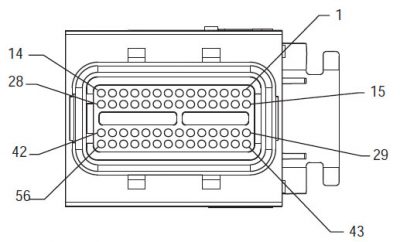
[/fusion_text][/fusion_builder_column][fusion_builder_column type=”2_3″ layout=”1_2″ spacing=”” center_content=”no” link=”” target=”_self” min_height=”” hide_on_mobile=”small-visibility,medium-visibility,large-visibility” class=”” id=”” background_color=”” background_image=”” background_image_id=”” background_position=”left top” background_repeat=”no-repeat” hover_type=”none” border_size=”0″ border_color=”” border_style=”solid” border_position=”all” padding_top=”” padding_right=”” padding_bottom=”” padding_left=”” margin_top=”” margin_bottom=”” animation_type=”” animation_direction=”left” animation_speed=”0.3″ animation_offset=”” last=”no”][fusion_imageframe image_id=”13934|400″ max_width=”” style_type=”” blur=”” stylecolor=”” hover_type=”none” bordersize=”” bordercolor=”” borderradius=”” align=”center” lightbox=”no” gallery_id=”” lightbox_image=”” lightbox_image_id=”” alt=”ਡੈਲਫੀ 56-ਰਾਹ ਮੇਲ ਕੁਨੈਕਟਰ ਦੇਖੋ” link=”” linktarget=”_self” hide_on_mobile=”small-visibility,medium-visibility,large-visibility” class=”” id=”” animation_type=”” animation_direction=”left” animation_speed=”0.3″ animation_offset=””]https://www.globaltransmissionsupply.com/wp-content/uploads/Delphi-56-Way-Mating-Connector-View-400×242.jpg[/fusion_imageframe][fusion_text columns=”” column_min_width=”” column_spacing=”” rule_style=”default” rule_size=”” rule_color=”” hide_on_mobile=”small-visibility,medium-visibility,large-visibility” class=”” id=””]
ਡੈਲਫੀ 56-ਰਾਹ ਮੇਲ ਕੁਨੈਕਟਰ ਦੇਖੋ
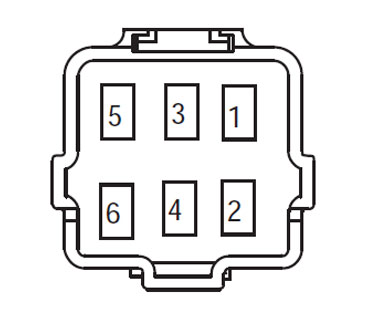
[/fusion_text][/fusion_builder_column][fusion_builder_column type=”1_3″ layout=”1_2″ spacing=”” center_content=”no” link=”” target=”_self” min_height=”” hide_on_mobile=”small-visibility,medium-visibility,large-visibility” class=”” id=”” background_color=”” background_image=”” background_image_id=”” background_position=”left top” background_repeat=”no-repeat” hover_type=”none” border_size=”0″ border_color=”” border_style=”solid” border_position=”all” padding_top=”” padding_right=”” padding_bottom=”” padding_left=”” margin_top=”” margin_bottom=”” animation_type=”” animation_direction=”left” animation_speed=”0.3″ animation_offset=”” last=”no”][fusion_imageframe image_id=”13966|full” max_width=”” style_type=”” blur=”” stylecolor=”” hover_type=”none” bordersize=”” bordercolor=”” borderradius=”” align=”center” lightbox=”no” gallery_id=”” lightbox_image=”” lightbox_image_id=”” alt=”Eaton ਸੰਚਾਰ Resolver ਹਾਰਨੈਸ ਦੇਖੋ” link=”” linktarget=”_self” hide_on_mobile=”small-visibility,medium-visibility,large-visibility” class=”” id=”” animation_type=”” animation_direction=”left” animation_speed=”0.3″ animation_offset=””]https://www.globaltransmissionsupply.com/wp-content/uploads/Eaton-Transmission-Resolver-Harness-View.jpg[/fusion_imageframe][fusion_text columns=”” column_min_width=”” column_spacing=”” rule_style=”default” rule_size=”” rule_color=”” hide_on_mobile=”small-visibility,medium-visibility,large-visibility” class=”” id=””]
Resolver ਹਾਰਨੈਸ ਦੇਖੋ (ਸਾਹਮਣੇ ਵਾਲੇ ਪਾਸੇ)
[/fusion_text][/fusion_builder_column][fusion_builder_column type=”1_1″ layout=”1_1″ spacing=”” center_content=”no” link=”” target=”_self” min_height=”” hide_on_mobile=”small-visibility,medium-visibility,large-visibility” class=”” id=”” background_image_id=”” background_color=”#000000″ background_image=”” background_position=”left top” undefined=”” background_repeat=”no-repeat” hover_type=”none” border_size=”0″ border_color=”” border_style=”solid” border_position=”all” padding_top=”” padding_right=”” padding_bottom=”” padding_left=”” margin_top=”” margin_bottom=”” animation_type=”” animation_direction=”left” animation_speed=”0.3″ animation_offset=”” last=”no”][fusion_text columns=”” column_min_width=”” column_spacing=”” rule_style=”default” rule_size=”” rule_color=”” hide_on_mobile=”small-visibility,medium-visibility,large-visibility” class=”” id=””]
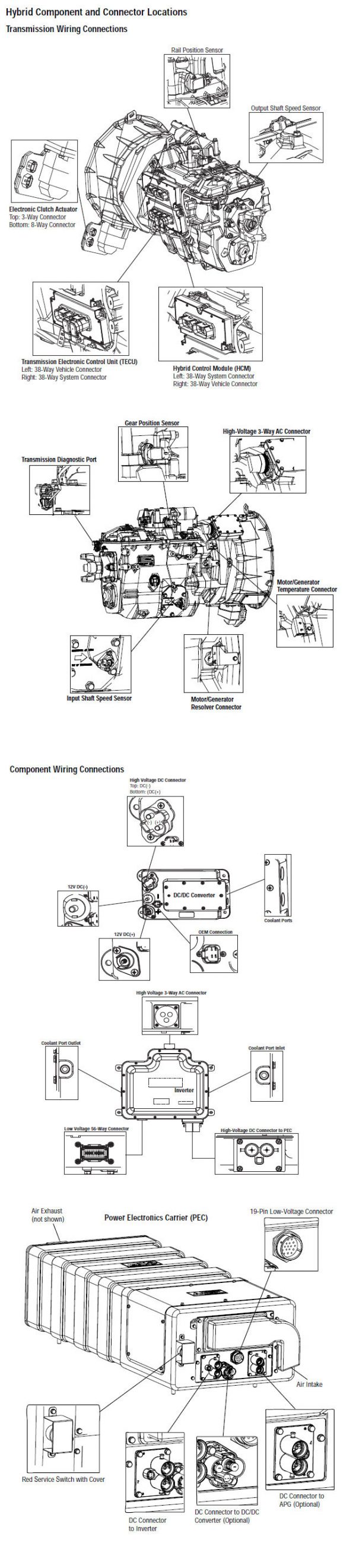
ਸੂਚਨਾ: ਵੇਖੋ Eaton ਹਾਈਬ੍ਰਾਇਡ ਭਾਗ ਅਤੇ ਕੁਨੈਕਟਰ ਸਥਿਤੀ MY08 ਸਿਸਟਮ ਵਿੱਚ ਕੁਨੈਕਟਰ ਸਥਾਨ ਲਈ
[/fusion_text][/fusion_builder_column][fusion_builder_column type=”1_1″ layout=”1_1″ spacing=”” center_content=”no” link=”” target=”_self” min_height=”” hide_on_mobile=”small-visibility,medium-visibility,large-visibility” class=”” id=”” background_color=”” background_image=”” background_image_id=”” background_position=”left top” background_repeat=”no-repeat” hover_type=”none” border_size=”0″ border_color=”” border_style=”solid” border_position=”all” padding_top=”” padding_right=”” padding_bottom=”” padding_left=”” margin_top=”” margin_bottom=”” animation_type=”” animation_direction=”left” animation_speed=”0.3″ animation_offset=”” last=”no”][fusion_imageframe image_id=”13965|800″ max_width=”” style_type=”” blur=”” stylecolor=”” hover_type=”none” bordersize=”” bordercolor=”” borderradius=”” align=”center” lightbox=”no” gallery_id=”” lightbox_image=”” lightbox_image_id=”” alt=”Eaton ਆਪੋ Inverter ਮੋਟਰ ਜਰਨੇਟਰ ਹੱਲ਼ ਕਰਨ ਕੁਨੈਕਸ਼ਨ” link=”” linktarget=”_self” hide_on_mobile=”small-visibility,medium-visibility,large-visibility” class=”” id=”” animation_type=”” animation_direction=”left” animation_speed=”0.3″ animation_offset=””]https://www.globaltransmissionsupply.com/wp-content/uploads/Eaton-Fuller-Inverter-motor-generator-resolver-connection-800×361.jpg[/fusion_imageframe][/fusion_builder_column][/fusion_builder_row][/fusion_builder_container][fusion_builder_container hundred_percent=”no” hundred_percent_height=”no” hundred_percent_height_scroll=”no” hundred_percent_height_center_content=”yes” equal_height_columns=”no” menu_anchor=”” hide_on_mobile=”small-visibility,medium-visibility,large-visibility” status=”published” publish_date=”” class=”” id=”” background_color=”” background_image=”” background_position=”center center” background_repeat=”no-repeat” fade=”no” background_parallax=”none” enable_mobile=”no” parallax_speed=”0.3″ video_mp4=”” video_webm=”” video_ogv=”” video_url=”” video_aspect_ratio=”16:9″ video_loop=”yes” video_mute=”yes” video_preview_image=”” border_size=”” border_color=”” border_style=”solid” margin_top=”” margin_bottom=”” padding_top=”” padding_right=”” padding_bottom=”” padding_left=””][fusion_builder_row][fusion_builder_column type=”1_1″ layout=”1_1″ spacing=”” center_content=”no” link=”” target=”_self” min_height=”” hide_on_mobile=”small-visibility,medium-visibility,large-visibility” class=”” id=”” background_color=”” background_image=”” background_image_id=”” background_position=”left top” background_repeat=”no-repeat” hover_type=”none” border_size=”0″ border_color=”” border_style=”solid” border_position=”all” padding_top=”” padding_right=”” padding_bottom=”” padding_left=”” margin_top=”” margin_bottom=”” animation_type=”” animation_direction=”left” animation_speed=”0.3″ animation_offset=”” last=”no”][fusion_text columns=”” column_min_width=”” column_spacing=”” rule_style=”default” rule_size=”” rule_color=”” hide_on_mobile=”small-visibility,medium-visibility,large-visibility” class=”” id=””]
ਭਾਗ ਪਛਾਣ my09 ਸਿਸਟਮ:
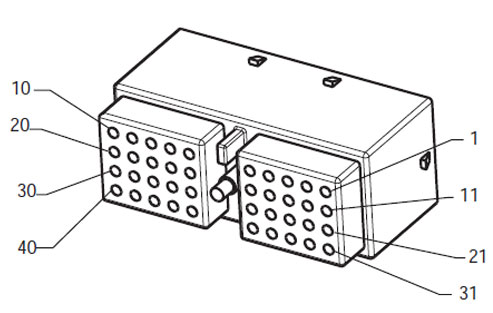
[/fusion_text][/fusion_builder_column][fusion_builder_column type=”2_3″ layout=”1_2″ spacing=”” center_content=”no” link=”” target=”_self” min_height=”” hide_on_mobile=”small-visibility,medium-visibility,large-visibility” class=”” id=”” background_color=”” background_image=”” background_image_id=”” background_position=”left top” background_repeat=”no-repeat” hover_type=”none” border_size=”0″ border_color=”” border_style=”solid” border_position=”all” padding_top=”” padding_right=”” padding_bottom=”” padding_left=”” margin_top=”” margin_bottom=”” animation_type=”” animation_direction=”left” animation_speed=”0.3″ animation_offset=”” last=”no”][fusion_imageframe image_id=”14000|full” max_width=”” style_type=”” blur=”” stylecolor=”” hover_type=”none” bordersize=”” bordercolor=”” borderradius=”” align=”center” lightbox=”no” gallery_id=”” lightbox_image=”” lightbox_image_id=”” alt=”Deutsch 40-ਰਾਹ ਮੇਲ ਕੁਨੈਕਟਰ ਦੇਖੋ” link=”” linktarget=”_self” hide_on_mobile=”small-visibility,medium-visibility,large-visibility” class=”” id=”” animation_type=”” animation_direction=”left” animation_speed=”0.3″ animation_offset=””]https://www.globaltransmissionsupply.com/wp-content/uploads/Deutsch-40-Way-Mating-Connector-View.jpg[/fusion_imageframe][fusion_text columns=”” column_min_width=”” column_spacing=”” rule_style=”default” rule_size=”” rule_color=”” hide_on_mobile=”small-visibility,medium-visibility,large-visibility” class=”” id=””]
Deutsch 40-ਰਾਹ ਮੇਲ ਕੁਨੈਕਟਰ ਦੇਖੋ
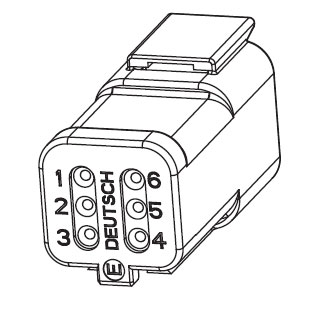
[/fusion_text][/fusion_builder_column][fusion_builder_column type=”1_3″ layout=”1_2″ spacing=”” center_content=”no” link=”” target=”_self” min_height=”” hide_on_mobile=”small-visibility,medium-visibility,large-visibility” class=”” id=”” background_color=”” background_image=”” background_image_id=”” background_position=”left top” background_repeat=”no-repeat” hover_type=”none” border_size=”0″ border_color=”” border_style=”solid” border_position=”all” padding_top=”” padding_right=”” padding_bottom=”” padding_left=”” margin_top=”” margin_bottom=”” animation_type=”” animation_direction=”left” animation_speed=”0.3″ animation_offset=”” last=”no”][fusion_imageframe image_id=”14028|full” max_width=”” style_type=”” blur=”” stylecolor=”” hover_type=”none” bordersize=”” bordercolor=”” borderradius=”” align=”center” lightbox=”no” gallery_id=”” lightbox_image=”” lightbox_image_id=”” alt=”Eaton Terminal Side – Harness Connector Resolver Deutsch 6-pin connector” link=”” linktarget=”_self” hide_on_mobile=”small-visibility,medium-visibility,large-visibility” class=”” id=”” animation_type=”” animation_direction=”left” animation_speed=”0.3″ animation_offset=””]https://www.globaltransmissionsupply.com/wp-content/uploads/Eaton-Terminal-Side-Harness-Connector-Deutsch-6-pin-connector.jpg[/fusion_imageframe][fusion_text columns=”” column_min_width=”” column_spacing=”” rule_style=”default” rule_size=”” rule_color=”” hide_on_mobile=”small-visibility,medium-visibility,large-visibility” class=”” id=””]
Eaton Terminal Side – Harness Connector Resolver Deutsch 6-pin connector
[/fusion_text][/fusion_builder_column][fusion_builder_column type=”1_1″ layout=”1_1″ spacing=”” center_content=”no” link=”” target=”_self” min_height=”” hide_on_mobile=”small-visibility,medium-visibility,large-visibility” class=”” id=”” background_image_id=”” background_color=”#000000″ background_image=”” background_position=”left top” undefined=”” background_repeat=”no-repeat” hover_type=”none” border_size=”0″ border_color=”” border_style=”solid” border_position=”all” padding_top=”” padding_right=”” padding_bottom=”” padding_left=”” margin_top=”” margin_bottom=”” animation_type=”” animation_direction=”left” animation_speed=”0.3″ animation_offset=”” last=”no”][fusion_text columns=”” column_min_width=”” column_spacing=”” rule_style=”default” rule_size=”” rule_color=”” hide_on_mobile=”small-visibility,medium-visibility,large-visibility” class=”” id=””]
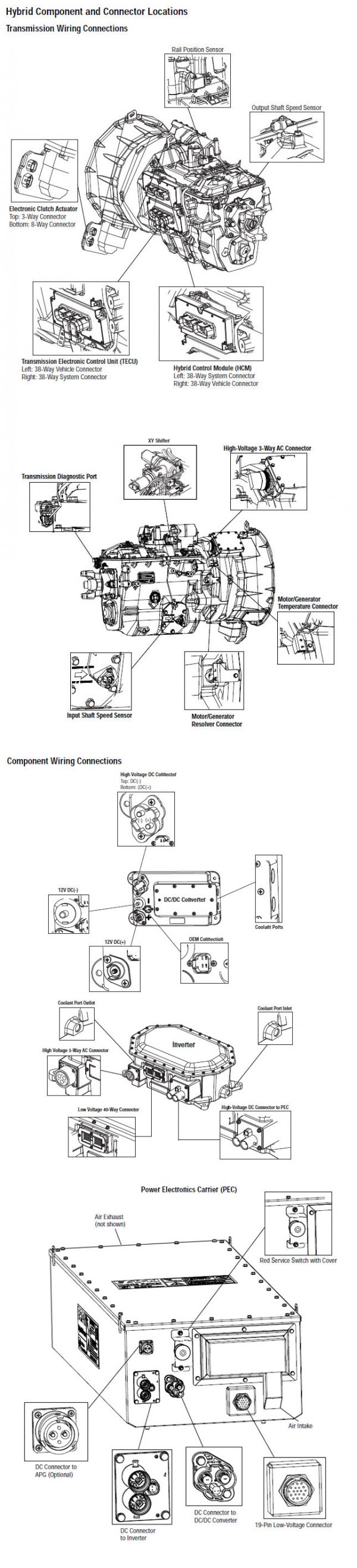
ਸੂਚਨਾ: ਵੇਖੋ Eaton ਹਾਈਬ੍ਰਾਇਡ ਭਾਗ ਅਤੇ ਕੁਨੈਕਟਰ ਸਥਿਤੀ My09 ਸਿਸਟਮ ਵਿੱਚ ਕੁਨੈਕਟਰ ਸਥਾਨ ਲਈ.
[/fusion_text][/fusion_builder_column][fusion_builder_column type=”1_1″ layout=”1_1″ spacing=”” center_content=”no” link=”” target=”_self” min_height=”” hide_on_mobile=”small-visibility,medium-visibility,large-visibility” class=”” id=”” background_color=”” background_image=”” background_image_id=”” background_position=”left top” background_repeat=”no-repeat” hover_type=”none” border_size=”0″ border_color=”” border_style=”solid” border_position=”all” padding_top=”” padding_right=”” padding_bottom=”” padding_left=”” margin_top=”” margin_bottom=”” animation_type=”” animation_direction=”left” animation_speed=”0.3″ animation_offset=”” last=”no”][fusion_imageframe image_id=”14029|800″ max_width=”” style_type=”” blur=”” stylecolor=”” hover_type=”none” bordersize=”” bordercolor=”” borderradius=”” align=”center” lightbox=”no” gallery_id=”” lightbox_image=”” lightbox_image_id=”” alt=”Eaton invertor motor generator resolver MY09″ link=”” linktarget=”_self” hide_on_mobile=”small-visibility,medium-visibility,large-visibility” class=”” id=”” animation_type=”” animation_direction=”left” animation_speed=”0.3″ animation_offset=””]https://www.globaltransmissionsupply.com/wp-content/uploads/Eaton-invertor-motor-generator-resolver-MY09-800×361.jpg[/fusion_imageframe][/fusion_builder_column][/fusion_builder_row][/fusion_builder_container][fusion_builder_container hundred_percent=”no” hundred_percent_height=”no” hundred_percent_height_scroll=”no” hundred_percent_height_center_content=”yes” equal_height_columns=”no” menu_anchor=”” hide_on_mobile=”small-visibility,medium-visibility,large-visibility” status=”published” publish_date=”” class=”” id=”” background_color=”” background_image=”” background_position=”center center” background_repeat=”no-repeat” fade=”no” background_parallax=”none” enable_mobile=”no” parallax_speed=”0.3″ video_mp4=”” video_webm=”” video_ogv=”” video_url=”” video_aspect_ratio=”16:9″ video_loop=”yes” video_mute=”yes” video_preview_image=”” border_size=”” border_color=”” border_style=”solid” margin_top=”” margin_bottom=”” padding_top=”” padding_right=”” padding_bottom=”” padding_left=””][fusion_builder_row][fusion_builder_column type=”1_1″ layout=”1_1″ spacing=”” center_content=”no” link=”” target=”_self” min_height=”” hide_on_mobile=”small-visibility,medium-visibility,large-visibility” class=”” id=”” background_color=”” background_image=”” background_image_id=”” background_position=”left top” background_repeat=”no-repeat” hover_type=”none” border_size=”0″ border_color=”” border_style=”solid” border_position=”all” padding_top=”” padding_right=”” padding_bottom=”” padding_left=”” margin_top=”” margin_bottom=”” animation_type=”” animation_direction=”left” animation_speed=”0.3″ animation_offset=”” last=”no”][fusion_modal name=”warnings_cautions” title=”ਚੇਤਾਵਨੀ & ਚੇਤਾਵਨੀ” size=”large” background=”” border_color=”” show_footer=”yes” class=”” id=””]
ਖ਼ਤਰਾ: ਖ਼ਤਰੇ ਦੇ ਸੰਕੇਤ ਕਰਦਾ ਹੈ ਕਿ ਤੁਹਾਨੂੰ ਬੁਰੀ ਜ਼ਖਮੀ ਹੋ ਜ ਦੀ ਮੌਤ ਹੋ ਜਾਵੇਗਾ, ਜੇ ਸੰਕੇਤ ਵਿਧੀ ਦੀ ਪਾਲਣਾ ਨਾ ਕਰਦੇ,.
ਚੇਤਾਵਨੀ: ਚੇਤਾਵਨੀ ਤੁਰੰਤ ਖਤਰਾ ਲੱਗਦਾ ਹੈ, ਗੰਭੀਰ ਨਿਜੀ ਸੱਟ ਦਾ ਨਤੀਜਾ ਹੋ ਸਕਦਾ ਹੈ, ਜੋ ਕਿ ਜੇਕਰ ਤੁਹਾਨੂੰ ਸੰਕੇਤ ਵਿਧੀ ਦੀ ਪਾਲਣਾ ਨਾ ਕਰਦੇ,.
ਸਾਵਧਾਨ: ਸਾਵਧਾਨ ਲੱਗਦਾ ਹੈ ਵਾਹਨ ਜ ਸੰਪਤੀ ਨੂੰ ਨੁਕਸਾਨ ਵਾਪਰ ਸਕਦਾ ਹੈ, ਜੇ ਤੁਹਾਨੂੰ ਸੰਕੇਤ ਵਿਧੀ ਦੀ ਪਾਲਣਾ ਨਾ ਕਰਦੇ,.
ਸੂਚਨਾ: ਸੂਚਨਾ ਵਾਧੂ ਵਿਸਥਾਰ ਹੈ, ਜੋ ਕਿ ਤਸ਼ਖੀਸ ਜ ਇੱਕ ਭਾਗ ਨੂੰ / ਸਿਸਟਮ ਦੀ ਮੁਰੰਮਤ 'ਚ ਮਦਦ ਕਰੇਗਾ ਪਤਾ ਲੱਗਦਾ ਹੈ.
ਵੇਖਾਏ ਕ੍ਰਮ ਨੂੰ ਨਿਜੀ ਸੱਟ ਬਚਣ ਲਈ ਵਿੱਚ ਦਿੱਤਾ ਕਾਰਵਾਈ ਦੀ ਪਾਲਣਾ ਕਰੋ:
1. ਹਾਈ-ਵੋਲਟੇਜ ਸ਼ੰਕੂ ਵਾਹਨ ਦੇ ਆਲੇ-ਦੁਆਲੇ ਹਨ ਅਤੇ ਤਾਲਾਬੰਦੀ PEC ਤੇ ਇੰਸਟਾਲ ਹੈ, ਜੇ, ਸਿਰਫ ਵਿਅਕਤੀ ਹੈ, ਜੋ ਕਿ ਵਾਹਨ ਸ਼ੁਰੂ ਕਰਨ ਦੀ ਇਜਾਜ਼ਤ ਕੀਤਾ ਜਾਣਾ ਚਾਹੀਦਾ ਹੈ, ਜੋ ਵਿਅਕਤੀ ਤਾਲਾਬੰਦੀ ਟੈਗ ਸਾਈਨ ਕੀਤਾ ਗਿਆ ਹੈ.
2. ਇੱਕ ਵਾਹਨ 'ਤੇ ਕੰਮ ਕਰ ਜ ਕੈਬ ਨੂੰ ਛੱਡ ਕੇ ਅੱਗੇ ਇੰਜਣ ਚੱਲ ਰਿਹਾ ਹੈ, ਜਦਕਿ, ਤੁਹਾਨੂੰ "n" ਵਿਚ ਸ਼ਿਫਟ ਲੀਵਰ ਰੱਖਣ ਚਾਹੀਦਾ ਹੈ ਪਾਰਕਿੰਗ ਤੋੜੀ ਸੈੱਟ ਕੀਤਾ, ਅਤੇ ਪਹੀਏ ਨੂੰ ਬਲਾਕ.
3. ਸੁਰੱਖਿਆ ਦੇ ਕਾਰਨ ਲਈ, ਹਮੇਸ਼ਾ ਸੇਵਾ ਬ੍ਰੇਕ ਸ਼ਾਮਲ "ਐਨ" ਤੱਕ ਗੇਅਰ ਅਹੁਦੇ ਦੀ ਚੋਣ ਕਰਨ ਲਈ ਪੁਰਾਣੇ
4. ਅੱਗੇ ਸ਼ੁਰੂ ਕਰਨ ਲਈ ਇੱਕ ਵਾਹਨ ਨੂੰ ਹਮੇਸ਼ਾ ਡਰਾਈਵਰ ਦੀ ਸੀਟ 'ਤੇ ਬੈਠੇ ਕੀਤਾ ਜਾ, ਦੀ ਚੋਣ ਕਰੋ "n" ਸ਼ਿਫਟ ਕੰਟਰੋਲ 'ਤੇ, ਅਤੇ ਪਾਰਕਿੰਗ ਬ੍ਰੇਕ ਸੈੱਟ ਕੀਤਾ.
5. ePTO ਨਾਲ ਵਾਹਨ ਵਿੱਚ, ਇੰਜਣ ਅਤੇ / ਜ
ਮੋਟਰ / ਜੇਨਰੇਟਰ ePTO ਮੋਡ ਵਿੱਚ ਸ਼ੁਰੂ ਕਰ ਸਕਦੇ ਹੋ. ਕਦੇ ਵੀ ਕਿਸੇ ਵੀ ਨਿਗਰਾਨੀ ਕਰਨ ਜ ਵਾਹਨ 'ਤੇ ਕੰਮ, ਇਸ ਮੋਡ ਵਿੱਚ, ਜਦਕਿ.
6. 12-ਵੋਲਟ ਬੈਟਰੀ ਸਕਾਰਾਤਮਕ (+) ਅਤੇ ਨਕਾਰਾਤਮਕ (-) ਕਿਸੇ ਵੀ ਹਾਈਬ੍ਰਾਇਡ ਲੈਸ ਵਾਹਨ 'ਤੇ ਕਿਸੇ ਵੀ ਿਲਵਿੰਗ ਕਰਨ ਲਈ ਪੁਰਾਣੇ ਕੁਨੈਕਸ਼ਨ ਬੰਦ ਕੀਤਾ ਜਾਣਾ ਚਾਹੀਦਾ ਹੈ.
ਸਾਵਧਾਨ: ਵੇਖਾਏ ਲਈ ਕ੍ਰਮ ਦੇ ਸਾਮਾਨ ਖ਼ਰਾਬ ਨੁਕਸਾਨ ਬਚਣ ਲਈ ਵਿੱਚ ਦਿੱਤਾ ਕਾਰਵਾਈ ਦੀ ਪਾਲਣਾ ਕਰੋ.
ਸਾਵਧਾਨ: ਪਾਰਕਿੰਗ ਤੋੜੀ ਮੁਕਤ ਕਰ ਜ, ਜਦ ਤੱਕ ਕਿ ਹਵਾ ਦਾ ਪ੍ਰੈਸ਼ਰ ਸਹੀ ਪੱਧਰ 'ਤੇ ਹੁੰਦਾ ਹੈ, ਇੱਕ ਗੇਅਰ ਦੀ ਚੋਣ ਕਰਨ ਦੀ ਕੋਸ਼ਿਸ਼ ਨਾ ਕਰੋ.
ਸਾਵਧਾਨ: "N" ਵਿਚ ਜਗ੍ਹਾ ਸ਼ਿਫਟ ਲੀਵਰ ਫ਼ਰਾਰ ਦੌਰਾਨ ਸੰਚਾਰ ਨੂੰ ਨੁਕਸਾਨ ਬਚਣ ਅਤੇ ਜ਼ਮੀਨ ਬੰਦ ਡਰਾਈਵ ਪਹੀਏ ਚੁੱਕਣ ਜ driveline ਕੁਨੈਕਸ਼ਨ ਬੰਦ ਕਰਨ ਲਈ.
ਹਾਈ-ਵੋਲਟੇਜ ਚੇਤਾਵਨੀ & ਚੇਤਾਵਨੀ
- CO2 ਜ ਡਰਾਈ ਕੈਮੀਕਲ Fire Extinguishers ਵਰਤੋ.
- ਹਾਈ-ਵੋਲਟੇਜ ਤਾਰ ਸੰਤਰੀ ਇਨਸੂਲੇਸ਼ਨ ਜ ਪੇਚੀਦਾ ਵਟਊਵਬੰਗ ਵਿਚ ਕਵਰ ਕੀਤਾ ਹੈ ਅਤੇ ਕੁਨੈਕਟਰ 'ਤੇ ਚੇਤਾਵਨੀ ਦੇ ਲੇਬਲ ਦੇ ਨਾਲ ਮਾਰਕ ਕੀਤਾ ਗਿਆ ਹੈ.
- ਸਾਰੇ Eaton® ਹਾਈਬ੍ਰਾਇਡ ਡੀਜ਼ਲ / ਇਲੈਕਟ੍ਰਿਕ ਵਾਹਨ ਮਾਰਕ ਕੀਤਾ ਜਾਵੇਗਾ, 'ਹਾਈਬ੍ਰਾਇਡ’ ਵਾਹਨ ਦੇ ਬਾਹਰ ਤੇ, ਡੈਸ਼ 'ਤੇ ਸ਼ਿਫਟ ਲੇਬਲ ਨੂੰ ਨਾਲ-ਨਾਲ.
- ਚੈਸੀ ਮਾਊਟ ਹਾਈਬ੍ਰਿਡ ਭਾਗ ਦੇ ਖਾਸ ਸਥਾਨ ਲਈ OEM ਵੇਖੋ.
- ਸੰਤਰੀ ਹਾਈ-ਵੋਲਟੇਜ ਕੇਬਲ ਵਿੱਚ ਕੱਟ ਨਾ ਕਰੋ.
- ਵਿੱਚ ਕੱਟ ਜ ਨਾ ਖੋਲ੍ਹੋ ਪੈਕ.
- ਵਿੱਚ ਕੱਟ ਜ ਡੀ.ਸੀ. / ਡੀ.ਸੀ. ਪਰਿਵਰਤਕ ਨਾ ਖੋਲ੍ਹੋ.
- ਵਿੱਚ ਕੱਟ ਜ Inverter ਨਾ ਖੋਲ੍ਹੋ.
ਇੱਕ ਬਫਰ ਜ਼ੋਨ ਸਥਾਪਤ ਹੋਣਾ ਚਾਹੀਦਾ ਹੈ ਅਤੇ ਉੱਚ-ਵੋਲਟੇਜ ਰਬੜ ਦੇ ਦਸਤਾਨੇ ਗਰਮੀ ਨੂੰ (ਕਲਾਸ 0 ਚਮੜੇ ਸੁਰੱਖਿਆ ਦੇ ਨਾਲ) ਹਾਈ-ਵੋਲਟੇਜ 'ਤੇ ਕੰਮ ਕਰ ਰਹੇ ਹਨ, ਨੂੰ ਪੁਰਾਣੇ ਦੀ ਲੋੜ. ਅਸਫ਼ਲਤਾ ਇਹ ਹਦਾਇਤ ਦੀ ਪਾਲਣਾ ਕਰਨ ਲਈ ਗੰਭੀਰ ਨਿਜੀ ਸੱਟ ਮੌਤ ਦਾ ਨਤੀਜਾ ਹੋ ਸਕਦਾ.
ਰਬੜ ਦੇ ਦਸਤਾਨੇ-ਗਰਮੀ ਨੂੰ ਹੈ, ਜੋ ਕਿ ਹੈ, ਜਦਕਿ ਹਾਈ-ਵੋਲਟੇਜ ਸਿਸਟਮ 'ਤੇ ਕੰਮ ਕਰ ਪਾਉਣਾ ਲਾਜ਼ਮੀ ਹੋਵੇਗਾ ਕਲਾਸ ਹਨ 0 ਚਮੜੇ ਸੁਰੱਖਿਆ ਦੇ ਨਾਲ. ਰਬੜ ਦੇ ਦਸਤਾਨੇ ਰਬੜ ਇਨਸੂਲੇਸ਼ਨ ਦਸਤਾਨੇ ਟੈਸਟਿੰਗ ਵਿਧੀ ਸਫ਼ਾ 'ਤੇ "ਡਾਇਗਨੋਸਟਿਕ ਲਈ ਸੰਦ / ਸੇਵਾ ਪ੍ਰਕਾਸ਼ਨ" ਵਿੱਚ ਪਾਇਆ ਹੇਠ ਹਰ ਵਰਤਣ ਅੱਗੇ ਟੈਸਟ ਕੀਤਾ ਜਾਣਾ ਚਾਹੀਦਾ ਹੈ 6. ਅਸਫ਼ਲਤਾ ਇਹ ਹਦਾਇਤ ਦੀ ਪਾਲਣਾ ਕਰਨ ਲਈ ਗੰਭੀਰ ਨਿਜੀ ਸੱਟ ਮੌਤ ਦਾ ਨਤੀਜਾ ਹੋ ਸਕਦਾ.
ਸਫ਼ੇ 'ਤੇ ਮੁਆਇਨਾ ਜ ਕੋਈ ਵੀ ਹਾਈ-ਵੋਲਟੇਜ ਕੇਬਲ ਜ ਭਾਗ' ਤੇ ਕੰਮ ਕਰ "ਹਾਈ-ਵੋਲਟੇਜ ਸੇਵਾ ਬੰਦ ਹੈ ਅਤੇ ਪਾਵਰ-ਅੱਪ ਵਿਧੀ" ਅੱਗੇ 4 ਬਾਅਦ ਵਿੱਚ ਕੀਤਾ ਜਾਣਾ ਚਾਹੀਦਾ ਹੈ. ਅਸਫ਼ਲਤਾ ਇਹ ਹਦਾਇਤ ਦੀ ਪਾਲਣਾ ਕਰਨ ਲਈ ਗੰਭੀਰ ਨਿਜੀ ਸੱਟ ਮੌਤ ਦਾ ਨਤੀਜਾ ਹੋ ਸਕਦਾ.
ਲਾਕਆਉਟ ਤੇ ਟੈਗਆਉਟ ਜੰਤਰ ਸਿਰਫ ਤਕਨੀਸ਼ੀਅਨ ਹੈ, ਜੋ ਕਿ ਗੱਡੀ 'ਤੇ ਲਾਕਆਉਟ ਤੇ ਟੈਗਆਉਟ ਜੰਤਰ ਰੱਖਿਆ ਕੇ ਹਟਾਇਆ ਜਾਣਾ ਚਾਹੀਦਾ ਹੈ. ਅਸਫ਼ਲਤਾ ਇਹ ਹਦਾਇਤ ਦੀ ਪਾਲਣਾ ਕਰਨ ਲਈ ਗੰਭੀਰ ਨਿਜੀ ਸੱਟ ਮੌਤ ਦਾ ਨਤੀਜਾ ਹੋ ਸਕਦਾ.
ਹਾਈ-ਵੋਲਟੇਜ ਰਬੜ ਦੇ ਦਸਤਾਨੇ ਗਰਮੀ ਨੂੰ (ਕਲਾਸ 0 ਚਮੜੇ ਸੁਰੱਖਿਆ ਦੇ ਨਾਲ) ਜਦ ਕਿਸੇ ਵੀ 'ਤੇ ਕੰਮ ਕਰ ਪਾਉਣਾ ਲਾਜ਼ਮੀ ਹੋਵੇਗਾ
ਹਾਈ-ਵੋਲਟੇਜ ਕੇਬਲ. "ਹਾਈ-ਵੋਲਟੇਜ ਸੇਵਾ ਬੰਦ ਹੈ ਅਤੇ ਪਾਵਰ-ਅੱਪ ਵਿਧੀ" ਸਫ਼ੇ 'ਤੇ 4 ਕਿਸੇ ਵੀ ਹਾਈ-ਵੋਲਟੇਜ ਕੇਬਲ ਨੂੰ ਹਟਾਉਣ ਲਈ ਪੁਰਾਣੇ ਬਾਅਦ ਵਿੱਚ ਕੀਤਾ ਜਾਣਾ ਚਾਹੀਦਾ ਹੈ. ਅਸਫ਼ਲਤਾ ਇਹ ਹਦਾਇਤ ਦੀ ਪਾਲਣਾ ਕਰਨ ਲਈ ਗੰਭੀਰ ਨਿਜੀ ਸੱਟ ਮੌਤ ਦਾ ਨਤੀਜਾ ਹੋ ਸਕਦਾ.
ਹਾਈ-ਵੋਲਟੇਜ ਕੇਬਲ ਅਤੇ ਵਾਇਰਿੰਗ ਸੰਤਰੀ ਹਨ ਅਤੇ ਕੁਨੈਕਟਰ 'ਤੇ ਇੱਕ ਚੇਤਾਵਨੀ ਦੇ ਲੇਬਲ ਸ਼ਾਮਿਲ ਹਨ. ਹਾਈ-ਵੋਲਟੇਜ ਭਾਗ ਇੱਕ ਲੇਬਲ ਨਾਲ ਮਾਰਕ ਕੀਤੇ ਹਨ,. ਹਾਈ-ਵੋਲਟੇਜ ਰਬੜ ਦੇ ਦਸਤਾਨੇ ਗਰਮੀ ਨੂੰ (ਕਲਾਸ 0 ਚਮੜੇ ਸੁਰੱਖਿਆ ਦੇ ਨਾਲ) ਇਹ ਭਾਗ ਦੇ ਕਿਸੇ ਵੀ 'ਤੇ ਕੰਮ ਕਰ ਲਈ ਵਰਤਿਆ ਜਾਣਾ ਚਾਹੀਦਾ ਹੈ. ਅਸਫ਼ਲਤਾ ਇਹ ਹਦਾਇਤ ਦੀ ਪਾਲਣਾ ਕਰਨ ਲਈ ਗੰਭੀਰ ਨਿਜੀ ਸੱਟ ਮੌਤ ਦਾ ਨਤੀਜਾ ਹੋ ਸਕਦਾ.
ਹਾਈ-ਵੋਲਟੇਜ ਸੇਵਾ ਬੰਦ ਨੇਮਾਵਲੀ
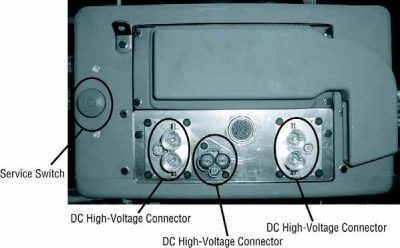
1. ਮਗਰ "ਹਾਈ-ਵੋਲਟੇਜ ਕੰਮ ਖੇਤਰ 'ਵਿਧੀ.
2. ਪੈਕ ਦੇ ਮੋਰਚੇ 'ਤੇ ਲਾਲ ਪੈਕ ਸਰਵਿਸ ਸਵਿੱਚ ਨੂੰ ਲੱਭੋ ਅਤੇ ਧੱਕਣ ਨੂੰ ਬੰਦ.
3. ਸਰਵਿਸ ਸਵਿੱਚ ਦਾ ਢੱਕਣ ਹਟਾਓ ਅਤੇ ਤਾਲਾਬੰਦੀ ਬਰੈਕਟ ਇੰਸਟਾਲ (J48506).
4. ਲਾੱਕਆਉਟ ਬਰੈਕਟ ਨੂੰ ਠੀਕ ਟੈਗ.
5. ਪੈਕ ਸਰਵਿਸ ਸਵਿੱਚ ਯਕੀਨੀ ਬੰਦ ਸਥਿਤੀ ਤੱਕ ਜਾਣ ਨਾ ਕਰ ਸਕਦਾ ਹੈ.
6. ਸਿਸਟਮ ਦੇ ਇੱਕ ਘੱਟੋ ਘੱਟ ਕਰਨ ਲਈ ਸੈੱਟ ਕਰਨ ਲਈ ਆਗਿਆ ਦਿਓ 5 ਮਿੰਟ ਹਾਈ ਵੋਲਟੇਜ ਉਤਾਰਨਾ.
7. ServiceRanger ਜੁੜੋ ਅਤੇ ਵੇਖਣ ਲਈ ਡਾਟਾ ਦੀ ਨਿਗਰਾਨੀ PID 116 ਕਹਿੰਦੇ ਹਨ, "ਹਾਈ-ਵੋਲਟੇਜ ਬੈਟਰੀ ਸੰਭਾਵੀ." SPN ਵਰਤੋ 520323 J1939 ਕੁਨੈਕਸ਼ਨ ਲਈ "ਬੈਟਰੀ ਵੋਲਟੇਜ ਆਰ.ਬੀ." (ਰੀਲੇਅ ਬਾਕਸ).
8. ਵੋਲਟੇਜ ਹੋਣਾ ਚਾਹੀਦਾ ਹੈ 30 ਵੋਲਟ ਜ ਘੱਟ. ਜੇ ਵੋਲਟੇਜ ਉਪਰ ਹੈ 30 ਵੋਲਟ, ਵਾਹਨ 'ਤੇ ਕੰਮ ਨਾ ਕਰਦੇ ਅਤੇ 1-800-826-ਮਦਦ' ਤੇ Eaton® ਸੰਪਰਕ ਕਰੋ (4357).
9. ਇਗਨੀਸ਼ਨ ਕੁੰਜੀ ਨੂੰ ਬੰਦ ਕਰ ਦਿਓ ਅਤੇ ਦੀ ਮੁਰੰਮਤ ਜ ਕਦਮ ਹੈ ਨਿਪਟਾਰਾ ਕਰਨ ਲਈ ਅੱਗੇ ਜਾਰੀ.
ਸੂਚਨਾ: ਵੋਲਟੇਜ ਫਿਲਹਾਲ ਜਦ ਕੁੰਜੀ ਬੰਦ ਹੈ ਦੇ ਤੁਪਕੇ.
ਹਾਈ-ਵੋਲਟੇਜ ਸਰਵਿਸ ਪਾਵਰ-ਅੱਪ ਵਿਧੀ
1. ਆਪਣੇ ਨੂੰ ਜਿੰਦਰਾ ਅਹੁਦੇ ਨੂੰ ਸਭ ਹਾਈ-ਵੋਲਟੇਜ ਕੁਨੈਕਟਰ ਇੰਸਟਾਲ.
2. ਵਿਅਕਤੀ ਨੂੰ ਵਾਹਨ 'ਤੇ ਕੰਮ ਕਰ ਤੁਹਾਨੂੰ ਹਨ, ਜੇ, ਲਾੱਕਆਉਟ ਬਰੈਕਟ ਅਤੇ ਟੈਗ ਹਟਾਉਣ ਲਈ.
3. ਸਰਵਿਸ ਸਵਿੱਚ ਵੱਧ ਲਾੱਕਆਉਟ ਬਰੈਕਟ ਮੁੜ.
4. ਸਰਵਿਸ ਕੱਢਣ ਬਾਹਰ ਜਾਓ ਅਤੇ ਇਸ ਲਈ ਵਾਹਨ ਦਾ ਸਮੂਹ ਚਾਹੀਦਾ ਹੈ 2 ਮਿੰਟ.
5. ਵਾਹਨ ਸ਼ੁਰੂ ਜਦ ਉਚਿਤ.
[/fusion_modal][fusion_modal name=”component_location” title=”Eaton ਹਾਈਬ੍ਰਾਇਡ ਭਾਗ ਅਤੇ ਕੁਨੈਕਟਰ ਸਥਿਤੀ ” size=”large” background=”#ffffff” border_color=”” show_footer=”yes” class=”” id=””]

[/fusion_modal][fusion_modal name=”component_location2″ title=”Eaton ਹਾਈਬ੍ਰਾਇਡ ਭਾਗ ਅਤੇ ਕੁਨੈਕਟਰ ਸਥਿਤੀ my09 ਸਿਸਟਮ” size=”large” background=”#ffffff” border_color=”” show_footer=”yes” class=”” id=””]

[/fusion_modal][/fusion_builder_column][/fusion_builder_row][/fusion_builder_container][fusion_builder_container hundred_percent=”no” hundred_percent_height=”no” hundred_percent_height_scroll=”no” hundred_percent_height_center_content=”yes” equal_height_columns=”no” menu_anchor=”” hide_on_mobile=”small-visibility,medium-visibility,large-visibility” status=”published” publish_date=”” class=”” id=”” background_color=”” background_image=”” background_position=”center center” background_repeat=”no-repeat” fade=”no” background_parallax=”none” enable_mobile=”no” parallax_speed=”0.3″ video_mp4=”” video_webm=”” video_ogv=”” video_url=”” video_aspect_ratio=”16:9″ video_loop=”yes” video_mute=”yes” video_preview_image=”” border_size=”” border_color=”” border_style=”solid” margin_top=”” margin_bottom=”” padding_top=”” padding_right=”” padding_bottom=”” padding_left=””][fusion_builder_row][fusion_builder_column type=”1_1″ layout=”1_1″ spacing=”” center_content=”no” link=”” target=”_self” min_height=”” hide_on_mobile=”small-visibility,medium-visibility,large-visibility” class=”” id=”” background_color=”” background_image=”” background_image_id=”” background_position=”left top” background_repeat=”no-repeat” hover_type=”none” border_size=”0″ border_color=”” border_style=”solid” border_position=”all” padding_top=”” padding_right=”” padding_bottom=”” padding_left=”” margin_top=”” margin_bottom=”” animation_type=”” animation_direction=”left” animation_speed=”0.3″ animation_offset=”” last=”no”][fusion_content_boxes layout=”clean-horizontal” columns=”1″ title_size=”18px” heading_size=”3″ title_color=”#ffffff” body_color=”#ffffff” backgroundcolor=”#4f4f4f” icon=”” iconflip=”” iconrotate=”” iconspin=”no” iconcolor=”” icon_circle=”” icon_circle_radius=”” circlecolor=”” circlebordersize=”” circlebordercolor=”” outercirclebordersize=”” outercirclebordercolor=”” icon_size=”” icon_hover_type=”” hover_accent_color=”#f41000″ image=”” image_id=”” image_width=”” image_height=”” link_type=”” button_span=”” link_area=”” link_target=”” icon_align=”left” animation_type=”” animation_delay=”” animation_offset=”” animation_direction=”left” animation_speed=”0.3″ margin_top=”” margin_bottom=”” hide_on_mobile=”small-visibility,medium-visibility,large-visibility” class=”” id=””][fusion_content_box title=”ਕਦਮ 1. ਐਕਟਿਵ ਜ ਸਰਗਰਮ ਨੁਕਸ ਕੋਡ ਹਾਲਤ ਲਈ ਚੈੱਕ ਕਰੋ.” backgroundcolor=”” icon=”” iconflip=”” iconrotate=”” iconspin=”no” iconcolor=”” circlecolor=”” circlebordersize=”” circlebordercolor=”” outercirclebordersize=”” outercirclebordercolor=”” image=”” image_id=”” image_width=”” image_height=”” link=”” linktext=”ਹੋਰ ਪੜ੍ਹੋ” link_target=”” animation_type=”” animation_direction=”left” animation_speed=”0.3″ animation_offset=””]
- ਦੀ ਸਮੀਖਿਆ ਅਤੇ ਪਾਲਣਾ ਕਰੋ ਚੇਤਾਵਨੀ & ਚੇਤਾਵਨੀ.
- 9-ਰਾਹ ਡਾਇਗਨੋਸਟਿਕ ਕੁਨੈਕਟਰ ਵਰਤ ServiceRanger ਨਾਲ ਸਰਗਰਮ ਨੁਕਸ ਕੋਡ ਅਤੇ FMIs ਪ੍ਰਾਪਤ.
- ਕੁੰਜੀ ਬੰਦ.
ਖ਼ਤਰਾ: ਦੇਖੋ ਉੱਚ-ਵੋਲਟੇਜ ਸੇਵਾ ਬੰਦ ਅਤੇ ਪਾਵਰ-ਅਪ ਪ੍ਰਕਿਰਿਆ. ਸਦਮਾ ਬਚਣ ਲਈ ਕਾਰਵਾਈ ਦੀ ਪਾਲਣਾ ਕਰੋ, ਸਾੜ ਜ ਗਲਤ ਪਰਬੰਧਨ ਹਾਈ-ਵੋਲਟੇਜ ਮੌਤ. - ਇਲੈਕਟ੍ਰੀਕਲ Pretest ਅਤੇ ਹਾਈਬ੍ਰਾਇਡ ਇਲੈਕਟ੍ਰੀਕਲ Pretest ਕਰਨ. (MY09 only)
- Check Inverter part number. (my09 ਕੇਵਲ)
• If Inverter is part number 4306453, contact Eaton Call Center at 1-800-826-HELP (4357) - ਕਿਹੜੇ FMIs ਮੌਜੂਦ ਹਨ?
- ਐਮਐਫਆਈਜ਼ 22, 24, 25, ਜ 27 ਸੂਚੀਬੱਧ ਹਨ, Inverter ਨੂੰ ਤਬਦੀਲ, ਫਿਰ ਕਦਮ ਨੂੰ ਜਾਣ 4.
- ਜੇ FMI 2, 23, ਜ 26 ਸੂਚੀਬੱਧ ਹਨ, ਕਦਮ ਨੂੰ ਜਾਣ 2.
- ਜੇ FMI 3 ਜ 21 ਸੂਚੀਬੱਧ ਹੈ, ਕਦਮ ਨੂੰ ਜਾਣ 6.
- ਜੇ FMI 0 ਸੂਚੀਬੱਧ ਹੈ, Using ServiceRanger select the Advanced Product Functions and download the TECU and HCM snapshots then contact Eaton at 1-800-826-HELP (4357) (MY08 only). ਕਦਮ ਜਾਓ 7 (MY09 only).
[/fusion_content_box][/fusion_content_boxes][fusion_content_boxes layout=”clean-horizontal” columns=”2″ title_size=”18px” heading_size=”3″ title_color=”#ffffff” body_color=”#ffffff” backgroundcolor=”#4f4f4f” icon=”” iconflip=”” iconrotate=”” iconspin=”no” iconcolor=”” icon_circle=”” icon_circle_radius=”” circlecolor=”” circlebordersize=”” circlebordercolor=”” outercirclebordersize=”” outercirclebordercolor=”” icon_size=”” icon_hover_type=”” hover_accent_color=”” image=”” image_id=”” image_width=”” image_height=”” link_type=”” button_span=”” link_area=”” link_target=”” icon_align=”left” animation_type=”” animation_delay=”” animation_offset=”” animation_direction=”left” animation_speed=”0.3″ margin_top=”” margin_bottom=”” hide_on_mobile=”small-visibility,medium-visibility,large-visibility” class=”” id=””][fusion_content_box title=”Resolver ਅਤੇ Inverter ਭਾਗ ਦੇ ਕਦਮ 2.Verify ਨਿਰੰਤਰਤਾ.” backgroundcolor=”” icon=”” iconflip=”” iconrotate=”” iconspin=”no” iconcolor=”” circlecolor=”” circlebordersize=”” circlebordercolor=”” outercirclebordersize=”” outercirclebordercolor=”” image=”” image_id=”” image_width=”” image_height=”” link=”” linktext=”ਹੋਰ ਪੜ੍ਹੋ” link_target=”” animation_type=”” animation_direction=”left” animation_speed=”0.3″ animation_offset=””]
- ਕੁੰਜੀ ਬੰਦ.
- Disconnect the Low-Voltage Connector at the Inverter.
- Inspect for water intrusion inside wire connector.
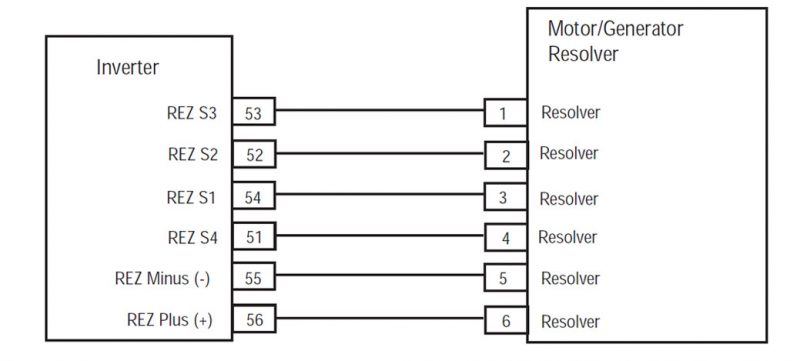
- (MY08 ਕੇਵਲ) 56-ਰਾਹ ਹਾਰਨੈਸ ਕੁਨੈਕਟਰ ਤੇ Resolver ਟਾਕਰੇ ਰਾਗ ਹੇਠ ਪਿੰਨ ਵਿਚਕਾਰ:
-
-
- ਪਿੰਨ 55 ਪਿੰਨ ਨੂੰ 56
- ਪਿੰਨ 53 ਪਿੰਨ ਨੂੰ 54
- ਪਿੰਨ 51 ਪਿੰਨ ਨੂੰ 52
ਸੂਚਨਾ: ਨਰਮੀ ਕੁਨੈਕਟਰ ਨੇੜੇ Inverter 56-ਰਾਹ ਕੁਨੈਕਟਰ ਹਾਰਨੈਸ ਤੰਦਰੁਸਤ ਟਾਕਰੇ ਮੁੱਲ ਦੀ ਨਿਗਰਾਨੀ, ਜਦਕਿ.
ਵਿਰੋਧ ਦਾ ਹੁੰਦਾ ਹੈ ਪਿੰਨ ਲਈ ਹਨ:- ਪਿੰਨ੍ਹ 55 ਪਿੰਨ ਨੂੰ 56: 10.5-8,6 ohms
- ਪਿੰਨ੍ਹ 53 ਪਿੰਨ ਨੂੰ 54: 34-28 ohms
- ਪਿੰਨ੍ਹ 51 ਪਿੰਨ ਨੂੰ 52: 27-23 ohms
-
- ਉਪਰੋਕਤ resistances ਪਾਇਆ ਕਰ ਰਹੇ ਹੋ, ਅਤੇ FMI 2 ਸਰਗਰਮ ਹੈ, contact Eaton at 1- 800-826-ਮਦਦ ਕਰੋ (4357).
- ਉਪਰੋਕਤ resistances ਪਾਇਆ ਕਰ ਰਹੇ ਹੋ, ਅਤੇ FMI 26 ਜ 23 ਸਰਗਰਮ ਹਨ, Inverter ਨੂੰ ਤਬਦੀਲ, ਫਿਰ ਕਦਮ ਨੂੰ ਜਾਣ 4.
- ਟਾਕਰੇ ਨਾਪ ਦੇ ਕਿਸੇ ਵੀ ਲਈ ਸੀਮਾ ਦੇ ਬਾਹਰ ਹੈ, ਜੇ, ਕਦਮ ਨੂੰ ਜਾਣ 3.
-
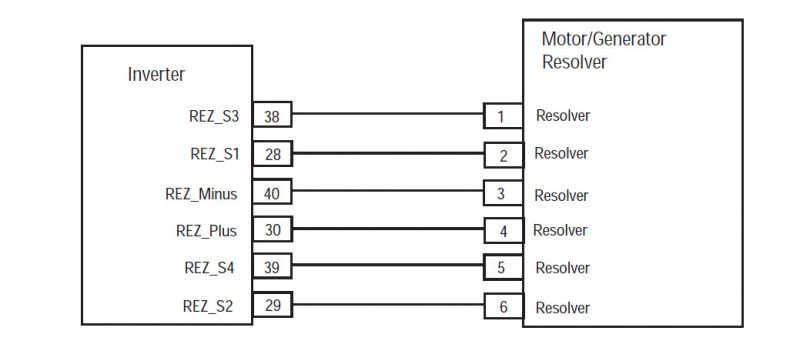
4. (MY09 only) Determine if resistance for the Resolver at the 40-Way Harness Connector between the following pins is within the range listed:
- ਪਿੰਨ 30 ਪਿੰਨ ਨੂੰ 40 is 8.6–10.5 ohms
- ਪਿੰਨ 28 ਪਿੰਨ ਨੂੰ 38 is 28–34 ohms
- ਪਿੰਨ 29 ਪਿੰਨ ਨੂੰ 39 is 23–27 ohms
ਸੂਚਨਾ: ਇੱਕ ਆਟੋ-ਲੈ ਡਿਜ਼ੀਟਲ ਵੋਲਟ / ohm ਮੀਟਰ ਵਰਤਿਆ ਜਾਣਾ ਚਾਹੀਦਾ ਹੈ.- ਟਾਕਰੇ ਨਾਪ ਦੇ ਕਿਸੇ ਵੀ ਲਈ ਸੀਮਾ ਦੇ ਬਾਹਰ ਹੈ, ਜੇ, ਕਦਮ ਨੂੰ ਜਾਣ 5.
• If resistance is within range, ਕਦਮ ਨੂੰ ਜਾਣ 3.
- ਟਾਕਰੇ ਨਾਪ ਦੇ ਕਿਸੇ ਵੀ ਲਈ ਸੀਮਾ ਦੇ ਬਾਹਰ ਹੈ, ਜੇ, ਕਦਮ ਨੂੰ ਜਾਣ 5.
[/fusion_content_box][fusion_content_box title=”ਕਦਮ 3. Resolver ਹਾਰਨੈਸ ਤੇ ਹੁਸ਼ਿਆਰ ਦੀ ਨਿਰੰਤਰਤਾ ਦੀ ਪੜਤਾਲ.” backgroundcolor=”” icon=”” iconflip=”” iconrotate=”” iconspin=”no” iconcolor=”” circlecolor=”” circlebordersize=”” circlebordercolor=”” outercirclebordersize=”” outercirclebordercolor=”” image=”” image_id=”” image_width=”” image_height=”” link=”” linktext=”ਹੋਰ ਪੜ੍ਹੋ” link_target=”” animation_type=”” animation_direction=”left” animation_speed=”0.3″ animation_offset=””]
- ਕੁੰਜੀ ਬੰਦ.
- ਨੂੰ ਬੰਦ 6-ਰਾਹ ਮੋਟਰ / ਜੇਨਰੇਟਰ Resolver ਕੁਨੈਕਟਰ.
- (MY08 only) ਰਾਗ ਹੇਠ ਪਿੰਨ ਵਿਚਕਾਰ 6-ਰਾਹ ਹਾਰਨੈਸ ਕੁਨੈਕਟਰ ਤੇ Resolver ਟਾਕਰੇ:
-
-
- ਪਿੰਨ 5 ਪਿੰਨ ਨੂੰ 6
- ਪਿੰਨ 1 ਪਿੰਨ ਨੂੰ 3
- ਪਿੰਨ 2 ਪਿੰਨ ਨੂੰ 4
ਸੂਚਨਾ: ਇੱਕ ਆਟੋ-ਲੈ ਡਿਜ਼ੀਟਲ ਵੋਲਟ / Ohm ਮੀਟਰ ਵਰਤਿਆ ਜਾਣਾ ਚਾਹੀਦਾ ਹੈ.
ਵਿਰੋਧ ਦਾ ਹੁੰਦਾ ਹੈ ਪਿੰਨ ਲਈ ਹਨ:- ਪਿੰਨ੍ਹ 5 ਪਿੰਨ ਨੂੰ 6: 10.5-8,6 ohms
- ਪਿੰਨ੍ਹ 1 ਪਿੰਨ ਨੂੰ 3: 34-28 ohms
- ਪਿੰਨ੍ਹ 2 ਪਿੰਨ ਨੂੰ 4: 27-23 ohms
-
- ਉਪਰੋਕਤ resistances ਪਾਇਆ ਕਰ ਰਹੇ ਹੋ, Inverter 56-ਰਾਹ ਕੁਨੈਕਟਰ ਅਤੇ ਮੋਟਰ / ਜੇਨਰੇਟਰ 6-ਰਾਹ Resolver ਕੁਨੈਕਟਰ ਦੇ ਵਿਚਕਾਰ ਖੁੱਲ੍ਹਾ ਕਵਚ ਦੀ ਮੁਰੰਮਤ, ਫਿਰ ਕਦਮ ਨੂੰ ਜਾਣ 4.
- ਟਾਕਰੇ ਸੀਮਾ ਦੇ ਬਾਹਰ ਹੈ, ਜੇ, ਮੋਟਰ / ਜੇਨਰੇਟਰ ਨੂੰ ਤਬਦੀਲ, ਫਿਰ ਕਦਮ ਨੂੰ ਜਾਣ 4.
-
3. (my09 ਕੇਵਲ) Measure Resolver resistance at the 40-Way Harness Connector between the following pins:
- ਪਿੰਨ 38 ਪਿੰਨ ਨੂੰ 40
- ਪਿੰਨ 38 ਪਿੰਨ ਨੂੰ 3
- ਪਿੰਨ 28 ਪਿੰਨ ਨੂੰ 40
- ਪਿੰਨ 28 ਪਿੰਨ ਨੂੰ 3
- ਪਿੰਨ 28 ਜ਼ਮੀਨ ਨੂੰ
- ਪਿੰਨ 38 ਜ਼ਮੀਨ ਨੂੰ
- ਪਿੰਨ 30 ਜ਼ਮੀਨ ਨੂੰ
- ਪਿੰਨ 40 ਜ਼ਮੀਨ ਨੂੰ
- ਜੇ ਟਾਕਰੇ ਓਪਨ ਜ ol ਹੈ, Inverter ਨੂੰ ਤਬਦੀਲ.
- ਵਿਰੋਧ ਦੇ ol ਵੱਧ ਹੋਰ ਕੁਝ ਵੀ ਹੈ, ਜੇ, ਕਦਮ ਨੂੰ ਜਾਣ 4.
[/fusion_content_box][/fusion_content_boxes][fusion_content_boxes layout=”clean-horizontal” columns=”1″ title_size=”18px” heading_size=”3″ title_color=”#ffffff” body_color=”#ffffff” backgroundcolor=”#4f4f4f” icon=”” iconflip=”” iconrotate=”” iconspin=”no” iconcolor=”” icon_circle=”” icon_circle_radius=”” circlecolor=”” circlebordersize=”” circlebordercolor=”” outercirclebordersize=”” outercirclebordercolor=”” icon_size=”” icon_hover_type=”” hover_accent_color=”#f41000″ image=”” image_id=”” image_width=”” image_height=”” link_type=”” button_span=”” link_area=”” link_target=”” icon_align=”left” animation_type=”” animation_delay=”” animation_offset=”” animation_direction=”left” animation_speed=”0.3″ margin_top=”” margin_bottom=”” hide_on_mobile=”small-visibility,medium-visibility,large-visibility” class=”” id=””][fusion_content_box title=”ਕਦਮ 4. (MY08 ਕੇਵਲ) ਮੁਰੰਮਤ ਦੀ ਪੜਤਾਲ.” backgroundcolor=”” icon=”” iconflip=”” iconrotate=”” iconspin=”no” iconcolor=”” circlecolor=”” circlebordersize=”” circlebordercolor=”” outercirclebordersize=”” outercirclebordercolor=”” image=”” image_id=”” image_width=”” image_height=”” link=”” linktext=”ਹੋਰ ਪੜ੍ਹੋ” link_target=”” animation_type=”” animation_direction=”left” animation_speed=”0.3″ animation_offset=””]
- ਕੁੰਜੀ ਬੰਦ.
- ਸਾਰੇ ਕੁਨੈਕਟਰ ਤੇ ਰਿਣਾਤਮਕ ਬੈਟਰੀ ਕੇਬਲ ਮੁੜ ਜੁੜਨ.
- ਕੁੰਜੀ 'ਤੇ.
- ਕੋਡ ਆਸਮਾਨ, ਵੇਖੋ, ਆਸਮਾਨ ਸਰਗਰਮ ਨੁਕਸ.
- ਵਾਹਨ ਗੱਡੀ ਅਤੇ ਕੋਡ ਮੁੜ ਕਰਨ ਦੀ ਕੋਸ਼ਿਸ਼.
- ਕੋਡ ਲਈ ਚੈੱਕ ਕਰੋ, ਵੇਖੋ, ਸਰਗਰਮ ਅਤੇ ਸਰਗਰਮ ਨੁਕਸ ਦੇਖੋ
- ਕੋਈ ਕੋਡ ਜੇ, ਟੈਸਟ ਮੁਕੰਮਲ ਹੋ ਗਈ ਹੈ.
- Fault ਕੋਡ ਜੇ 4 ਦਿਸਦਾ ਹੈ, 1-800-826-ਮਦਦ 'ਤੇ Eaton ਸੰਪਰਕ ਕਰੋ (4357).
- ਇੱਕ ਕੋਡ ਦੇ ਇਲਾਵਾ ਹੋਰ, ਜੇ 4 ਦਿਸਦਾ ਹੈ, ਵੇਖੋ, ਕੋਡ ਇੰਡੈਕਸ ਸੂਚੀ ਖਰਾਬ.
[/fusion_content_box][/fusion_content_boxes][fusion_content_boxes layout=”clean-horizontal” columns=”2″ title_size=”18px” heading_size=”3″ title_color=”#ffffff” body_color=”#ffffff” backgroundcolor=”#4f4f4f” icon=”” iconflip=”” iconrotate=”” iconspin=”no” iconcolor=”” icon_circle=”” icon_circle_radius=”” circlecolor=”” circlebordersize=”” circlebordercolor=”” outercirclebordersize=”” outercirclebordercolor=”” icon_size=”” icon_hover_type=”” hover_accent_color=”” image=”” image_id=”” image_width=”” image_height=”” link_type=”” button_span=”” link_area=”” link_target=”” icon_align=”left” animation_type=”” animation_delay=”” animation_offset=”” animation_direction=”left” animation_speed=”0.3″ margin_top=”” margin_bottom=”” hide_on_mobile=”small-visibility,medium-visibility,large-visibility” class=”” id=””][fusion_content_box title=”ਕਦਮ 4. (MY09 only) Resolver ਹਾਰਨੈਸ ਤੇ ਹੁਸ਼ਿਆਰ ਦੀ ਨਿਰੰਤਰਤਾ ਦੀ ਪੜਤਾਲ.” backgroundcolor=”” icon=”” iconflip=”” iconrotate=”” iconspin=”no” iconcolor=”” circlecolor=”” circlebordersize=”” circlebordercolor=”” outercirclebordersize=”” outercirclebordercolor=”” image=”” image_id=”” image_width=”” image_height=”” link=”” linktext=”ਹੋਰ ਪੜ੍ਹੋ” link_target=”” animation_type=”” animation_direction=”left” animation_speed=”0.3″ animation_offset=””]
- Disconnect the 6-Way motor/generator Resolver Connector (the connector going into the motor).
- ਰਾਗ ਹੇਠ ਪਿੰਨ ਵਿਚਕਾਰ 6-ਰਾਹ ਹਾਰਨੈਸ ਕੁਨੈਕਟਰ ਤੇ Resolver ਟਾਕਰੇ:
ਸੂਚਨਾ: ਇੱਕ ਆਟੋ-ਲੈ ਡਿਜ਼ੀਟਲ ਵੋਲਟ / ohm ਮੀਟਰ ਵਰਤਿਆ ਜਾਣਾ ਚਾਹੀਦਾ ਹੈ.- ਪਿੰਨ 1 ਪਿੰਨ ਨੂੰ 3
- ਪਿੰਨ 1 ਪਿੰਨ ਨੂੰ 4
- ਪਿੰਨ 2 ਪਿੰਨ ਨੂੰ 3
- ਪਿੰਨ 2 ਪਿੰਨ ਨੂੰ 4
- ਪਿੰਨ 1 ਜ਼ਮੀਨ ਨੂੰ
- ਪਿੰਨ 2 ਜ਼ਮੀਨ ਨੂੰ
- ਪਿੰਨ 3 ਜ਼ਮੀਨ ਨੂੰ
- ਪਿੰਨ 4 ਜ਼ਮੀਨ ਨੂੰ
- ਜੇ ਟਾਕਰੇ ਓਪਨ ਜ ol ਹੈ, repair wiring between Resolver and Inverter.
- ਵਿਰੋਧ ਦੇ ol ਵੱਧ ਹੋਰ ਕੁਝ ਵੀ ਹੈ, ਜੇ, replace the motor/generator then go to Step 8.
[/fusion_content_box][fusion_content_box title=”ਕਦਮ 5. (my09 ਕੇਵਲ) Measure resistance of Resolver circuit at motor/generator.” backgroundcolor=”” icon=”” iconflip=”” iconrotate=”” iconspin=”no” iconcolor=”” circlecolor=”” circlebordersize=”” circlebordercolor=”” outercirclebordersize=”” outercirclebordercolor=”” image=”” image_id=”” image_width=”” image_height=”” link=”” linktext=”ਹੋਰ ਪੜ੍ਹੋ” link_target=”” animation_type=”” animation_direction=”left” animation_speed=”0.3″ animation_offset=””]
- Disconnect 6-Way Resolver wire connector at motor/generator.
- Determine if resistance on the following pins falls within the listed range:
- ਪਿੰਨ 1 ਪਿੰਨ ਨੂੰ 2 is between 28–34 ohms
- ਪਿੰਨ 3 ਪਿੰਨ ਨੂੰ 4 is between 8.6–10.5 ohms
- ਪਿੰਨ 5 ਪਿੰਨ ਨੂੰ 6 is between 23–27 ohms
- ਟਾਕਰੇ ਸੀਮਾ ਦੇ ਬਾਹਰ ਹੈ, ਜੇ, replace the motor/generator (Resolver is not serviceable). After repairs are made go to Step 8.
- If resistance is within range, repair wiring between Resolver and Inverter. After repairs are made go to Step 8.
[/fusion_content_box][/fusion_content_boxes][fusion_content_boxes layout=”clean-horizontal” columns=”2″ title_size=”18px” heading_size=”3″ title_color=”#ffffff” body_color=”#ffffff” backgroundcolor=”#4f4f4f” icon=”” iconflip=”” iconrotate=”” iconspin=”no” iconcolor=”” icon_circle=”” icon_circle_radius=”” circlecolor=”” circlebordersize=”” circlebordercolor=”” outercirclebordersize=”” outercirclebordercolor=”” icon_size=”” icon_hover_type=”” hover_accent_color=”” image=”” image_id=”” image_width=”” image_height=”” link_type=”” button_span=”” link_area=”” link_target=”” icon_align=”left” animation_type=”” animation_delay=”” animation_offset=”” animation_direction=”left” animation_speed=”0.3″ margin_top=”” margin_bottom=”” hide_on_mobile=”small-visibility,medium-visibility,large-visibility” class=”” id=””][fusion_content_box title=”ਕਦਮ 6. (MY09 only) Verify the resistance at the Inverter.” backgroundcolor=”” icon=”” iconflip=”” iconrotate=”” iconspin=”no” iconcolor=”” circlecolor=”” circlebordersize=”” circlebordercolor=”” outercirclebordersize=”” outercirclebordercolor=”” image=”” image_id=”” image_width=”” image_height=”” link=”” linktext=”ਹੋਰ ਪੜ੍ਹੋ” link_target=”” animation_type=”” animation_direction=”left” animation_speed=”0.3″ animation_offset=””]
-
- ਕੁੰਜੀ ਬੰਦ
- Disconnect 40-Way Low Voltage Connector at the Inverter.
- Measure Resolver resistance at the 40-Way Har-ness connector between the following pins:
- ਪਿੰਨ 28 ਪਿੰਨ ਨੂੰ 1
- ਪਿੰਨ 28 ਪਿੰਨ ਨੂੰ 6
- ਪਿੰਨ 29 ਪਿੰਨ ਨੂੰ 1
- ਪਿੰਨ 29 ਪਿੰਨ ਨੂੰ 6
- ਪਿੰਨ 38 ਪਿੰਨ ਨੂੰ 1
- ਪਿੰਨ 38 ਪਿੰਨ ਨੂੰ 6
- ਪਿੰਨ 39 ਪਿੰਨ ਨੂੰ 1
- ਪਿੰਨ 39 ਪਿੰਨ ਨੂੰ 6
ਸੂਚਨਾ: ਇੱਕ ਆਟੋ-ਲੈ ਡਿਜ਼ੀਟਲ ਵੋਲਟ / ohm ਮੀਟਰ ਵਰਤਿਆ ਜਾਣਾ ਚਾਹੀਦਾ ਹੈ.
- If resistance is open or OL replace inverter. After repair is made go to Step 8.
- If resistance is anything other than OL go to H.
[/fusion_content_box][fusion_content_box title=”ਕਦਮ 7. (my09 ਕੇਵਲ) Verify overspeed condition by test driving the vehicle.” backgroundcolor=”” icon=”” iconflip=”” iconrotate=”” iconspin=”no” iconcolor=”” circlecolor=”” circlebordersize=”” circlebordercolor=”” outercirclebordersize=”” outercirclebordercolor=”” image=”” image_id=”” image_width=”” image_height=”” link=”” linktext=”ਹੋਰ ਪੜ੍ਹੋ” link_target=”” animation_type=”” animation_direction=”left” animation_speed=”0.3″ animation_offset=””]
- 1. Test drive vehicle to verify an overspeed condition. This may require a downhill road condition, verify with customer the road condition when fault was set.
- ਜੇ FMI 0 is set in a true overspeed condition, vehicle will need to be slowed down to prevent overspeed condition.
- ਜੇ ਮੁਮਕਿਨ, update HCM software version number 672 or higher. If vehicle has HCM with primary hardware version 4306455, the most current software version available is 663. To update software version 672 or higher requires an HCM with hardware version 4306473. Hardware version number can be found in Service Ranger under Product Configurations, HCM, Primary Hardware Version.
[/fusion_content_box][/fusion_content_boxes][fusion_content_boxes layout=”clean-horizontal” columns=”1″ title_size=”18px” heading_size=”3″ title_color=”#ffffff” body_color=”#ffffff” backgroundcolor=”#4f4f4f” icon=”” iconflip=”” iconrotate=”” iconspin=”no” iconcolor=”” icon_circle=”” icon_circle_radius=”” circlecolor=”” circlebordersize=”” circlebordercolor=”” outercirclebordersize=”” outercirclebordercolor=”” icon_size=”” icon_hover_type=”” hover_accent_color=”#f41000″ image=”” image_id=”” image_width=”” image_height=”” link_type=”” button_span=”” link_area=”” link_target=”” icon_align=”left” animation_type=”” animation_delay=”” animation_offset=”” animation_direction=”left” animation_speed=”0.3″ margin_top=”” margin_bottom=”” hide_on_mobile=”small-visibility,medium-visibility,large-visibility” class=”” id=””][fusion_content_box title=”ਕਦਮ 4. (my09 ਕੇਵਲ) ਮੁਰੰਮਤ ਦੀ ਪੜਤਾਲ.” backgroundcolor=”” icon=”” iconflip=”” iconrotate=”” iconspin=”no” iconcolor=”” circlecolor=”” circlebordersize=”” circlebordercolor=”” outercirclebordersize=”” outercirclebordercolor=”” image=”” image_id=”” image_width=”” image_height=”” link=”” linktext=”ਹੋਰ ਪੜ੍ਹੋ” link_target=”” animation_type=”” animation_direction=”left” animation_speed=”0.3″ animation_offset=””]
- ਕੁੰਜੀ ਬੰਦ.
- ਸਾਰੇ ਕੁਨੈਕਟਰ ਤੇ ਰਿਣਾਤਮਕ ਬੈਟਰੀ ਕੇਬਲ ਮੁੜ ਜੁੜਨ.
- ਕੁੰਜੀ 'ਤੇ.
- ਕੋਡ ਆਸਮਾਨ, ਵੇਖੋ, ਆਸਮਾਨ ਸਰਗਰਮ ਨੁਕਸ.
- ਵਾਹਨ ਗੱਡੀ ਅਤੇ ਕੋਡ ਮੁੜ ਕਰਨ ਦੀ ਕੋਸ਼ਿਸ਼.
- ਕੋਡ ਲਈ ਚੈੱਕ ਕਰੋ, ਵੇਖੋ, ਸਰਗਰਮ ਅਤੇ ਸਰਗਰਮ ਨੁਕਸ ਦੇਖੋ
- ਕੋਈ ਕੋਡ ਜੇ, ਟੈਸਟ ਮੁਕੰਮਲ ਹੋ ਗਈ ਹੈ.
- Fault ਕੋਡ ਜੇ 4 ਦਿਸਦਾ ਹੈ, 1-800-826-ਮਦਦ 'ਤੇ Eaton ਸੰਪਰਕ ਕਰੋ (4357).
- ਇੱਕ ਕੋਡ ਦੇ ਇਲਾਵਾ ਹੋਰ, ਜੇ 4 ਦਿਸਦਾ ਹੈ, ਵੇਖੋ, ਕੋਡ ਇੰਡੈਕਸ ਸੂਚੀ ਖਰਾਬ.
[/fusion_content_box][/fusion_content_boxes][/fusion_builder_column][/fusion_builder_row][/fusion_builder_container][fusion_global id=”13788″]