[fusion_builder_container hundred_percent=nohundred_percent_height=nohundred_percent_height_scroll=nohundred_percent_height_center_content=yesequal_height_columns=nomenu_anchor=”” hide_on_mobile=small-visibility,medium-visibility,large-visibilitystatus=publishedpublish_date=”” class=”” id=”” background_color=”” background_image=”” background_position=center centerbackground_repeat=no-repeatfade=nobackground_parallax=noneenable_mobile=noparallax_speed=”0.3″ video_mp4=”” video_webm=”” video_ogv=”” video_url=”” video_aspect_ratio=”16:9″ video_loop=yesvideo_mute=yesvideo_preview_image=”” border_size=”” border_color=”” border_style=solidmargin_top=”35″ margin_bottom=”” padding_top=”” padding_right=”” padding_bottom=”” padding_left=””][fusion_builder_row][fusion_builder_column type=”1_1layout=”1_1spacing=”” center_content=nolink=”” target=_selfmin_height=”” hide_on_mobile=small-visibility,medium-visibility,large-visibilityclass=”” id=”” background_color=”” background_image=”” background_image_id=”” background_position=left topbackground_repeat=no-repeathover_type=noneborder_size=”0″ border_color=”” border_style=solidborder_position=allpadding_top=”” padding_right=”” padding_bottom=”” padding_left=”” margin_top=”” margin_bottom=”” animation_type=”” animation_direction=leftanimation_speed=”0.3″ animation_offset=”” last=no”][fusion_text columns=”” column_min_width=”” column_spacing=”” rule_style=defaultrule_size=”” rule_color=”” hide_on_mobile=small-visibility,medium-visibility,large-visibilityclass=”” id=””]

עאַטאָן פוללער היבריד טראַנסמיסיע שולד קאָוד 68 – מיינונג סענסאָר שולד

[/fusion_text][/fusion_builder_column][/fusion_builder_row][/fusion_builder_container][fusion_builder_container hundred_percent=nohundred_percent_height=nohundred_percent_height_scroll=nohundred_percent_height_center_content=yesequal_height_columns=nomenu_anchor=”” hide_on_mobile=small-visibility,medium-visibility,large-visibilitystatus=publishedpublish_date=”” class=”” id=”” background_color=”” background_image=”” background_position=center centerbackground_repeat=no-repeatfade=nobackground_parallax=noneenable_mobile=noparallax_speed=”0.3″ video_mp4=”” video_webm=”” video_ogv=”” video_url=”” video_aspect_ratio=”16:9″ video_loop=yesvideo_mute=yesvideo_preview_image=”” border_size=”” border_color=”” border_style=solidmargin_top=”” margin_bottom=”” padding_top=”” padding_right=”” padding_bottom=”” padding_left=””][fusion_builder_row][fusion_builder_column type=”1_1layout=”1_1spacing=”” center_content=nolink=”” target=_selfmin_height=”” hide_on_mobile=small-visibility,medium-visibility,large-visibilityclass=”” id=”” background_color=”” background_image=”” background_image_id=”” background_position=left topbackground_repeat=no-repeathover_type=noneborder_size=”0″ border_color=”” border_style=solidborder_position=allpadding_top=”” padding_right=”” padding_bottom=”” padding_left=”” margin_top=”” margin_bottom=”” animation_type=”” animation_direction=leftanimation_speed=”0.3″ animation_offset=”” last=no”][fusion_text columns=”” column_min_width=”” column_spacing=”” rule_style=defaultrule_size=”” rule_color=”” hide_on_mobile=small-visibility,medium-visibility,large-visibilityclass=”” id=””]

שולד קאָד פֿאַר עאַטאָן היבריד דרייוו סיסטעמס מאָדעלס (מי08) האַ-8ע306אַ-ו, EH-8E306A-UPG, האַ-8ע306אַ-אַרויף, EH-8E306A-CD, EH-8E306A-T, האַ-6ע606ב-סי, (מי09) האַ-8ע406אַ-ו / פּ, האַ-8ע406אַ-אַרויף, האַ-8ע406אַ-ופּג, האַ-8ע406אַ-סי, האַ-8ע406אַ-קדג, האַ-8ע406אַ-קדר, האַ-8ע406אַ-ה, האַ-6ע706ב-סי, האַ-6ע706ב-פּ און האַ-6ע706ב-ופּג. Read below to learn how to test, קלאָר און פאַרריכטן שולד קאָד ערראָרס פֿאַר דיין פרעיגהטלינער, מאַק, פּעטערבילט, קענוואָרטה, וואָלוואָ, אינטערנאַציאָנאַלע, און שווער-פליכט טראָק און ויסריכט. די גראַדע סענסאָר איז אַ ינערלעך קאָמפּאָנענט פון די היבריד קאָנטראָל מאָדולע (הקם). עס קאַלקיאַלייץ די פאָרמיטל מיינונג דארף פֿאַר די הילל אָנהייב אַססיסט (הסאַ) שטריך צו פונקציאָנירן רעכט. הסאַ מאָומאַנטעראַלי האלט די סערוויס בראַקעס בייַ קאַטער צו לאָזן איין-פֿיס טרעטלען אָפּעראַציע אָן די פאָרמיטל ראָולינג צוריק.

שולד קאָוד 68 – מיינונג סענסאָר שולד דעטעקטיאָן

די ווייַטערדיק פּריקאַנדישאַנז מוזן זיין באגעגנט איידער דער סיסטעם דיטעקץ די שולד:

  • היבריד קאָנטראָל מאָדולע (הקם) יגנישאַן וואָולטידזש איז גרעסער ווי 7 וואלטס און ווייניקער ווי 16 וואלטס.

נאטיץ: ווען טראָובלעשאָאָטינג אַ ינאַקטיווע קאָד אָפּשיקן צו די פּראָדוקט דיאַגנאָסטיק מאָדע (פּדם)

טנאָים צו שטעלן שולד קאָד אַקטיוו

  • ימף 12 איז באַשטימט ווען די מיינונג סענסער איז ניט אַקטיוו אָדער פאָרשטעלן און הסאַ איז ענייבאַלד אין די הקם קאָנפיגוראַטיאָן.
  • ימף 13 is set when HSA is enabled in the HCM configuration but the grade sensor has not been calibrated.
  • ימף 14 איז באַשטימט ווען די הקם איז יקוויפּט מיט אַ מיינונג סענסאָר, הסאַ איז ענייבאַלד און די סיגנאַל פון די סענסער איז אויס פון קייט.

פאַללבאַקק ווען שולד קאָוד 68 is set the following conditions occur:

  • בורשטין "טשעק היבריד" ליכט ילומאַנייץ.
  • שולד איז סטאָרד אין היבריד קאָנטראָל מאָדולע (הקם) זיקאָרן.

[/fusion_text][fusion_text columns=”” column_min_width=”” column_spacing=”” rule_style=defaultrule_size=”” rule_color=”” hide_on_mobile=small-visibility,medium-visibility,large-visibilityclass=”” id=””]

דעם שולד קאָד קענען ווערן געפֿירט דורך קיין פון די ווייַטערדיק:

  • ימף 12
    • פאַלש הקם קאָנפיגוראַטיאָן
    • הקם
  • ימף 13
    • מיינונג סענסאָר קאַלאַבריישאַן
    • פאַלש הקם קאָנפיגוראַטיאָן
  • ימף 14
    • הקם
    • פאַלש הקם מאַונטינג צו טראַנסמיסיע

[/fusion_text][/fusion_builder_column][/fusion_builder_row][/fusion_builder_container][fusion_builder_container hundred_percent=nohundred_percent_height=nohundred_percent_height_scroll=nohundred_percent_height_center_content=yesequal_height_columns=nomenu_anchor=”” hide_on_mobile=small-visibility,medium-visibility,large-visibilitystatus=publishedpublish_date=”” class=”” id=”” background_color=”” background_image=”” background_position=center centerbackground_repeat=no-repeatfade=nobackground_parallax=noneenable_mobile=noparallax_speed=”0.3″ video_mp4=”” video_webm=”” video_ogv=”” video_url=”” video_aspect_ratio=”16:9″ video_loop=yesvideo_mute=yesvideo_preview_image=”” border_size=”” border_color=”” border_style=solidmargin_top=”” margin_bottom=”” padding_top=”” padding_right=”” padding_bottom=”” padding_left=””][fusion_builder_row][fusion_builder_column type=”1_1layout=”1_1spacing=”” center_content=nolink=”” target=_selfmin_height=”” hide_on_mobile=small-visibility,medium-visibility,large-visibilityclass=”” id=”” background_color=”” background_image=”” background_image_id=”” background_position=left topbackground_repeat=no-repeathover_type=noneborder_size=”0″ border_color=”” border_style=solidborder_position=allpadding_top=”” padding_right=”” padding_bottom=”” padding_left=”” margin_top=”” margin_bottom=”” animation_type=”” animation_direction=leftanimation_speed=”0.3″ animation_offset=”” last=no”][fusion_text columns=”” column_min_width=”” column_spacing=”” rule_style=defaultrule_size=”” rule_color=”” hide_on_mobile=small-visibility,medium-visibility,large-visibilityclass=”” id=””]

שולד קאָוד 68 – מיינונג סענסאָר שולד טעסט

[/fusion_text][/fusion_builder_column][/fusion_builder_row][/fusion_builder_container][fusion_builder_container hundred_percent=nohundred_percent_height=nohundred_percent_height_scroll=nohundred_percent_height_center_content=yesequal_height_columns=nomenu_anchor=”” hide_on_mobile=small-visibility,medium-visibility,large-visibilitystatus=publishedpublish_date=”” class=”” id=”” background_color=”” background_image=”” background_position=center centerbackground_repeat=no-repeatfade=nobackground_parallax=noneenable_mobile=noparallax_speed=”0.3″ video_mp4=”” video_webm=”” video_ogv=”” video_url=”” video_aspect_ratio=”16:9″ video_loop=yesvideo_mute=yesvideo_preview_image=”” border_size=”” border_color=”” border_style=solidmargin_top=”” margin_bottom=”” padding_top=”” padding_right=”” padding_bottom=”” padding_left=””][fusion_builder_row][fusion_builder_column type=”1_1layout=”1_1spacing=”” center_content=nolink=”” target=_selfmin_height=”” hide_on_mobile=small-visibility,medium-visibility,large-visibilityclass=”” id=”” background_color=”” background_image=”” background_image_id=”” background_position=left topbackground_repeat=no-repeathover_type=noneborder_size=”0″ border_color=”” border_style=solidborder_position=allpadding_top=”” padding_right=”” padding_bottom=”” padding_left=”” margin_top=”” margin_bottom=”” animation_type=”” animation_direction=leftanimation_speed=”0.3″ animation_offset=”” last=no”][fusion_text columns=”” column_min_width=”” column_spacing=”” rule_style=defaultrule_size=”” rule_color=”” hide_on_mobile=small-visibility,medium-visibility,large-visibilityclass=”” id=””]

קאָמפּאָנענט לעגיטימאַציע:

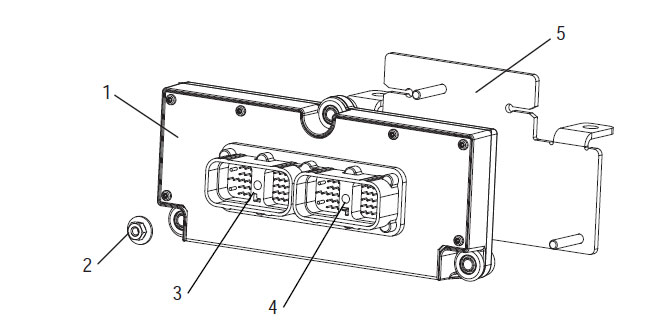
[/fusion_text][/fusion_builder_column][fusion_builder_column type=”1_1layout=”1_2spacing=”” center_content=nolink=”” target=_selfmin_height=”” hide_on_mobile=small-visibility,medium-visibility,large-visibilityclass=”” id=”” background_color=”” background_image=”” background_image_id=”” background_position=left topbackground_repeat=no-repeathover_type=noneborder_size=”0″ border_color=”” border_style=solidborder_position=allpadding_top=”” padding_right=”” padding_bottom=”” padding_left=”” margin_top=”” margin_bottom=”” animation_type=”” animation_direction=leftanimation_speed=”0.3″ animation_offset=”” last=no”][fusion_imageframe image_id=”14400|fullmax_width=”” style_type=”” blur=”” stylecolor=”” hover_type=nonebordersize=”” bordercolor=”” borderradius=”” align=centerlightbox=nogallery_id=”” lightbox_image=”” lightbox_image_id=”” alt=”היבריד קאָנטראָל מאָדולע פֿאַר עאַטאָן פוללער טראַנסמיסיע” link=”” linktarget=_selfhide_on_mobile=small-visibility,medium-visibility,large-visibilityclass=”” id=”” animation_type=”” animation_direction=leftanimation_speed=”0.3″ animation_offset=””]https://www.globaltransmissionsupply.com/wp-content/uploads/Hybrid-Control-Module.jpg[/fusion_imageframe][fusion_text columns=”2″ column_min_width=”” column_spacing=”” rule_style=defaultrule_size=”” rule_color=”” hide_on_mobile=small-visibility,medium-visibility,large-visibilityclass=”” id=””]

1. היבריד קאָנטראָל מאָדולע (הקם)
2. נוס (3)
3. 38-וועג סיסטעם קאַנעקטער צאַפּן-אין
4. 38-וועג וועהיקלע קאַנעקטער צאַפּן-אין
5. מאָונטינג פּלאַטע

[/fusion_text][/fusion_builder_column][fusion_builder_column type=”1_1layout=”1_1spacing=”” center_content=nolink=”” target=_selfmin_height=”” hide_on_mobile=small-visibility,medium-visibility,large-visibilityclass=”” id=”” background_image_id=”” background_color=”#000000″ background_image=”” background_position=left topundefined=”” background_repeat=no-repeathover_type=noneborder_size=”0″ border_color=”” border_style=solidborder_position=allpadding_top=”” padding_right=”” padding_bottom=”” padding_left=”” margin_top=”20″ margin_bottom=”20″ animation_type=”” animation_direction=leftanimation_speed=”0.3″ animation_offset=”” last=no”][fusion_text columns=”” column_min_width=”” column_spacing=”” rule_style=defaultrule_size=”” rule_color=”” hide_on_mobile=small-visibility,medium-visibility,large-visibilityclass=”” id=””]

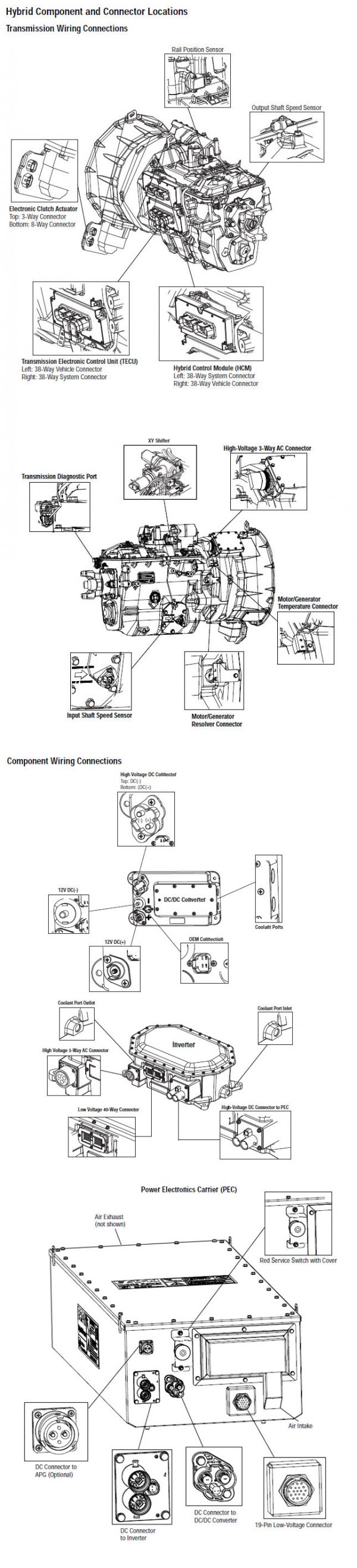
נאטיץ: אָפּשיקן צו די עאַטאָן היבריד קאָמפּאָנענט און קאַנעקטער אָרט פֿאַר קאַנעקטער לאָקאַטיאָנס.

[/fusion_text][/fusion_builder_column][/fusion_builder_row][/fusion_builder_container][fusion_builder_container hundred_percent=nohundred_percent_height=nohundred_percent_height_scroll=nohundred_percent_height_center_content=yesequal_height_columns=nomenu_anchor=”” hide_on_mobile=small-visibility,medium-visibility,large-visibilitystatus=publishedpublish_date=”” class=”” id=”” background_color=”” background_image=”” background_position=center centerbackground_repeat=no-repeatfade=nobackground_parallax=noneenable_mobile=noparallax_speed=”0.3″ video_mp4=”” video_webm=”” video_ogv=”” video_url=”” video_aspect_ratio=”16:9″ video_loop=yesvideo_mute=yesvideo_preview_image=”” border_size=”” border_color=”” border_style=solidmargin_top=”” margin_bottom=”” padding_top=”” padding_right=”” padding_bottom=”” padding_left=””][fusion_builder_row][fusion_builder_column type=”1_1layout=”1_1spacing=”” center_content=nolink=”” target=_selfmin_height=”” hide_on_mobile=small-visibility,medium-visibility,large-visibilityclass=”” id=”” background_color=”” background_image=”” background_image_id=”” background_position=left topbackground_repeat=no-repeathover_type=noneborder_size=”0″ border_color=”” border_style=solidborder_position=allpadding_top=”” padding_right=”” padding_bottom=”” padding_left=”” margin_top=”” margin_bottom=”” animation_type=”” animation_direction=leftanimation_speed=”0.3″ animation_offset=”” last=no”][fusion_modal name=warnings_cautionstitle=”וואַרנינגס & קאַוטיאָנס” size=largebackground=”” border_color=”” show_footer=yesclass=”” id=””]געפאַר: Danger indicates you will be severely injured or killed if do not follow the indicated procedure.
ווארענונג: ווארענונג ינדיקייץ אַ באַלדיק ריזיקירן, which could result in severe personal injury if you do not follow the indicated procedure.
וואָרענען: Caution indicates vehicle or property damage could occur if you do not follow the indicated procedure.

נאטיץ: Note indicates additional detail that will aid in the diagnosis or repair of a component/system.

גיי די ספּעסיפיעד פּראָוסידזשערז אין די אנגעוויזן סדר צו ויסמייַדן פּערזענלעך שאָדן:

1. אויב די הויך-וואָולטידזש קאָנעס זענען אַרום די פאָרמיטל און די לאַקאַוט איז אינסטאַלירן אויף די PEC, דער בלויז מענטש אַז זאָל זיין ערלויבט צו אָנהייבן די פאָרמיטל איז דער מענטש וואס געחתמעט די לאַקאַוט קוויטל.
2. איידער ארבעטן אויף אַ פאָרמיטל אָדער געלאזן די קאַב בשעת די מאָטאָר איז פליסנדיק, איר זאָל שטעלן די יבעררוק הייבער אין "ען" שטעלן די פּאַרקינג טאָרמאָז, און פאַרשפּאַרן די ווילז.
3. פֿאַר זיכערקייַט סיבות, שטענדיק דינגען די דינסט בראַקעס פריערדיק צו סאַלעקטינג גאַנג שטעלעס פון "ען"
4. איידער סטאַרטינג אַ פאָרמיטל שטענדיק זיין סיטאַד אין די שאָפער 'ס אַוועקזעצן, סעלעקטירן "ען" אויף די יבעררוק קאָנטראָל, און שטעלן די פּאַרקינג בראַקעס.
5. אין וויכיקאַלז מיט עפּטאָ, די מאָטאָר און / אָדער
מאָטאָר / גענעראַטאָר קענען אָנהייבן אין עפּטאָ מאָדע. קיינמאָל דורכפירן קיין וישאַלט אָדער אַרבעט אויף פאָרמיטל, בשעת אין דעם מאָדע.
6. 12-וואלט באַטערי Positive (+) און נעגאַטיוו (-) מוזן זיין דיסקאַנעקטיד פריערדיק צו קיין וועלדינג אויף קיין היבריד יקוויפּט פאָרמיטל.

וואָרענען: גיי די ספּעסיפיעד פּראָוסידזשערז אין די אנגעוויזן סדר צו ויסמייַדן ויסריכט Malfunction אָדער שעדיקן.
וואָרענען: Do not release the parking brake or attempt to select a gear until the air pressure is at the correct level.
וואָרענען: To avoid damage to the transmission during towing place the shift lever in “N” and lift the drive wheels off the ground or disconnect the driveline.

הויך-וואָולטידזש וואַרנינגס & קאַוטיאָנס

  • נוצן קאָ 2 אָדער טרוקן כעמישער Fire עקסטינגוישערס.
  • די הויך-וואָולטידזש וויירינג איז באדעקט אין מאַראַנץ ינסאַליישאַן אָדער קאַנוואַלוטאַד טובינג און אנגעצייכנט מיט ווארענונג לאַבעלס ביי די קאַנעקטערז.
  • אַלע עאַטאָנ® היבריד דיעסעל / עלעקטריק וועהיקלעס וועט זיין אנגעצייכנט 'היבריד’ אויף דעם אַרויס פון די פאָרמיטל, צוזאמען מיט די יבעררוק פירמע אויף די לאָך.
  • אָפּשיקן צו אָעם פֿאַר ספּעציפיש אָרט פון שאַסי מאָונטעד כייבריד קאַמפּאָונאַנץ.
  • דו זאלסט נישט שנייַדן אין דער מאַראַנץ הויך-וואָולטידזש קייבאַלז.
  • דו זאלסט נישט שנייַדן זיך אָדער עפענען די PEC.
  • דו זאלסט נישט שנייַדן זיך אָדער עפענען די דק / דק קאָנווערטער.
  • דו זאלסט נישט שנייַדן זיך אָדער עפענען די ינווערטער.

א Buffer זאָנע מוזן זיין שטעלן אַרויף און הויך-וואָולטידזש ינסאַלייטיד גומע גלאַווז (קלאַס 0 מיט לעדער פּראַטעקטערז) זענען required פריערדיק צו ארבעטן אויף הויך-וואָולטידזש. דורכפאַל צו נאָכפאָלגן די ינסטראַקשאַנז קען רעזולטאַט אין שטרענג פּערזענלעך שאָדן אָדער טויט.
די גומע-ינסאַלייטיד גלאַווז אַז מוזן זיין וואָרן בשעת ארבעטן אויף די הויך-וואָולטידזש סיסטעם זענען קלאַס 0 מיט לעדער פּראַטעקטערז. די גומע גלאַווז זאָל זיין טעסטעד איידער יעדער נוצן ווייַטערדיק די גומע ינסאַליישאַן גלאַווז טעסטינג פּראָצעדור געפֿונען אין "דיאַגנאָסטיק מכשירים / סערוויס אויסגאבעס" אויף בלאַט 6. דורכפאַל צו נאָכפאָלגן די ינסטראַקשאַנז קען רעזולטאַט אין שטרענג פּערזענלעך שאָדן אָדער טויט.
איידער ינספּעקטינג אָדער ארבעטן אויף קיין הויך-וואָולטידזש קייבאַלז אָדער קאַמפּאָונאַנץ די "הויך-וואָולטידזש סערוויס שוטדאָוון און מאַכט-אַרויף פּראַסידזשער" אויף בלאַט 4 זאָל זיין נאכגעגאנגען. דורכפאַל צו נאָכפאָלגן די ינסטראַקשאַנז קען רעזולטאַט אין שטרענג פּערזענלעך שאָדן אָדער טויט.
די לאַקאַוט און טאַגאָוט דיווייסאַז זאָל נאָר זיין אַוועקגענומען דורך די טעכניקער אַז געשטעלט די לאַקאַוט און טאַגאָוט דיווייסאַז אויף די פאָרמיטל. דורכפאַל צו נאָכפאָלגן די ינסטראַקשאַנז קען רעזולטאַט אין שטרענג פּערזענלעך שאָדן אָדער טויט.
הויך-וואָולטידזש גומע ינסאַלייטיד גלאַווז (קלאַס 0 מיט לעדער פּראַטעקטערז) מוזן זיין וואָרן ווען ארבעטן אויף קיין
הויך-וואָולטידזש קייבאַלז. די "הויך-וואָולטידזש סערוויס שוטדאָוון און מאַכט-אַרויף פּראַסידזשער" אויף בלאַט 4 מוזן זיין נאכגעגאנגען פריערדיק צו רימוווינג קיין הויך-וואָולטידזש קייבאַלז. דורכפאַל צו נאָכפאָלגן די ינסטראַקשאַנז קען רעזולטאַט אין שטרענג פּערזענלעך שאָדן אָדער טויט.
הויך-וואָולטידזש קייבאַלז און וויירינג זענען מאַראַנץ און אַנטהאַלטן אַ ווארענונג פירמע אין די קאַנעקטערז. הויך-וואָולטידזש קאַמפּאָונאַנץ זענען אנגעצייכנט מיט אַ פירמע. הויך-וואָולטידזש גומע ינסאַלייטיד גלאַווז (קלאַס 0 מיט לעדער פּראַטעקטערז) מוזן ווערן געניצט ווען ארבעטן אויף קיין פון די קאַמפּאָונאַנץ. דורכפאַל צו נאָכפאָלגן די ינסטראַקשאַנז קען רעזולטאַט אין שטרענג פּערזענלעך שאָדן אָדער טויט.

הויך-וואָולטידזש סערוויס שוטדאָוון פּראָוסידזשערז
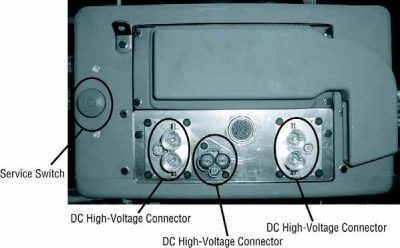
הויך-וואָולטידזש סערוויס שוטדאָוון און מאַכט-אַרויף פּראַסידזשער1. גיי "הויך-וואָולטידזש אַרבעט געגנט" פּראָצעדור.
2. געפינען די רויט PEC סערוויס סוויטש אויף די פראָנט פון די PEC און שטופּן באַשטימען אַוועק.
3. אַראָפּנעמען די סערוויס סוויטש דעקן און ינסטאַלירן די לאַקאַוט בראַקקעט (דזש48506).
4. פאַסטען קוויטל צו די לאַקאַוט בראַקקעט.
5. ענשור די PEC סערוויס סוויטש קענען נישט רירן פון די אַוועק שטעלע.
6. לאָזן די סיסטעם צו שטעלן פֿאַר אַ מינימום פון 5 מינוט צו אָפּזאָגן הויך וואָולטידזש.
7. פאַרבינדן סערוויסעראַנגער און קוק די דאַטע מאָניטאָר פּיד 116 גערופֿן "הויך-וואָולטידזש באַטאַרייע פּאָטענציעל." נוצן ספּן 520323 פֿאַר דזש1939 קשר "באַטאַרייע וואָולטידזש רב" (רעלע באָקס).
8. די וואָולטידזש זאָל זיין 30 וואלטס אָדער ווייניקער. אויב די וואָולטידזש איז אויבן 30 וואלטס, דו זאלסט נישט אַרבעטן אויף די פאָרמיטל און קאָנטאַקט עאַטאָנ® ביי 1-800-826-help (4357).
9. דרייַ יגנישאַן שליסל אַוועק און גיינ ווייַטער צו פאַרריכטן אָדער טראָובלעשאָאָטינג שריט.
נאטיץ: די וואָולטידזש דראָפּס צו נול ווען דער שליסל איז אַוועק.

הויך-וואָולטידזש סערוויס מאַכט-אַרויף פּראַסידזשער

1. ינסטאַלירן אַלע הויך-וואָולטידזש קאַנעקטערז אין זייער לאַקט שטעלעס.
2. אויב איר זענען די מענטש ארבעטן אויף די פאָרמיטל, אַראָפּנעמען די לאַקאַוט בראַקקעט און קוויטל.
3. ריינסטאַל די לאַקאַוט בראַקקעט איבער די סערוויס סוויטש.
4. ציען די סערוויס סוויטש אויס און לאָזן פאָרמיטל באַשטימט פֿאַר 2 מינוט.
5. Start vehicle when appropriate.[/fusion_modal][fusion_modal name=component_locationtitle=”עאַטאָן היבריד קאָמפּאָנענט און קאַנעקטער אָרט ” size=largebackground=”#ffffffborder_color=”” show_footer=yesclass=”” id=””]
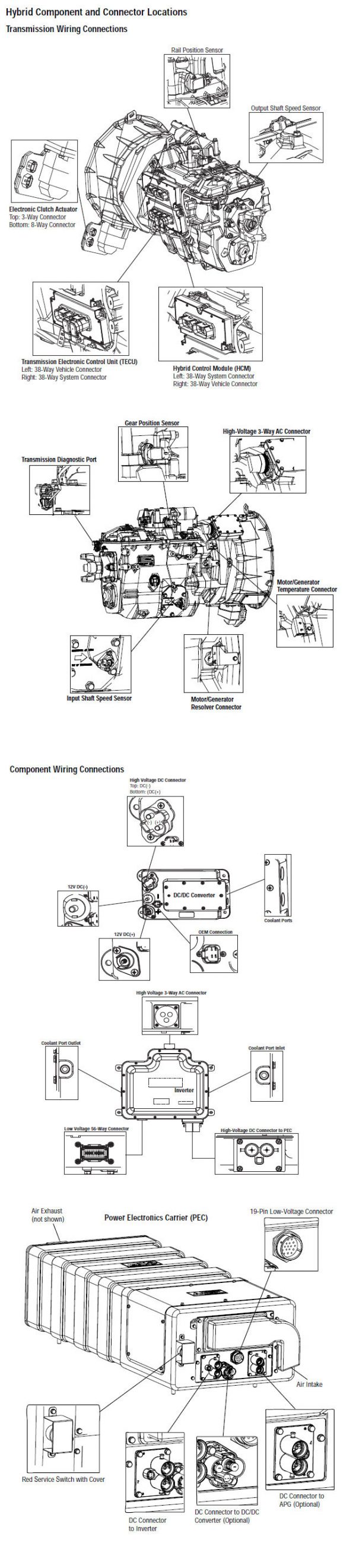
עאַטאָן היבריד קאָמפּאָנענט און קאַנעקטער לאָקאַטיאָנס מי08 סיסטעמס

[/fusion_modal][fusion_modal name=component_location2title=”עאַטאָן היבריד קאָמפּאָנענט און קאַנעקטער אָרט מי09 סיסטעמס” size=largebackground=”#ffffffborder_color=”” show_footer=yesclass=”” id=””]

עאַטאָן היבריד קאָמפּאָנענט און קאַנעקטער לאָקאַטיאָנס מי09 סיסטעמס

[/fusion_modal][/fusion_builder_column][/fusion_builder_row][/fusion_builder_container][fusion_builder_container hundred_percent=nohundred_percent_height=nohundred_percent_height_scroll=nohundred_percent_height_center_content=yesequal_height_columns=nomenu_anchor=”” hide_on_mobile=small-visibility,medium-visibility,large-visibilitystatus=publishedpublish_date=”” class=”” id=”” background_color=”” background_image=”” background_position=center centerbackground_repeat=no-repeatfade=nobackground_parallax=noneenable_mobile=noparallax_speed=”0.3″ video_mp4=”” video_webm=”” video_ogv=”” video_url=”” video_aspect_ratio=”16:9″ video_loop=yesvideo_mute=yesvideo_preview_image=”” border_size=”” border_color=”” border_style=solidmargin_top=”” margin_bottom=”” padding_top=”” padding_right=”” padding_bottom=”” padding_left=””][fusion_builder_row][fusion_builder_column type=”1_1layout=”1_1spacing=”” center_content=nolink=”” target=_selfmin_height=”” hide_on_mobile=small-visibility,medium-visibility,large-visibilityclass=”” id=”” background_color=”” background_image=”” background_image_id=”” background_position=left topbackground_repeat=no-repeathover_type=noneborder_size=”0″ border_color=”” border_style=solidborder_position=allpadding_top=”” padding_right=”” padding_bottom=”” padding_left=”” margin_top=”” margin_bottom=”” animation_type=”” animation_direction=leftanimation_speed=”0.3″ animation_offset=”” last=no”][fusion_content_boxes layout=clean-horizontalcolumns=”1″ title_size=”18pxheading_size=”3″ title_color=”#ffffffbody_color=”#ffffffbackgroundcolor=”#4f4f4ficon=”” iconflip=”” iconrotate=”” iconspin=noiconcolor=”” icon_circle=”” icon_circle_radius=”” circlecolor=”” circlebordersize=”” circlebordercolor=”” outercirclebordersize=”” outercirclebordercolor=”” icon_size=”” icon_hover_type=”” hover_accent_color=”” image=”” image_id=”” image_width=”” image_height=”” link_type=”” button_span=”” link_area=”” link_target=”” icon_align=leftanimation_type=”” animation_delay=”” animation_offset=”” animation_direction=leftanimation_speed=”0.3″ margin_top=”” margin_bottom=”” hide_on_mobile=small-visibility,medium-visibility,large-visibilityclass=”” id=””][fusion_content_box title=טרעפּל 1. באַשטעטיקן פמיס פאָרשטעלן.backgroundcolor=”” icon=”” iconflip=”” iconrotate=”” iconspin=noiconcolor=”” circlecolor=”” circlebordersize=”” circlebordercolor=”” outercirclebordersize=”” outercirclebordercolor=”” image=”” image_id=”” image_width=”” image_height=”” link=”” linktext=”לייענען מער” link_target=”” animation_type=”” animation_direction=leftanimation_speed=”0.3″ animation_offset=””]

  1. שליסל אויף.
  2. Retrieve Active fault codes and FMIs with ServiceRanger using the 9-Way Diagnostic Connector or manually.
    • אויב פמי 12 איז אַקטיוו, גיין צו שריט 2.
    • אויב פמי 13 איז אַקטיוו, גיין צו שריט 3.
    • אויב פמי 14 איז אַקטיוו, גיין צו שריט 4.

[/fusion_content_box][/fusion_content_boxes][fusion_content_boxes layout=clean-horizontalcolumns=”2″ title_size=”18pxheading_size=”3″ title_color=”#ffffffbody_color=”#ffffffbackgroundcolor=”#4f4f4ficon=”” iconflip=”” iconrotate=”” iconspin=noiconcolor=”” icon_circle=”” icon_circle_radius=”” circlecolor=”” circlebordersize=”” circlebordercolor=”” outercirclebordersize=”” outercirclebordercolor=”” icon_size=”” icon_hover_type=”” hover_accent_color=”” image=”” image_id=”” image_width=”” image_height=”” link_type=”” button_span=”” link_area=”” link_target=”” icon_align=leftanimation_type=”” animation_delay=”” animation_offset=”” animation_direction=leftanimation_speed=”0.3″ margin_top=”” margin_bottom=”” hide_on_mobile=small-visibility,medium-visibility,large-visibilityclass=”” id=””][fusion_content_box title=טרעפּל 2. באַשטעטיקן הקם קאָנפיגוראַטיאָן.backgroundcolor=”” icon=”” iconflip=”” iconrotate=”” iconspin=noiconcolor=”” circlecolor=”” circlebordersize=”” circlebordercolor=”” outercirclebordersize=”” outercirclebordercolor=”” image=”” image_id=”” image_width=”” image_height=”” link=”” linktext=”לייענען מער” link_target=”” animation_type=”” animation_direction=leftanimation_speed=”0.3″ animation_offset=””]

  1. שליסל אויף.
  2. ניצן סערוויסעראַנגער קוק די הקם קאָנפיגוראַטיאָן.
    • אויב הסאַ קאָנפיגוראַטיאָן איז שטעלן אין "הסאַ ענאַבלעד" און הסאַ שטריך איז ניט דארף, סעלעקטירן "ניין הסאַ" פון די דראָפּדאָוון קעסטל. היט דעם קאָנפיגוראַטיאָן טוישן דורך סאַלעקטינג אָפּלאָדירן, דאַן גיין צו שריט 5.
    • אויב הסאַ קאָנפיגוראַטיאָן איז שטעלן אין "הסאַ ענאַבלעד" און הסאַ שטריך איז דארף, הקם מוזן זיין געביטן צו ייַזנוואַרג ווערסיע 3.7 אָדער העכער מיט אַ ינערלעך גראַדע סענסאָר. קאָנטאַקט עאַטאָן פֿאַר ריכטיק הקם טייל נומער אינפֿאָרמאַציע.

[/fusion_content_box][fusion_content_box title=טרעפּל 3. באַשטעטיקן גראַדע סענסאָר איז קאַלאַברייטאַד.backgroundcolor=”” icon=”” iconflip=”” iconrotate=”” iconspin=”” iconcolor=”” circlecolor=”” circlebordersize=”” circlebordercolor=”” outercirclebordersize=”” outercirclebordercolor=”” image=”” image_id=”” image_width=”” image_height=”” link=”” linktext=”” link_target=”” animation_type=”” animation_direction=leftanimation_speed=”0.3″ animation_offset=””]

  1. שליסל אויף.
  2. ניצן סערוויסעראַנגער, קאַלאַברייט די גראַדע סענסאָר דורך סאַלעקטינג "אַוואַנסירטע פּראָדוקט" פון די הויפּט מעניו.
  3. סעלעקט "היבריד קאָנטראָל מאָדולע."
  4. סעלעקט "גראַדע סענסאָר קאַליבראַטיאָן" און נאָכפאָלגן די אויף-פאַרשטעלן ינסטראַקשאַנז:
    • אויב פמי 13 איז ניט אַקטיוו נאָך קאַליבראַטינג, קאַלאַבריישאַן גאַנץ, גיין צו שריט 5.
    • אויב פמי 13 איז אַקטיוו נאָך קאַליבראַטינג, קאָנטאַקט עאַטאָן ביי 1-800-826-help (4357).

[/fusion_content_box][/fusion_content_boxes][fusion_content_boxes layout=clean-horizontalcolumns=”2″ title_size=”18pxheading_size=”3″ title_color=”#ffffffbody_color=”#ffffffbackgroundcolor=”#4f4f4ficon=”” iconflip=”” iconrotate=”” iconspin=noiconcolor=”” icon_circle=”” icon_circle_radius=”” circlecolor=”” circlebordersize=”” circlebordercolor=”” outercirclebordersize=”” outercirclebordercolor=”” icon_size=”” icon_hover_type=”” hover_accent_color=”#f41000image=”” image_id=”” image_width=”” image_height=”” link_type=”” button_span=”” link_area=”” link_target=”” icon_align=leftanimation_type=”” animation_delay=”” animation_offset=”” animation_direction=leftanimation_speed=”0.3″ margin_top=”” margin_bottom=”” hide_on_mobile=small-visibility,medium-visibility,large-visibilityclass=”” id=””][fusion_content_box title=טרעפּל 4. באַשטעטיקן הקם איז רעכט מאָונטעד.backgroundcolor=”” icon=”” iconflip=”” iconrotate=”” iconspin=”” iconcolor=”” circlecolor=”” circlebordersize=”” circlebordercolor=”” outercirclebordersize=”” outercirclebordercolor=”” image=”” image_id=”” image_width=”” image_height=”” link=”” linktext=”” link_target=”” animation_type=”” animation_direction=leftanimation_speed=”0.3″ animation_offset=””]

  1. שליסל אויף.
  2. Ensure the HCM is properly mounted to the transmission.
    • אויב הקם איז ניט רעכט מאָונטעד אָדער היטל סקרוז זענען פרייַ, פאַרשטייַפן הקם מאַונטינג היטל סקרוז, דאַן גיין צו שריט 5.
    • אויב הקם איז רעכט מאָונטעד צו די טראַנסמיסיע, פאַרבייַטן הקם. זען די היבריד קאָנטראָל מאָדולע (הקם) באַזייַטיקונג און ינסטאַללאַטיאָן פּראָצעדור אין TRSM2000, דאַן גיין צו שריט 5.

[/fusion_content_box][fusion_content_box title=טרעפּל 5. באַשטעטיקן פאַרריכטן.backgroundcolor=”” icon=”” iconflip=”” iconrotate=”” iconspin=noiconcolor=”” circlecolor=”” circlebordersize=”” circlebordercolor=”” outercirclebordersize=”” outercirclebordercolor=”” image=”” image_id=”” image_width=”” image_height=”” link=”” linktext=”לייענען מער” link_target=”” animation_type=”” animation_direction=leftanimation_speed=”0.3″ animation_offset=””]

  1. שליסל אַוועק.
  2. ריקאַנעקט אַלע קאַנעקטערז און די נעגאַטיוו באַטאַרייע קאַבלע.
  3. שליסל אויף.
  4. קלאָר קאָודז, זען קלאָר ינאַקטיווע חסרונות.
  5. פאָר די פאָרמיטל און פּרווון צו באַשטעטיק די קאָד.
  6. טשעק פֿאַר קאָודז, זען קוק אַקטיוו און ינאַקטיווע חסרונות.
    • אויב קיין קאָודז, פּרובירן איז גאַנץ.
    • אויב שולד קאָוד 68 אויס, געפינען טעות אין טעסטינג, גיין צו שריט 1.
    • אויב אַ קאָד אנדערע ווי 68 אויס, זען שולד קאָוד אינדעקס רשימה.

[/fusion_content_box][/fusion_content_boxes][/fusion_builder_column][/fusion_builder_row][/fusion_builder_container][fusion_global id=”13788″]