[fusion_builder_container hundred_percent=”yes” hundred_percent_height=”no” hundred_percent_height_scroll=”no” hundred_percent_height_center_content=”yes” equal_height_columns=”no” menu_anchor=”” hide_on_mobile=”small-visibility,medium-visibility,large-visibility” status=”published” publish_date=”” class=”” id=”” background_color=”” background_image=”https://www.globaltransmissionsupply.com/wp-content/uploads/gears-dark-overlay.jpg” background_position=”center center” background_repeat=”no-repeat” fade=”no” background_parallax=”none” enable_mobile=”no” parallax_speed=”0.3″ video_mp4=”” video_webm=”” video_ogv=”” video_url=”” video_aspect_ratio=”16:9″ video_loop=”yes” video_mute=”yes” video_preview_image=”” border_size=”” border_color=”” border_style=”solid” margin_top=”” margin_bottom=”” padding_top=”3%” padding_right=”” padding_bottom=”3%” padding_left=””][fusion_builder_row][fusion_builder_column type=”1_1″ layout=”1_1″ spacing=”” center_content=”no” link=”” target=”_self” min_height=”” hide_on_mobile=”small-visibility,medium-visibility,large-visibility” class=”” id=”” background_image_id=”” background_color=”rgba(0,0,0,0.4)” background_image=”” background_position=”left top” undefined=”” background_repeat=”no-repeat” hover_type=”none” border_size=”0″ border_color=”” border_style=”solid” border_position=”all” padding_top=”” padding_right=”” padding_bottom=”” padding_left=”” margin_top=”” margin_bottom=”” animation_type=”” animation_direction=”left” animation_speed=”0.3″ animation_offset=”” last=”no”][fusion_text columns=”” column_min_width=”” column_spacing=”” rule_style=”default” rule_size=”” rule_color=”” hide_on_mobile=”small-visibility,medium-visibility,large-visibility” class=”” id=””]
Eaton Fuller ტრანსმისია ბრალია კოდები
[/fusion_text][/fusion_builder_column][/fusion_builder_row][/fusion_builder_container][fusion_builder_container hundred_percent=”no” hundred_percent_height=”no” hundred_percent_height_scroll=”no” hundred_percent_height_center_content=”yes” equal_height_columns=”no” menu_anchor=”” hide_on_mobile=”small-visibility,medium-visibility,large-visibility” status=”published” publish_date=”” class=”” id=”” background_color=”” background_image=”” background_position=”center center” background_repeat=”no-repeat” fade=”no” background_parallax=”none” enable_mobile=”no” parallax_speed=”0.3″ video_mp4=”” video_webm=”” video_ogv=”” video_url=”” video_aspect_ratio=”16:9″ video_loop=”yes” video_mute=”yes” video_preview_image=”” border_size=”” border_color=”” border_style=”solid” margin_top=”25″ margin_bottom=”” padding_top=”” padding_right=”” padding_bottom=”” padding_left=””][fusion_builder_row][fusion_builder_column type=”1_1″ layout=”1_1″ spacing=”” center_content=”no” link=”” target=”_self” min_height=”” hide_on_mobile=”small-visibility,medium-visibility,large-visibility” class=”” id=”” background_color=”” background_image=”” background_image_id=”” background_position=”left top” background_repeat=”no-repeat” hover_type=”none” border_size=”0″ border_color=”” border_style=”solid” border_position=”all” padding_top=”” padding_right=”” padding_bottom=”” padding_left=”” margin_top=”” margin_bottom=”” animation_type=”” animation_direction=”left” animation_speed=”0.3″ animation_offset=”” last=”no”][fusion_text columns=”” column_min_width=”” column_spacing=”” rule_style=”default” rule_size=”” rule_color=”” hide_on_mobile=”small-visibility,medium-visibility,large-visibility” class=”” id=””]
მიღება Eaton Fuller ტრანსმისია ბრალია კოდები ხელით
[/fusion_text][fusion_separator style_type=”default” hide_on_mobile=”small-visibility,medium-visibility,large-visibility” class=”” id=”” sep_color=”#0038a0″ top_margin=”” bottom_margin=”20″ border_size=”” icon=”” icon_circle=”” icon_circle_color=”” width=”20%” alignment=”left” /][fusion_text columns=”” column_min_width=”” column_spacing=”” rule_style=”default” rule_size=”” rule_color=”” hide_on_mobile=”small-visibility,medium-visibility,large-visibility” class=”” id=””]
მითითებებს ამ გვერდზე იპოვოს, შესამოწმებლად და ისწავლოს დაფიქსირება ბრალია კოდი შეცდომები თქვენი Freightliner, Mack, Peterbilt, Kenworth, Volvo და საერთაშორისო სატვირთო. ვიღებ Eaton Fuller გადაცემის ბრალია კოდები მიერ ხელსაყრელი სისტემის თვითმმართველობის სადიაგნოსტიკო რეჟიმი. მას შემდეგ, რაც თქვენ გაქვთ თქვენი ბრალია კოდი, გადახვევა ქვემოთ მოცემული ცხრილის იპოვოს აღწერა.
შენიშვნა: თქვენ ასევე შეგიძლიათ გამოიყენოთ PC- დაფუძნებული მომსახურების ინსტრუმენტი, such as ServiceRanger to retrieve fault codes.
[/fusion_text][/fusion_builder_column][fusion_builder_column type=”1_2″ layout=”1_2″ spacing=”” center_content=”no” link=”” target=”_self” min_height=”” hide_on_mobile=”small-visibility,medium-visibility,large-visibility” class=”” id=”” background_color=”” background_image=”” background_image_id=”” background_position=”left top” background_repeat=”no-repeat” hover_type=”none” border_size=”0″ border_color=”” border_style=”solid” border_position=”all” padding_top=”” padding_right=”” padding_bottom=”” padding_left=”” margin_top=”” margin_bottom=”” animation_type=”” animation_direction=”left” animation_speed=”0.3″ animation_offset=”” last=”no”][fusion_text columns=”” column_min_width=”” column_spacing=”” rule_style=”default” rule_size=”” rule_color=”” hide_on_mobile=”small-visibility,medium-visibility,large-visibility” class=”” id=””]
-
- ადგილი ცვლა ბერკეტი ნეიტრალურ.
- უცნობია პარკირების მუხრუჭი.
- ჩართეთ გასაღები ძრავის off.
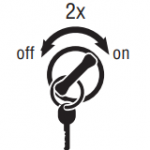
შენიშვნა: თუ ძრავა უკვე არის გაშვებული, you may still retrieve codes; თუმცა, do not engage the starter if the engine stalls. - To Retrieve Active Codes: გასაღები. Turn Key off და 2 ჯერ ხუთ წამში დამთავრებული გასაღები. მას შემდეგ, რაც 5 წამში, სამსახურის მსუბუქი იწყება სასქესო ორგანოების დანახება ორი ციფრი ბრალია კოდები. თუ არ ხარვეზი აქტიური, the service light will flash code 25 (არ კოდები).
შენიშვნა: An “88” may show up in the dash at key on which is a normal power-up test of the display
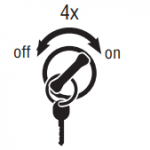
- ვიღებ Inactive Codes: ჩართეთ გასაღები. Turn the key off and on 4 ჯერ ხუთ წამში დამთავრებული გასაღები თანამდებობაზე. მას შემდეგ, რაც 5 წამში, სამსახურის მსუბუქი იწყება სასქესო ორგანოების დანახება ორი ციფრი ბრალია კოდები. თუ არ ხარვეზი აქტიური, the service light will flash code 25 (არ კოდები).
- Two digit fault codes will be displayed in the gear display. ზოგიერთი მანქანა შეიძლება აღჭურვილი მომსახურების სინათლის.
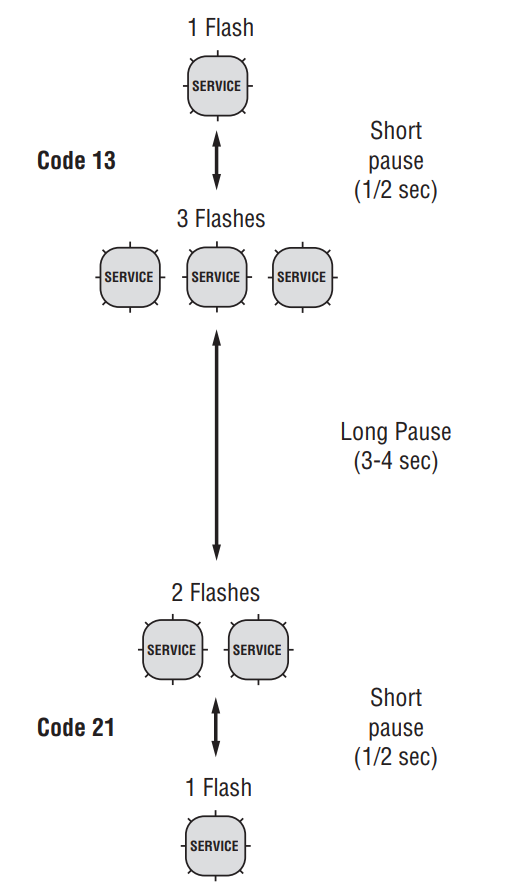
- Observe the sequence of flashes on the service light and record the codes. A 1- to 2-second pause separates each stored code, and the sequence automatically repeats after all codes have been flashed.
[/fusion_text][/fusion_builder_column][fusion_builder_column type=”1_2″ layout=”1_2″ spacing=”” center_content=”no” link=”” target=”_self” min_height=”” hide_on_mobile=”small-visibility,medium-visibility,large-visibility” class=”” id=”” background_color=”” background_image=”” background_image_id=”” background_position=”left top” background_repeat=”no-repeat” hover_type=”none” border_size=”0″ border_color=”” border_style=”solid” border_position=”all” padding_top=”” padding_right=”” padding_bottom=”” padding_left=”” margin_top=”” margin_bottom=”” animation_type=”” animation_direction=”left” animation_speed=”0.3″ animation_offset=”” last=”no”][fusion_imageframe image_id=”13871|full” max_width=”” style_type=”” blur=”” stylecolor=”” hover_type=”none” bordersize=”” bordercolor=”” borderradius=”” align=”none” lightbox=”no” gallery_id=”” lightbox_image=”” lightbox_image_id=”” alt=”Eaton Fuller გადაცემის ბრალია კოდები- როგორ უნდა წაიკითხოთ სახელმძღვანელო ბრალია კოდი თანმიმდევრობა ” link=”” linktarget=”_self” hide_on_mobile=”small-visibility,medium-visibility,large-visibility” class=”” id=”” animation_type=”” animation_direction=”left” animation_speed=”0.3″ animation_offset=””]https://www.globaltransmissionsupply.com/wp-content/uploads/fault-code-sequence-flash-e1553099338337.png[/fusion_imageframe][/fusion_builder_column][fusion_builder_column type=”1_1″ layout=”1_1″ spacing=”” center_content=”no” link=”” target=”_self” min_height=”” hide_on_mobile=”small-visibility,medium-visibility,large-visibility” class=”” id=”” background_color=”” background_image=”” background_image_id=”” background_position=”left top” background_repeat=”no-repeat” hover_type=”none” border_size=”0″ border_color=”” border_style=”solid” border_position=”all” padding_top=”” padding_right=”” padding_bottom=”” padding_left=”” margin_top=”” margin_bottom=”” animation_type=”” animation_direction=”left” animation_speed=”0.3″ animation_offset=”” last=”no”][fusion_text columns=”” column_min_width=”” column_spacing=”” rule_style=”default” rule_size=”” rule_color=”” hide_on_mobile=”small-visibility,medium-visibility,large-visibility” class=”” id=””]
გაწმენდის ბრალია კოდები ხელით
[/fusion_text][fusion_separator style_type=”default” hide_on_mobile=”small-visibility,medium-visibility,large-visibility” class=”” id=”” sep_color=”#0038a0″ top_margin=”” bottom_margin=”20″ border_size=”” icon=”” icon_circle=”” icon_circle_color=”” width=”20%” alignment=”left” /][fusion_text columns=”” column_min_width=”” column_spacing=”” rule_style=”default” rule_size=”” rule_color=”” hide_on_mobile=”small-visibility,medium-visibility,large-visibility” class=”” id=””]
The following procedure clears all Inactive fault codes from the TECU’s memory. Active fault codes are automatically cleared when the fault has been corrected.
შენიშვნა: თქვენ შეგიძლიათ გამოიყენოთ PC დაფუძნებული მომსახურების ინსტრუმენტი, როგორიცაა ServiceRanger, გარკვევა ბრალია კოდები.
1. ადგილი ცვლა ბერკეტი ნეიტრალურ.
2. უცნობია პარკირების მუხრუჭი.
3. ჩართეთ გასაღები ძრავის off.
4. Turn Key off და 6 ჯერ შიგნით 5 seconds ending with key on. შენიშვნა: თუ კოდები წარმატებით განბაჟებული, the Service light will come on and stay on for five seconds. სიჩქარის ეკრანზე გამოჩნდება 25 (არ კოდები).
5. გახდეს გასაღები და საშუალებას სისტემის ძალა
ქვემოთ.
[/fusion_text][/fusion_builder_column][/fusion_builder_row][/fusion_builder_container][fusion_builder_container hundred_percent=”no” hundred_percent_height=”no” hundred_percent_height_scroll=”no” hundred_percent_height_center_content=”yes” equal_height_columns=”no” menu_anchor=”” hide_on_mobile=”small-visibility,medium-visibility,large-visibility” status=”published” publish_date=”” class=”” id=”” background_color=”” background_image=”” background_position=”center center” background_repeat=”no-repeat” fade=”no” background_parallax=”none” enable_mobile=”no” parallax_speed=”0.3″ video_mp4=”” video_webm=”” video_ogv=”” video_url=”” video_aspect_ratio=”16:9″ video_loop=”yes” video_mute=”yes” video_preview_image=”” border_size=”” border_color=”” border_style=”solid” margin_top=”” margin_bottom=”” padding_top=”” padding_right=”” padding_bottom=”” padding_left=””][fusion_builder_row][fusion_builder_column type=”1_1″ layout=”1_1″ spacing=”” center_content=”no” link=”” target=”_self” min_height=”” hide_on_mobile=”small-visibility,medium-visibility,large-visibility” class=”” id=”” background_color=”” background_image=”” background_image_id=”” background_position=”left top” background_repeat=”no-repeat” hover_type=”none” border_size=”0″ border_color=”” border_style=”solid” border_position=”all” padding_top=”” padding_right=”” padding_bottom=”” padding_left=”” margin_top=”” margin_bottom=”” animation_type=”” animation_direction=”left” animation_speed=”0.3″ animation_offset=”” last=”no”][fusion_text columns=”” column_min_width=”” column_spacing=”” rule_style=”default” rule_size=”” rule_color=”” hide_on_mobile=”small-visibility,medium-visibility,large-visibility” class=”” id=””]
Fault Code Retrieval and Clearing in ServiceRanger
[/fusion_text][fusion_separator style_type=”default” hide_on_mobile=”small-visibility,medium-visibility,large-visibility” class=”” id=”” sep_color=”#0038a0″ top_margin=”” bottom_margin=”20″ border_size=”” icon=”” icon_circle=”” icon_circle_color=”” width=”20%” alignment=”left” /][fusion_text columns=”” column_min_width=”” column_spacing=”” rule_style=”default” rule_size=”” rule_color=”” hide_on_mobile=”small-visibility,medium-visibility,large-visibility” class=”” id=””]
იმისათვის, რომ ნახოთ ბრალია კოდები და გარკვევა მათ, follow the procedures below.
[/fusion_text][/fusion_builder_column][fusion_builder_column type=”1_2″ layout=”1_2″ spacing=”” center_content=”no” link=”” target=”_self” min_height=”” hide_on_mobile=”small-visibility,medium-visibility,large-visibility” class=”” id=”” background_color=”” background_image=”” background_image_id=”” background_position=”left top” background_repeat=”no-repeat” hover_type=”none” border_size=”0″ border_color=”” border_style=”solid” border_position=”all” padding_top=”” padding_right=”” padding_bottom=”” padding_left=”” margin_top=”” margin_bottom=”” animation_type=”” animation_direction=”left” animation_speed=”0.3″ animation_offset=”” last=”no”][fusion_text columns=”” column_min_width=”” column_spacing=”” rule_style=”default” rule_size=”” rule_color=”” hide_on_mobile=”small-visibility,medium-visibility,large-visibility” class=”” id=””]
ნახეთ აქტიური და არააქტიური ხარვეზებით
1. დაკავშირება ServiceRanger 9-Way დიაგნოსტიკური Connector.
2. გადასვლა მენიუ "Tools" და აირჩიეთ "ურთიერთობა" tab.
3. Select the appropriate communication device for J1587 and J1939.
4. აირჩიეთ "Connect" მთავარ გვერდზე.
5. აირჩიეთ "View ბრალია კოდები" tab.
შენიშვნა: პირველადი გამოყენება მოითხოვს ყველა ნაბიჯი; however subsequent uses require only Step 4 და ნაბიჯი 5.
[/fusion_text][/fusion_builder_column][fusion_builder_column type=”1_2″ layout=”1_2″ spacing=”” center_content=”no” link=”” target=”_self” min_height=”” hide_on_mobile=”small-visibility,medium-visibility,large-visibility” class=”” id=”” background_color=”” background_image=”” background_image_id=”” background_position=”left top” background_repeat=”no-repeat” hover_type=”none” border_size=”0″ border_color=”” border_style=”solid” border_position=”all” padding_top=”” padding_right=”” padding_bottom=”” padding_left=”” margin_top=”” margin_bottom=”” animation_type=”” animation_direction=”left” animation_speed=”0.3″ animation_offset=”” last=”no”][fusion_text columns=”” column_min_width=”” column_spacing=”” rule_style=”default” rule_size=”” rule_color=”” hide_on_mobile=”small-visibility,medium-visibility,large-visibility” class=”” id=””]
წმინდა უმოქმედო ხარვეზებით
1. დაკავშირება ServiceRanger 9-Way დიაგნოსტიკური Connector.
2. გადასვლა მენიუ "Tools" და აირჩიეთ "ურთიერთობა" tab.
3. Select the appropriate communication device for J1587 and J1939.
4. აირჩიეთ "Connect" მთავარ გვერდზე.
5. აირჩიეთ "View ბრალია კოდები" tab.
6. აირჩიეთ "წმინდა ხარვეზებით" ღილაკს.
შენიშვნა: პირველადი გამოყენება მოითხოვს ყველა ნაბიჯი, თუმცა, შემდგომი გამოყენების მოითხოვოს მხოლოდ ნაბიჯი 4 და ნაბიჯი 5.
[/fusion_text][/fusion_builder_column][/fusion_builder_row][/fusion_builder_container][fusion_builder_container hundred_percent=”no” hundred_percent_height=”no” hundred_percent_height_scroll=”no” hundred_percent_height_center_content=”yes” equal_height_columns=”no” menu_anchor=”” hide_on_mobile=”small-visibility,medium-visibility,large-visibility” status=”published” publish_date=”” class=”” id=”” background_color=”” background_image=”” background_position=”center center” background_repeat=”no-repeat” fade=”no” background_parallax=”none” enable_mobile=”no” parallax_speed=”0.3″ video_mp4=”” video_webm=”” video_ogv=”” video_url=”” video_aspect_ratio=”16:9″ video_loop=”yes” video_mute=”yes” video_preview_image=”” border_size=”” border_color=”” border_style=”solid” margin_top=”” margin_bottom=”” padding_top=”” padding_right=”” padding_bottom=”” padding_left=””][fusion_builder_row][fusion_builder_column type=”1_1″ layout=”1_1″ spacing=”” center_content=”no” link=”” target=”_self” min_height=”” hide_on_mobile=”small-visibility,medium-visibility,large-visibility” class=”” id=”” background_color=”” background_image=”” background_image_id=”” background_position=”left top” background_repeat=”no-repeat” hover_type=”none” border_size=”0″ border_color=”” border_style=”solid” border_position=”all” padding_top=”” padding_right=”” padding_bottom=”” padding_left=”” margin_top=”” margin_bottom=”” animation_type=”” animation_direction=”left” animation_speed=”0.3″ animation_offset=”” last=”no”][fusion_text columns=”” column_min_width=”” column_spacing=”” rule_style=”default” rule_size=”” rule_color=”” hide_on_mobile=”small-visibility,medium-visibility,large-visibility” class=”” id=””]
პროდუქტის დიაგნოსტიკური რეჟიმი (PDM)
[/fusion_text][fusion_text columns=”” column_min_width=”” column_spacing=”” rule_style=”default” rule_size=”” rule_color=”” hide_on_mobile=”small-visibility,medium-visibility,large-visibility” class=”” id=””]
პროდუქტის დიაგნოსტიკური რეჟიმი (PDM)
პროდუქტის დიაგნოსტიკური რეჟიმი (PDM) გამოიყენება, რათა დაეხმაროს დიაგნოსტიკა Inactive კოდები, რომელიც შეიძლება უკვე მითითებული დროს ნორმალური მამოძრავებელი. ამ კვლევის რეჟიმი ზრდის სენსიტიურობის ბრალია ზონდირების შესაძლებლობები.
ეს პროცედურა ამოწმებს loose, დეგრადირებული და წყვეტილი კავშირები. იხილეთ "AULT Code იზოლაცია ინდექსი ქვემოთ. გამოიყენეთ ინდექსი როგორც სახელმძღვანელო გაყვანილობა და კონექტორები, რომლებიც დაკავშირებულია არააქტიური ბრალია კოდები. Flex გაყვანილობა აღკაზმულობა და კონექტორები და ცდილობენ ხელახლა ბრალია გააქტიურების შემდეგ PDM.
PDM მხოლოდ გამოყენებული იქნას მომზადებული მომსახურების ტექნიკოსი ავტორიზებული დილერი.
შესვლის PDM რეჟიმი:
შენიშვნა: მანქანა არ დაიწყება პროდუქტის დიაგნოსტიკური რეჟიმი.
(PDM). ჩართეთ ავტომობილის გასაღები "OFF" და საშუალებას სისტემის ხელისუფლებაში ქვემოთ გასასვლელად PDM.
-
-
-
- მანქანა უნდა იყოს სტაციონარული, ძრავა არ უნდა იყოს გაშვებული, ავტომობილის პარკირების მუხრუჭი უნდა იყოს მითითებული.
- დაკავშირება ServiceRanger 9-Way დიაგნოსტიკური Connector.
- აირჩიეთ "View ბრალია კოდები" ეკრანზე.
- ასრულებს ორ ძირითად დაწკაპუნებით ანთება შეცვლა დაწყებული გასაღები, და დამთავრებული გასაღები.
შენიშვნა: An “88” შეიძლება გამოჩნდება ტირე at გასაღები, რომელიც ნორმალურ ძალაუფლების up გამოცდა ჩვენება. - სიჩქარის ჩვენება ფლეშის მყარი "PD" (პროდუქტის დიაგნოსტიკური რეჟიმი) და რეჟიმი ამოქმედდება.
- Flex გაყვანილობა აღკაზმულობა და კონექტორები და ცდილობენ ხელახლა ბრალია. იმ შემთხვევაში, თუ ბრალი ხდება აქტიური დროს PDM, ServiceRanger არიან ბრალი სტატუსი აქტიურია.
- იმ შემთხვევაში, თუ ბრალი ხდება აქტიური დროს PDM, ServiceRanger არიან ბრალი სტატუსი აქტიურია.
- If a fault is detected, გასასვლელი PDM რეჟიმი და შეასრულოს შესაბამისი ბრალია კოდი troubleshooting პროცედურა. See Fault Code Isolation Procedure Index below.
შენიშვნა: Active კოდები მითითებული დროს PDM რეჟიმი არ იქნება ინახება როგორც უმოქმედო. - გასასვლელად PDM რეჟიმი, ძალაუფლების სისტემა მიერ გარდამტეხი გასაღები off.
-
-
[/fusion_text][fusion_text columns=”” column_min_width=”” column_spacing=”” rule_style=”default” rule_size=”” rule_color=”” hide_on_mobile=”small-visibility,medium-visibility,large-visibility” class=”” id=””]
PDM იმუშავებს მხოლოდ შემდეგი Inactive კოდები
9, 10, 14, 16, 17, 18, 19, 22, 24, 32, 33, 34, 35, 36, 38, 39, 40, 48, 49, 50, 51, 52, 56, 58, 59, 60, 61, 63, 76, 87, 88, 89, 95, 118
[/fusion_text][/fusion_builder_column][/fusion_builder_row][/fusion_builder_container][fusion_builder_container hundred_percent=”no” hundred_percent_height=”no” hundred_percent_height_scroll=”no” hundred_percent_height_center_content=”yes” equal_height_columns=”no” menu_anchor=”” hide_on_mobile=”small-visibility,medium-visibility,large-visibility” status=”published” publish_date=”” class=”” id=”” background_color=”” background_image=”” background_position=”center center” background_repeat=”no-repeat” fade=”no” background_parallax=”none” enable_mobile=”no” parallax_speed=”0.3″ video_mp4=”” video_webm=”” video_ogv=”” video_url=”” video_aspect_ratio=”16:9″ video_loop=”yes” video_mute=”yes” video_preview_image=”” border_size=”” border_color=”” border_style=”solid” margin_top=”” margin_bottom=”” padding_top=”” padding_right=”” padding_bottom=”” padding_left=””][fusion_builder_row][fusion_builder_column type=”1_1″ layout=”1_1″ spacing=”” center_content=”no” link=”” target=”_self” min_height=”” hide_on_mobile=”small-visibility,medium-visibility,large-visibility” class=”” id=”” background_color=”” background_image=”” background_image_id=”” background_position=”left top” background_repeat=”no-repeat” hover_type=”none” border_size=”0″ border_color=”” border_style=”solid” border_position=”all” padding_top=”” padding_right=”” padding_bottom=”” padding_left=”” margin_top=”” margin_bottom=”” animation_type=”” animation_direction=”left” animation_speed=”0.3″ animation_offset=”” last=”no”][fusion_text columns=”” column_min_width=”” column_spacing=”” rule_style=”default” rule_size=”” rule_color=”” hide_on_mobile=”small-visibility,medium-visibility,large-visibility” class=”” id=””]
FMI (Failure Mode იდენტიფიკატორი)
[/fusion_text][fusion_text columns=”” column_min_width=”” column_spacing=”” rule_style=”default” rule_size=”” rule_color=”” hide_on_mobile=”small-visibility,medium-visibility,large-visibility” class=”” id=””]
FMI (Failure Mode იდენტიფიკატორი) გამოიყენება ერთად SPN მიაწოდოს ინფორმაცია, რომ ეხება სადიაგნოსტიკო პრობლემები კოდი (DTC). FMI იმაზე მიუთითებს, რომ პრობლემა ელექტრონული ჩართვა ან ელექტრონული კომპონენტი გამოვლენილია. FMI შეიძლება ასევე მიუთითებს, რომ პათოლოგიური ოპერაციული მდგომარეობა გამოვლენილია.
[/fusion_text][fusion_text columns=”” column_min_width=”” column_spacing=”” rule_style=”default” rule_size=”” rule_color=”” hide_on_mobile=”small-visibility,medium-visibility,large-visibility” class=”” id=””]
საერთაშორისო სავალუტო ფონდის – აღწერა
[/fusion_text][fusion_text columns=”2″ column_min_width=”” column_spacing=”” rule_style=”default” rule_size=”” rule_color=”” hide_on_mobile=”small-visibility,medium-visibility,large-visibility” class=”” id=””]
| 0 | High - ყველაზე მძიმე |
| 1 | დაბალი - ყველაზე მძიმე |
| 2 | არაეთიკური, წყვეტილი, ან არასწორი |
| 3 | Voltage ზემოთ ნორმალური |
| 4 | Voltage ნორმალური |
| 5 | აქტუალური ნორმალური |
| 6 | აქტუალური ზემოთ ნორმალური |
| 7 | არ რეაგირებს |
| 8 | პათოლოგიური სიხშირე, პულსის, ან პერიოდი |
| 9 | პათოლოგიური განახლება კურსი |
| 10 | პათოლოგიური განაკვეთის ცვლილების |
| 11 | სხვა ვერ რეჟიმი |
| 12 | მარცხი |
| 13 | Out of Calibration |
| 14 | სპეციალური ინსტრუქცია |
| 15 | High - ნაკლებად მძიმე |
| 16 | High - საშუალო სიმძიმის |
| 17 | დაბალი - ნაკლებად მძიმე |
| 18 | დაბალი - საშუალო სიმძიმის |
| 19 | მონაცემთა შეცდომა |
| 20 | მონაცემთა drifted High |
| 21 | მონაცემთა drifted დაბალი |
| 31 | - |
[/fusion_text][/fusion_builder_column][/fusion_builder_row][/fusion_builder_container][fusion_builder_container hundred_percent=”no” hundred_percent_height=”no” hundred_percent_height_scroll=”no” hundred_percent_height_center_content=”yes” equal_height_columns=”no” menu_anchor=”” hide_on_mobile=”small-visibility,medium-visibility,large-visibility” status=”published” publish_date=”” class=”” id=”” background_color=”” background_image=”” background_position=”center center” background_repeat=”no-repeat” fade=”no” background_parallax=”none” enable_mobile=”no” parallax_speed=”0.3″ video_mp4=”” video_webm=”” video_ogv=”” video_url=”” video_aspect_ratio=”16:9″ video_loop=”yes” video_mute=”yes” video_preview_image=”” border_size=”” border_color=”” border_style=”solid” margin_top=”” margin_bottom=”” padding_top=”” padding_right=”” padding_bottom=”” padding_left=””][fusion_builder_row][fusion_builder_column type=”1_1″ layout=”1_1″ spacing=”” center_content=”no” link=”” target=”_self” min_height=”” hide_on_mobile=”small-visibility,medium-visibility,large-visibility” class=”” id=”” background_color=”” background_image=”” background_image_id=”” background_position=”left top” background_repeat=”no-repeat” hover_type=”none” border_size=”0″ border_color=”” border_style=”solid” border_position=”all” border_radius=”” box_shadow=”no” dimension_box_shadow=”” box_shadow_blur=”0″ box_shadow_spread=”0″ box_shadow_color=”” box_shadow_style=”” padding_top=”” padding_right=”” padding_bottom=”” padding_left=”” margin_top=”” margin_bottom=”” animation_type=”” animation_direction=”left” animation_speed=”0.3″ animation_offset=”” last=”no”][fusion_text columns=”” column_min_width=”” column_spacing=”” rule_style=”default” rule_size=”” rule_color=”” hide_on_mobile=”small-visibility,medium-visibility,large-visibility” class=”” id=””]
View Eaton Fuller Transmission Fault Codes Isolation Procedure Index
[/fusion_text][/fusion_builder_column][fusion_builder_column type=”1_1″ layout=”1_1″ spacing=”” center_content=”no” link=”” target=”_self” min_height=”” hide_on_mobile=”small-visibility,medium-visibility,large-visibility” class=”” id=”” background_image_id=”” background_color=”” background_image=”” background_position=”left top” undefined=”” background_repeat=”no-repeat” hover_type=”none” border_size=”0″ border_color=”” border_style=”solid” border_position=”all” padding_top=”” padding_right=”” padding_bottom=”” padding_left=”” margin_top=”” margin_bottom=”” animation_type=”” animation_direction=”left” animation_speed=”0.3″ animation_offset=”” last=”no”][fusion_separator style_type=”none” hide_on_mobile=”small-visibility,medium-visibility,large-visibility” class=”” id=”” sep_color=”” top_margin=”20″ bottom_margin=”20″ border_size=”0″ icon=”” icon_circle=”” icon_circle_color=”” width=”” alignment=”center” /][fusion_text columns=”” column_min_width=”” column_spacing=”” rule_style=”default” rule_size=”” rule_color=”” class=”” id=””]
იყიდება სახელმძღვანელოები და სხვა უფასო რესურსების გთხოვთ ეწვიოთ ჩვენს ჩამოტვირთვების გვერდი
[/fusion_text][fusion_button link=”https://globaltransmissionsupply.com/transmission-manuals” text_transform=”uppercase” title=”დიაგრამები, სახელმძღვანელოები და ნაწილი PDFs” target=”_self” link_attributes=”დიაგრამები, სახელმძღვანელოები და ნაწილი PDFs” alignment=”center” modal=”” hide_on_mobile=”small-visibility,medium-visibility,large-visibility” class=”” id=”” color=”custom” button_gradient_top_color=”#000000″ button_gradient_bottom_color=”#000000″ button_gradient_top_color_hover=”#f44336″ button_gradient_bottom_color_hover=”#f44336″ accent_color=”#ffffff” accent_hover_color=”#ffffff” type=”flat” bevel_color=”” border_width=”” size=”medium” stretch=”default” shape=”square” icon=”” icon_position=”left” icon_divider=”no” animation_type=”” animation_direction=”left” animation_speed=”0.3″ animation_offset=””]დიაგრამები, სახელმძღვანელოები და ნაწილები PDFs >>>[/fusion_button][fusion_separator style_type=”none” hide_on_mobile=”small-visibility,medium-visibility,large-visibility” class=”” id=”” sep_color=”” top_margin=”20″ bottom_margin=”20″ border_size=”0″ icon=”” icon_circle=”” icon_circle_color=”” width=”” alignment=”center” /][/fusion_builder_column][/fusion_builder_row][/fusion_builder_container][fusion_global id=”13788″]