[fusion_builder_container hundred_percent=”no” hundred_percent_height=”no” hundred_percent_height_scroll=”no” hundred_percent_height_center_content=”yes” equal_height_columns=”no” menu_anchor=”” hide_on_mobile=”small-visibility,medium-visibility,large-visibility” status=”published” publish_date=”” class=”” id=”” background_color=”” background_image=”” background_position=”center center” background_repeat=”no-repeat” fade=”no” background_parallax=”none” enable_mobile=”no” parallax_speed=”0.3″ video_mp4=”” video_webm=”” video_ogv=”” video_url=”” video_aspect_ratio=”16:9″ video_loop=”yes” video_mute=”yes” video_preview_image=”” border_size=”” border_color=”” border_style=”solid” margin_top=”35″ margin_bottom=”” padding_top=”” padding_right=”” padding_bottom=”” padding_left=””][fusion_builder_row][fusion_builder_column type=”1_1″ layout=”1_1″ spacing=”” center_content=”no” link=”” target=”_self” min_height=”” hide_on_mobile=”small-visibility,medium-visibility,large-visibility” class=”” id=”” background_color=”” background_image=”” background_image_id=”” background_position=”left top” background_repeat=”no-repeat” hover_type=”none” border_size=”0″ border_color=”” border_style=”solid” border_position=”all” padding_top=”” padding_right=”” padding_bottom=”” padding_left=”” margin_top=”” margin_bottom=”” animation_type=”” animation_direction=”left” animation_speed=”0.3″ animation_offset=”” last=”no”][fusion_text columns=”” column_min_width=”” column_spacing=”” rule_style=”default” rule_size=”” rule_color=”” hide_on_mobile=”small-visibility,medium-visibility,large-visibility” class=”” id=””]
Eaton Fuller ჰიბრიდული ტრანსმისია ბრალია კოდი 38 – Battery Fan Relay
[/fusion_text][/fusion_builder_column][/fusion_builder_row][/fusion_builder_container][fusion_builder_container hundred_percent=”no” hundred_percent_height=”no” hundred_percent_height_scroll=”no” hundred_percent_height_center_content=”yes” equal_height_columns=”no” menu_anchor=”” hide_on_mobile=”small-visibility,medium-visibility,large-visibility” status=”published” publish_date=”” class=”” id=”” background_color=”” background_image=”” background_position=”center center” background_repeat=”no-repeat” fade=”no” background_parallax=”none” enable_mobile=”no” parallax_speed=”0.3″ video_mp4=”” video_webm=”” video_ogv=”” video_url=”” video_aspect_ratio=”16:9″ video_loop=”yes” video_mute=”yes” video_preview_image=”” border_size=”” border_color=”” border_style=”solid” margin_top=”” margin_bottom=”” padding_top=”” padding_right=”” padding_bottom=”” padding_left=””][fusion_builder_row][fusion_builder_column type=”1_1″ layout=”1_1″ spacing=”” center_content=”no” link=”” target=”_self” min_height=”” hide_on_mobile=”small-visibility,medium-visibility,large-visibility” class=”” id=”” background_color=”” background_image=”” background_image_id=”” background_position=”left top” background_repeat=”no-repeat” hover_type=”none” border_size=”0″ border_color=”” border_style=”solid” border_position=”all” padding_top=”” padding_right=”” padding_bottom=”” padding_left=”” margin_top=”” margin_bottom=”” animation_type=”” animation_direction=”left” animation_speed=”0.3″ animation_offset=”” last=”no”][fusion_text columns=”” column_min_width=”” column_spacing=”” rule_style=”default” rule_size=”” rule_color=”” hide_on_mobile=”small-visibility,medium-visibility,large-visibility” class=”” id=””]
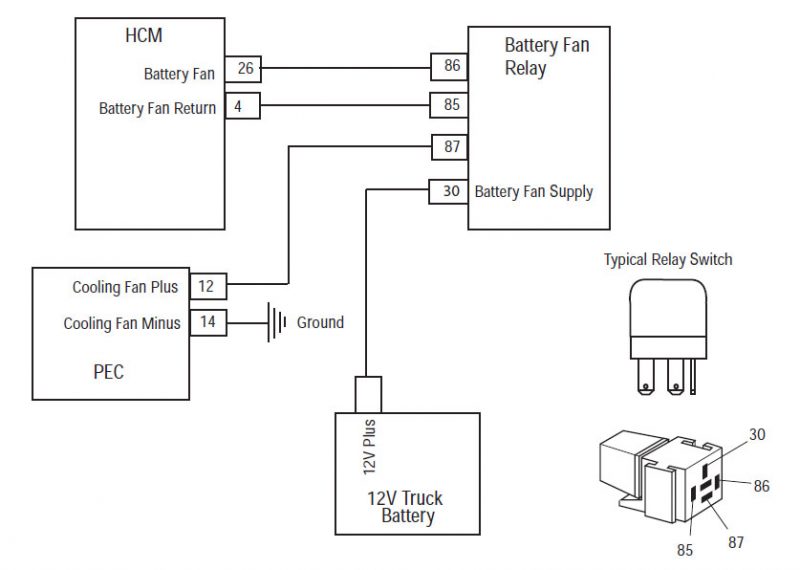
ბრალია კოდი Eaton ჰიბრიდული წამყვანი სისტემები მოდელები (my08) EH-8E306A-U, EH-8E306A-UPG, EH-8E306A-UP, EH-8E306A-CD, EH-8E306A-T, EH-6E606B-CD, (MY09) EH-8E406A-U / P, EH-8E406A-UP, EH-8E406A-UPG, EH-8E406A-CD, EH-8E406A-CDG, EH-8E406A-CDR, EH-8E406A-T, EH-6E706B-CD, EH-6E706B-P და EH-6E706B-UPG. The Battery Fan Relay ჩვეულებრივ ღია სარელეო დაკავშირებული ჰიბრიდული კონტროლის მოდული (HCM) კონტროლის მხარე. როდესაც HCM უფლებამოსილების კონტროლის ჩართვა, ეს იხურება სარელეო კონტაქტები და გამოდის სარელეო. The Battery Fan Relay უფლებამოსილების Battery Fan მდებარეობს დენის ელექტრონიკა Carrier (საუბნო საარჩევნო კომისიის), გაგრილების მაღალი ძაბვის ბატარეები.
ბრალია კოდი 38 – Battery Fan Relay Detection
შემდეგი წინაპირობები უნდა შეხვდნენ, სანამ სისტემა აღმოაჩენს ბრალია:
- HCM ანთება ძაბვის მეტია, ვიდრე 7 ვოლტი და ნაკლები 16 ვ.
შენიშვნა: როდესაც troubleshooting Inactive კოდი ეხება პროდუქტის დიაგნოსტიკური რეჟიმი (PDM)
პირობები უცნობია ბრალია კოდი აქტიურია
პირობები უცნობია ბრალია:
• საერთაშორისო სავალუტო ფონდის 3 არის, როდესაც სენსორი ძაბვის მეტია, ვიდრე 4.1 ვოლტი 10 წამში, ხოლო Inverter ტემპერატურა მეტი 35 ° C ან 95 ° F, თუ სენსორი გამომავალი ძაბვის ნაკლებია, ვიდრე 0.2 ვოლტი 10 წამში.
სამარაგო როდესაც ბრალია კოდი 38 არის შემდეგი პირობებით მოხდეს:
- საერთაშორისო სავალუტო ფონდის 3 არის, როდესაც HCM ცნობს მოკლე to ბატარეის coil circuit ბატარეის Fan Relay.
- საერთაშორისო სავალუტო ფონდის 4 არის, როდესაც HCM ცნობს მოკლე to ადგილზე coil circuit ბატარეის Fan Relay.
- საერთაშორისო სავალუტო ფონდის 5 არის, როდესაც HCM ცნობს ღია coil circuit ბატარეის Fan Relay.
- საერთაშორისო სავალუტო ფონდის 14 არის, როდესაც შემდეგი პირობები ნამდვილი 10 -ე:
- High-voltage battery temperature is greater than 131 ° F (55 ° C)
- სხვაობა მინიმალური და მაქსიმალური ბატარეის ტემპერატურა ნაკლებია, ვიდრე 33 ° F (1 ° C)
- არარის ბატარეის ტემპერატურა ხარვეზებით ბატარეის კონტროლის მოდული
[/fusion_text][fusion_text columns=”” column_min_width=”” column_spacing=”” rule_style=”default” rule_size=”” rule_color=”” hide_on_mobile=”small-visibility,medium-visibility,large-visibility” class=”” id=””]
პირობები უცნობია ბრალია Code Inactive
მხოლოდ Inactive ხარვეზებით შეიძლება გაირკვეს გადამცემი Electronic Control Unit (TECU) ან ჰიპერტროფიული ისტორიის გამოყენებით ServiceRanger. TECU ავტომატურად აუმჯობესებს ხარვეზებით ისტორიის შემდეგ 200 საათი და HCM ავტომატურად აუმჯობესებს ხარვეზებით ისტორიის შემდეგ ბრალი უკვე უმოქმედო 200 საათი.
ეს ბრალია კოდი შეიძლება გამოწვეული რომელიმე შემდეგი:
- საერთაშორისო სავალუტო ფონდის 3, 4, 5
- Vehicle აღკაზმულობა მხრიდან HCM ბატერის Fan Relay
- Battery Fan Relay
- HCM
- საერთაშორისო სავალუტო ფონდის 14
- Battery Fan Relay
- Battery Fan
- Plugged Air Filter
- Battery Fan Relay მთავარი ელექტრომომარაგება
[/fusion_text][/fusion_builder_column][/fusion_builder_row][/fusion_builder_container][fusion_builder_container hundred_percent=”no” hundred_percent_height=”no” hundred_percent_height_scroll=”no” hundred_percent_height_center_content=”yes” equal_height_columns=”no” menu_anchor=”” hide_on_mobile=”small-visibility,medium-visibility,large-visibility” status=”published” publish_date=”” class=”” id=”” background_color=”” background_image=”” background_position=”center center” background_repeat=”no-repeat” fade=”no” background_parallax=”none” enable_mobile=”no” parallax_speed=”0.3″ video_mp4=”” video_webm=”” video_ogv=”” video_url=”” video_aspect_ratio=”16:9″ video_loop=”yes” video_mute=”yes” video_preview_image=”” border_size=”” border_color=”” border_style=”solid” margin_top=”” margin_bottom=”” padding_top=”” padding_right=”” padding_bottom=”” padding_left=””][fusion_builder_row][fusion_builder_column type=”1_1″ layout=”1_1″ spacing=”” center_content=”no” link=”” target=”_self” min_height=”” hide_on_mobile=”small-visibility,medium-visibility,large-visibility” class=”” id=”” background_color=”” background_image=”” background_image_id=”” background_position=”left top” background_repeat=”no-repeat” hover_type=”none” border_size=”0″ border_color=”” border_style=”solid” border_position=”all” padding_top=”” padding_right=”” padding_bottom=”” padding_left=”” margin_top=”” margin_bottom=”” animation_type=”” animation_direction=”left” animation_speed=”0.3″ animation_offset=”” last=”no”][fusion_text columns=”” column_min_width=”” column_spacing=”” rule_style=”default” rule_size=”” rule_color=”” hide_on_mobile=”small-visibility,medium-visibility,large-visibility” class=”” id=””]
ბრალია კოდი 38 – Battery Fan Relay ტესტი
[/fusion_text][/fusion_builder_column][/fusion_builder_row][/fusion_builder_container][fusion_builder_container hundred_percent=”no” hundred_percent_height=”no” hundred_percent_height_scroll=”no” hundred_percent_height_center_content=”yes” equal_height_columns=”no” menu_anchor=”” hide_on_mobile=”small-visibility,medium-visibility,large-visibility” status=”published” publish_date=”” class=”” id=”” background_color=”” background_image=”” background_position=”center center” background_repeat=”no-repeat” fade=”no” background_parallax=”none” enable_mobile=”no” parallax_speed=”0.3″ video_mp4=”” video_webm=”” video_ogv=”” video_url=”” video_aspect_ratio=”16:9″ video_loop=”yes” video_mute=”yes” video_preview_image=”” border_size=”” border_color=”” border_style=”solid” margin_top=”” margin_bottom=”” padding_top=”” padding_right=”” padding_bottom=”” padding_left=””][fusion_builder_row][fusion_builder_column type=”1_1″ layout=”1_1″ spacing=”” center_content=”no” link=”” target=”_self” min_height=”” hide_on_mobile=”small-visibility,medium-visibility,large-visibility” class=”” id=”” background_color=”” background_image=”” background_image_id=”” background_position=”left top” background_repeat=”no-repeat” hover_type=”none” border_size=”0″ border_color=”” border_style=”solid” border_position=”all” padding_top=”” padding_right=”” padding_bottom=”” padding_left=”” margin_top=”” margin_bottom=”” animation_type=”” animation_direction=”left” animation_speed=”0.3″ animation_offset=”” last=”no”][fusion_text columns=”” column_min_width=”” column_spacing=”” rule_style=”default” rule_size=”” rule_color=”” hide_on_mobile=”small-visibility,medium-visibility,large-visibility” class=”” id=””]
კომპონენტი საიდენტიფიკაციო:
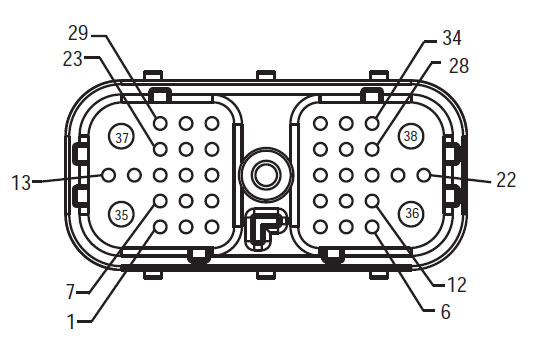
[/fusion_text][/fusion_builder_column][fusion_builder_column type=”1_2″ layout=”1_2″ spacing=”” center_content=”no” link=”” target=”_self” min_height=”” hide_on_mobile=”small-visibility,medium-visibility,large-visibility” class=”” id=”” background_color=”” background_image=”” background_image_id=”” background_position=”left top” background_repeat=”no-repeat” hover_type=”none” border_size=”0″ border_color=”” border_style=”solid” border_position=”all” padding_top=”” padding_right=”” padding_bottom=”” padding_left=”” margin_top=”” margin_bottom=”” animation_type=”” animation_direction=”left” animation_speed=”0.3″ animation_offset=”” last=”no”][fusion_imageframe image_id=”14061|full” max_width=”” style_type=”” blur=”” stylecolor=”” hover_type=”none” bordersize=”” bordercolor=”” borderradius=”” align=”center” lightbox=”no” gallery_id=”” lightbox_image=”” lightbox_image_id=”” alt=”წინა აღკაზმულობა ნახვა HCM – Hybrid System Interface Connector” link=”” linktarget=”_self” hide_on_mobile=”small-visibility,medium-visibility,large-visibility” class=”” id=”” animation_type=”” animation_direction=”left” animation_speed=”0.3″ animation_offset=””]https://www.globaltransmissionsupply.com/wp-content/uploads/Fuller-Front-Harness-View-HCM.jpg[/fusion_imageframe][fusion_text columns=”” column_min_width=”” column_spacing=”” rule_style=”default” rule_size=”” rule_color=”” hide_on_mobile=”small-visibility,medium-visibility,large-visibility” class=”” id=””]
წინა აღკაზმულობა ნახვა
HCM – Hybrid System Interface Connecto
[/fusion_text][/fusion_builder_column][fusion_builder_column type=”1_2″ layout=”1_2″ spacing=”” center_content=”no” link=”” target=”_self” min_height=”” hide_on_mobile=”small-visibility,medium-visibility,large-visibility” class=”” id=”” background_color=”” background_image=”” background_image_id=”” background_position=”left top” background_repeat=”no-repeat” hover_type=”none” border_size=”0″ border_color=”” border_style=”solid” border_position=”all” padding_top=”” padding_right=”” padding_bottom=”” padding_left=”” margin_top=”” margin_bottom=”” animation_type=”” animation_direction=”left” animation_speed=”0.3″ animation_offset=”” last=”no”][fusion_imageframe image_id=”14213|medium” max_width=”” style_type=”” blur=”” stylecolor=”” hover_type=”none” bordersize=”” bordercolor=”” borderradius=”” align=”center” lightbox=”no” gallery_id=”” lightbox_image=”” lightbox_image_id=”” alt=”აღკაზმულობა Connector ნახვა (საუბნო საარჩევნო კომისიის 19 – Way)” link=”” linktarget=”_self” hide_on_mobile=”small-visibility,medium-visibility,large-visibility” class=”” id=”” animation_type=”” animation_direction=”left” animation_speed=”0.3″ animation_offset=””]https://www.globaltransmissionsupply.com/wp-content/uploads/Eaton-Fuller-Harness-Connector-View-300×289.jpg[/fusion_imageframe][fusion_text columns=”” column_min_width=”” column_spacing=”” rule_style=”default” rule_size=”” rule_color=”” hide_on_mobile=”small-visibility,medium-visibility,large-visibility” class=”” id=””]
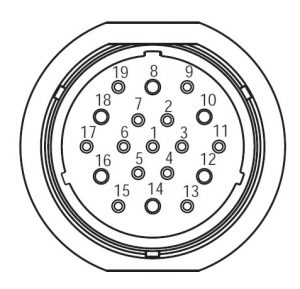
აღკაზმულობა Connector ნახვა
(საუბნო საარჩევნო კომისიის 19 – Way)
[/fusion_text][/fusion_builder_column][fusion_builder_column type=”1_1″ layout=”1_1″ spacing=”” center_content=”no” link=”” target=”_self” min_height=”” hide_on_mobile=”small-visibility,medium-visibility,large-visibility” class=”” id=”” background_image_id=”” background_color=”#000000″ background_image=”” background_position=”left top” undefined=”” background_repeat=”no-repeat” hover_type=”none” border_size=”0″ border_color=”” border_style=”solid” border_position=”all” padding_top=”” padding_right=”” padding_bottom=”” padding_left=”” margin_top=”” margin_bottom=”” animation_type=”” animation_direction=”left” animation_speed=”0.3″ animation_offset=”” last=”no”][fusion_text columns=”” column_min_width=”” column_spacing=”” rule_style=”default” rule_size=”” rule_color=”” hide_on_mobile=”small-visibility,medium-visibility,large-visibility” class=”” id=””]
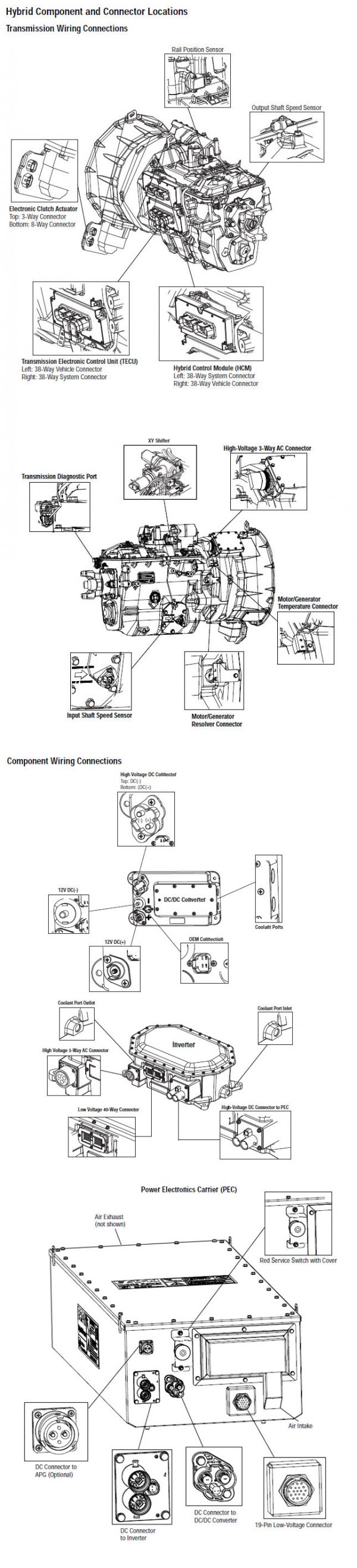
ᲨᲔᲜᲘᲨᲕᲜᲐ: იხილეთ Eaton ჰიბრიდული კომპონენტი და შემაერთებელი მდებარეობა for Connector მისამართები my08 სისტემები
[/fusion_text][/fusion_builder_column][fusion_builder_column type=”1_1″ layout=”1_1″ spacing=”” center_content=”no” link=”” target=”_self” min_height=”” hide_on_mobile=”small-visibility,medium-visibility,large-visibility” class=”” id=”” background_image_id=”” background_color=”#000000″ background_image=”” background_position=”left top” undefined=”” background_repeat=”no-repeat” hover_type=”none” border_size=”0″ border_color=”” border_style=”solid” border_position=”all” padding_top=”” padding_right=”” padding_bottom=”” padding_left=”” margin_top=”20″ margin_bottom=”” animation_type=”” animation_direction=”left” animation_speed=”0.3″ animation_offset=”” last=”no”][fusion_text columns=”” column_min_width=”” column_spacing=”” rule_style=”default” rule_size=”” rule_color=”” hide_on_mobile=”small-visibility,medium-visibility,large-visibility” class=”” id=””]
ᲨᲔᲜᲘᲨᲕᲜᲐ: იხილეთ Eaton ჰიბრიდული კომპონენტი და შემაერთებელი მდებარეობა for Connector მისამართები MY09 სისტემები.
[/fusion_text][/fusion_builder_column][fusion_builder_column type=”1_1″ layout=”1_1″ spacing=”” center_content=”no” link=”” target=”_self” min_height=”” hide_on_mobile=”small-visibility,medium-visibility,large-visibility” class=”” id=”” background_color=”” background_image=”” background_image_id=”” background_position=”left top” background_repeat=”no-repeat” hover_type=”none” border_size=”0″ border_color=”” border_style=”solid” border_position=”all” padding_top=”” padding_right=”” padding_bottom=”” padding_left=”” margin_top=”” margin_bottom=”” animation_type=”” animation_direction=”left” animation_speed=”0.3″ animation_offset=”” last=”no”][fusion_imageframe image_id=”14214|800″ max_width=”” style_type=”” blur=”” stylecolor=”” hover_type=”none” bordersize=”” bordercolor=”” borderradius=”” align=”center” lightbox=”no” gallery_id=”” lightbox_image=”” lightbox_image_id=”” alt=”Eaton HCM Battery Fan Relay საუბნო საარჩევნო კომისიის Battery connector” link=”” linktarget=”_self” hide_on_mobile=”small-visibility,medium-visibility,large-visibility” class=”” id=”” animation_type=”” animation_direction=”left” animation_speed=”0.3″ animation_offset=””]https://www.globaltransmissionsupply.com/wp-content/uploads/HCM-Battery-Fan-Relay-PEC-Battery-connector-800×570.jpg[/fusion_imageframe][/fusion_builder_column][/fusion_builder_row][/fusion_builder_container][fusion_builder_container hundred_percent=”no” hundred_percent_height=”no” hundred_percent_height_scroll=”no” hundred_percent_height_center_content=”yes” equal_height_columns=”no” menu_anchor=”” hide_on_mobile=”small-visibility,medium-visibility,large-visibility” status=”published” publish_date=”” class=”” id=”” background_color=”” background_image=”” background_position=”center center” background_repeat=”no-repeat” fade=”no” background_parallax=”none” enable_mobile=”no” parallax_speed=”0.3″ video_mp4=”” video_webm=”” video_ogv=”” video_url=”” video_aspect_ratio=”16:9″ video_loop=”yes” video_mute=”yes” video_preview_image=”” border_size=”” border_color=”” border_style=”solid” margin_top=”” margin_bottom=”” padding_top=”” padding_right=”” padding_bottom=”” padding_left=””][fusion_builder_row][fusion_builder_column type=”1_1″ layout=”1_1″ spacing=”” center_content=”no” link=”” target=”_self” min_height=”” hide_on_mobile=”small-visibility,medium-visibility,large-visibility” class=”” id=”” background_color=”” background_image=”” background_image_id=”” background_position=”left top” background_repeat=”no-repeat” hover_type=”none” border_size=”0″ border_color=”” border_style=”solid” border_position=”all” padding_top=”” padding_right=”” padding_bottom=”” padding_left=”” margin_top=”” margin_bottom=”” animation_type=”” animation_direction=”left” animation_speed=”0.3″ animation_offset=”” last=”no”][fusion_modal name=”warnings_cautions” title=”გაფრთხილებები & გვაფრთხილებს” size=”large” background=”” border_color=”” show_footer=”yes” class=”” id=””]Danger: Danger მიუთითებს თქვენ მძიმედ დაშავდა ან დაიღუპა თუ არ მოჰყვება მითითებული პროცედურა.
გაფრთხილება: გაფრთხილება მიუთითებს დაუყოვნებლივ საფრთხის, რომელიც შეიძლება გამოიწვიოს მძიმე დაზიანება, თუ არ დაიცვას აღნიშნული პროცედურა.
Სიფრთხილით: Caution მიუთითებს ავტომობილის ან ქონებრივი ზიანი შეიძლება მოხდეს, თუ არ დაიცვას აღნიშნული პროცედურა.
შენიშვნა: ნოტაში დამატებითი დეტალი, რომელიც დახმარების დიაგნოზი ან შეკეთება კომპონენტი / სისტემა.
დაიცავით მითითებული პროცედურების აღნიშნული, რათა თავიდან ავიცილოთ დაზიანება:
1. იმ შემთხვევაში, თუ მაღალი ძაბვის გირჩები გარშემო მანქანა და ლოკაუტის დამონტაჟებული საუბნო საარჩევნო კომისიის, ერთადერთი ადამიანი, რომ უნდა მიეცეთ დაიწყოს მანქანა არის პირი, რომელმაც ხელი მოაწერა lockout tag.
2. ადრე მომუშავე სატრანსპორტო საშუალება ან ტოვებს კაბინა ძრავა არის გაშვებული, თქვენ უნდა განათავსონ ცვლა ბერკეტი "N" მითითებული პარკირების მუხრუჭი, და დაბლოკოს დისკები.
3. უსაფრთხოების მიზნით, ყოველთვის ჩაერთონ მომსახურება მუხრუჭები ადრე შერჩევის მექანიზმი თანამდებობებზე "ნ"
4. დაწყებამდე მანქანა ყოველთვის უნდა მჯდომარე მძღოლის სავარძლის, აირჩიეთ "N" ცვლა კონტროლი, და მითითებული პარკირების მუხრუჭები.
5. ავტოსატრანსპორტო საშუალებების ePTO, ძრავა და / ან
Motor / გენერატორი შეიძლება დაიწყოს ePTO რეჟიმი. არასოდეს შეასრულოს ნებისმიერი სარემონტო და მუშაობა მანქანა, ხოლო ამ რეჟიმში.
6. 12-Volt Battery დადებითი (+) და უარყოფითი (-) უნდა იყოს გათიშული ადრე ნებისმიერი შედუღების ნებისმიერ Hybrid აღჭურვილია მანქანა.
Სიფრთხილით: დაიცავით მითითებული პროცედურების მითითებულ თავიდან აცილების მიზნით, ტექნიკის malfunction ან დაზიანება.
Სიფრთხილით: არ გაათავისუფლოს პარკირების მუხრუჭი და ცდილობენ შესარჩევად gear სანამ ჰაერის წნევა არის სწორი დონე.
Სიფრთხილით: რათა თავიდან ავიცილოთ დაზიანება გადაცემის დროს საბუქსირე ადგილი ცვლა ბერკეტი "N" და მოხსნის წამყვანი თვლები off ადგილზე ან გაწყვეტა ხაზზე მოძრაობა.
მაღალი ძაბვის გაფრთხილებები & გვაფრთხილებს
- გამოყენება CO2 და მშრალი ქიმიური Fire Extinguishers.
- მაღალი ძაბვის გაყვანილობა არის დაფარული ნარინჯისფერი იზოლაციის ან convoluted მილები და აღნიშნულია გაფრთხილება ეტიკეტები at კონექტორები.
- ყველა Eaton® ჰიბრიდული დიზელი / ელექტრო ტექნიკა იქნება აღნიშნული "ჰიბრიდული’ გარეთ ავტომანქანა, ერთად ცვლა წარწერა dash.
- იხილეთ OEM კონკრეტული ადგილმდებარეობა შასი დამონტაჟებული ჰიბრიდული კომპონენტები.
- არ გაჭრა შევიდა ფორთოხლის მაღალი ძაბვის კაბელები.
- არ გაჭრა ან გახსნას საუბნო საარჩევნო კომისიის.
- არ გაჭრა ან გახსნას DC / DC Converter.
- არ გაჭრა ან გახსნას Inverter.
ბუფერული ზონა უნდა შეიქმნას და მაღალი ძაბვის იზოლირებული რეზინის ხელთათმანები (კლასი 0 ტყავის მფარველები) საჭირო ადრე მუშაობს მაღალი ძაბვის. დაუცველობა დაიცვას ამ ინსტრუქციის შეიძლება გამოიწვიოს მძიმე პირადი დაზიანება ან სიკვდილი.
რეზინის იზოლირებული ხელთათმანები, რომელიც უნდა იყოს ნახმარი მუშაობისას, მაღალი ძაბვის სისტემის კლასის 0 ტყავის მფარველები. რეზინის ხელთათმანები უნდა ტესტირება ყოველი გამოყენების შემდეგ რეზინის იზოლაციის gloves ტესტირება პროცედურა ნაპოვნი "დიაგნოსტიკური ინსტრუმენტები / მომსახურება პუბლიკაციები" გვერდი 6. დაუცველობა დაიცვას ამ ინსტრუქციის შეიძლება გამოიწვიოს მძიმე პირადი დაზიანება ან სიკვდილი.
სანამ შემოწმების ან მუშაობს ნებისმიერი მაღალი ძაბვის კაბელები და კომპონენტები "მაღალი ძაბვის სამსახურის Shutdown და ძალაუფლების პროცედურა" გვერდზე 4 უნდა მოჰყვეს. დაუცველობა დაიცვას ამ ინსტრუქციის შეიძლება გამოიწვიოს მძიმე პირადი დაზიანება ან სიკვდილი.
ლოკაუტის და Tagout მოწყობილობები უნდა იყოს მხოლოდ ამოღებულ მიერ ტექნიკოსი, რომელიც განთავსებული Lockout და Tagout მოწყობილობები მანქანა. დაუცველობა დაიცვას ამ ინსტრუქციის შეიძლება გამოიწვიოს მძიმე პირადი დაზიანება ან სიკვდილი.
მაღალი ძაბვის რეზინის იზოლირებული ხელთათმანები (კლასი 0 ტყავის მფარველები) უნდა იყოს ნახმარი, როდესაც მუშაობა ნებისმიერი
მაღალი ძაბვის კაბელები. The "მაღალი ძაბვის სამსახურის Shutdown და ძალაუფლების პროცედურა" გვერდზე 4 უნდა მოჰყვეს ადრე მოხსნის ნებისმიერი მაღალი ძაბვის კაბელები. დაუცველობა დაიცვას ამ ინსტრუქციის შეიძლება გამოიწვიოს მძიმე პირადი დაზიანება ან სიკვდილი.
მაღალი ძაბვის კაბელები და გაყვანილობა ფორთოხალი და შეიცავდეს გაფრთხილებას ეტიკეტების კონექტორები. მაღალი ძაბვის კომპონენტები აღნიშნულია label. მაღალი ძაბვის რეზინის იზოლირებული ხელთათმანები (კლასი 0 ტყავის მფარველები) უნდა იქნას გამოყენებული, როდესაც მუშაობა რომელიმე ამ კომპონენტების. დაუცველობა დაიცვას ამ ინსტრუქციის შეიძლება გამოიწვიოს მძიმე პირადი დაზიანება ან სიკვდილი.
მაღალი ძაბვის სამსახურის Shutdown პროცედურები
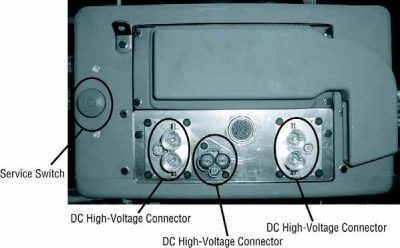
1. Follow "მაღალი ძაბვის სამუშაო ფართობი" პროცედურა.
2. განთავსდება წითელი საუბნო საარჩევნო კომისიის სამსახურის შეცვლა თვალწინ საუბნო საარჩევნო კომისიის და დააყენებს გათიშვა.
3. ამოღება სამსახურის Switch Cover და დააყენოთ Lockout Bracket (J48506).
4. Fasten tag ლოკაუტის Bracket.
5. დარწმუნდით, რომ საუბნო საარჩევნო კომისიის სამსახურის შეცვლა არ შეუძლიათ გადაადგილება off პოზიცია.
6. საშუალებას სისტემის შექმნას მინიმუმ 5 ე წუთზე განმუხტვა მაღალი ძაბვის.
7. დაკავშირება ServiceRanger და ნახოთ მონაცემები მონიტორი PID 116 ე.წ. "მაღალი ძაბვის ბატარეის პოტენციალი." გამოყენება SPN 520323 for J1939 კავშირი "ბატარეის ძაბვის RB" (relay Box).
8. ძაბვის უნდა იყოს 30 ვოლტი ან ნაკლები. თუ ძაბვის ზემოთ 30 ვ, არ მუშაობს მანქანა და საკონტაქტო Eaton® at 1-800-826 დახმარება (4357).
9. ჩართეთ ანთება გასაღები off და გაგრძელება შეკეთება ან troubleshooting ნაბიჯი.
შენიშვნა: ძაბვის წვეთები ნულის როდესაც გასაღები off.
მაღალი ძაბვის სამსახურის Power-პროცედურა
1. დააინსტალირეთ ყველა მაღალი ძაბვის კონექტორები მათი ჩაკეტილი პოზიციებზე.
2. თუ თქვენ ხართ ადამიანი, მომუშავე მანქანა, ამოიღონ Lockout Bracket და tag.
3. გადააყენეთ Lockout Bracket მეტი სამსახურის შეცვლა.
4. გაიგეთ სამსახურის გადასვლა out და მოდით მანქანა ნაკრები 2 -ე.
5. Start vehicle when appropriate.[/fusion_modal][fusion_modal name=”component_location” title=”Eaton ჰიბრიდული კომპონენტი და შემაერთებელი მდებარეობა ” size=”large” background=”#ffffff” border_color=”” show_footer=”yes” class=”” id=””]
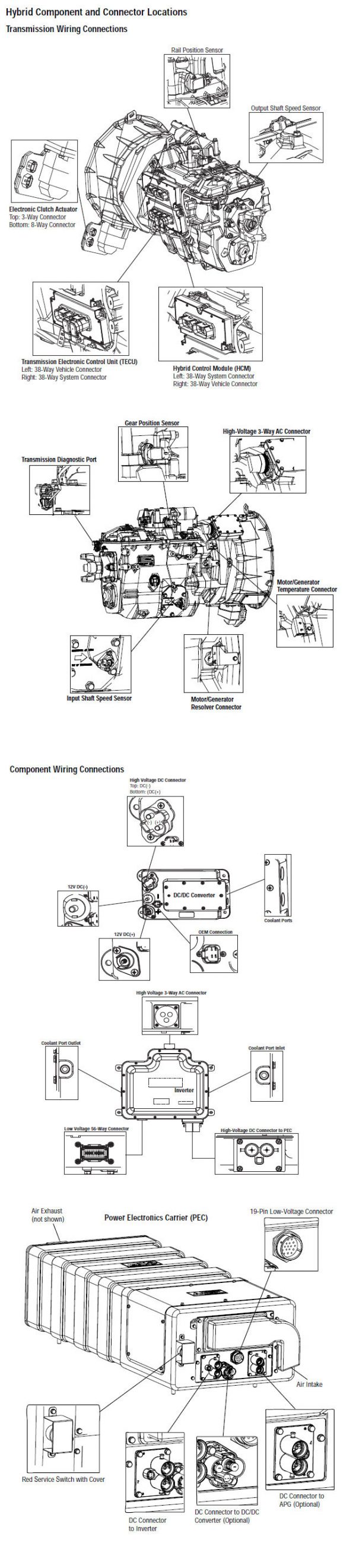
[/fusion_modal][fusion_modal name=”component_location2″ title=”Eaton ჰიბრიდული კომპონენტი და შემაერთებელი საიდან MY09 სისტემები” size=”large” background=”#ffffff” border_color=”” show_footer=”yes” class=”” id=””]

[/fusion_modal][/fusion_builder_column][/fusion_builder_row][/fusion_builder_container][fusion_builder_container hundred_percent=”no” hundred_percent_height=”no” hundred_percent_height_scroll=”no” hundred_percent_height_center_content=”yes” equal_height_columns=”no” menu_anchor=”” hide_on_mobile=”small-visibility,medium-visibility,large-visibility” status=”published” publish_date=”” class=”” id=”” background_color=”” background_image=”” background_position=”center center” background_repeat=”no-repeat” fade=”no” background_parallax=”none” enable_mobile=”no” parallax_speed=”0.3″ video_mp4=”” video_webm=”” video_ogv=”” video_url=”” video_aspect_ratio=”16:9″ video_loop=”yes” video_mute=”yes” video_preview_image=”” border_size=”” border_color=”” border_style=”solid” margin_top=”” margin_bottom=”” padding_top=”” padding_right=”” padding_bottom=”” padding_left=””][fusion_builder_row][fusion_builder_column type=”1_1″ layout=”1_1″ spacing=”” center_content=”no” link=”” target=”_self” min_height=”” hide_on_mobile=”small-visibility,medium-visibility,large-visibility” class=”” id=”” background_color=”” background_image=”” background_image_id=”” background_position=”left top” background_repeat=”no-repeat” hover_type=”none” border_size=”0″ border_color=”” border_style=”solid” border_position=”all” padding_top=”” padding_right=”” padding_bottom=”” padding_left=”” margin_top=”” margin_bottom=”” animation_type=”” animation_direction=”left” animation_speed=”0.3″ animation_offset=”” last=”no”][fusion_content_boxes layout=”clean-horizontal” columns=”1″ title_size=”18px” heading_size=”3″ title_color=”#ffffff” body_color=”#ffffff” backgroundcolor=”#4f4f4f” icon=”” iconflip=”” iconrotate=”” iconspin=”no” iconcolor=”” icon_circle=”” icon_circle_radius=”” circlecolor=”” circlebordersize=”” circlebordercolor=”” outercirclebordersize=”” outercirclebordercolor=”” icon_size=”” icon_hover_type=”” hover_accent_color=”” image=”” image_id=”” image_width=”” image_height=”” link_type=”” button_span=”” link_area=”” link_target=”” icon_align=”left” animation_type=”” animation_delay=”” animation_offset=”” animation_direction=”left” animation_speed=”0.3″ margin_top=”” margin_bottom=”” hide_on_mobile=”small-visibility,medium-visibility,large-visibility” class=”” id=””][fusion_content_box title=”STEP 1. შეამოწმეთ აქტიური ან არააქტიური ბრალია კოდი სკოლის სტატუსი.” backgroundcolor=”” icon=”” iconflip=”” iconrotate=”” iconspin=”no” iconcolor=”” circlecolor=”” circlebordersize=”” circlebordercolor=”” outercirclebordersize=”” outercirclebordercolor=”” image=”” image_id=”” image_width=”” image_height=”” link=”” linktext=”Წაიკითხე მეტი” link_target=”” animation_type=”” animation_direction=”left” animation_speed=”0.3″ animation_offset=””]
- განიხილავს და დაიცვას გაფრთხილებები & გვაფრთხილებს.
- ვიღებ Active ბრალია კოდები და FMIs ერთად ServiceRanger გამოყენებით 9-Way დიაგნოსტიკური Connector.
- Disconnect the Temperature Sensor Connector at the Motor/Generator.
Danger: აგრეთვე მაღალი ძაბვის სამსახურის ემუქრება და Power პროცედურები. Follow პროცედურები, რათა თავიდან ავიცილოთ შოკი, დამწვრობის ან გარდაცვალების არასწორად სიფრთხილით მაღალი ძაბვის. Follow პროცედურები, რათა თავიდან ავიცილოთ შოკი, დამწვრობის ან გარდაცვალების არასწორად სიფრთხილით მაღალი ძაბვის. - გაცვლითი Battery Fan Relay სხვა relay, რომ, თუ ბრალი ბრუნდება.
- თუ ბრალი არ დაბრუნდება ახალი სარელეო, შეცვლის ბატარეის Fan Relay, მერე ნაბიჯი 9.
- თუ დამნაშავე ბრუნდება ახალი სარელეო, წასვლა ნაბიჯი 2.
[/fusion_content_box][/fusion_content_boxes][fusion_content_boxes layout=”clean-horizontal” columns=”2″ title_size=”18px” heading_size=”3″ title_color=”#ffffff” body_color=”#ffffff” backgroundcolor=”#4f4f4f” icon=”” iconflip=”” iconrotate=”” iconspin=”no” iconcolor=”” icon_circle=”” icon_circle_radius=”” circlecolor=”” circlebordersize=”” circlebordercolor=”” outercirclebordersize=”” outercirclebordercolor=”” icon_size=”” icon_hover_type=”” hover_accent_color=”” image=”” image_id=”” image_width=”” image_height=”” link_type=”” button_span=”” link_area=”” link_target=”” icon_align=”left” animation_type=”” animation_delay=”” animation_offset=”” animation_direction=”left” animation_speed=”0.3″ margin_top=”” margin_bottom=”” hide_on_mobile=”small-visibility,medium-visibility,large-visibility” class=”” id=””][fusion_content_box title=”STEP 2. დაადასტურეთ FMI იმყოფება.” backgroundcolor=”” icon=”” iconflip=”” iconrotate=”” iconspin=”no” iconcolor=”” circlecolor=”” circlebordersize=”” circlebordercolor=”” outercirclebordersize=”” outercirclebordercolor=”” image=”” image_id=”” image_width=”” image_height=”” link=”” linktext=”Წაიკითხე მეტი” link_target=”” animation_type=”” animation_direction=”left” animation_speed=”0.3″ animation_offset=””]
- რომელი FMIs იყო ჩამოთვლილი ნაბიჯი 1?
Შენიშვნა* ბატარეის fan უნდა სახაზო მიხედვით Eaton® მოთხოვნებს ამ ტესტის იმუშავებს. თუ სადენიანი განსხვავებულად, კონსულტაციები OEM სწორი გაყვანილობა სქემატური.- თუ FMI 5 ჩამოთვლილი, წასვლა ნაბიჯი 3.
- თუ FMI 3 ჩამოთვლილი, წასვლა ნაბიჯი 4.
- თუ FMI 4 ჩამოთვლილი, წასვლა ნაბიჯი 5.
- თუ FMI 14 ჩამოთვლილი, წასვლა ნაბიჯი 6.
[/fusion_content_box][fusion_content_box title=”STEP 3. დაადასტურეთ უწყვეტობა HCM აღკაზმულობა სქემები.” backgroundcolor=”” icon=”” iconflip=”” iconrotate=”” iconspin=”” iconcolor=”” circlecolor=”” circlebordersize=”” circlebordercolor=”” outercirclebordersize=”” outercirclebordercolor=”” image=”” image_id=”” image_width=”” image_height=”” link=”” linktext=”” link_target=”” animation_type=”” animation_direction=”left” animation_speed=”0.3″ animation_offset=””]
- ძირითადი off.
- Disconnect უარყოფითი ბატარეის კაბელი.
- გათიშულია HCM აღკაზმულობა 38-Way Connector.
- Measure the resistance between the HCM Harness 38- Way Connector Pin 26 და Pin 4
- იმ შემთხვევაში, თუ წინააღმდეგობას შორის Pin 26 და Pin 4 არის 40-120 ohms, შეცვლის ჰიბრიდული კონტროლის მოდული (HCM) (იმ შემთხვევაში, თუ ბრალია Code აქტიური), მერე ნაბიჯი 9.
- იმ შემთხვევაში, თუ წინააღმდეგობას გარეთ სპექტრი, შეკეთება Vehicle აღკაზმულობა ღია circuit, მერე ნაბიჯი 9.
[/fusion_content_box][/fusion_content_boxes][fusion_content_boxes layout=”clean-horizontal” columns=”2″ title_size=”18px” heading_size=”3″ title_color=”#ffffff” body_color=”#ffffff” backgroundcolor=”#4f4f4f” icon=”” iconflip=”” iconrotate=”” iconspin=”no” iconcolor=”” icon_circle=”” icon_circle_radius=”” circlecolor=”” circlebordersize=”” circlebordercolor=”” outercirclebordersize=”” outercirclebordercolor=”” icon_size=”” icon_hover_type=”” hover_accent_color=”” image=”” image_id=”” image_width=”” image_height=”” link_type=”” button_span=”” link_area=”” link_target=”” icon_align=”left” animation_type=”” animation_delay=”” animation_offset=”” animation_direction=”left” animation_speed=”0.3″ margin_top=”” margin_bottom=”” hide_on_mobile=”small-visibility,medium-visibility,large-visibility” class=”” id=””][fusion_content_box title=”STEP 4. დაადასტურეთ ძაბვების HCM აღკაზმულობა სქემები.” backgroundcolor=”” icon=”” iconflip=”” iconrotate=”” iconspin=”no” iconcolor=”” circlecolor=”” circlebordersize=”” circlebordercolor=”” outercirclebordersize=”” outercirclebordercolor=”” image=”” image_id=”” image_width=”” image_height=”” link=”” linktext=”Წაიკითხე მეტი” link_target=”” animation_type=”” animation_direction=”left” animation_speed=”0.3″ animation_offset=””]
- გასაღები.
- ღონისძიება ძაბვის შორის HCM აღკაზმულობა 38-Way Connector Pin 26 და ადგილზე გასაღები:
- თუ ძაბვის შორის Pin 26 და ადგილზე 0 ვ, შეცვლის ჰიბრიდული კონტროლის მოდული (HCM) (მხოლოდ ბრალია კოდი აქტიური), მერე ნაბიჯი 9.
- თუ ძაბვის შორის Pin 26 და ადგილზე 12 ვ, შეკეთება მოკლე, VBATT on აღკაზმულობა, მერე ნაბიჯი 9.
[/fusion_content_box][fusion_content_box title=”STEP 5. დაადასტურეთ უწყვეტობა HCM აღკაზმულობა სქემები.” backgroundcolor=”” icon=”” iconflip=”” iconrotate=”” iconspin=”” iconcolor=”” circlecolor=”” circlebordersize=”” circlebordercolor=”” outercirclebordersize=”” outercirclebordercolor=”” image=”” image_id=”” image_width=”” image_height=”” link=”” linktext=”” link_target=”” animation_type=”” animation_direction=”left” animation_speed=”0.3″ animation_offset=””]
- ძირითადი off.
- Disconnect უარყოფითი ბატარეის კაბელი.
- გაზომეთ შორის დაპირისპირებას HCM სისტემა აღკაზმულობა 38-Way Connector ქინძისთავები 26 და ადგილზე:
- თუ წინააღმდეგობას შორის Pin 26 და ადგილზე 10K ohms ან მეტი, შეცვლის ჰიბრიდული კონტროლის მოდული (HCM) (მხოლოდ ბრალია კოდი აქტიური), მერე ნაბიჯი 9.
- თუ წინააღმდეგობას გარეთ სპექტრი, შეკეთება Vehicle აღკაზმულობა მოკლე მიწაზე, მერე ნაბიჯი 9.
[/fusion_content_box][/fusion_content_boxes][fusion_content_boxes layout=”clean-horizontal” columns=”2″ title_size=”18px” heading_size=”3″ title_color=”#ffffff” body_color=”#ffffff” backgroundcolor=”#4f4f4f” icon=”” iconflip=”” iconrotate=”” iconspin=”no” iconcolor=”” icon_circle=”” icon_circle_radius=”” circlecolor=”” circlebordersize=”” circlebordercolor=”” outercirclebordersize=”” outercirclebordercolor=”” icon_size=”” icon_hover_type=”” hover_accent_color=”” image=”” image_id=”” image_width=”” image_height=”” link_type=”” button_span=”” link_area=”” link_target=”” icon_align=”left” animation_type=”” animation_delay=”” animation_offset=”” animation_direction=”left” animation_speed=”0.3″ margin_top=”” margin_bottom=”” hide_on_mobile=”small-visibility,medium-visibility,large-visibility” class=”” id=””][fusion_content_box title=”STEP 6. დაადასტურეთ მდგომარეობის საუბნო საარჩევნო კომისიის Air Filter Element.” backgroundcolor=”” icon=”” iconflip=”” iconrotate=”” iconspin=”no” iconcolor=”” circlecolor=”” circlebordersize=”” circlebordercolor=”” outercirclebordersize=”” outercirclebordercolor=”” image=”” image_id=”” image_width=”” image_height=”” link=”” linktext=”Წაიკითხე მეტი” link_target=”” animation_type=”” animation_direction=”left” animation_speed=”0.3″ animation_offset=””]
- ძირითადი off.
- ამოღება და შეამოწმოს Air Filter საუბნო საარჩევნო კომისიის Inlet და Exhaust Screen საუბნო საარჩევნო კომისიის განყოფილება.
- იმ შემთხვევაში, თუ ჰაერის ფილტრი და Exhaust Screen არიან სუფთა და უფასო ნარჩენებისგან, წასვლა ნაბიჯი 7.
- იმ შემთხვევაში, თუ ჰაერის ფილტრი არის ბინძური ან Exhaust Screen არის plugged, შეცვლის ჰაერის ფილტრი და სუფთა გამონაბოლქვი Screen. წასვლა ნაბიჯი 9.
[/fusion_content_box][fusion_content_box title=”STEP 7.Verify ოპერაციის საუბნო საარჩევნო კომისიის Battery Fan.” backgroundcolor=”” icon=”” iconflip=”” iconrotate=”” iconspin=”” iconcolor=”” circlecolor=”” circlebordersize=”” circlebordercolor=”” outercirclebordersize=”” outercirclebordercolor=”” image=”” image_id=”” image_width=”” image_height=”” link=”” linktext=”” link_target=”” animation_type=”” animation_direction=”left” animation_speed=”0.3″ animation_offset=””]
- ძირითადი off.
- დაკავშირება ServiceRanger 9-Way დიაგნოსტიკური Connector კაბინა.
- გასაღები.
- Select the following options from ServiceRanger menus: "Advanced პროდუქტის ფუნქცია,"" ჰიბრიდი კონტროლის მოდული,"და" დაიწყე APF ".
- გადასვლა პროდუქტის ტესტები და აირჩიეთ Battery Fan Relay.
- შეამოწმეთ ჰაერის წინა და უკანა საჰაერო პორტების საუბნო საარჩევნო კომისიის.
- თუ ჰაერის შეიძლება იგრძნო, საუბნო საარჩევნო კომისიის ჰაერის შემშვებ და გამოსაბოლქვი, თუ ბრალია Code აქტიური საკონტაქტო Eaton® at 1-800-826-4357.
- თუ ჰაერის არ შეიძლება იგრძნო, საუბნო საარჩევნო კომისიის Air Inlet და Exhaust, წასვლა ნაბიჯი 8.
[/fusion_content_box][/fusion_content_boxes][fusion_content_boxes layout=”clean-horizontal” columns=”2″ title_size=”18px” heading_size=”3″ title_color=”#ffffff” body_color=”#ffffff” backgroundcolor=”#4f4f4f” icon=”” iconflip=”” iconrotate=”” iconspin=”no” iconcolor=”” icon_circle=”” icon_circle_radius=”” circlecolor=”” circlebordersize=”” circlebordercolor=”” outercirclebordersize=”” outercirclebordercolor=”” icon_size=”” icon_hover_type=”” hover_accent_color=”#f41000″ image=”” image_id=”” image_width=”” image_height=”” link_type=”” button_span=”” link_area=”” link_target=”” icon_align=”left” animation_type=”” animation_delay=”” animation_offset=”” animation_direction=”left” animation_speed=”0.3″ margin_top=”” margin_bottom=”” hide_on_mobile=”small-visibility,medium-visibility,large-visibility” class=”” id=””][fusion_content_box title=”STEP 8. დაადასტურეთ ძაბვების საუბნო საარჩევნო კომისიის აღკაზმულობა სქემები.” backgroundcolor=”” icon=”” iconflip=”” iconrotate=”” iconspin=”” iconcolor=”” circlecolor=”” circlebordersize=”” circlebordercolor=”” outercirclebordersize=”” outercirclebordercolor=”” image=”” image_id=”” image_width=”” image_height=”” link=”” linktext=”” link_target=”” animation_type=”” animation_direction=”left” animation_speed=”0.3″ animation_offset=””]
- გასაღები.
- გათიშულია 19-Way Connector საუბნო საარჩევნო კომისიის.
- ღონისძიება ძაბვის დროს 19-Way კონექტორი Pin 12 ამოძრავებთ 14:
- თუ ძაბვის შორის Pin 12 და Pin 14 არის ± 0.2 ვოლტი ბატარეის ძაბვის, შეცვლის დენის ელექტრონიკა Carrier (საუბნო საარჩევნო კომისიის), მერე ნაბიჯი 9.
- თუ ძაბვის შორის Pin 12 და Pin 14 გარეთ სპექტრი, სარემონტო გაყვანილობა და სარელეო პრობლემა. იხილეთ OEM.
[/fusion_content_box][fusion_content_box title=”STEP 9. გადაამოწმოს სარემონტო.” backgroundcolor=”” icon=”” iconflip=”” iconrotate=”” iconspin=”no” iconcolor=”” circlecolor=”” circlebordersize=”” circlebordercolor=”” outercirclebordersize=”” outercirclebordercolor=”” image=”” image_id=”” image_width=”” image_height=”” link=”” linktext=”Წაიკითხე მეტი” link_target=”” animation_type=”” animation_direction=”left” animation_speed=”0.3″ animation_offset=””]
- ძირითადი off.
- ხელახლა ყველა კონექტორები და უარყოფითი ბატარეის კაბელი.
- გასაღები.
- წმინდა კოდები, ვხედავ წმინდა უმოქმედო ხარვეზებით.
- მანქანა მანქანა და ცდილობენ აღადგინოთ კოდი.
- შეამოწმეთ კოდები, ვხედავ ნახეთ აქტიური და არააქტიური ხარვეზებით.
- თუ არ კოდები, ტესტი სრული.
- თუ ბრალია კოდი 38 როგორც ჩანს,, მოვძებნოთ შეცდომა ტესტირება, წასვლა ნაბიჯი 1.
- თუ კოდი გარდა 38 როგორც ჩანს,, ვხედავ ბრალია კოდი ინდექსი სია.
[/fusion_content_box][/fusion_content_boxes][/fusion_builder_column][/fusion_builder_row][/fusion_builder_container][fusion_global id=”13788″]