[fusion_builder_container hundred_percent=yeshundred_percent_height=nohundred_percent_height_scroll=nohundred_percent_height_center_content=yesequal_height_columns=nomenu_anchor=”” hide_on_mobile=small-visibility,medium-visibility,large-visibilitystatus=publishedpublish_date=”” class=”” id=”” background_color=”” background_image=”” background_position=center centerbackground_repeat=no-repeatfade=nobackground_parallax=noneenable_mobile=noparallax_speed=”0.3″ video_mp4=”” video_webm=”” video_ogv=”” video_url=”” video_aspect_ratio=”16:9″ video_loop=yesvideo_mute=yesvideo_preview_image=”” border_size=”” border_color=”” border_style=solidmargin_top=”35″ margin_bottom=”” padding_top=”” padding_right=”” padding_bottom=”” padding_left=””][fusion_builder_row][fusion_builder_column type=”1_1layout=”1_1spacing=”” center_content=nolink=”” target=_selfmin_height=”” hide_on_mobile=small-visibility,medium-visibility,large-visibilityclass=”” id=”” background_color=”” background_image=”” background_image_id=”” background_position=left topbackground_repeat=no-repeathover_type=noneborder_size=”0″ border_color=”” border_style=solidborder_position=allpadding_top=”” padding_right=”” padding_bottom=”” padding_left=”” margin_top=”” margin_bottom=”” animation_type=”” animation_direction=leftanimation_speed=”0.3″ animation_offset=”” last=no”][fusion_text columns=”” column_min_width=”” column_spacing=”” rule_style=defaultrule_size=”” rule_color=”” hide_on_mobile=small-visibility,medium-visibility,large-visibilityclass=”” id=””]

Eaton Fuller ბრალია კოდი 4 motor / გენერატორი ბრუნვის სიჩქარე Sensor

[/fusion_text][/fusion_builder_column][/fusion_builder_row][/fusion_builder_container][fusion_builder_container hundred_percent=nohundred_percent_height=nohundred_percent_height_scroll=nohundred_percent_height_center_content=yesequal_height_columns=nomenu_anchor=”” hide_on_mobile=small-visibility,medium-visibility,large-visibilitystatus=publishedpublish_date=”” class=”” id=”” background_color=”” background_image=”” background_position=center centerbackground_repeat=no-repeatfade=nobackground_parallax=noneenable_mobile=noparallax_speed=”0.3″ video_mp4=”” video_webm=”” video_ogv=”” video_url=”” video_aspect_ratio=”16:9″ video_loop=yesvideo_mute=yesvideo_preview_image=”” border_size=”” border_color=”” border_style=solidmargin_top=”” margin_bottom=”” padding_top=”” padding_right=”” padding_bottom=”” padding_left=””][fusion_builder_row][fusion_builder_column type=”1_1layout=”1_1spacing=”” center_content=nolink=”” target=_selfmin_height=”” hide_on_mobile=small-visibility,medium-visibility,large-visibilityclass=”” id=”” background_color=”” background_image=”” background_image_id=”” background_position=left topbackground_repeat=no-repeathover_type=noneborder_size=”0″ border_color=”” border_style=solidborder_position=allpadding_top=”” padding_right=”” padding_bottom=”” padding_left=”” margin_top=”” margin_bottom=”” animation_type=”” animation_direction=leftanimation_speed=”0.3″ animation_offset=”” last=no”][fusion_text columns=”” column_min_width=”” column_spacing=”” rule_style=defaultrule_size=”” rule_color=”” hide_on_mobile=small-visibility,medium-visibility,large-visibilityclass=”” id=””]

ბრალია კოდი Eaton ჰიბრიდული წამყვანი სისტემები მოდელები (my08) EH-8E306A-U, EH-8E306A-UPG, EH-8E306A-UP, EH-8E306A-CD, EH-8E306A-T, EH-6E606B-CD, (MY09) EH-8E406A-U / P, EH-8E406A-UP, EH-8E406A-UPG, EH-8E406A-CD, EH-8E406A-CDG, EH-8E406A-CDR, EH-8E406A-T, EH-6E706B-CD, EH-6E706B-P და EH-6E706B-UPG. საავტომობილო / გენერატორი ბრუნვის სიჩქარე სენსორი დამონტაჟებული უკან Motor / გენერატორი გარშემო შეყვანის Shaft. სენსორი (ორი ცალი დიზაინი) არის rotor დამონტაჟებული შეყვანის Shaft და ზონდირება Ring დამონტაჟებული საავტომობილო საცხოვრებელი. ზონდირება ბეჭედი მიეწოდება დაბალი ძაბვის ექსპლუატაციის დროს. როტორის გამოდის inducing ძაბვის ცვალებადობის შევიდა ზონდირების ბეჭედი, რომელიც მაშინ გარდაიქმნება ციფრული სიგნალი Motor / გენერატორი RPM. ძაბვის გამომავალი და სიხშირე დაბალია მოჩვენებითი და იზრდება RPM.

ბრალია კოდი 4 – Motor / გენერატორი ბრუნვის სიჩქარე Sensor Detection

  • Inverter ანთება ძაბვის მეტია, ვიდრე 7 ვოლტი და ნაკლები 16 ვ.
  • საერთაშორისო სავალუტო ფონდის 2 ჯერ არ არის, თუ არ არის აქტიური გადამცემი შეყვანის Shaft სიჩქარე სენსორი ბრალია.

პირობები უცნობია ბრალია კოდი აქტიურია

პირობები უცნობია faul Code აქტიურია:

  • საერთაშორისო სავალუტო ფონდის 0 არის, როდესაც Motor / გენერატორი სიჩქარე აღემატება ნორმალური დასაშვები დიაპაზონი.
  • საერთაშორისო სავალუტო ფონდის 2 არის, როდესაც Motor / გენერატორი სიჩქარე განსხვავებულია, ვიდრე ტრანსმისია შეყვანის Shaft Speed-ზე მეტი 100 RPM მინიმუმ 10 წამში.
  • საერთაშორისო სავალუტო ფონდის 3: Set when the resolver circuit is shorted to ground.
  • საერთაშორისო სავალუტო ფონდის 21: Set when a resolver signal line short to 12-volt battery or ground is detected.
  • საერთაშორისო სავალუტო ფონდის 22, 24, 25 უეჭველია, როდესაც მოედანზე ანალოგური-ის ციფრული კონვერტორი სიგნალები mismatch.
  • საერთაშორისო სავალუტო ფონდის 27 არის, როდესაც Inverter ცნობს შეცდომა დროს საწყის გამშვები.
  • საერთაშორისო სავალუტო ფონდის 23 არის, როდესაც არ არის ანალოგი-ის ციფრული კონვერტორი გამომავალი შეცდომა სიგნალი 100 ᲥᲐᲚᲑᲐᲢᲝᲜᲘ.
  • საერთაშორისო სავალუტო ფონდის 26 არის, როდესაც როტაცია სენსორი სიჩქარე მეტია, ვიდრე 6000 min-1 10 ᲥᲐᲚᲑᲐᲢᲝᲜᲘ.

სამარაგო როდესაც ბრალია კოდი 4 არის შემდეგი პირობებით მოხდეს:
• Amber "Check ჰიბრიდი" სინათლის ბზინვარებას.
• ბრალია ინახება ჰიბრიდული კონტროლის მოდული (HCM) მეხსიერება.
• Electric Motor/Generator Assist and Regeneration are disabled; თუმცა, მაღალი ძაბვის ფილტრაცია რჩება იკვებება.
• HCM continues to control the hybrid vehicle in a diesel-only mode.
• გადამცემი დეფოლტის დაიწყოს მექანიზმი 1.

[/fusion_text][fusion_text columns=”” column_min_width=”” column_spacing=”” rule_style=defaultrule_size=”” rule_color=”” hide_on_mobile=small-visibility,medium-visibility,large-visibilityclass=”” id=””]

პირობები უცნობია ბრალია Code Inactive

მხოლოდ Inactive ხარვეზებით შეიძლება გაირკვეს გადამცემი Electronic Control Unit (TECU) ან ჰიპერტროფიული ისტორიის გამოყენებით ServiceRanger. TECU ავტომატურად აუმჯობესებს ხარვეზებით ისტორიის შემდეგ 200 საათი. HCM ავტომატურად აუმჯობესებს ხარვეზებით ისტორიის შემდეგ ბრალი უკვე უმოქმედო 200 საათი

ეს ბრალია კოდი შეიძლება გამოწვეული რომელიმე შემდეგი:

my08

  • საერთაშორისო სავალუტო ფონდის 0
    • დიდხანს გაგრძელდეს შეფასება შეიძლება მოითხოვოს წყვეტილი გამოყენება მომსახურება მუხრუჭები ნელი მანქანა
  • საერთაშორისო სავალუტო ფონდის 22, 24, 25, 27
    • Inverter
  • საერთაშორისო სავალუტო ფონდის 2, 23, 26
    • Inverter
    • Motor / გენერატორი
    • Resolver აღკაზმულობა შორის Motor / გენერატორი და Inverter

MY09

  • საერთაშორისო სავალუტო ფონდის 3, 21
    • Inverter
    • Resolver Harness between the motor/generator
      and Inverter
  • საერთაშორისო სავალუტო ფონდის 2, 22, 23, 24, 25, 27
    • Inverter
    • Motor / გენერატორი
    • Resolver აღკაზმულობა შორის Motor / გენერატორი და Inverter
    • Water in Inverter or Resolver wire connector

[/fusion_text][/fusion_builder_column][/fusion_builder_row][/fusion_builder_container][fusion_builder_container hundred_percent=nohundred_percent_height=nohundred_percent_height_scroll=nohundred_percent_height_center_content=yesequal_height_columns=nomenu_anchor=”” hide_on_mobile=small-visibility,medium-visibility,large-visibilitystatus=publishedpublish_date=”” class=”” id=”” background_color=”” background_image=”” background_position=center centerbackground_repeat=no-repeatfade=nobackground_parallax=noneenable_mobile=noparallax_speed=”0.3″ video_mp4=”” video_webm=”” video_ogv=”” video_url=”” video_aspect_ratio=”16:9″ video_loop=yesvideo_mute=yesvideo_preview_image=”” border_size=”” border_color=”” border_style=solidmargin_top=”” margin_bottom=”” padding_top=”” padding_right=”” padding_bottom=”” padding_left=””][fusion_builder_row][fusion_builder_column type=”1_1layout=”1_1spacing=”” center_content=nolink=”” target=_selfmin_height=”” hide_on_mobile=small-visibility,medium-visibility,large-visibilityclass=”” id=”” background_color=”” background_image=”” background_image_id=”” background_position=left topbackground_repeat=no-repeathover_type=noneborder_size=”0″ border_color=”” border_style=solidborder_position=allpadding_top=”” padding_right=”” padding_bottom=”” padding_left=”” margin_top=”” margin_bottom=”” animation_type=”” animation_direction=leftanimation_speed=”0.3″ animation_offset=”” last=no”][fusion_text columns=”” column_min_width=”” column_spacing=”” rule_style=defaultrule_size=”” rule_color=”” hide_on_mobile=small-visibility,medium-visibility,large-visibilityclass=”” id=””]

ბრალია კოდი 4 – Motor / გენერატორი ბრუნვის სიჩქარე Sensor ტესტი

[/fusion_text][/fusion_builder_column][/fusion_builder_row][/fusion_builder_container][fusion_builder_container hundred_percent=nohundred_percent_height=nohundred_percent_height_scroll=nohundred_percent_height_center_content=yesequal_height_columns=nomenu_anchor=”” hide_on_mobile=small-visibility,medium-visibility,large-visibilitystatus=publishedpublish_date=”” class=”” id=”” background_color=”” background_image=”” background_position=center centerbackground_repeat=no-repeatfade=nobackground_parallax=noneenable_mobile=noparallax_speed=”0.3″ video_mp4=”” video_webm=”” video_ogv=”” video_url=”” video_aspect_ratio=”16:9″ video_loop=yesvideo_mute=yesvideo_preview_image=”” border_size=”” border_color=”” border_style=solidmargin_top=”” margin_bottom=”” padding_top=”” padding_right=”” padding_bottom=”” padding_left=””][fusion_builder_row][fusion_builder_column type=”1_1layout=”1_1spacing=”” center_content=nolink=”” target=_selfmin_height=”” hide_on_mobile=small-visibility,medium-visibility,large-visibilityclass=”” id=”” background_color=”” background_image=”” background_image_id=”” background_position=left topbackground_repeat=no-repeathover_type=noneborder_size=”0″ border_color=”” border_style=solidborder_position=allpadding_top=”” padding_right=”” padding_bottom=”” padding_left=”” margin_top=”” margin_bottom=”” animation_type=”” animation_direction=leftanimation_speed=”0.3″ animation_offset=”” last=no”][fusion_text columns=”” column_min_width=”” column_spacing=”” rule_style=defaultrule_size=”” rule_color=”” hide_on_mobile=small-visibility,medium-visibility,large-visibilityclass=”” id=””]

კომპონენტი საიდენტიფიკაციო my08 სისტემა:
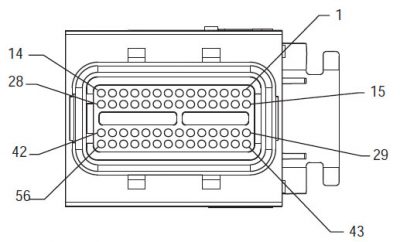
[/fusion_text][/fusion_builder_column][fusion_builder_column type=”2_3layout=”1_2spacing=”” center_content=nolink=”” target=_selfmin_height=”” hide_on_mobile=small-visibility,medium-visibility,large-visibilityclass=”” id=”” background_color=”” background_image=”” background_image_id=”” background_position=left topbackground_repeat=no-repeathover_type=noneborder_size=”0″ border_color=”” border_style=solidborder_position=allpadding_top=”” padding_right=”” padding_bottom=”” padding_left=”” margin_top=”” margin_bottom=”” animation_type=”” animation_direction=leftanimation_speed=”0.3″ animation_offset=”” last=no”][fusion_imageframe image_id=”13934|400″ max_width=”” style_type=”” blur=”” stylecolor=”” hover_type=nonebordersize=”” bordercolor=”” borderradius=”” align=centerlightbox=nogallery_id=”” lightbox_image=”” lightbox_image_id=”” alt=”Delphi 56-Way Mating Connector ნახვა” link=”” linktarget=_selfhide_on_mobile=small-visibility,medium-visibility,large-visibilityclass=”” id=”” animation_type=”” animation_direction=leftanimation_speed=”0.3″ animation_offset=””]https://www.globaltransmissionsupply.com/wp-content/uploads/Delphi-56-Way-Mating-Connector-View-400×242.jpg[/fusion_imageframe][fusion_text columns=”” column_min_width=”” column_spacing=”” rule_style=defaultrule_size=”” rule_color=”” hide_on_mobile=small-visibility,medium-visibility,large-visibilityclass=”” id=””]

Delphi 56-Way Mating Connector ნახვა

[/fusion_text][/fusion_builder_column][fusion_builder_column type=”1_3layout=”1_2spacing=”” center_content=nolink=”” target=_selfmin_height=”” hide_on_mobile=small-visibility,medium-visibility,large-visibilityclass=”” id=”” background_color=”” background_image=”” background_image_id=”” background_position=left topbackground_repeat=no-repeathover_type=noneborder_size=”0″ border_color=”” border_style=solidborder_position=allpadding_top=”” padding_right=”” padding_bottom=”” padding_left=”” margin_top=”” margin_bottom=”” animation_type=”” animation_direction=leftanimation_speed=”0.3″ animation_offset=”” last=no”][fusion_imageframe image_id=”13966|fullmax_width=”” style_type=”” blur=”” stylecolor=”” hover_type=nonebordersize=”” bordercolor=”” borderradius=”” align=centerlightbox=nogallery_id=”” lightbox_image=”” lightbox_image_id=”” alt=”Eaton ტრანსმისია Resolver აღკაზმულობა ნახვა” link=”” linktarget=_selfhide_on_mobile=small-visibility,medium-visibility,large-visibilityclass=”” id=”” animation_type=”” animation_direction=leftanimation_speed=”0.3″ animation_offset=””]https://www.globaltransmissionsupply.com/wp-content/uploads/Eaton-Transmission-Resolver-Harness-View.jpg[/fusion_imageframe][fusion_text columns=”” column_min_width=”” column_spacing=”” rule_style=defaultrule_size=”” rule_color=”” hide_on_mobile=small-visibility,medium-visibility,large-visibilityclass=”” id=””]

Resolver აღკაზმულობა ნახვა (წინა მხარეს)

[/fusion_text][/fusion_builder_column][fusion_builder_column type=”1_1layout=”1_1spacing=”” center_content=nolink=”” target=_selfmin_height=”” hide_on_mobile=small-visibility,medium-visibility,large-visibilityclass=”” id=”” background_image_id=”” background_color=”#000000″ background_image=”” background_position=left topundefined=”” background_repeat=no-repeathover_type=noneborder_size=”0″ border_color=”” border_style=solidborder_position=allpadding_top=”” padding_right=”” padding_bottom=”” padding_left=”” margin_top=”” margin_bottom=”” animation_type=”” animation_direction=leftanimation_speed=”0.3″ animation_offset=”” last=no”][fusion_text columns=”” column_min_width=”” column_spacing=”” rule_style=defaultrule_size=”” rule_color=”” hide_on_mobile=small-visibility,medium-visibility,large-visibilityclass=”” id=””]

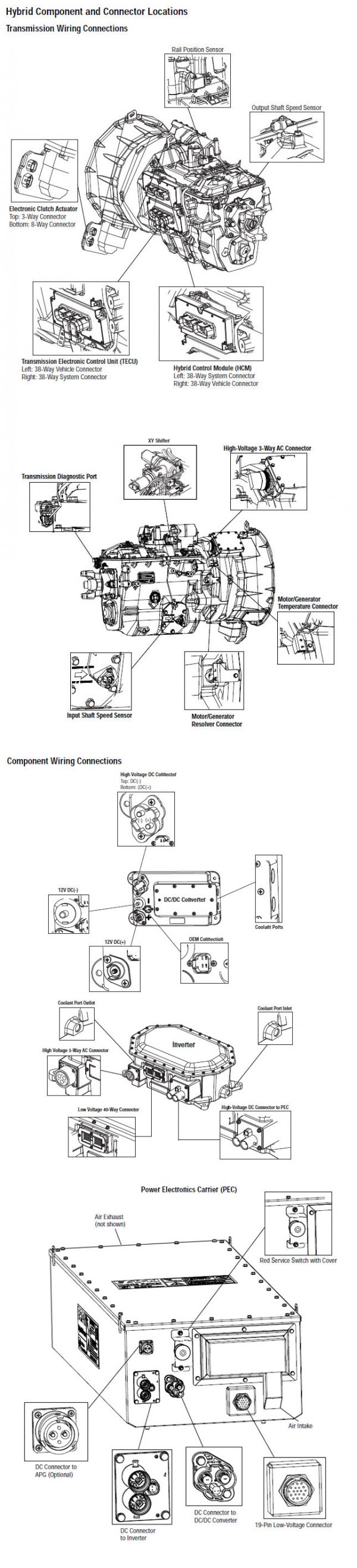
ᲨᲔᲜᲘᲨᲕᲜᲐ: იხილეთ Eaton ჰიბრიდული კომპონენტი და შემაერთებელი მდებარეობა for Connector მისამართები my08 სისტემები
[/fusion_text][/fusion_builder_column][fusion_builder_column type=”1_1layout=”1_1spacing=”” center_content=nolink=”” target=_selfmin_height=”” hide_on_mobile=small-visibility,medium-visibility,large-visibilityclass=”” id=”” background_color=”” background_image=”” background_image_id=”” background_position=left topbackground_repeat=no-repeathover_type=noneborder_size=”0″ border_color=”” border_style=solidborder_position=allpadding_top=”” padding_right=”” padding_bottom=”” padding_left=”” margin_top=”” margin_bottom=”” animation_type=”” animation_direction=leftanimation_speed=”0.3″ animation_offset=”” last=no”][fusion_imageframe image_id=”13965|800″ max_width=”” style_type=”” blur=”” stylecolor=”” hover_type=nonebordersize=”” bordercolor=”” borderradius=”” align=centerlightbox=nogallery_id=”” lightbox_image=”” lightbox_image_id=”” alt=”Eaton Fuller Inverter საავტომობილო გენერატორი resolver დაკავშირებით” link=”” linktarget=_selfhide_on_mobile=small-visibility,medium-visibility,large-visibilityclass=”” id=”” animation_type=”” animation_direction=leftanimation_speed=”0.3″ animation_offset=””]https://www.globaltransmissionsupply.com/wp-content/uploads/Eaton-Fuller-Inverter-motor-generator-resolver-connection-800×361.jpg[/fusion_imageframe][/fusion_builder_column][/fusion_builder_row][/fusion_builder_container][fusion_builder_container hundred_percent=nohundred_percent_height=nohundred_percent_height_scroll=nohundred_percent_height_center_content=yesequal_height_columns=nomenu_anchor=”” hide_on_mobile=small-visibility,medium-visibility,large-visibilitystatus=publishedpublish_date=”” class=”” id=”” background_color=”” background_image=”” background_position=center centerbackground_repeat=no-repeatfade=nobackground_parallax=noneenable_mobile=noparallax_speed=”0.3″ video_mp4=”” video_webm=”” video_ogv=”” video_url=”” video_aspect_ratio=”16:9″ video_loop=yesvideo_mute=yesvideo_preview_image=”” border_size=”” border_color=”” border_style=solidmargin_top=”” margin_bottom=”” padding_top=”” padding_right=”” padding_bottom=”” padding_left=””][fusion_builder_row][fusion_builder_column type=”1_1layout=”1_1spacing=”” center_content=nolink=”” target=_selfmin_height=”” hide_on_mobile=small-visibility,medium-visibility,large-visibilityclass=”” id=”” background_color=”” background_image=”” background_image_id=”” background_position=left topbackground_repeat=no-repeathover_type=noneborder_size=”0″ border_color=”” border_style=solidborder_position=allpadding_top=”” padding_right=”” padding_bottom=”” padding_left=”” margin_top=”” margin_bottom=”” animation_type=”” animation_direction=leftanimation_speed=”0.3″ animation_offset=”” last=no”][fusion_text columns=”” column_min_width=”” column_spacing=”” rule_style=defaultrule_size=”” rule_color=”” hide_on_mobile=small-visibility,medium-visibility,large-visibilityclass=”” id=””]

კომპონენტი საიდენტიფიკაციო MY09 სისტემა:
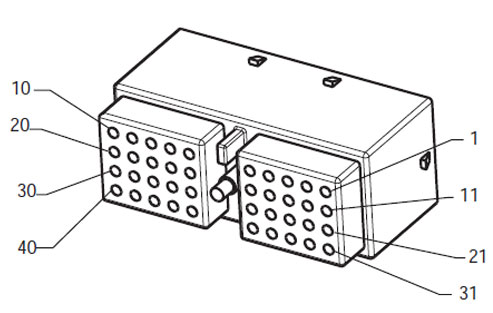
[/fusion_text][/fusion_builder_column][fusion_builder_column type=”2_3layout=”1_2spacing=”” center_content=nolink=”” target=_selfmin_height=”” hide_on_mobile=small-visibility,medium-visibility,large-visibilityclass=”” id=”” background_color=”” background_image=”” background_image_id=”” background_position=left topbackground_repeat=no-repeathover_type=noneborder_size=”0″ border_color=”” border_style=solidborder_position=allpadding_top=”” padding_right=”” padding_bottom=”” padding_left=”” margin_top=”” margin_bottom=”” animation_type=”” animation_direction=leftanimation_speed=”0.3″ animation_offset=”” last=no”][fusion_imageframe image_id=”14000|fullmax_width=”” style_type=”” blur=”” stylecolor=”” hover_type=nonebordersize=”” bordercolor=”” borderradius=”” align=centerlightbox=nogallery_id=”” lightbox_image=”” lightbox_image_id=”” alt=”Deutsch 40-Way Mating Connector ნახვა” link=”” linktarget=_selfhide_on_mobile=small-visibility,medium-visibility,large-visibilityclass=”” id=”” animation_type=”” animation_direction=leftanimation_speed=”0.3″ animation_offset=””]https://www.globaltransmissionsupply.com/wp-content/uploads/Deutsch-40-Way-Mating-Connector-View.jpg[/fusion_imageframe][fusion_text columns=”” column_min_width=”” column_spacing=”” rule_style=defaultrule_size=”” rule_color=”” hide_on_mobile=small-visibility,medium-visibility,large-visibilityclass=”” id=””]

Deutsch 40-Way Mating Connector ნახვა
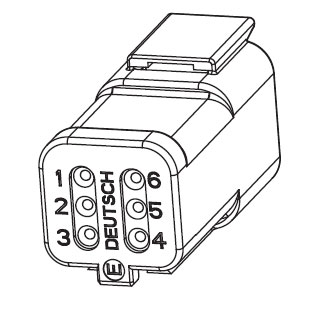
[/fusion_text][/fusion_builder_column][fusion_builder_column type=”1_3layout=”1_2spacing=”” center_content=nolink=”” target=_selfmin_height=”” hide_on_mobile=small-visibility,medium-visibility,large-visibilityclass=”” id=”” background_color=”” background_image=”” background_image_id=”” background_position=left topbackground_repeat=no-repeathover_type=noneborder_size=”0″ border_color=”” border_style=solidborder_position=allpadding_top=”” padding_right=”” padding_bottom=”” padding_left=”” margin_top=”” margin_bottom=”” animation_type=”” animation_direction=leftanimation_speed=”0.3″ animation_offset=”” last=no”][fusion_imageframe image_id=”14028|fullmax_width=”” style_type=”” blur=”” stylecolor=”” hover_type=nonebordersize=”” bordercolor=”” borderradius=”” align=centerlightbox=nogallery_id=”” lightbox_image=”” lightbox_image_id=”” alt=Eaton Terminal SideHarness Connector Resolver Deutsch 6-pin connectorlink=”” linktarget=_selfhide_on_mobile=small-visibility,medium-visibility,large-visibilityclass=”” id=”” animation_type=”” animation_direction=leftanimation_speed=”0.3″ animation_offset=””]https://www.globaltransmissionsupply.com/wp-content/uploads/Eaton-Terminal-Side-Harness-Connector-Deutsch-6-pin-connector.jpg[/fusion_imageframe][fusion_text columns=”” column_min_width=”” column_spacing=”” rule_style=defaultrule_size=”” rule_color=”” hide_on_mobile=small-visibility,medium-visibility,large-visibilityclass=”” id=””]

Eaton Terminal SideHarness Connector Resolver Deutsch 6-pin connector

[/fusion_text][/fusion_builder_column][fusion_builder_column type=”1_1layout=”1_1spacing=”” center_content=nolink=”” target=_selfmin_height=”” hide_on_mobile=small-visibility,medium-visibility,large-visibilityclass=”” id=”” background_image_id=”” background_color=”#000000″ background_image=”” background_position=left topundefined=”” background_repeat=no-repeathover_type=noneborder_size=”0″ border_color=”” border_style=solidborder_position=allpadding_top=”” padding_right=”” padding_bottom=”” padding_left=”” margin_top=”” margin_bottom=”” animation_type=”” animation_direction=leftanimation_speed=”0.3″ animation_offset=”” last=no”][fusion_text columns=”” column_min_width=”” column_spacing=”” rule_style=defaultrule_size=”” rule_color=”” hide_on_mobile=small-visibility,medium-visibility,large-visibilityclass=”” id=””]

ᲨᲔᲜᲘᲨᲕᲜᲐ: იხილეთ Eaton ჰიბრიდული კომპონენტი და შემაერთებელი მდებარეობა for Connector მისამართები MY09 სისტემები.
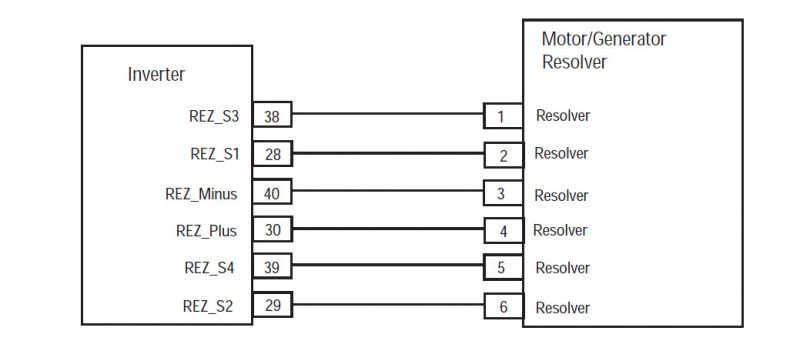
[/fusion_text][/fusion_builder_column][fusion_builder_column type=”1_1layout=”1_1spacing=”” center_content=nolink=”” target=_selfmin_height=”” hide_on_mobile=small-visibility,medium-visibility,large-visibilityclass=”” id=”” background_color=”” background_image=”” background_image_id=”” background_position=left topbackground_repeat=no-repeathover_type=noneborder_size=”0″ border_color=”” border_style=solidborder_position=allpadding_top=”” padding_right=”” padding_bottom=”” padding_left=”” margin_top=”” margin_bottom=”” animation_type=”” animation_direction=leftanimation_speed=”0.3″ animation_offset=”” last=no”][fusion_imageframe image_id=”14029|800″ max_width=”” style_type=”” blur=”” stylecolor=”” hover_type=nonebordersize=”” bordercolor=”” borderradius=”” align=centerlightbox=nogallery_id=”” lightbox_image=”” lightbox_image_id=”” alt=Eaton invertor motor generator resolver MY09link=”” linktarget=_selfhide_on_mobile=small-visibility,medium-visibility,large-visibilityclass=”” id=”” animation_type=”” animation_direction=leftanimation_speed=”0.3″ animation_offset=””]https://www.globaltransmissionsupply.com/wp-content/uploads/Eaton-invertor-motor-generator-resolver-MY09-800×361.jpg[/fusion_imageframe][/fusion_builder_column][/fusion_builder_row][/fusion_builder_container][fusion_builder_container hundred_percent=nohundred_percent_height=nohundred_percent_height_scroll=nohundred_percent_height_center_content=yesequal_height_columns=nomenu_anchor=”” hide_on_mobile=small-visibility,medium-visibility,large-visibilitystatus=publishedpublish_date=”” class=”” id=”” background_color=”” background_image=”” background_position=center centerbackground_repeat=no-repeatfade=nobackground_parallax=noneenable_mobile=noparallax_speed=”0.3″ video_mp4=”” video_webm=”” video_ogv=”” video_url=”” video_aspect_ratio=”16:9″ video_loop=yesvideo_mute=yesvideo_preview_image=”” border_size=”” border_color=”” border_style=solidmargin_top=”” margin_bottom=”” padding_top=”” padding_right=”” padding_bottom=”” padding_left=””][fusion_builder_row][fusion_builder_column type=”1_1layout=”1_1spacing=”” center_content=nolink=”” target=_selfmin_height=”” hide_on_mobile=small-visibility,medium-visibility,large-visibilityclass=”” id=”” background_color=”” background_image=”” background_image_id=”” background_position=left topbackground_repeat=no-repeathover_type=noneborder_size=”0″ border_color=”” border_style=solidborder_position=allpadding_top=”” padding_right=”” padding_bottom=”” padding_left=”” margin_top=”” margin_bottom=”” animation_type=”” animation_direction=leftanimation_speed=”0.3″ animation_offset=”” last=no”][fusion_modal name=warnings_cautionstitle=”გაფრთხილებები & გვაფრთხილებს” size=largebackground=”” border_color=”” show_footer=yesclass=”” id=””]

Danger: Danger მიუთითებს თქვენ მძიმედ დაშავდა ან დაიღუპა თუ არ მოჰყვება მითითებული პროცედურა.
გაფრთხილება: გაფრთხილება მიუთითებს დაუყოვნებლივ საფრთხის, რომელიც შეიძლება გამოიწვიოს მძიმე დაზიანება, თუ არ დაიცვას აღნიშნული პროცედურა.
Სიფრთხილით: Caution მიუთითებს ავტომობილის ან ქონებრივი ზიანი შეიძლება მოხდეს, თუ არ დაიცვას აღნიშნული პროცედურა.

შენიშვნა: ნოტაში დამატებითი დეტალი, რომელიც დახმარების დიაგნოზი ან შეკეთება კომპონენტი / სისტემა.

დაიცავით მითითებული პროცედურების აღნიშნული, რათა თავიდან ავიცილოთ დაზიანება:

1. იმ შემთხვევაში, თუ მაღალი ძაბვის გირჩები გარშემო მანქანა და ლოკაუტის დამონტაჟებული საუბნო საარჩევნო კომისიის, ერთადერთი ადამიანი, რომ უნდა მიეცეთ დაიწყოს მანქანა არის პირი, რომელმაც ხელი მოაწერა lockout tag.
2. ადრე მომუშავე სატრანსპორტო საშუალება ან ტოვებს კაბინა ძრავა არის გაშვებული, თქვენ უნდა განათავსონ ცვლა ბერკეტი "N" მითითებული პარკირების მუხრუჭი, და დაბლოკოს დისკები.
3. უსაფრთხოების მიზნით, ყოველთვის ჩაერთონ მომსახურება მუხრუჭები ადრე შერჩევის მექანიზმი თანამდებობებზე "ნ"
4. დაწყებამდე მანქანა ყოველთვის უნდა მჯდომარე მძღოლის სავარძლის, აირჩიეთ "N" ცვლა კონტროლი, და მითითებული პარკირების მუხრუჭები.
5. ავტოსატრანსპორტო საშუალებების ePTO, ძრავა და / ან
Motor / გენერატორი შეიძლება დაიწყოს ePTO რეჟიმი. არასოდეს შეასრულოს ნებისმიერი სარემონტო და მუშაობა მანქანა, ხოლო ამ რეჟიმში.
6. 12-Volt Battery დადებითი (+) და უარყოფითი (-) უნდა იყოს გათიშული ადრე ნებისმიერი შედუღების ნებისმიერ Hybrid აღჭურვილია მანქანა.

Სიფრთხილით: დაიცავით მითითებული პროცედურების მითითებულ თავიდან აცილების მიზნით, ტექნიკის malfunction ან დაზიანება.
Სიფრთხილით: არ გაათავისუფლოს პარკირების მუხრუჭი და ცდილობენ შესარჩევად gear სანამ ჰაერის წნევა არის სწორი დონე.
Სიფრთხილით: რათა თავიდან ავიცილოთ დაზიანება გადაცემის დროს საბუქსირე ადგილი ცვლა ბერკეტი "N" და მოხსნის წამყვანი თვლები off ადგილზე ან გაწყვეტა ხაზზე მოძრაობა.

მაღალი ძაბვის გაფრთხილებები & გვაფრთხილებს

  • გამოყენება CO2 და მშრალი ქიმიური Fire Extinguishers.
  • მაღალი ძაბვის გაყვანილობა არის დაფარული ნარინჯისფერი იზოლაციის ან convoluted მილები და აღნიშნულია გაფრთხილება ეტიკეტები at კონექტორები.
  • ყველა Eaton® ჰიბრიდული დიზელი / ელექტრო ტექნიკა იქნება აღნიშნული "ჰიბრიდული’ გარეთ ავტომანქანა, ერთად ცვლა წარწერა dash.
  • იხილეთ OEM კონკრეტული ადგილმდებარეობა შასი დამონტაჟებული ჰიბრიდული კომპონენტები.
  • არ გაჭრა შევიდა ფორთოხლის მაღალი ძაბვის კაბელები.
  • არ გაჭრა ან გახსნას საუბნო საარჩევნო კომისიის.
  • არ გაჭრა ან გახსნას DC / DC Converter.
  • არ გაჭრა ან გახსნას Inverter.

ბუფერული ზონა უნდა შეიქმნას და მაღალი ძაბვის იზოლირებული რეზინის ხელთათმანები (კლასი 0 ტყავის მფარველები) საჭირო ადრე მუშაობს მაღალი ძაბვის. დაუცველობა დაიცვას ამ ინსტრუქციის შეიძლება გამოიწვიოს მძიმე პირადი დაზიანება ან სიკვდილი.
რეზინის იზოლირებული ხელთათმანები, რომელიც უნდა იყოს ნახმარი მუშაობისას, მაღალი ძაბვის სისტემის კლასის 0 ტყავის მფარველები. რეზინის ხელთათმანები უნდა ტესტირება ყოველი გამოყენების შემდეგ რეზინის იზოლაციის gloves ტესტირება პროცედურა ნაპოვნი "დიაგნოსტიკური ინსტრუმენტები / მომსახურება პუბლიკაციები" გვერდი 6. დაუცველობა დაიცვას ამ ინსტრუქციის შეიძლება გამოიწვიოს მძიმე პირადი დაზიანება ან სიკვდილი.
სანამ შემოწმების ან მუშაობს ნებისმიერი მაღალი ძაბვის კაბელები და კომპონენტები "მაღალი ძაბვის სამსახურის Shutdown და ძალაუფლების პროცედურა" გვერდზე 4 უნდა მოჰყვეს. დაუცველობა დაიცვას ამ ინსტრუქციის შეიძლება გამოიწვიოს მძიმე პირადი დაზიანება ან სიკვდილი.
ლოკაუტის და Tagout მოწყობილობები უნდა იყოს მხოლოდ ამოღებულ მიერ ტექნიკოსი, რომელიც განთავსებული Lockout და Tagout მოწყობილობები მანქანა. დაუცველობა დაიცვას ამ ინსტრუქციის შეიძლება გამოიწვიოს მძიმე პირადი დაზიანება ან სიკვდილი.
მაღალი ძაბვის რეზინის იზოლირებული ხელთათმანები (კლასი 0 ტყავის მფარველები) უნდა იყოს ნახმარი, როდესაც მუშაობა ნებისმიერი
მაღალი ძაბვის კაბელები. The "მაღალი ძაბვის სამსახურის Shutdown და ძალაუფლების პროცედურა" გვერდზე 4 უნდა მოჰყვეს ადრე მოხსნის ნებისმიერი მაღალი ძაბვის კაბელები. დაუცველობა დაიცვას ამ ინსტრუქციის შეიძლება გამოიწვიოს მძიმე პირადი დაზიანება ან სიკვდილი.
მაღალი ძაბვის კაბელები და გაყვანილობა ფორთოხალი და შეიცავდეს გაფრთხილებას ეტიკეტების კონექტორები. მაღალი ძაბვის კომპონენტები აღნიშნულია label. მაღალი ძაბვის რეზინის იზოლირებული ხელთათმანები (კლასი 0 ტყავის მფარველები) უნდა იქნას გამოყენებული, როდესაც მუშაობა რომელიმე ამ კომპონენტების. დაუცველობა დაიცვას ამ ინსტრუქციის შეიძლება გამოიწვიოს მძიმე პირადი დაზიანება ან სიკვდილი.

მაღალი ძაბვის სამსახურის Shutdown პროცედურები
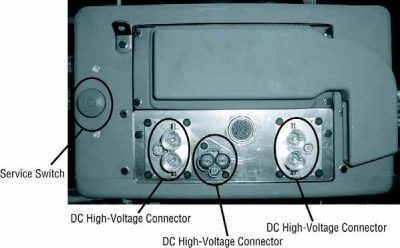
მაღალი ძაბვის სამსახურის Shutdown და ძალაუფლების პროცედურა1. Follow "მაღალი ძაბვის სამუშაო ფართობი" პროცედურა.
2. განთავსდება წითელი საუბნო საარჩევნო კომისიის სამსახურის შეცვლა თვალწინ საუბნო საარჩევნო კომისიის და დააყენებს გათიშვა.
3. ამოღება სამსახურის Switch Cover და დააყენოთ Lockout Bracket (J48506).
4. Fasten tag ლოკაუტის Bracket.
5. დარწმუნდით, რომ საუბნო საარჩევნო კომისიის სამსახურის შეცვლა არ შეუძლიათ გადაადგილება off პოზიცია.
6. საშუალებას სისტემის შექმნას მინიმუმ 5 ე წუთზე განმუხტვა მაღალი ძაბვის.
7. დაკავშირება ServiceRanger და ნახოთ მონაცემები მონიტორი PID 116 ე.წ. "მაღალი ძაბვის ბატარეის პოტენციალი." გამოყენება SPN 520323 for J1939 კავშირი "ბატარეის ძაბვის RB" (relay Box).
8. ძაბვის უნდა იყოს 30 ვოლტი ან ნაკლები. თუ ძაბვის ზემოთ 30 ვ, არ მუშაობს მანქანა და საკონტაქტო Eaton® at 1-800-826 დახმარება (4357).
9. ჩართეთ ანთება გასაღები off და გაგრძელება შეკეთება ან troubleshooting ნაბიჯი.
შენიშვნა: ძაბვის წვეთები ნულის როდესაც გასაღები off.

მაღალი ძაბვის სამსახურის Power-პროცედურა

1. დააინსტალირეთ ყველა მაღალი ძაბვის კონექტორები მათი ჩაკეტილი პოზიციებზე.
2. თუ თქვენ ხართ ადამიანი, მომუშავე მანქანა, ამოიღონ Lockout Bracket და tag.
3. გადააყენეთ Lockout Bracket მეტი სამსახურის შეცვლა.
4. გაიგეთ სამსახურის გადასვლა out და მოდით მანქანა ნაკრები 2 -ე.
5. დაწყება მანქანა, როდესაც შესაბამისი.

[/fusion_modal][fusion_modal name=component_locationtitle=”Eaton ჰიბრიდული კომპონენტი და შემაერთებელი მდებარეობა ” size=largebackground=”#ffffffborder_color=”” show_footer=yesclass=”” id=””]
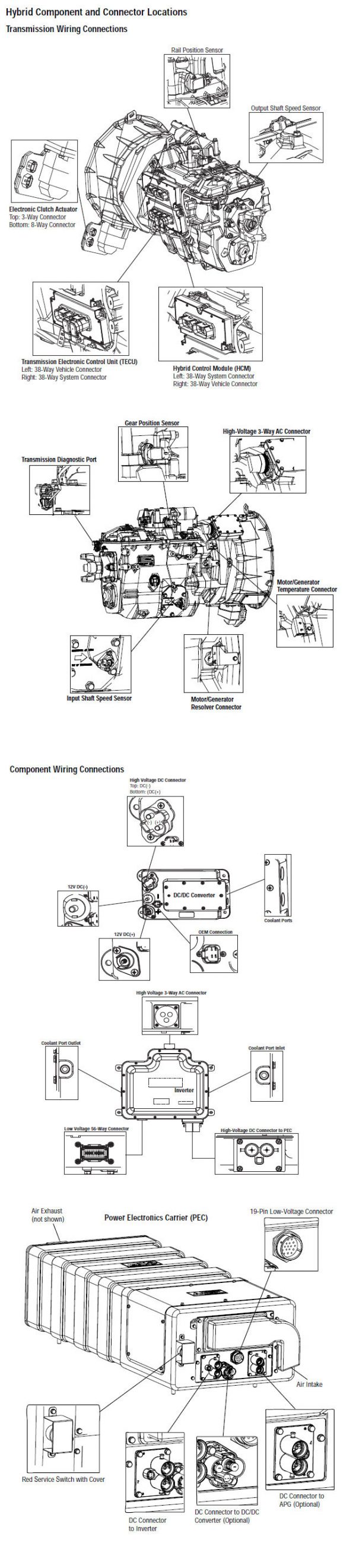
Eaton ჰიბრიდული კომპონენტი და შემაერთებელი Locations my08 სისტემები

[/fusion_modal][fusion_modal name=component_location2title=”Eaton ჰიბრიდული კომპონენტი და შემაერთებელი საიდან MY09 სისტემები” size=largebackground=”#ffffffborder_color=”” show_footer=yesclass=”” id=””]

Eaton ჰიბრიდული კომპონენტი და შემაერთებელი Locations MY09 სისტემები

[/fusion_modal][/fusion_builder_column][/fusion_builder_row][/fusion_builder_container][fusion_builder_container hundred_percent=nohundred_percent_height=nohundred_percent_height_scroll=nohundred_percent_height_center_content=yesequal_height_columns=nomenu_anchor=”” hide_on_mobile=small-visibility,medium-visibility,large-visibilitystatus=publishedpublish_date=”” class=”” id=”” background_color=”” background_image=”” background_position=center centerbackground_repeat=no-repeatfade=nobackground_parallax=noneenable_mobile=noparallax_speed=”0.3″ video_mp4=”” video_webm=”” video_ogv=”” video_url=”” video_aspect_ratio=”16:9″ video_loop=yesvideo_mute=yesvideo_preview_image=”” border_size=”” border_color=”” border_style=solidmargin_top=”” margin_bottom=”” padding_top=”” padding_right=”” padding_bottom=”” padding_left=””][fusion_builder_row][fusion_builder_column type=”1_1layout=”1_1spacing=”” center_content=nolink=”” target=_selfmin_height=”” hide_on_mobile=small-visibility,medium-visibility,large-visibilityclass=”” id=”” background_color=”” background_image=”” background_image_id=”” background_position=left topbackground_repeat=no-repeathover_type=noneborder_size=”0″ border_color=”” border_style=solidborder_position=allpadding_top=”” padding_right=”” padding_bottom=”” padding_left=”” margin_top=”” margin_bottom=”” animation_type=”” animation_direction=leftanimation_speed=”0.3″ animation_offset=”” last=no”][fusion_content_boxes layout=clean-horizontalcolumns=”1″ title_size=”18pxheading_size=”3″ title_color=”#ffffffbody_color=”#ffffffbackgroundcolor=”#4f4f4ficon=”” iconflip=”” iconrotate=”” iconspin=noiconcolor=”” icon_circle=”” icon_circle_radius=”” circlecolor=”” circlebordersize=”” circlebordercolor=”” outercirclebordersize=”” outercirclebordercolor=”” icon_size=”” icon_hover_type=”” hover_accent_color=”#f41000image=”” image_id=”” image_width=”” image_height=”” link_type=”” button_span=”” link_area=”” link_target=”” icon_align=leftanimation_type=”” animation_delay=”” animation_offset=”” animation_direction=leftanimation_speed=”0.3″ margin_top=”” margin_bottom=”” hide_on_mobile=small-visibility,medium-visibility,large-visibilityclass=”” id=””][fusion_content_box title=STEP 1. შეამოწმეთ აქტიური ან არააქტიური ბრალია კოდი სკოლის სტატუსი.backgroundcolor=”” icon=”” iconflip=”” iconrotate=”” iconspin=noiconcolor=”” circlecolor=”” circlebordersize=”” circlebordercolor=”” outercirclebordersize=”” outercirclebordercolor=”” image=”” image_id=”” image_width=”” image_height=”” link=”” linktext=”Წაიკითხე მეტი” link_target=”” animation_type=”” animation_direction=leftanimation_speed=”0.3″ animation_offset=””]

  1. განიხილავს და დაიცვას გაფრთხილებები & გვაფრთხილებს.
  2. ვიღებ Active ბრალია კოდები და FMIs ერთად ServiceRanger გამოყენებით 9-Way დიაგნოსტიკური Connector.
  3. ძირითადი off.
    Danger: აგრეთვე მაღალი ძაბვის სამსახურის ემუქრება და Power პროცედურები. Follow პროცედურები, რათა თავიდან ავიცილოთ შოკი, დამწვრობის ან გარდაცვალების არასწორად სიფრთხილით მაღალი ძაბვის.
  4. ასრულებს ელექტრო ტესტის და ჰიბრიდული ელექტრო ტესტის. (MY09 only)
  5. Check Inverter part number. (MY09 მხოლოდ)
    • If Inverter is part number 4306453, contact Eaton Call Center at 1-800-826-HELP (4357)
  6. რომელი FMIs იმყოფებიან?
    • MFIs 22, 24, 25, ან 27 ჩამოთვლილია, შეცვლის Inverter, მერე ნაბიჯი 4.
    • თუ FMI 2, 23, ან 26 ჩამოთვლილია, წასვლა ნაბიჯი 2.
    • თუ FMI 3 ან 21 ჩამოთვლილი, წასვლა ნაბიჯი 6.
    • თუ FMI 0 ჩამოთვლილი, Using ServiceRanger select the Advanced Product Functions and download the TECU and HCM snapshots then contact Eaton at 1-800-826-HELP (4357) (MY08 only). გადადით დაიხევს 7 (MY09 only).

[/fusion_content_box][/fusion_content_boxes][fusion_content_boxes layout=clean-horizontalcolumns=”2″ title_size=”18pxheading_size=”3″ title_color=”#ffffffbody_color=”#ffffffbackgroundcolor=”#4f4f4ficon=”” iconflip=”” iconrotate=”” iconspin=noiconcolor=”” icon_circle=”” icon_circle_radius=”” circlecolor=”” circlebordersize=”” circlebordercolor=”” outercirclebordersize=”” outercirclebordercolor=”” icon_size=”” icon_hover_type=”” hover_accent_color=”” image=”” image_id=”” image_width=”” image_height=”” link_type=”” button_span=”” link_area=”” link_target=”” icon_align=leftanimation_type=”” animation_delay=”” animation_offset=”” animation_direction=leftanimation_speed=”0.3″ margin_top=”” margin_bottom=”” hide_on_mobile=small-visibility,medium-visibility,large-visibilityclass=”” id=””][fusion_content_box title=STEP 2.Verify უწყვეტობა Resolver და Inverter კომპონენტები.backgroundcolor=”” icon=”” iconflip=”” iconrotate=”” iconspin=noiconcolor=”” circlecolor=”” circlebordersize=”” circlebordercolor=”” outercirclebordersize=”” outercirclebordercolor=”” image=”” image_id=”” image_width=”” image_height=”” link=”” linktext=”Წაიკითხე მეტი” link_target=”” animation_type=”” animation_direction=leftanimation_speed=”0.3″ animation_offset=””]

  1. ძირითადი off.
  2. Disconnect the Low-Voltage Connector at the Inverter.
  3. Inspect for water intrusion inside wire connector.
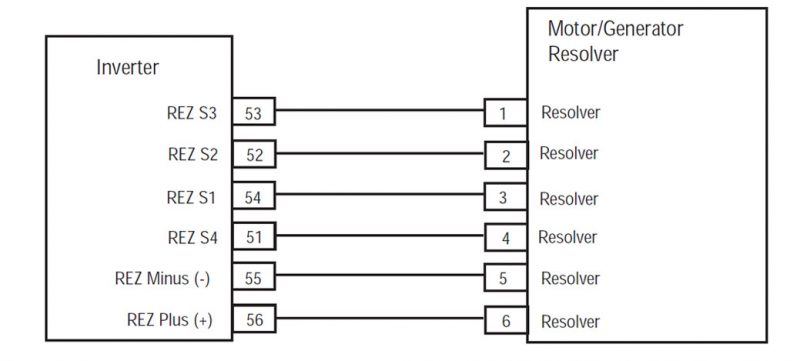
  4. (my08 მხოლოდ) გაზომეთ Resolver წინააღმდეგობის 56-Way აღკაზმულობა Connector შორის შემდეგი ქინძისთავები:
        • pin 55 ამოძრავებთ 56
        • pin 53 ამოძრავებთ 54
        • pin 51 ამოძრავებთ 52

      შენიშვნა: ნაზად flex ინვერტორული 56-Way Connector აღკაზმულობა ახლოს Connector ხოლო მონიტორინგის წინააღმდეგობის ღირებულებები.
      წინააღმდეგობის მერყეობს ქინძისთავები:

      • Pins 55 ამოძრავებთ 56: 10.5-8,6 ohms
      • Pins 53 ამოძრავებთ 54: 34-28 ohms
      • Pins 51 ამოძრავებთ 52: 27-23 ohms
    • თუ აღნიშნული წინააღმდეგობების გვხვდება, და FMI 2 აქტიური, contact Eaton at 1- 800-826-დახმარება (4357).
    • თუ აღნიშნული წინააღმდეგობების გვხვდება, და FMI 26 ან 23 აქტიური, შეცვლის Inverter, მერე ნაბიჯი 4.
    • თუ წინააღმდეგობას გარეთ სპექტრი ნებისმიერი კითხვას, წასვლა ნაბიჯი 3.

4. (MY09 only) Determine if resistance for the Resolver at the 40-Way Harness Connector between the following pins is within the range listed:

  • pin 30 ამოძრავებთ 40 is 8.6–10.5 ohms
  • pin 28 ამოძრავებთ 38 is 28–34 ohms
  • pin 29 ამოძრავებთ 39 is 23–27 ohms
    შენიშვნა: ავტო დაწყებული ციფრული volt / ohm მეტრი უნდა იყოს გამოყენებული.

    • თუ წინააღმდეგობას გარეთ სპექტრი ნებისმიერი კითხვას, წასვლა ნაბიჯი 5.
      • If resistance is within range, წასვლა ნაბიჯი 3.

[/fusion_content_box][fusion_content_box title=STEP 3. დაადასტურეთ უწყვეტობა Resolver აღკაზმულობა სქემით.backgroundcolor=”” icon=”” iconflip=”” iconrotate=”” iconspin=noiconcolor=”” circlecolor=”” circlebordersize=”” circlebordercolor=”” outercirclebordersize=”” outercirclebordercolor=”” image=”” image_id=”” image_width=”” image_height=”” link=”” linktext=”Წაიკითხე მეტი” link_target=”” animation_type=”” animation_direction=leftanimation_speed=”0.3″ animation_offset=””]

  1. ძირითადი off.
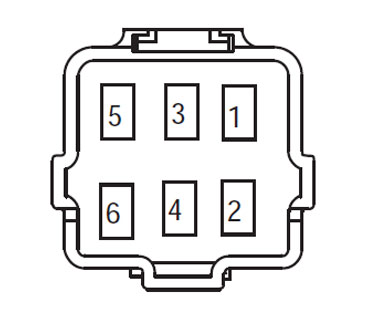
  2. გათიშულია 6-Way Motor / გენერატორი Resolver Connector.
  3. (MY08 only) გაზომეთ Resolver წინააღმდეგობის 6-Way აღკაზმულობა Connector შორის შემდეგი ქინძისთავები:
        • pin 5 ამოძრავებთ 6
        • pin 1 ამოძრავებთ 3
        • pin 2 ამოძრავებთ 4

      შენიშვნა: ავტო დაწყებული ციფრული Volt / Ohm მეტრი უნდა იყოს გამოყენებული.
      წინააღმდეგობის მერყეობს ქინძისთავები:

      • Pins 5 ამოძრავებთ 6: 10.5-8,6 ohms
      • Pins 1 ამოძრავებთ 3: 34-28 ohms
      • Pins 2 ამოძრავებთ 4: 27-23 ohms
    • თუ აღნიშნული წინააღმდეგობების გვხვდება, შეკეთება ღია აღკაზმულობა შორის Inverter 56-Way Connector და Motor / გენერატორი 6-Way Resolver Connector, მერე ნაბიჯი 4.
    • თუ წინააღმდეგობას გარეთ სპექტრი, შეცვლის Motor / გენერატორი, მერე ნაბიჯი 4.

3. (MY09 მხოლოდ) Measure Resolver resistance at the 40-Way Harness Connector between the following pins:

  • pin 38 ამოძრავებთ 40
  • pin 38 ამოძრავებთ 3
  • pin 28 ამოძრავებთ 40
  • pin 28 ამოძრავებთ 3
  • pin 28 ადგილზე
  • pin 38 ადგილზე
  • pin 30 ადგილზე
  • pin 40 ადგილზე
    • თუ წინააღმდეგობას ღია ან OL, შეცვლის Inverter.
    • თუ წინააღმდეგობას არაფერი, გარდა OL, წასვლა ნაბიჯი 4.

[/fusion_content_box][/fusion_content_boxes][fusion_content_boxes layout=clean-horizontalcolumns=”1″ title_size=”18pxheading_size=”3″ title_color=”#ffffffbody_color=”#ffffffbackgroundcolor=”#4f4f4ficon=”” iconflip=”” iconrotate=”” iconspin=noiconcolor=”” icon_circle=”” icon_circle_radius=”” circlecolor=”” circlebordersize=”” circlebordercolor=”” outercirclebordersize=”” outercirclebordercolor=”” icon_size=”” icon_hover_type=”” hover_accent_color=”#f41000image=”” image_id=”” image_width=”” image_height=”” link_type=”” button_span=”” link_area=”” link_target=”” icon_align=leftanimation_type=”” animation_delay=”” animation_offset=”” animation_direction=leftanimation_speed=”0.3″ margin_top=”” margin_bottom=”” hide_on_mobile=small-visibility,medium-visibility,large-visibilityclass=”” id=””][fusion_content_box title=STEP 4. (my08 მხოლოდ) გადაამოწმოს სარემონტო.backgroundcolor=”” icon=”” iconflip=”” iconrotate=”” iconspin=noiconcolor=”” circlecolor=”” circlebordersize=”” circlebordercolor=”” outercirclebordersize=”” outercirclebordercolor=”” image=”” image_id=”” image_width=”” image_height=”” link=”” linktext=”Წაიკითხე მეტი” link_target=”” animation_type=”” animation_direction=leftanimation_speed=”0.3″ animation_offset=””]

  1. ძირითადი off.
  2. ხელახლა ყველა კონექტორები და უარყოფითი ბატარეის კაბელი.
  3. გასაღები.
  4. წმინდა კოდები, ვხედავ წმინდა უმოქმედო ხარვეზებით.
  5. მანქანა მანქანა და ცდილობენ ხელახლა კოდი.
  6. შეამოწმეთ კოდები, ვხედავ ნახეთ აქტიური და არააქტიური ხარვეზებით
    • თუ არ კოდები, ტესტი სრული.
    • თუ ბრალია კოდი 4 როგორც ჩანს,, საკონტაქტო Eaton at 1-800-826 დახმარება (4357).
    • თუ კოდი გარდა 4 როგორც ჩანს,, ვხედავ ბრალია კოდი ინდექსი სია.

[/fusion_content_box][/fusion_content_boxes][fusion_content_boxes layout=clean-horizontalcolumns=”2″ title_size=”18pxheading_size=”3″ title_color=”#ffffffbody_color=”#ffffffbackgroundcolor=”#4f4f4ficon=”” iconflip=”” iconrotate=”” iconspin=noiconcolor=”” icon_circle=”” icon_circle_radius=”” circlecolor=”” circlebordersize=”” circlebordercolor=”” outercirclebordersize=”” outercirclebordercolor=”” icon_size=”” icon_hover_type=”” hover_accent_color=”” image=”” image_id=”” image_width=”” image_height=”” link_type=”” button_span=”” link_area=”” link_target=”” icon_align=leftanimation_type=”” animation_delay=”” animation_offset=”” animation_direction=leftanimation_speed=”0.3″ margin_top=”” margin_bottom=”” hide_on_mobile=small-visibility,medium-visibility,large-visibilityclass=”” id=””][fusion_content_box title=STEP 4. (MY09 only) დაადასტურეთ უწყვეტობა Resolver აღკაზმულობა სქემით.backgroundcolor=”” icon=”” iconflip=”” iconrotate=”” iconspin=noiconcolor=”” circlecolor=”” circlebordersize=”” circlebordercolor=”” outercirclebordersize=”” outercirclebordercolor=”” image=”” image_id=”” image_width=”” image_height=”” link=”” linktext=”Წაიკითხე მეტი” link_target=”” animation_type=”” animation_direction=leftanimation_speed=”0.3″ animation_offset=””]

  1. Disconnect the 6-Way motor/generator Resolver Connector (the connector going into the motor).
  2. გაზომეთ Resolver წინააღმდეგობის 6-Way აღკაზმულობა Connector შორის შემდეგი ქინძისთავები:
    შენიშვნა: ავტო დაწყებული ციფრული volt / ohm მეტრი უნდა იყოს გამოყენებული.

    • pin 1 ამოძრავებთ 3
    • pin 1 ამოძრავებთ 4
    • pin 2 ამოძრავებთ 3
    • pin 2 ამოძრავებთ 4
    • pin 1 ადგილზე
    • pin 2 ადგილზე
    • pin 3 ადგილზე
    • pin 4 ადგილზე
  3. თუ წინააღმდეგობას ღია ან OL, repair wiring between Resolver and Inverter.
  4. თუ წინააღმდეგობას არაფერი, გარდა OL, replace the motor/generator then go to Step 8.

[/fusion_content_box][fusion_content_box title=STEP 5. (MY09 მხოლოდ) Measure resistance of Resolver circuit at motor/generator.backgroundcolor=”” icon=”” iconflip=”” iconrotate=”” iconspin=noiconcolor=”” circlecolor=”” circlebordersize=”” circlebordercolor=”” outercirclebordersize=”” outercirclebordercolor=”” image=”” image_id=”” image_width=”” image_height=”” link=”” linktext=”Წაიკითხე მეტი” link_target=”” animation_type=”” animation_direction=leftanimation_speed=”0.3″ animation_offset=””]

  1. Disconnect 6-Way Resolver wire connector at motor/generator.
  2. Determine if resistance on the following pins falls within the listed range:
    • pin 1 ამოძრავებთ 2 is between 28–34 ohms
    • pin 3 ამოძრავებთ 4 is between 8.6–10.5 ohms
    • pin 5 ამოძრავებთ 6 is between 23–27 ohms
  3. თუ წინააღმდეგობას გარეთ სპექტრი, replace the motor/generator (Resolver is not serviceable). After repairs are made go to Step 8.
  4. If resistance is within range, repair wiring between Resolver and Inverter. After repairs are made go to Step 8.

[/fusion_content_box][/fusion_content_boxes][fusion_content_boxes layout=clean-horizontalcolumns=”2″ title_size=”18pxheading_size=”3″ title_color=”#ffffffbody_color=”#ffffffbackgroundcolor=”#4f4f4ficon=”” iconflip=”” iconrotate=”” iconspin=noiconcolor=”” icon_circle=”” icon_circle_radius=”” circlecolor=”” circlebordersize=”” circlebordercolor=”” outercirclebordersize=”” outercirclebordercolor=”” icon_size=”” icon_hover_type=”” hover_accent_color=”” image=”” image_id=”” image_width=”” image_height=”” link_type=”” button_span=”” link_area=”” link_target=”” icon_align=leftanimation_type=”” animation_delay=”” animation_offset=”” animation_direction=leftanimation_speed=”0.3″ margin_top=”” margin_bottom=”” hide_on_mobile=small-visibility,medium-visibility,large-visibilityclass=”” id=””][fusion_content_box title=STEP 6. (MY09 only) Verify the resistance at the Inverter.backgroundcolor=”” icon=”” iconflip=”” iconrotate=”” iconspin=noiconcolor=”” circlecolor=”” circlebordersize=”” circlebordercolor=”” outercirclebordersize=”” outercirclebordercolor=”” image=”” image_id=”” image_width=”” image_height=”” link=”” linktext=”Წაიკითხე მეტი” link_target=”” animation_type=”” animation_direction=leftanimation_speed=”0.3″ animation_offset=””]

    1. ძირითადი off
    2. Disconnect 40-Way Low Voltage Connector at the Inverter.
    3. Measure Resolver resistance at the 40-Way Har-ness connector between the following pins:
      • pin 28 ამოძრავებთ 1
      • pin 28 ამოძრავებთ 6
      • pin 29 ამოძრავებთ 1
      • pin 29 ამოძრავებთ 6
      • pin 38 ამოძრავებთ 1
      • pin 38 ამოძრავებთ 6
      • pin 39 ამოძრავებთ 1
      • pin 39 ამოძრავებთ 6
        შენიშვნა: ავტო დაწყებული ციფრული volt / ohm მეტრი უნდა იყოს გამოყენებული.
    4. If resistance is open or OL replace inverter. After repair is made go to Step 8.
    5. If resistance is anything other than OL go to H.

[/fusion_content_box][fusion_content_box title=STEP 7. (MY09 მხოლოდ) Verify overspeed condition by test driving the vehicle.backgroundcolor=”” icon=”” iconflip=”” iconrotate=”” iconspin=noiconcolor=”” circlecolor=”” circlebordersize=”” circlebordercolor=”” outercirclebordersize=”” outercirclebordercolor=”” image=”” image_id=”” image_width=”” image_height=”” link=”” linktext=”Წაიკითხე მეტი” link_target=”” animation_type=”” animation_direction=leftanimation_speed=”0.3″ animation_offset=””]

  1. 1. Test drive vehicle to verify an overspeed condition. This may require a downhill road condition, verify with customer the road condition when fault was set.
    • თუ FMI 0 is set in a true overspeed condition, vehicle will need to be slowed down to prevent overspeed condition.
    • Თუ შესაძლებელია, update HCM software version number 672 or higher. If vehicle has HCM with primary hardware version 4306455, the most current software version available is 663. To update software version 672 or higher requires an HCM with hardware version 4306473. Hardware version number can be found in Service Ranger under Product Configurations, HCM, Primary Hardware Version.

[/fusion_content_box][/fusion_content_boxes][fusion_content_boxes layout=clean-horizontalcolumns=”1″ title_size=”18pxheading_size=”3″ title_color=”#ffffffbody_color=”#ffffffbackgroundcolor=”#4f4f4ficon=”” iconflip=”” iconrotate=”” iconspin=noiconcolor=”” icon_circle=”” icon_circle_radius=”” circlecolor=”” circlebordersize=”” circlebordercolor=”” outercirclebordersize=”” outercirclebordercolor=”” icon_size=”” icon_hover_type=”” hover_accent_color=”#f41000image=”” image_id=”” image_width=”” image_height=”” link_type=”” button_span=”” link_area=”” link_target=”” icon_align=leftanimation_type=”” animation_delay=”” animation_offset=”” animation_direction=leftanimation_speed=”0.3″ margin_top=”” margin_bottom=”” hide_on_mobile=small-visibility,medium-visibility,large-visibilityclass=”” id=””][fusion_content_box title=STEP 4. (MY09 მხოლოდ) გადაამოწმოს სარემონტო.backgroundcolor=”” icon=”” iconflip=”” iconrotate=”” iconspin=noiconcolor=”” circlecolor=”” circlebordersize=”” circlebordercolor=”” outercirclebordersize=”” outercirclebordercolor=”” image=”” image_id=”” image_width=”” image_height=”” link=”” linktext=”Წაიკითხე მეტი” link_target=”” animation_type=”” animation_direction=leftanimation_speed=”0.3″ animation_offset=””]

  1. ძირითადი off.
  2. ხელახლა ყველა კონექტორები და უარყოფითი ბატარეის კაბელი.
  3. გასაღები.
  4. წმინდა კოდები, ვხედავ წმინდა უმოქმედო ხარვეზებით.
  5. მანქანა მანქანა და ცდილობენ ხელახლა კოდი.
  6. შეამოწმეთ კოდები, ვხედავ ნახეთ აქტიური და არააქტიური ხარვეზებით
    • თუ არ კოდები, ტესტი სრული.
    • თუ ბრალია კოდი 4 როგორც ჩანს,, საკონტაქტო Eaton at 1-800-826 დახმარება (4357).
    • თუ კოდი გარდა 4 როგორც ჩანს,, ვხედავ ბრალია კოდი ინდექსი სია.

[/fusion_content_box][/fusion_content_boxes][/fusion_builder_column][/fusion_builder_row][/fusion_builder_container][fusion_global id=”13788″]